Ts-node-dev: Code broken after update from "1.0.0-pre.44" to "1.0.0-pre.49"
Error after update from "1.0.0-pre.44" to "1.0.0-pre.49".
// package.json
  "devDependencies": {
    "@types/express": "^4.17.6",
    "@types/jest": "^26.0.0",
    "@types/node": "^12.12.47",
    "apollo-boost": "^0.4.9",
    "axios": "^0.19.2",
    "env-cmd": "^10.1.0",
    "graphql-request": "^2.0.0",
    "jest": "^26.0.1",
    "ts-jest": "^26.1.1",
    "ts-node-dev": "^1.0.0-pre.49",
    "typescript": "^3.9.5"
  },
  "dependencies": {
    "apollo-server": "^2.15.0",
    "graphql": "^14.5.8",
    "mssql": "^6.2.0",
    "reflect-metadata": "^0.1.10",
    "ts-node": "^8.10.2",
    "tsconfig-paths": "^3.9.0",
    "type-graphql": "^0.17.5",
    "typeorm": "^0.2.25"
  },
"scripts": {
    "dev": "env-cmd -e dev ts-node-dev --type-check --respawn src/index.ts",
// index.ts
import 'reflect-metadata'
import 'tsconfig-paths/register'
i
import { createConnections } from 'typeorm'

import { AccountResolver } from './resolvers/AccountResolver'
;(async () => {
  try {
    await createConnections()
  } catch (error) {
    console.log('Failed creating database connections: ', error)
  }
}
Thrown error:
env-cmd -e dev ts-node-dev --type-check --respawn src/index.ts
Using ts-node version 8.10.2, typescript version 3.9.5
Failed creating database connections: MissingDriverError: Wrong driver: "undefined" given. Supported drivers are: "cordova", "expo", "mariadb", "mongodb", "mssql", "mysql", "oracle", "postgres", "sqlite", "sqljs", "react-native", "aurora-data-api", "aurora-data-api-pg".
I tried to delete the folder node_modules and have it reinstalled but I always end up with the same error. I am certain that the database driver with typeorm is correctly defined. The only thing I did was upgrading the package ts-node-dev.
Did something change? I tried looking for a change log for the upgrade but couldn't find it.
Downgrading fixed the issue again:
npm install -D [email protected]
On a side note there's a small typo in the README:

 DarkLite1
All 36 comments
I can not imagine what changes could lead to such unrelated to ts-node-dev error. You probably have to debug the source for this error in your app.
--type-check is enabled by default now.
 wclr
on 22 Jun 2020
wclr
on 22 Jun 2020
Thank you Alex for getting back to me. I do believe this is an error somewhere in the code of ts-node-dev. To prove this I've set up a super simple repro on GitHub.
If you follow these steps you'll see that the app is not started on the first run:
- Start the app
npm run dev
Notice no text displayed in the terminal.
- Restart app
Modify the file 'index.ts', save it and see ts-node-dev restart
it will now display the text in the terminal correctly
DarkLite1
on 23 Jun 2020
I cloned the repo made yarn install and run yarn dev:
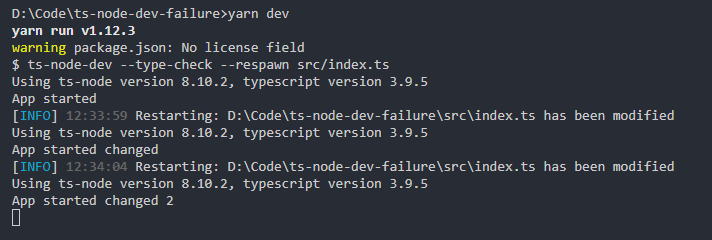
What node version you are using?
wclr
on 23 Jun 2020
Strange... I used npm. Can you try to use only npm?
node --version
v12.16.3
DarkLite1
on 23 Jun 2020
Everything is ok with npm too.
wclr
on 23 Jun 2020
Can you check the node version v12.16.3?
DarkLite1
on 23 Jun 2020
I've just tried upgrading to the latest stable, being v12.18.1 and I'm still having the same issue:

I also tried reinstalling the latest npm version 6.14.5, but still the same issue.
DarkLite1
on 23 Jun 2020
That's strange, I'll think what it could be, I would recommend digging into yourself, and try on another machine and in docker.
wclr
on 23 Jun 2020
Weird... I tried with the same node version, same npm version and the same test repo on another machine (Win 10) and there it works fine. Although, it takes 15 seconds before the console text appears.
On my problem machine, Windows Server 2016, it doesn't display anything. Not even after 2 minutes of waiting. But it does display the text instantaneous on changes on both machines.
The strange thing is that version 1.0.0-pre.44 did not have this issue at all. Are you making use of some other caching mechanism? Did the change in arguments/feature (default --type-check ) change some logic? There must be something different between these two versions that triggers a different behavior on both machines.
Also of note is running npm run prod works flawless:
"scripts": {
    "dev": "ts-node-dev --type-check --respawn src/index.ts",
    "prod": "ts-node --type-check src/index.ts"
  }
I tried to narrow it further down and the problem started to appear since version 45. The question now is which commits happened between version 44 and version 45 ? One of these commits is the issue.
ok:
"ts-node-dev": "^1.0.0-pre.44",

not ok:
"ts-node-dev": "^1.0.0-pre.45",
Version 44: debug log:

Version 45: debug log:

Comparing both versions:
- /bin/ts-node-dev.js
someone added'restart-terminated' - /lib/cfg.js
old:ignoreWatch.length && console.log('Ignore watch:', ignoreWatch)
nes:opts.debug && console.log('Ignore watch:', ignoreWatch) - /lib/child-require-hook.js
old:
  process.send({
    compile: fileName,
    compiledPath: compiledPath
  })

require(sourceMapSupportPath).install({
  hookRequire: true
})
new:
var Module = require("module")
var compile = (code, fileName) => {
  var compiledPath = getCompiledPath(code, fileName, compiledDir)
  process.send && process.send({
    compile: fileName,
    compiledPath: compiledPath
  })
var sourceMapRequire = Module.createRequire ? Module.createRequire(sourceMapSupportPath) : require

sourceMapRequire(sourceMapSupportPath).install({
  hookRequire: true
})
@DarkLite1 so can you try to modify the code of installed version ts-node-dev on your machine and try to find out what affects the behavior?
wclr
on 23 Jun 2020
@DarkLite1 can you check if what you're transpiling has a valid .js, .json, .ts, or .tsx extension on it? I ran into an issue (which is why I'm in this thread), when running some Sequelize migrations after upgrading to the latest version: 1.0.0-pre.49.
I can confirm that when using ts-node-dev on a .sequelizerc (https://sequelize.org/v4/manual/tutorial/migrations.html#the-sequelizerc-file) file, it throws a runtime error:
Output:
Compilation error in /Sites/app/.sequelizerc
Error: extHandler is not a function
    at Object.<anonymous> (/Sites/app/.sequelizerc:1:7)
    at Module._compile (internal/modules/cjs/loader.js:945:30)
    at Module._compile (/Sites/app/node_modules/source-map-support/source-map-support.js:547:25)
    at Module.m._compile (/private/var/folders/6b/2f2sjrrn6l152v1lcl5l9qmr0000gp/T/ts-node-dev-hook-24803773999190337.js:100:27)
    at Module._extensions..js (internal/modules/cjs/loader.js:962:10)
    at require.extensions..js (/private/var/folders/6b/2f2sjrrn6l152v1lcl5l9qmr0000gp/T/ts-node-dev-hook-24803773999190337.js:103:14)
    at Object.nodeDevHook [as .js] (/Sites/app/node_modules/ts-node-dev/lib/hook.js:61:7)
    at Module.load (internal/modules/cjs/loader.js:798:32)
    at Function.Module._load (internal/modules/cjs/loader.js:711:12)
    at Module.require (internal/modules/cjs/loader.js:838:19)
So extHandler seems to be undefined here (makes sense, if it's not picking up any non-standard js/ts based file extensions): https://github.com/whitecolor/ts-node-dev/blob/7bc6bec28a536dba880e50a55faeefe4e55400e6/lib/compiler.js#L255 and then throws here: https://github.com/whitecolor/ts-node-dev/blob/7bc6bec28a536dba880e50a55faeefe4e55400e6/lib/compiler.js#L267
In my case, https://github.com/whitecolor/ts-node-dev/blob/7bc6bec28a536dba880e50a55faeefe4e55400e6/lib/child-require-hook.js#L41 is actually generating a path before it bombs:
/var/folders/6b/2f2sjrrn6l152v1lcl5l9qmr0000gp/T/.ts-node5nfPvW/compiled/_sequelizerc_25ed4cdb095a5707b75c58cbcba48f6a13f080151491b02d7cf4ac4986836ca1.js
I'll probably just keep it pinned @1.0.0-pre.44 (the breaking change for me is also in @1.0.0-pre.44) for the time being, since I can't use a Sequelize static config as I need dynamic runtime variables.
 pruhstal
on 24 Jun 2020
pruhstal
on 24 Jun 2020
@pruhstal thanks for reporting that you have an issue with version 1.0.0-pre.45 too (I guess you made a typo in version number). Just to be 100% certain, could you clone my repo and validate that:
- When you run
npm run devon your problem machine, there is no console textApp startedin the terminal? - When you did that, keep the app running and just change some text in
index.ts, save it and confirm you see that text in the console now.
- Both actions need to be done on the machine where you have the issue. As this issue does not occur on all machines I've noticed. Thanks for confirming my findings above, because in the end it doesn't have anything to do with databases but rather with
ts-node-dev.
DarkLite1
on 24 Jun 2020
@whitecolor I already figured out that the problem is located within compiler.js. When I swap this file from 44 to 45 it works fine again. Pinpointing exactly the issue is a bit hard for me as I'm a newbie. But I did see that var tsHandler is totally unused in the compiler.js file of version 45.
In attachment you can find the good and the bad compiler.js file. If you want me to test something feel free to provide me with an updated file.
DarkLite1
on 24 Jun 2020
@DarkLite1 Ok will check.
@pruhstal I was fixing this issue before but it seems that wasn't enough. Will fix this.
wclr
on 24 Jun 2020
@DarkLite1 not quite sure if this helps, but I cloned that repo and it seems like it actually does output App started upon npm run dev:
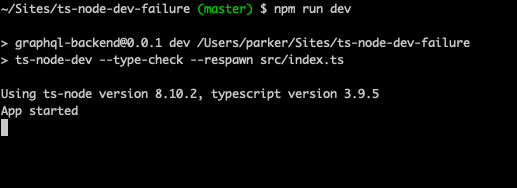
And also when editing (upon auto-recompilation):

What version of node are you running on your machine?
pruhstal
on 25 Jun 2020
@pruhstal thanks for testing. It happens only on my production server Windows Server 2016 with node v12.18.1.
DarkLite1
on 25 Jun 2020
@whitecolor if you happen to have a new compiler.js file for testing/debugging this further, please feel free to provide. I'm more than willing to test it.
DarkLite1
on 29 Jun 2020
Just chiming in with similar issues on OSX (not just a windows bug...)
 evantahler
on 29 Jun 2020
evantahler
on 29 Jun 2020
@evantahler could you confirm that you have the same result as me with the test below:
@pruhstal thanks for reporting that you have an issue with version
1.0.0-pre.45too (I guess you made a typo in version number). Just to be 100% certain, could you clone my repo and validate that:
- When you run
npm run devon your problem machine, there is no console textApp startedin the terminal?- When you did that, keep the app running and just change some text in
index.ts, save it and confirm you see that text in the console now.
- Both actions need to be done on the machine where you have the issue. As this issue does not occur on all machines I've noticed. Thanks for confirming my findings above, because in the end it doesn't have anything to do with databases but rather with
ts-node-dev.
DarkLite1
on 30 Jun 2020
OSX: 10.15.5
node version: v12.18.2
npm version: 6.14.5
It looks like the issue is actually the same with ts-node - the application starts and hangs with 100% cpu use for a few minutes then eventually core-dumps. Sorry I don't have more info to share
evantahler
on 30 Jun 2020
@pruhstal so you are using {allowJs: true} option? I've added a check for extension. Btw with ts-node it wouldn't work without explicitly ignoring (for example with --ignore) such non-js files.
wclr
on 1 Jul 2020
With ts-node for me all works fine. But with ts-node-dev on the first run it doesn't work properly. It always needs a resave to restart the app, after which ts-node-dev functions fine.
@whitecolor if you have a compiler.js file with a shitload of debug info in it to track this down, feel free to share it with me so I can provide you with more details.
DarkLite1
on 1 Jul 2020
@whitecolor yes, in my tsconfig.json compilerOptions, I'm calling allowJs: true, and upon upgrading to the latest release 1.0.0-pre.50 all is well. Cheers!
pruhstal
on 1 Jul 2020
@DarkLite1
In lib/index.js in could you this replace line https://github.com/whitecolor/ts-node-dev/blob/master/lib/index.js#L252 with setTimeout(() => start()) and try?
wclr
on 2 Jul 2020
@whitecolor just tried it, no luck I'm afraid :(
DarkLite1
on 3 Jul 2020
So, to further troubleshoot this nasty little beast I've added a shitload of console.log() statements in the hope it might help clear things up for you. See the attachment for the file compiler.js, as this is where the issue is located. It's clear from swapping out the old version with the new that this is the problem file.
First run unsuccessful
T:\Test\Brecht\Node\playground\ts-node-dev-failure-45-fixed [master ≡ +0 ~2 -0 !]> npm run dev

> [email protected] dev T:\Test\Brecht\Node\playground\ts-node-dev-failure-45-fixed
> ts-node-dev --type-check --respawn --transpile-only --debug src/index.ts

Ignore watch: []
init
registerTsNode
registerTsNode in extensions.forEach
registerTsNode in extensions.forEach
registerTsNode extensions.forEach
registerTsNode extensions.forEach
getCompiledDir
createCompiledDir
getCompiledDir
createCompiledDir mkridn.sync
getCompiledDir
writeChildHookFile
getCompilationId
getCompiledDir
getCompilerReadyFilePath
getChildHookPath
Using ts-node version 8.10.2, typescript version 3.9.5
getChildHookPath
[DEBUG] 09:35:27 Starting child process -r C:/Users/bgijbels/AppData/Local/Temp/2/ts-node-dev-hook-0694047543423526.js T:\Test\Brecht\Node\playground\ts-node-dev-failure-45-fixed\node_modules\ts-node-dev\lib\wrap.js src/index.ts
getCompileReqFilePath
getCompiledDir
getCompilationId
getCompileReqFilePath
getCompiledDir
getCompilationId
writeReadyFile
getCompilerReadyFilePath
compile
compile in try
compile writeCompiled
compile writeCompiled
[DEBUG] 09:35:28 T:\Test\Brecht\Node\playground\ts-node-dev-failure-45-fixed\src\index.ts compiled in 61 ms
[DEBUG] 09:35:28 Child exited with code 0
Second run unsuccessful on re-saving index.ts
[INFO] 09:35:43 Restarting: T:\Test\Brecht\Node\playground\ts-node-dev-failure-45-fixed\src\index.ts has been modified
compileChanged
compileChanged before try
compileChanged in try
getCompiledDir
compile
compile existsSync  C:\Users\bgijbels\AppData\Local\Temp\2\.ts-nodeMOhpMz\compiled\src_index_ts_67c5e4a34fd1052c8b67ab5b5f96c4369108f763d4d1841e3d8a92eb75d92f69.js
[DEBUG] 09:35:43 Removing all watchers from files
[DEBUG] 09:35:43 Child is already stopped, probably due to a previous error
Using ts-node version 8.10.2, typescript version 3.9.5
getChildHookPath
[DEBUG] 09:35:43 Starting child process -r C:/Users/bgijbels/AppData/Local/Temp/2/ts-node-dev-hook-0694047543423526.js T:\Test\Brecht\Node\playground\ts-node-dev-failure-45-fixed\node_modules\ts-node-dev\lib\wrap.js src/index.ts
getCompileReqFilePath
getCompiledDir
getCompilationId
getCompileReqFilePath
getCompiledDir
getCompilationId
writeReadyFile
getCompilerReadyFilePath
compile
compile existsSync  C:\Users\bgijbels\AppData\Local\Temp\2\.ts-nodeMOhpMz\compiled\src_index_ts_67c5e4a34fd1052c8b67ab5b5f96c4369108f763d4d1841e3d8a92eb75d92f69.js
--------------------- APP STARTED -----------------------------------
[DEBUG] 09:35:44 Child exited with code 0
It seems to me that in the first run the code doesn't get passed the function wrtieCompiled:
  compile: function (params) {
    console.log('compile')
    var fileName = params.compile
    var code = fs.readFileSync(fileName, 'utf-8')
    var compiledPath = params.compiledPath
    function writeCompiled(code, filename) {
    console.log('compile writeCompiled')
    fs.writeFileSync(compiledPath, code)
      fs.writeFileSync(compiledPath + '.done', '')
    }
    if (fs.existsSync(compiledPath)) {
    console.log('compile existsSync ', compiledPath)
    return
    }
    var starTime = new Date().getTime()
    var m = {
      _compile: writeCompiled,
    }
    try {
    console.log('compile in try')
On a side note, upgrading to the latest release (1.0.0-pre.50) did not fix it for me.
DarkLite1
on 3 Jul 2020
@DarkLite1 check the latest
wclr
on 9 Jul 2020
I'm afraid the upgrade to 1.0.0-pre.51 didn't fix the issue. Even after removing the bad option --type-check. Same result as before, see screenshot below.
If you want you can always provide me with a custom compiler.js file with more console.logs for debugging purposes. I'm happy to run it for you so you can see where it goes wrong.
I'm 100% certain I'm not the only one with this issue or running ts-node-dev on a Windows Server 206. If we get this fixed others might not jump to other libraries like tsc-watch thinking that ts-node-dev doesn't work.

DarkLite1
on 9 Jul 2020
Does it happen if app is not exiting?
wclr
on 9 Jul 2020
It happens like this:
- Run
npm run dev - Notice that the console log "--App started--" is not displayed
- Open file
index.tsin vs code and pressCTRL + Sto save it again - Notice
ts-node-devrestarting and displaying the text "--App started--" correctly this time
ts-node-dev does not close itself or exit with an error, it just keeps running but doesn't display/compile index.ts correctly on the first run. In my production app which is more complex we sometimes have to press CTRL + S up to 3 times to get it all compiled correctly, so that means 3 restarts for ts-node-dev in the worst case. These restarts are automatically triggered by ts-node-dev upon resave, not me issuing the npm run dev command 3 times. Just to be clear.
DarkLite1
on 9 Jul 2020
@DarkLite1 make your app not exit, insert setTimeout(() => {}, 5000)
wclr
on 9 Jul 2020
In that case it does work:

The thing is that I made this to replicate the problem. The production app we have has this same problem and is not exited but keeps running. Sometimes that app needs to be re-saved 3 times to have it compiled correctly with ts-node-dev while with ts-node it does compile correctly from the first time.
Could you have another look at this? It simply means that ts-node-dev bails out before all is compiled and executed. This should be encountered for.
DarkLite1
on 9 Jul 2020
@DarkLite1 I just wanted to understand if timeout works in your case. I will look into it.
wclr
on 9 Jul 2020
@whitecolor would you be able to implement some more debugging info? Maybe adding some extra console.log statements to see where it fails?
DarkLite1
on 22 Jul 2020
Problem gone after upgrading to "ts-node-dev": "^1.0.0-pre.55 and using the latest TypeScript 3.9.7.
DarkLite1
on 24 Jul 2020
Related issues
 DMCTowns
·
3Comments
DMCTowns
·
3Comments
 gipcompany
·
8Comments
gipcompany
·
8Comments
 Sytten
·
7Comments
Sytten
·
7Comments
 Richienb
·
3Comments
Richienb
·
3Comments
 Yegorich555
·
4Comments
Yegorich555
·
4Comments
Most helpful comment
@DarkLite1 Ok will check.
@pruhstal I was fixing this issue before but it seems that wasn't enough. Will fix this.