Ts-morph: Remove node but preserve contents.
Hi
After completely giving up with the standard compiler API I found your library and it looks fantastic.
Is it currently possible in any way to strip out a block element but leave the contents intact.
Basically, I'm trying to write something that will remove the old namespaces from our code, and then possibly add in the required imports to each ts file.
 dmeagor
All 21 comments
Hi @dmeagor, currently there's not a nice way of doing this, but it is possible.
I think this would work, but let me know if not:
const ast = new Ast(/* etc... */);
// ...add source files... etc...
const sourceFile = ast.getSourceFileOrThrow("YourSourceFile.ts");

while (sourceFile.getNamespaces().length > 0) {
    const currentNamespace = sourceFile.getNamespaces()[0];
    const namespaceBodyText = currentNamespace.getBody().getChildSyntaxListOrThrow().getFullText();

    // replace the namespace with the body text
    sourceFile.replaceText([currentNamespace.getPos(), currentNamespace.getEnd()], namespaceBodyText);
}

sourceFile.formatText(); // make the text look nice
You need to loop over the namespaces in the file in this way because the replaceText method will blow away all the sourceFile's previously navigated child nodes (see the warning here).
Regarding figuring out what namespaces to import... just my thoughts... I'm sure you've thought this through... I think you'll need to do a pass over all your source files and construct a graph (edit: oh yeah, as you will mention, you could just use a map) that describes the dependencies between all the files. Then pass over all the source files to add the imports and remove any references to the namespaces to now use the new import. You'll probably only want to deal with named exports and imports for now. From there, you can use the code above to remove all the namespaces.
Good luck and let me know if you have any more questions! That might be challenging, but maybe it won't be so bad :)
 dsherret
on 8 Oct 2017
dsherret
on 8 Oct 2017
Hi thanks for that. I ran your code which removed the word "module" from the source but unfortunately left the module name and the opening/closing curly braces.
Regarding the import stuff, yea a map of some sort was what I was thinking.
dmeagor
on 8 Oct 2017
Ah, ok I tried the code out and the body includes the surrounding braces.
So:
const namespaceBodyText = currentNamespace.getBody().getFullText();
Should be:
const namespaceBodyText = currentNamespace.getBody().getChildSyntaxListOrThrow().getFullText();
In order to get the syntax list that's between the surrounding braces (the children of the body are FirstPunctuation, SyntaxList, and CloseBraceToken). I updated the code above.
dsherret
on 8 Oct 2017
Thanks. That works for me.
Not sure if this is a bug or I'm just not understanding the node structure works but when I run this.
currentNamespace.getNameIdentifier().getText()
on this code
module hello.there {
...
}
The result is just "hello" not hello there. Is that just the way things are stored, i.e. "there" is a child of "." which is a child of "module hello"?
Google has failed to find me any info on the actual structure of the ts files/nodes. I was thinking they were like DOM objects initially but I'm clearly way off with that theory.
dmeagor
on 8 Oct 2017
Sorry, ignore that, just found another getName() command which gets the full name.
Again thanks for your help.
dmeagor
on 8 Oct 2017
I should add documentation about that. Yeah, it's because behind the scenes when doing a fully qualified name it's a NamespaceDeclaration within a NamespaceDeclaration so .getNameIdentifier() in that case only returns the identifier of the outer namespace declaration.
To get all the name identifiers for a namespace, you can use:
const identifiers = currentNamespace.getNameIdentifiers();
// or
const name = currentNamespace.getName(); // returns the fully qualified name as a string
For viewing the AST, I'll eventually get around to recommend some AST viewers in the documentation (#79). The most accurate one I've found is the one in atom-typescript. You just have to ensure the source file you want to check is active and then from the command palette enter the command "TypeScript: Ast Full". That will open up a new tab with an AST viewer.
dsherret
on 8 Oct 2017
Thanks for your help yesterday. I've managed to get this module refactoring tool pretty much working thanks to your library.
Currently, the tool scans the project, graphs the dependencies between files and remembers the exported class and interface names so it can automatically insert them into the calling source files.
The main problem I've encountered is searching for exports and then getting the name of the variable or class/interface. there are methods for class and interface but I couldn't see a way to search for exports. I used getDescendantsOfKind(ts.SyntaxKind.ExportKeyword) but I'm not sure how to extract the variable name from it since getname() is not a property.
    namespace.getClasses().forEach(function(c){
        if (c.isNamedExport){
            exportedClassCount++;
            exportNames.push(c.getName());
        }
    });

    var exportedInterfaceCount = 0;
    namespace.getInterfaces().forEach(function(c){
        if (c.isNamedExport){
            exportedInterfaceCount++;
            exportNames.push(c.getName());
        }
    });

    namespace.getDescendantsOfKind(ts.SyntaxKind.ExportKeyword).forEach(function(c){
        exportedTotalCount++;
        exportNames.push(c.getName());  //getname is not valid in this case.
    });
Any thoughts on how I might do this?
dmeagor
on 9 Oct 2017
You could get all the statements of the namespace, then check for all the ones that are exportable. I think this should work (untested):
import Ast, {TypeGuards} from "ts-simple-ast";

// ...

const exportNames: string[] = [];

// then to get the names
for (const namespaceExport of namespace.getStatements()) {
    if (!TypeGuards.isExportableNode(namespaceExport) || !s.hasExportKeyword())
        continue;

    if (TypeGuards.isVariableStatement(namespaceExport)) {
        for (const variableDeclaration of namespaceExport.getDeclarationList().getDeclarations()) {
            exportNames.push(variableDeclaration.getName());
        }
    }
    else
        exportNames.push(namespaceExport.getName());
}
Remember that variable statements can look like this so that's why they need special treatment:
let someVar = 4, someOtherVar = 5;
Might have found a bug in getStatements()
c:\Users\dmeag\Source\Repos\es6-module-refactor\node_modules\ts-simple-ast\dist\compiler\statement\StatementedNode.js:21
            return statements.map(s => this.global.compilerFactory.getNodeFromCompilerNode(s, this.sourceFile));
about:blank
also getName() is not a property of namespaceExport. _[ts] Property 'getName' does not exist on type 'ExportableNode & Node
I changed !s.hasExportKeyword() to !namespaceExport.hasExportKeyword(). I assumed that was the intention.
dmeagor
on 9 Oct 2017
seems getStatements() fails on module names with periods. module foo.bar { }.
dmeagor
on 9 Oct 2017
I should test this stuff out before posting. Yeah, it should not have been s and that makes sense about getName... that's what happens when you don't write code in an IDE.
This works for me:
const {firstChild, sourceFile} = getInfoFromText<NamespaceDeclaration>(text);
const exportNames: string[] = [];

for (const statement of firstChild.getStatements()) {
    if (!TypeGuards.isExportableNode(statement) || !statement.hasExportKeyword())
        continue;

    if (TypeGuards.isVariableStatement(statement)) {
        for (const variableDeclaration of statement.getDeclarationList().getDeclarations()) {
            exportNames.push(variableDeclaration.getName());
        }
    }
    else if (TypeGuards.isNamedNode(statement))
        exportNames.push(statement.getName());
    else
        console.error(`Unhandled exported statement: ${statement.getText()}`);
}
Thanks for letting me know about the problem with .getStatements(). I'll have it fixed soon.
dsherret
on 9 Oct 2017
The issue with .getStatements() and namespaces with dots in the name is fixed in 0.72.2.
dsherret
on 9 Oct 2017
Awesome. Works for me thanks.
It'll be interesting to see what happens when this is finally run on 100's of angularjs files.
dmeagor
on 10 Oct 2017
@dmeagor yeah, that will be pretty cool. Let me know how it goes!
dsherret
on 10 Oct 2017
Got it working for importing things in the same namespace, or one level deeper. After removing the namespaces some of the type/class/variable identifiers on the page which refer to things in other modules will need to be changed to remove their nesting. eg. foo.bar.IDog would become fooBar.IDog.
Do I use getDependents to get the flattened list of nodes and then TypeGuard to check? How would I get the names after since getName() doesn't seem to work on the generic child/dependents functions?
dmeagor
on 11 Oct 2017
What do you mean by getName() not working on "generic child/dependents functions"?
I think you would need to use .findReferences() before any manipulation to figure out where all the references to a particular identifier are.
Unfortunately, replacing the text of PropertyAccessExpressions isn't supported yet. I just opened #98 and I'll work on it this week. Until then... you're stuck with sourceFile.replaceText, which isn't so nice because it destroys wrapped nodes. You would also have to make sure you shift any positions you've stored about a file to ensure they're up to date after replacing text in a file.
Note, that I also opened #99. Once I implement #99 and #98, doing this will be very easy for you because you will be able to keep references to the nodes within the file while manipulating it. #99 is a little difficult, so I'll implement #98 first.
dsherret
on 11 Oct 2017
If you don't want to be exact with references, you could probably get by, by finding all the PropertyAccessExpressions. Yeah, you would just go through all the descendants and use TypeGuards.isPropertyAccessExpression(node). Then replace its text using sourceFile.replaceText(....)
Edit... actually, you could just do this:
// edit 2: I feel like I should rename this to be getDescendantsByKind to be consistent with the other methods...
const propertyAccessExpressions = sourceFile.getDescendantsOfKind(ts.SyntaxKind.PropertyAccessExpression);
That will give you all the PropertyAccessExpressions in a file typed as a PropertyAccessExpression.
dsherret
on 11 Oct 2017
Thanks, after a bit of experimentation I discovered I needed the TypeReferenceNode's to pick up the types being used on the page as PropertyAccessExpressions just exclude all the typings. QualifiedName also worked but as with PropertyAccessExpression would pull out multiple entries for the nested nodes.
i.e.
foo.bar.IDog
foo.bar
foo
I also needed to use .getText to pull out the fully qualified name and not just the last name identifier.
    const nodes = sourceFile.getDescendants();
    nodes.forEach(function(n){
        if (TypeGuards.isTypeReferenceNode(n)){
            console.log("TRN: getText="+n.getText());
        }else if (TypeGuards.isPropertyAccessExpression(n)){
            console.log("PAE: getText="+n.getText()+ " getName="+n.getName());
        }
    });
If I rename one does this immediately mess up the ability to rename another (i.e. I need to run getDecendants() on each individual change?) I'll probably just wait for your new version if that's going to be easier.
I considered using the findReference() data generated at the start of your program but I'm unsure how to go from a result to something which encapsulates the fully qualified name. Even if I could get this full name changing it would appear to invalidate the position data in all of the other references on that sourceFile would it not?
dmeagor
on 11 Oct 2017
Oh yeah, for types it will be a TypeReference and for assignments, it will be a PropertyAccessExpression.
When you have more than one dot, then the compiler will start nesting them under each other.
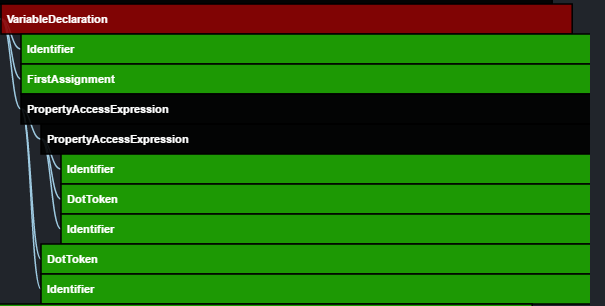
I also needed to use .getText to pull out the fully qualified name and not just the last name identifier.
Yeah, on PropertyAccessExpressions, the name property will only be the last identifier.
I considered using the findReference() data generated at the start of your program but I'm unsure how to go from a result to something which encapsulates the fully qualified name. Even if I could get this full name changing it would appear to invalidate the position data in all of the other references on that sourceFile would it not?
Yes... it would and that's a problem. I'll work on this over the weekend. It would be much easier if you can stick with only having to use the information retrieved from findReferences
dsherret
on 13 Oct 2017
@dmeagor just a heads up that #98 is implemented in 0.73.0. I ended up making this functionality available on any node.
That means on QualifiedNames or PropertyAccessExpressions, you can now call the new replaceWithText(...) method. Note that this will destroy the node this was called on, but it will return a new node for the new text.
It could be used this way:
const newNode = propertyAccessExpression.replaceWithText(propertyAccessExpression.getText().replace(/\./g, ""));
This is now implemented via #99 in 0.74.0.
Given a namespace, you can now call:
namespaceDeclaration.unwrap();
That will replace the namespace declaration with its contents. Additionally, this also works on function declarations. Note that there is no reason to call .format() on the source file anymore because .unwrap() handles deindenting the lines.
(Let me know if you think I should name this method something else... I wasn't sure about the name "unwrap")
I'm closing this issue because I believe it is resolved, but feel free to message about anything.
dsherret
on 15 Oct 2017
Related issues
 HoldYourWaffle
·
4Comments
HoldYourWaffle
·
4Comments
 CarstenLeue
·
4Comments
CarstenLeue
·
4Comments
 allenhwkim
·
4Comments
allenhwkim
·
4Comments
 gregjacobs
·
4Comments
dsherret
·
3Comments
gregjacobs
·
4Comments
dsherret
·
3Comments