Ts-jest: v23: require(...).install is not a function
ts-jest v23.0.0
If I revert back to the latest v22.4.6 and my tests work without issue.
 FAIL  __tests__/base.gun.spec.ts
  ● Test suite failed to run

    TypeError: require(...).install is not a function

    > 1 | import { myAPI } from '../src/myAPI'
 jadbox
All 55 comments
Hi,
Can you provide a minimum repo to reproduce your problem ? That would help a lot for us to debug :)
 ahnpnl
on 3 Jul 2018
ahnpnl
on 3 Jul 2018
I'm seeing the same sort of thing too, though curiously enough not locally, but only our CI environment.
TypeError: Cannot read property 'createElement' of undefined

      11 |   beforeEach(() => {
      12 |     metadata = generateTestMetadata();
      13 |     wrapper = shallow(<MetadataView metadata={metadata} />);
         |                       ^
      14 |   });
Unfortunately I'm unable to provide a minimum repo.
 akx
on 3 Jul 2018
akx
on 3 Jul 2018
can you try require(...) instead of require(...).install()?
ignore this please
 kulshekhar
on 3 Jul 2018
kulshekhar
on 3 Jul 2018
I do have the same issue. While I can't create a minimal repo just now, I did a debug session and narrowed to this: import xyz from './relative/path/to/file', which used to resolve to ./relative/path/to/file.ts before (just updated ts-jest version), is now failing.
FYI the import statement is within a __mocks__/some-node-module.ts.
The issue seems to be that the resolver is not appending .ts to the end of a relative import since the underlying Error is: Error: ENOENT, no such file or directory '/absolute/path/to/relative/path/to/file'... where the path should have been /absolute/path/to/relative/path/to/file.ts (note the extension).
 huafu
on 3 Jul 2018
huafu
on 3 Jul 2018
If there's a minimal repo, I can look at this and try to fix it after work today
kulshekhar
on 3 Jul 2018
...at the end I decided to do one right now, will post t here when done
huafu
on 3 Jul 2018
Hardly tried to create a bare repo, added all files one by one from my own repo, same config (package.json, jest.config.js, tsconfig.json), same deps, ... still unable to reproduce! I even removed my node_modules directory and re-launched yarn without success :-/
The error I reported above (in my own project) is happening when trying to import a relative TS file from the first line of another TS file which itself is within the setupFiles Jest config array.
The full stack trace of underlying error is as follow (no line removed, only original root dir replaced with <rootDir>:
Error: ENOENT: no such file or directory, stat '<rootDir>/src/lib/container' <= this is when `import { container } from './lib/container'`
    at Object.fs.statSync (fs.js:948:3)
    at Object.statSync (<rootDir>/node_modules/graceful-fs/polyfills.js:297:22)
    at isFile (<rootDir>/node_modules/jest-resolve/build/default_resolver.js:180:46)
    at resolveAsFile (<rootDir>/node_modules/jest-resolve/build/default_resolver.js:132:9)
    at tryResolve (<rootDir>/node_modules/jest-resolve/build/default_resolver.js:121:16)
    at resolveSync (<rootDir>/node_modules/jest-resolve/build/default_resolver.js:81:20)
    at defaultResolver (<rootDir>/node_modules/jest-resolve/build/default_resolver.js:51:10)
    at Function.findNodeModule (<rootDir>/node_modules/jest-resolve/build/index.js:107:14)
    at resolveNodeModule (<rootDir>/node_modules/jest-resolve/build/index.js:168:16)
    at Resolver.resolveModule (<rootDir>/node_modules/jest-resolve/build/index.js:179:16)
I can't continue to dig that right now so I'll just revert to <23. I provided this hoping it could help a bit...
huafu
on 3 Jul 2018
Does this issue still appear if you run with --no-cache?
 GeeWee
on 3 Jul 2018
GeeWee
on 3 Jul 2018
yup, also tried that :-/
huafu
on 3 Jul 2018
btw, this might be a jest issue, since keeping [email protected] does work when going back to jest@<23 (I've tried any version of jest between 23.0.0 and the latest 23.2.0 without success)
huafu
on 3 Jul 2018
That's really strange. I assume require(...).install is not a function is from the source-map-support library that uses an install hook to make sure the sourcemaps are gone.
However, we removed that in 23 and we're using jests built-in source map support, so we've deleted the dependency entirely. It errors on line 1 because we're prepending the install hook to the file - but it obviously can't find it.
This is why I'm thinking it's a cache issue, as somehow the old files don't get the install hook removed, further supported by you not being able to reproduce on a clean repo.
At least that's my theory.
Unsure why changing the jest version work though. I'm stil betting on a cache issue - try running the stuff here and maybe seeing if there's both a global and a local cache.
GeeWee
on 3 Jul 2018
@GeeWee you're right, thanks a lot!
TLDR: rm -rf on the jest cache directory fixed the issue for me!
Tho it's weird. I did all the runs with --no-cache and I was still getting the same issue. Now I've just yarn add --dev jest to go back to latest jest and a rm -rf on the directory that I got in the output of ./node_modules/.bin/jest --showConfig | grep cacheDirectory, then I got all back to normal! I guess it's a --no-cache jest issue then.
huafu
on 3 Jul 2018
@huafu I want to share a tip about the caching issue that if you see your tests constantly repeat the same error via several runs, it's better to run yarn jest --clearCache or npm run jest --clearCache. That will at least make sure that jest doesn't cache the old codes and run with your correct code :)
ahnpnl
on 3 Jul 2018
@ahnpnl thanks for the tip, tho I use to do what I thought being the same with yarn jest --no-cache
So my question, why would yarn jest --no-cache would act differently from yarn jest --clearCache && yarn jest? Ok it's not the same, but I expect it to behave more or less the same, since no-cache for me means that it will NOT use the cache.
huafu
on 3 Jul 2018
honestly I don't know either why there is such a difference between those 2 ways. Perhaps you can raise this issue in jest repo and the community there can give you better support 👍
ahnpnl
on 3 Jul 2018
I was getting this importing the deep-equal package in particular. Downgrading ts-jest fixes that issue but not others. Running with --no-cache works but using --clearCache breaks things (can't find node_modules/jsdom/lib/jsdom/living/nodes/HTMLCollection-impl.js apparently).
 birtles
on 3 Jul 2018
birtles
on 3 Jul 2018
I've ran both --no-cache and --clearCache with npm, but my problem still persists. Although the error seems to be a little different now.
  ● Test suite failed to run

    Jest encountered an unexpected token

    This usually means that you are trying to import a file which Jest cannot parse, e.g. it's not plain JavaScript.

    By default, if Jest sees a Babel config, it will use that to transform your files, ignoring "node_modules".

    Here's what you can do:
     • To have some of your "node_modules" files transformed, you can specify a custom "transformIgnorePatterns" in your config.
     • If you need a custom transformation specify a "transform" option in your config.
     • If you simply want to mock your non-JS modules (e.g. binary assets) you can stub them out with the "moduleNameMapper" config option.

    You'll find more details and examples of these config options in the docs:
    https://facebook.github.io/jest/docs/en/configuration.html

    Details:

    /home/jdunlap/plus/github/finality/layer2storage/__tests__/base.gun.spec.ts:81
    import { GunStorageProxy } from '../src/layer2storage';
    ^^^^^^

    SyntaxError: Unexpected token import

      at ScriptTransformer._transformAndBuildScript (node_modules/jest-runtime/build/script_transformer.js:403:17)
I'm exhibiting this issue as well, I haven't yet been able to experiment with the clear cache params described above.
 fbartho
on 3 Jul 2018
fbartho
on 3 Jul 2018
I'm experiencing the same require(...).install is not a function issue since upgrading to ts-jest 23.0.0. Downgrading to the previous version fixes the issue.
I have made a minimum repo to reproduce the issue at https://github.com/duncanhall/ts-jest-issue-603 (CC: @ahnpnl @kulshekhar)
You can simply yarn install && yarn test to reproduce it. You can also then downgrade ts-jest to 22.4.2 and the issue goes away. More notes are available in the README
Clearing the jest cache makes absolutely no difference and from reading the responses above seems to be an entirely separate issue from require(...).install is not a function.
 duncanhall
on 4 Jul 2018
duncanhall
on 4 Jul 2018
@duncanhall you are using react-script-ts which has in its dependencies jest 22 and ts-jest 22. I might be wrong, but maybe it's not compatible with jest and ts-jest version 23, which might be why your test fails when you switch to version 23 of ts-jest.
huafu
on 4 Jul 2018
@huafu at least for me, I am not using react-script-ts in my project.
jadbox
on 5 Jul 2018
@jadbox, your issue now is that your file /home/jdunlap/plus/github/finality/layer2storage/__tests__/base.gun.spec.ts is not handled as a typescript file. Can you provide your jest config?
huafu
on 5 Jul 2018
On the newest master branch, searching for require this is all I get. There's no require.install() anywhere.
I've looked at your repo @duncanhall - the culprit here is react-scripts-ts. If I just try with jest and ts-jest@23 and just run "yarn jest" with the appropriate regex in my package.json - both versions compile fine.
Either:
1) Something went wrong with the npm/build step and we're publishing an old preprocessor (seems unlikely)
2) It's a caching issue (Still my best bet, also seeing as clearing the cache gave jadbox a different error)
GeeWee
on 6 Jul 2018
@GeeWee I just checked inside node_modules/ts-jest with v23 and found this
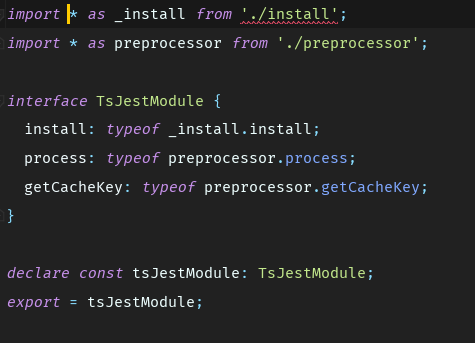
I think the publishing process to npm had issues.
ahnpnl
on 6 Jul 2018
@GeeWee Thanks for looking into this. I had wondered if react-scripts-ts might be the culprit but it seemed others were hitting the issue without it. Does @ahnpnl's comment above suggest a fix?
duncanhall
on 6 Jul 2018
If that is really publishing to npm issue, I think we should add additionally to prepublish script to install tar file just built and run tests on this repo again. This can at least prevent the similar issue happen again in the future (if our tests cover the new features/bug fixes).
Adding the same script to postpublish is also an additional check.
ahnpnl
on 6 Jul 2018
Is it at all related to https://github.com/kulshekhar/ts-jest/blob/958d84d07cfd20b6ecc1a44890587e1272ee8084/index.d.ts
Which contains import * as _install from './install';
 krohrsb
on 6 Jul 2018
krohrsb
on 6 Jul 2018
@krohrsb I don't think so. The require(...).install was some code injected by the transformer.
huafu
on 6 Jul 2018
For what it's worth, cloning and building locally and linking it to my project works properly. Both on master and with the v23 tag. Once I use the published version, it breaks.
krohrsb
on 6 Jul 2018
Wow, that doesn't sound good at all.
Just in case (but I guess you did that already) yarn and/or npm cache cleared?
huafu
on 6 Jul 2018
I tried again after clearing cache/everything. Same result. Fails with published version and passes with the linked v23 tag
krohrsb
on 6 Jul 2018
@krohrsb is this in a public repo?
huafu
on 6 Jul 2018
Unfortunately no, it is in a private enterprise one.
krohrsb
on 6 Jul 2018
Ok sorry for the false alarm. I did still have some old jest cache lying around (even though I thought I had cleared it). So the issue stems from using an older jest cache w/ the new lib (when using the published one? not sure why). Either way it seems my issue is solved.
krohrsb
on 6 Jul 2018
@krohrsb I'm still having the issue even though I'm clearing my cache.... maybe you can shine light on if I might be as confused with clearing the real cache as you where?
jadbox
on 7 Jul 2018
@jadbox if you are still having the issue you described there then I am pretty sure it's related to facebook/jest#6546
Can you share your jest config file?
huafu
on 7 Jul 2018
I can confirm that this issue disappeared once I upgraded all projects in my repo to ts-jest 23 and Jest 23. "Disappeared" here means that it no longer occurs in CI - locally I'll probably still have to mess around with clearing caches and stuff, but that at least indicates that the source of this error is probably people having old versions of Jest still lying around somewhere, so anyone looking to fix the problem should probably look in that direction.
 Vinnl
on 9 Jul 2018
Vinnl
on 9 Jul 2018
@huafu I've removed ts-jest and jest, remove the cache, and re-added the latest version of jest/ts-jest to the project. Oddly, now I'm getting a new error. The typechecker is trying to check libraries imported from node_modules:
 FAIL  __tests__/base.gun.multi.spec.ts
  ● Test suite failed to run

    TypeError: Cannot read property 'on' of undefined

    > 1 | import Gun from 'gun'
        | ^
      2 | // const Gun = require('gun');
      3 | import { GunStorageProxy, LCState, VCState, Sig } from '../src/layer2storage'
      4 | require('gun/lib/then.js')

      at Object.<anonymous> (node_modules/gun/lib/store.js:5:5)
      at node_modules/gun/lib/server.js:12:2
      at Object.<anonymous> (node_modules/gun/lib/server.js:22:2)
      at Object.<anonymous> (node_modules/gun/index.js:1:45)
      at Object.<anonymous> (__tests__/base.gun.multi.spec.ts:1:1)
tsconfig.json
{
  "compilerOptions": {
    "moduleResolution": "node",
    "target": "es5",
    "module":"es2015",
    "lib": ["es2015", "es2016", "es2017", "dom"],
    "strict": true,
    "sourceMap": true,
    "inlineSourceMap": false,
    "declaration": true,
    "allowSyntheticDefaultImports": true,
    "experimentalDecorators": true,
    "emitDecoratorMetadata": true,
    "declarationDir": "dist/types",
    "outDir": "dist/lib",
    "skipLibCheck": true,
    "typeRoots": [
      "node_modules/@types"
    ]
  },
  "include": [
    "src/**/*.ts",
    "src/**/*.tsx"
  ],
  "exclude": [
    "node_modules"
  ]
}
@jadbox I need the jest config ;-) – jest.config.js usually
huafu
on 11 Jul 2018
@huafu My bad!
jest.config.js:
module.exports = {
  "transform": {
    "^.+\\.tsx?$": "ts-jest"
  },
  "testRegex": "(/__tests__/.*|(\\.|/)(test|spec))\\.(jsx?|tsx?)$",
  "testPathIgnorePatterns": ["/lib/", "/node_modules/"],
  "moduleFileExtensions": ["ts", "tsx", "js", "jsx", "json", "node"],
  "coverageThreshold": {
    "global": {
      "branches": 50,
      "functions": 90,
      "lines": 80,
      "statements": 80
    }
  },
  "bail": true,
  "collectCoverage": true
};
The type error is complaining about this node_module gun. For a JS project, the logic is fine... still my project should being trying to typecheck my node_modules.
https://github.com/amark/gun/blob/master/lib/store.js
if(typeof window === "undefined"){
  var Gun = require('../gun');
}
// .on is giving a typeerror because the conditional above checking for Node.js
Gun.on('opt', function(ctx){ ...
The typescript compiler seems to be ignoring node_mobules broadly.
tsc --listFiles
/home/jdunlap/plus/github/finality/layer2storage/node_modules/typescript/lib/lib.dom.d.ts
/home/jdunlap/plus/github/finality/layer2storage/node_modules/typescript/lib/lib.es2017.d.ts
/home/jdunlap/plus/github/finality/layer2storage/node_modules/typescript/lib/lib.es2017.typedarrays.d.ts
/home/jdunlap/plus/github/finality/layer2storage/node_modules/typescript/lib/lib.es2017.intl.d.ts
/home/jdunlap/plus/github/finality/layer2storage/node_modules/typescript/lib/lib.es2017.string.d.ts
/home/jdunlap/plus/github/finality/layer2storage/node_modules/typescript/lib/lib.es2017.sharedmemory.d.ts
/home/jdunlap/plus/github/finality/layer2storage/node_modules/typescript/lib/lib.es2017.object.d.ts
/home/jdunlap/plus/github/finality/layer2storage/node_modules/typescript/lib/lib.es2016.d.ts
/home/jdunlap/plus/github/finality/layer2storage/node_modules/typescript/lib/lib.es2016.array.include.d.ts
/home/jdunlap/plus/github/finality/layer2storage/node_modules/typescript/lib/lib.es2015.d.ts
/home/jdunlap/plus/github/finality/layer2storage/node_modules/typescript/lib/lib.es5.d.ts
/home/jdunlap/plus/github/finality/layer2storage/node_modules/typescript/lib/lib.es2015.symbol.wellknown.d.ts
/home/jdunlap/plus/github/finality/layer2storage/node_modules/typescript/lib/lib.es2015.reflect.d.ts
/home/jdunlap/plus/github/finality/layer2storage/node_modules/typescript/lib/lib.es2015.proxy.d.ts
/home/jdunlap/plus/github/finality/layer2storage/node_modules/typescript/lib/lib.es2015.iterable.d.ts
/home/jdunlap/plus/github/finality/layer2storage/node_modules/typescript/lib/lib.es2015.symbol.d.ts
/home/jdunlap/plus/github/finality/layer2storage/node_modules/typescript/lib/lib.es2015.promise.d.ts
/home/jdunlap/plus/github/finality/layer2storage/node_modules/typescript/lib/lib.es2015.generator.d.ts
/home/jdunlap/plus/github/finality/layer2storage/node_modules/typescript/lib/lib.es2015.collection.d.ts
/home/jdunlap/plus/github/finality/layer2storage/node_modules/typescript/lib/lib.es2015.core.d.ts
/home/jdunlap/plus/github/finality/layer2storage/src/layer2storage.ts
/home/jdunlap/plus/github/finality/layer2storage/node_modules/@types/estree/index.d.ts
/home/jdunlap/plus/github/finality/layer2storage/node_modules/@types/events/index.d.ts
/home/jdunlap/plus/github/finality/layer2storage/node_modules/@types/node/inspector.d.ts
/home/jdunlap/plus/github/finality/layer2storage/node_modules/@types/node/index.d.ts
/home/jdunlap/plus/github/finality/layer2storage/node_modules/@types/fs-extra/index.d.ts
/home/jdunlap/plus/github/finality/layer2storage/node_modules/@types/minimatch/index.d.ts
/home/jdunlap/plus/github/finality/layer2storage/node_modules/@types/glob/index.d.ts
/home/jdunlap/plus/github/finality/layer2storage/node_modules/@types/handlebars/index.d.ts
/home/jdunlap/plus/github/finality/layer2storage/node_modules/@types/highlight.js/index.d.ts
/home/jdunlap/plus/github/finality/layer2storage/node_modules/@types/jest/index.d.ts
/home/jdunlap/plus/github/finality/layer2storage/node_modules/@types/lodash/common/common.d.ts
/home/jdunlap/plus/github/finality/layer2storage/node_modules/@types/lodash/common/array.d.ts
/home/jdunlap/plus/github/finality/layer2storage/node_modules/@types/lodash/common/collection.d.ts
/home/jdunlap/plus/github/finality/layer2storage/node_modules/@types/lodash/common/date.d.ts
/home/jdunlap/plus/github/finality/layer2storage/node_modules/@types/lodash/common/function.d.ts
/home/jdunlap/plus/github/finality/layer2storage/node_modules/@types/lodash/common/lang.d.ts
/home/jdunlap/plus/github/finality/layer2storage/node_modules/@types/lodash/common/math.d.ts
/home/jdunlap/plus/github/finality/layer2storage/node_modules/@types/lodash/common/number.d.ts
/home/jdunlap/plus/github/finality/layer2storage/node_modules/@types/lodash/common/object.d.ts
/home/jdunlap/plus/github/finality/layer2storage/node_modules/@types/lodash/common/seq.d.ts
/home/jdunlap/plus/github/finality/layer2storage/node_modules/@types/lodash/common/string.d.ts
/home/jdunlap/plus/github/finality/layer2storage/node_modules/@types/lodash/common/util.d.ts
/home/jdunlap/plus/github/finality/layer2storage/node_modules/@types/lodash/index.d.ts
/home/jdunlap/plus/github/finality/layer2storage/node_modules/@types/marked/index.d.ts
/home/jdunlap/plus/github/finality/layer2storage/node_modules/@types/shelljs/index.d.ts
Feel free to test with:
git clone https://github.com/layer2lib/layer2storage.git
cd layer2storage
git checkout jest
npm i
npm run test
@huafu Never mind, I think Gun 0.9.9994 is causing the issue somehow. When I reverted to .9.9993, the Jest tests are now all working. I'm not sure what ended up ultimately fixing this issue... might have been deleting node_modules and reinstalling.
jadbox
on 11 Jul 2018
hmm I think delete cache still doesn't work for me. I uninstalled jest, ts-jest and delete cache folder but after that it still didn't work in my local
ahnpnl
on 20 Jul 2018
Breaks my app :( I need Jest v23.
 nth-commit
on 24 Jul 2018
nth-commit
on 24 Jul 2018
@nth-commit #626 has latest jest, babel, etc... I'd love to have a minimal repo from you which I could test on to double check that my PR is fixing your issue.
huafu
on 24 Jul 2018
@huafu Hey, sorry, you replied straight away but that was my last act before bed last night. I don't have a minimal repro at the moment, sorry. This is my side-project so prob won't get one together until the end of the week. This might be too much to ask, but if you can easily deploy a beta or alpha stream, I will install that and test - given this bug was inserted at publish-time, that might make sense?
nth-commit
on 24 Jul 2018
@huafu Actually, I just realised I could do this and I think it will work: yarn add https://github.com/huafu/ts-jest#feature/upgrade-babel-and-fix-tsconfig (and should replace the ts-jest version from npm). Will test as soon as I get the opportunity today.
nth-commit
on 24 Jul 2018
wont work, but you can git clone, then git checkout the correct branch, then yarn build, then yarn link and then go back to your repo and yarn link ts-jest
sorry it's bed time here
huafu
on 24 Jul 2018
@huafu Oh awesome, thanks! Will do that instead, then. Hopefully I'll have a result for you in your morning. Cheers.
nth-commit
on 24 Jul 2018
Are there any updates on this? I cleared the jest cache that comes up when I run jest --showConfig. I have [email protected] and ts-jest@ 23.10.4 installed in a create-react-app application. I get the require(...).install error on files importing .tsx files.
 alexwendte
on 22 Oct 2018
alexwendte
on 22 Oct 2018
with 23.10 it's impossible, the code is gone. Be sure that what is launching jest is not dropping in another version or so... else share a minimal repo (or the full repo if it's a public on) so that others can help ;-)
huafu
on 22 Oct 2018
from looking at running react-scripts-ts test --env=jsdom "--showConfig" the version of jest is actually 20.0.4 and the version of ts-jest is probably different too.
I think you're right.
alexwendte
on 22 Oct 2018
This worked for me.
$ npm install [email protected] -D
 allenhwkim
on 22 Nov 2019
allenhwkim
on 22 Nov 2019
Related issues
 japhar81
·
3Comments
japhar81
·
3Comments
 stephenotalora
·
3Comments
Vinnl
·
3Comments
ahnpnl
·
3Comments
stephenotalora
·
3Comments
Vinnl
·
3Comments
ahnpnl
·
3Comments
 AlexGellert
·
4Comments
AlexGellert
·
4Comments
Most helpful comment
@duncanhall you are using react-script-ts which has in its dependencies jest 22 and ts-jest 22. I might be wrong, but maybe it's not compatible with jest and ts-jest version 23, which might be why your test fails when you switch to version 23 of ts-jest.