Trumbowyg: icons on WYSIWYG editor does not show
Informations
Trumbowyg WYSIWYG editor does not work in IE but works perfectly in Chrome and Firefox but when I babeled the code, it worked in all browsers but no icons showed.
Browser version: IE 11, Chrome and firefox
OS: Windows 7
How to reproduce the bug?
Was not working in IE, so I put 'Trumbowyg.js' through babel for conversion and it worked in all browsers except now the little icons don't show in all browsers.

Any ideas?
 isogunro
All 6 comments
Are icons working here? https://alex-d.github.io/Trumbowyg/
If yes, it's on your side, can't help you without more information.
 Alex-D
on 14 May 2018
Alex-D
on 14 May 2018
Hi Alex, it happens the same to me when I use the plugin under a phonegap app.-
The plugin works fine, the files seems to load fine, but icons are not showing.
Tested on iphone 6 - ios 11 / Android 7.
It seems that the plugin creates a div with the svg icons, just after the body:
In web/chrome:
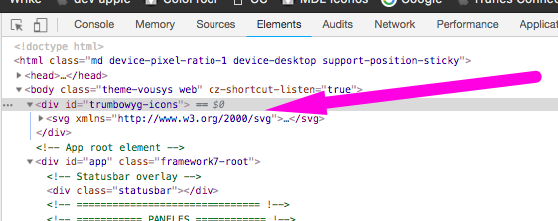
But when you open it in the native browser, it's empty:

 vousys
on 9 Jul 2018
vousys
on 9 Jul 2018
Hey,
check this section of the doc:
https://alex-d.github.io/Trumbowyg/documentation/#common-issues
Alex-D
on 9 Jul 2018
@Alex-D thanks for your answer. Is there any way I can use it without https? because when you compile the hybrid app, is just like when you work on localhost. And your plugin is awesome
vousys
on 11 Jul 2018
If it doesn't works, try to directly embed SVG in HTML: https://alex-d.github.io/Trumbowyg/documentation/#svg-icons (Use SVG icons without XHR or via an another protocol than HTTP(S))
Alex-D
on 11 Jul 2018
Thank you so much Alex!
vousys
on 14 Jul 2018
Related issues
 dmorrison-olive
·
3Comments
dmorrison-olive
·
3Comments
 vasileioslaios
·
5Comments
vasileioslaios
·
5Comments
 Droeftoeter
·
5Comments
Droeftoeter
·
5Comments
 DirkOlten
·
3Comments
DirkOlten
·
3Comments
 MACscr
·
6Comments
MACscr
·
6Comments