- [x] I've asked for help in the Truffle Gitter before filing this issue.
Issue
truffle compile is not building build file for my solidity contract
Steps to Reproduce
When I run truffle init following files got created.
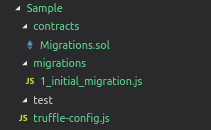
Then I added helloworld.sol contract to this. But when I do truffle compile , build file or json file for my contract is not creating
truffle compile returns back without showing any errors as well.
Even truffle test is not working
Expected Behavior
truffle compile works properly then truffle migrate also works.
Actual Results
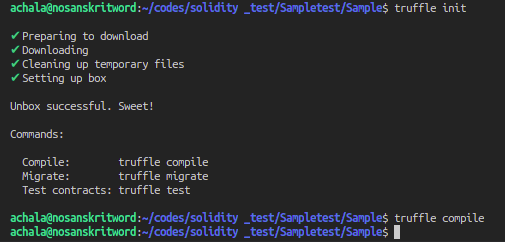
Environment
- Operating System: Ubuntu 18.04
- Ethereum client: ganache-cli
- Truffle version (
truffle version): Truffle v5.0.4 (core: 5.0.4) - node version (
node --version): 11.10.0 - npm version (
npm --version): 6.7.0
 AchalaSB
All 17 comments
Closing this issue since it is fixed for version Truffle v5.0.0-next.26
AchalaSB
on 20 Feb 2019
This is a bit puzzling, I don't seem to be able to reproduce your problem. I think the next release we do will include a patch for truffle compile error reporting. Currently it swallows errors in some cases so I'd be curious to see what happens if you were to try this again after that release.
 eggplantzzz
on 20 Feb 2019
eggplantzzz
on 20 Feb 2019
I'm going to re-open this just to see if anyone else is experiencing this issue, anyone?
eggplantzzz
on 20 Feb 2019
Also seeing this problem:
Truffle v5.0.4 (core: 5.0.4)
Solidity v0.5.0 (solc-js)
Node v10.15.1
Downgrading to Truffle v5.0.0 seems to fix it for now.
 ewust
on 21 Feb 2019
ewust
on 21 Feb 2019
The same problem:
Truffle v5.0.5 (core: 5.0.5)
Solidity v0.5.0 (solc-js)
Node v10.15.1
 sulenn
on 23 Feb 2019
sulenn
on 23 Feb 2019
The same problem:
Truffle v5.0.5 (core: 5.0.5)
Solidity v0.5.0 (solc-js)
Node v10.8.0
 yqsy
on 24 Feb 2019
yqsy
on 24 Feb 2019
the same problem :
Truffle v5.0.5
solidity 0.5.4
Node v11.10.0
 omid04
on 24 Feb 2019
omid04
on 24 Feb 2019
Same problem here
Truffle v5.0.5 (core: 5.0.5)
Solidity v0.5.0 (solc-js)
Node v11.10.0
If I run 'truffle compile' as root user, it works.
 andig85
on 25 Feb 2019
andig85
on 25 Feb 2019
We should have a patch release soon to fix the error swallowing. If you are experiencing issues based on what kind of user you are logged in as, then you should probably ensure you have npm and truffle installed properly with adequate permissions. I see a lot of people doing things like sudo npm .... You probably shouldn't be doing this. See npm's article --> https://docs.npmjs.com/resolving-eacces-permissions-errors-when-installing-packages-globally. You probably should use something like nvm.
eggplantzzz
on 26 Feb 2019
@eggplantzzz You are right. Node has to install using NVM and people please use npm install -g truffle don't use sudo npm install
The latest version truffle v5.0.5 is working fine for all the specific version of solidity
AchalaSB
on 27 Feb 2019
if you installed with sudo npm ... then:
sudo truffle develop
should make it work
 muzakparov
on 1 Mar 2019
muzakparov
on 1 Mar 2019
Update: I think as of Truffle v5.0.8 you should not have these errors even if you did install Truffle with sudo. Closing this for maintenance but let us know if you have problems.
eggplantzzz
on 15 Mar 2019
Having v5.1.28 and running truffle test or truffle develop does nothing
 hmarcelodn
on 4 Jun 2020
hmarcelodn
on 4 Jun 2020
I have the same problem with develop and it does it work.
 SalahAdDin
on 23 Aug 2020
SalahAdDin
on 23 Aug 2020
truffle hangs when I do truffle test
truffle version
Truffle v5.1.41 (core: 5.1.41)
Solidity - 0.6.6 (solc-js)
Node v14.7.0
Web3.js v1.2.1
which node
~/.nvm/versions/node/v14.7.0/bin/node
which npm
~/.nvm/versions/node/v14.7.0/bin/npm
 kevinmachstudio
on 27 Aug 2020
kevinmachstudio
on 27 Aug 2020
@kevinmachstudio As far as i can understand, truffle is not totally compatible with the last node version.
SalahAdDin
on 27 Aug 2020
the same problem :v5.1.50
mac ~/hwt/constact_test/1030/demo3 % ls
LICENSE         client          contracts       migrations      test            truffle-config.js
mac ~/hwt/constact_test/1030/demo3 % truffle version
Truffle v5.1.50 (core: 5.1.50)
Solidity v0.5.16 (solc-js)
Node v10.16.3
Web3.js v1.2.9
mac ~/hwt/constact_test/1030/demo3 % truffle compile

Compiling your contracts...
===========================
> Everything is up to date, there is nothing to compile.

mac ~/hwt/constact_test/1030/demo3 % ls
LICENSE         client          contracts       migrations      test            truffle-config.js
mac ~/hwt/constact_test/1030/demo3 %
 huwentao1
on 30 Oct 2020
huwentao1
on 30 Oct 2020
Related issues
 abcoathup
·
3Comments
abcoathup
·
3Comments
 oed
·
3Comments
oed
·
3Comments
 Katsu1991
·
3Comments
Katsu1991
·
3Comments
 ferittuncer
·
3Comments
ferittuncer
·
3Comments
 timothywangdev
·
3Comments
timothywangdev
·
3Comments
Most helpful comment
if you installed with
sudo npm ...then:should make it work