Truffle: darq-truffle@next debugger not working
- [ ] I've asked for help in the Truffle Gitter before filing this issue.
Issue
Using the debug command is not working with darq-truffle, it exits the debug mode automatically. Trying the same command with truffle is actually working.
Steps to Reproduce
darq-truffle debug txhash enters debuging mode and then it closes it without user interaction.
Expected Behavior
Expected to be able to debug using darq-truffle
Actual Results
Debugger exits automatically.
darq-truffle debug thxash
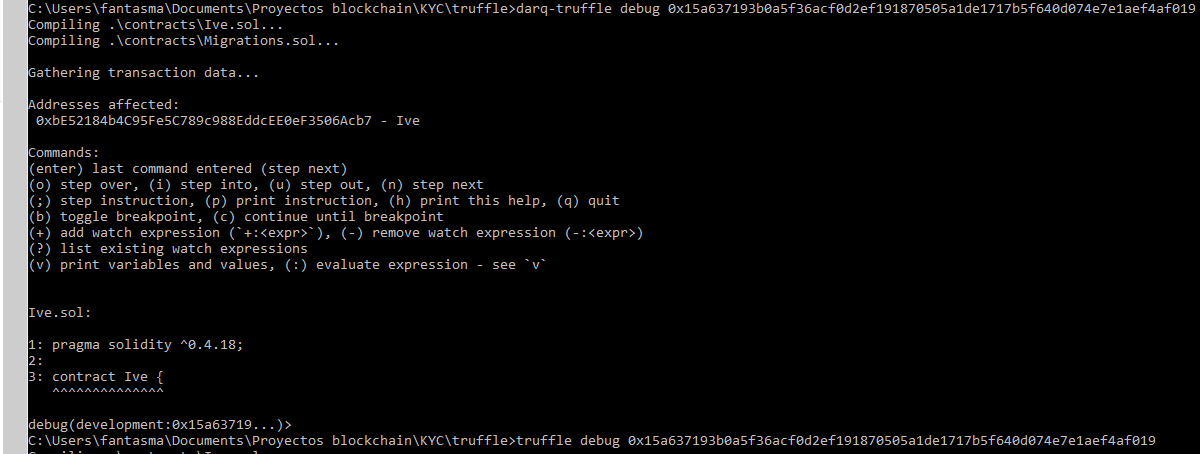
Had to use truffle debug txhash instead to debug
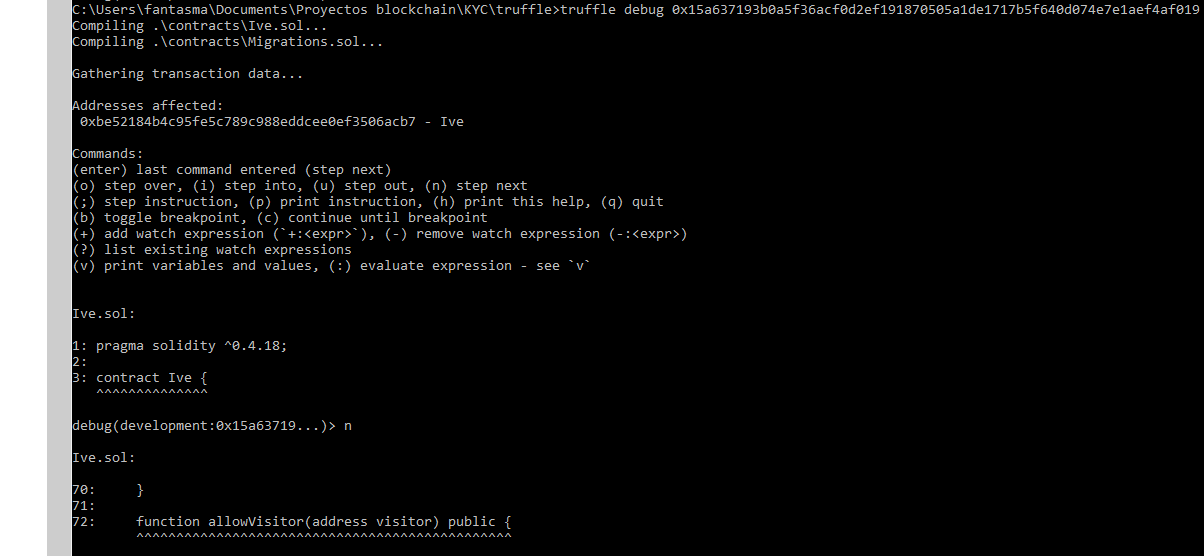
Environment
- Operating System: Windows 10
- Ethereum client: Ganache CLI v6.1.0 (ganache-core: 2.1.0)
- darq-truffle version (
darq-truffle version): Truffle v4.1.4-next.8 (core: 4.1.8) - Truffle version (
truffle version): Truffle v4.1.8 (core: 4.1.8) - node version (
node --version): v8.11.1 - npm version (
npm --version): 5.6.0
 RobertoC27
All 16 comments
@RobertoC27 Thanks! Will check this out.
 cgewecke
on 10 Jun 2018
cgewecke
on 10 Jun 2018
Update: This turned out to be a publishing error. The debugger is a built project and the way we've been publishing darq-truffle failed to take that into account.
It looks like starting Monday we'll be publishing anything/everything from this repository since we've moved all the modules here and have Lerna installed. This bug should be fixed then and darq-truffle will just be called truffle@next.
Will ping this issue when that happens.
cgewecke
on 15 Jun 2018
Just to clarify, i should prepare to use truffle@next from Monday on.
RobertoC27
on 15 Jun 2018
@RobertoC27 I think so yes - it's our first attempt publishing from this new project architecture - so it's a little 'fingers crossed'. darq-truffle will still exist but the current build is probably the last unless someone insists on retaining that name or re-appropriates it for darq purposes.
cgewecke
on 15 Jun 2018
@RobertoC27 Sorry for the delay. Just published truffle@next. If you have a chance to report back about whether the debugger works that would be great, thanks!
cgewecke
on 22 Jun 2018
@cgewecke sorry for the delay, i'm a bit short on time but will try to do it during the weekend. Any installation instructions that may have changed? or just npm install truffle@next
RobertoC27
on 22 Jun 2018
@RobertoC27 No worries at all :) Please take as much time as you need. Yes, that installation line should work.
cgewecke
on 22 Jun 2018
@cgewecke btw, when invoking instructions from this new package. Should it be truffle@next init or will it collide with my current truffle global install?
RobertoC27
on 22 Jun 2018
@RobertoC27 Yes unfortunatley it will collide and expects to be invoked as truffle. This was one nice thing about the darq-truffle name.
It's not uncommon for people to install truffle as a local dev dependency and write scripts in their package.json to run truffle test as npm test where the script is:
"test": "./node_modules/.bin/truffle test"
This lets you control truffle versions more easily for a specific use.
cgewecke
on 22 Jun 2018
@cgewecke being kind of new to this managing my dependencies and scripts stuff, seems like this learning scripts is going to take more time, to really understand what I'm configuring. Sure gonna miss that part of darq-truffle :(
RobertoC27
on 22 Jun 2018
Here's a quick guide using the metacoin box as an example:
mkdir metacoin
cd metacoin
truffle unbox metacoin
npm init # <-- This will add a package.json to project if it doesn't exist
npm install --save-dev truffle@next # <-- This will install truffle as a development dependency
Local truffle will be in the node_modules folder and available at the command line by running
./node_modules/.bin/truffle
Open pacakge.json in your text editor. It will have a scripts key you can use to define convenient shell command aliases for this project. Make a script entry like this:
"scripts": {
   "test": "./node_modules/.bin/truffle test",
   "compile": "./node_modules/.bin/truffle compile"
 },
At the terminal prompt you can now run:
npm test # 'test' is a little special because npm doesn't make you type `npm run test`
npm run compile  # Here, prefix the command name with 'run'. Most commands are like this.
More about this here
cgewecke
on 23 Jun 2018
@cgewecke running the debug statement produces the issue on #1051
executed command "./node_modules/.bin/truffle debug 0x7002c8a8eb2706d74bd8b4834b910c9d528be37776c9bacae93f4b996cf769b3"
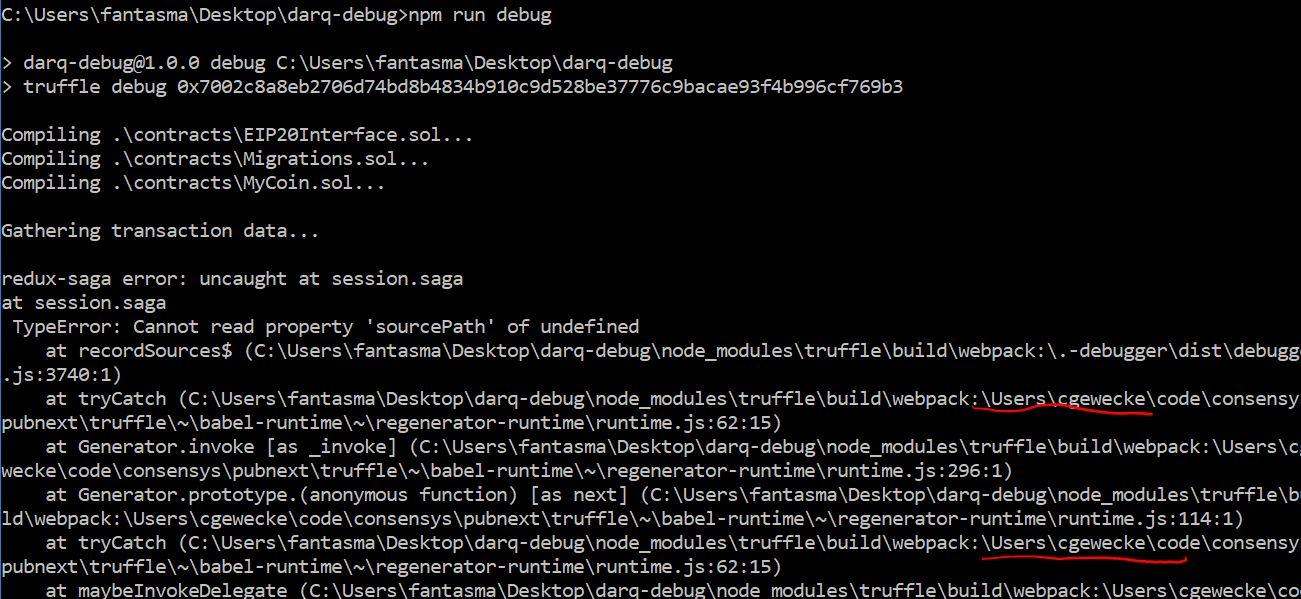
Notice how it is searching for a path related to your user, is that expected behavior?
truffle version:

RobertoC27
on 23 Jun 2018
Ah thanks @RobertoC27 - that's a bug - actually now I realize it's also affecting the normal release.
We're having some teething problems with the new structure and it looks like webpack is not building the debugger correctly. We'll have another release for everything early next week to fix this stuff.
cgewecke
on 23 Jun 2018
@RobertoC27 Sorry - this took forever it seems like . . . 5.0.0-next.1 should have fixed the debugger build so npm install truffle@next might work.
cgewecke
on 28 Jun 2018
@cgewecke I'm not bearing good news, debugger crashed again. https://gist.github.com/RobertoC27/5b3532b82277b28e880ab8f511fe4f42 a gist with the error output
RobertoC27
on 28 Jun 2018
Thanks so much @RobertoC27 - there's another report of this at #1051 which affects the non-next build. Hope you don't mind I'm going to close here and track the problem here, adding a link to your gist to the discussion.
cgewecke
on 28 Jun 2018
Related issues
 hefgi
·
3Comments
hefgi
·
3Comments
 ripper234
·
4Comments
ripper234
·
4Comments
 mezrin
·
3Comments
mezrin
·
3Comments
 rotcivegaf
·
3Comments
rotcivegaf
·
3Comments
 EmanHerawy
·
3Comments
EmanHerawy
·
3Comments