Trix: Multiple custom style buttons do not play nice. Unclear how exclusive/terminal/group works.
The goal
I have created two toolbar buttons that apply a color style to the highlighted text. One adds a red color style and the other a green. I want them to be exclusive. I want the red style on the text to be removed when the green style is added, and vice-versa.
(In production, I plan to have around 20 colors. A single character should only ever have one color.)
The problem
It looks like the first color style is not being removed. I have tried various combinations of the exclusive, terminal, group, and inheritable config parameters on the Trix configs (see below), but haven't gotten anything to work yet. I may be using them wrong because I couldn't find any documentation on them.
My application ends up looking like this, where you can see that the styles conflict, with red trumping green:
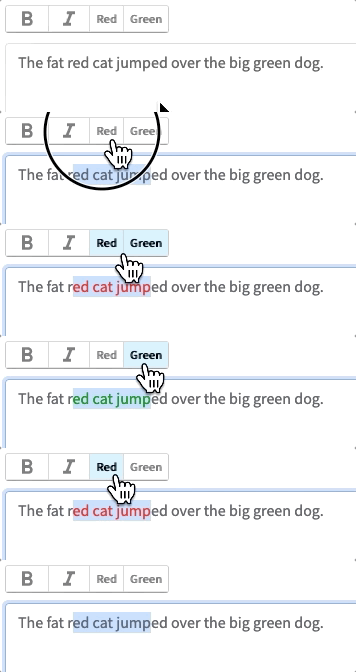
In my demo, if red and then green is applied to text, the resultant HTML looks like this when inspected:
<!--block-->The <span style="color: rgb(155, 0, 0);">fat red cat jumped</span> over the big green dog.
So you can see that the green is not applied at all.
And if the green is applied first instead, then the HTML looks the same (the green style is overwritten by the red).
Similar behavior occurs in a jsfiddle by @javan at https://jsfiddle.net/javan/egg7fgvv/, where he demos custom "RED" and "LOL" buttons. They don't play nice, and they're not even trying to work on the same style (they do color and font, respectively, where as I am attempting color and color):
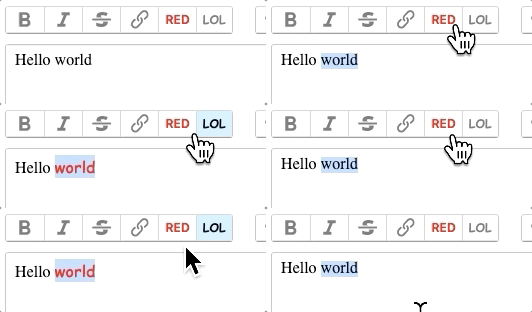
You can add exclusive and terminal to his jsfiddle and see what happens. For me, it had no effect.
The buttons and configs
I added two buttons in a toolbar:
Trix.config.toolbar =
  getDefaultHTML: -> """
      ...
        <button type="button" class="trix-button" data-trix-attribute="red" title="Red" tabindex="-1">Red</button>
        <button type="button" class="trix-button" data-trix-attribute="green" title="Green" tabindex="-1">Green</button>
      ...
  """
I added one config attribute for each button:
Trix.config.textAttributes.red =
  exclusive: true # I have been trying multiple mixes of exclusive, terminal, and inheritable but haven't gotten anything to work yet
  terminal: true
  style: color: '#9b0000'
  parser: (element) ->
    element.style.color == '#9b0000'

Trix.config.textAttributes.green =
  exclusive: true
  terminal: true
  style: color: '#009624'
  parser: (element) ->
    element.style.color == '#009624'
References
- https://jsfiddle.net/javan/egg7fgvv/
- Something like this issue came up in https://github.com/basecamp/trix/issues/606#issuecomment-479233228 but the issue went stale. The solution mentioned in that comment (adding
exclusiveand/orterminal) did not work for me.
Details
- Trix version: 1.1.1
- Browser name and version: Firefox Quantum 68.0.2 (64-bit)
- Operating system: macOS Mojave 10.14.6
 dtgay
dtgay
All 2 comments
This issue has been automatically marked as stale after 90 days of inactivity. It will be closed if no further activity occurs.
![stale[bot] picture](https://avatars.githubusercontent.com/in/1724?v=4&s=40) stale[bot]
on 5 Dec 2019
stale[bot]
on 5 Dec 2019
@dtgay did you ever find a solution to this issue?
 KayakinKoder
on 27 Feb 2020
KayakinKoder
on 27 Feb 2020
Related issues
 adamdebono
·
3Comments
adamdebono
·
3Comments
 atuttle
·
4Comments
atuttle
·
4Comments
 lanzhiheng
·
4Comments
lanzhiheng
·
4Comments
 benzkji
·
3Comments
benzkji
·
3Comments
 betorina
·
3Comments
betorina
·
3Comments
Most helpful comment
@dtgay did you ever find a solution to this issue?