Trix: Custom color-tool formatting is lost after load
when I create a custom text-color button:
```
Trix.config.textAttributes.red = {
style: { color: "red" },
parser: function(element) {
return element.style.color === "red"
},
inheritable: true
};
    addEventListener("trix-initialize", function(event) {
        var buttonHTML = '<button type="button" data-trix-attribute="red">RED</button>';
        event.target.toolbarElement.
        querySelector(".trix-button-group.trix-button-group--text-tools").
        insertAdjacentHTML("beforeend", buttonHTML)
    });
```
everything works fine, but when I try to load this text again, it loads only plain text into editor, without formatting s with "red" color.
What I should please do?
- Trix version: 1.1.1
- Browser name and version: Chrome
- Operating system: Windows
 janvacek
All 11 comments
Can you share a working example that reproduces the issue? I tried (https://codepen.io/javan/embed/oKWxgO?default-tab=html,result) and it's working as expected for me.
 javan
on 30 Jul 2019
javan
on 30 Jul 2019
If I set a valuef rom database to a connected input to trix, that contains
formatting from trix editor, the color formatting is gone. But, the
original ones from trix like "bold, italic, etc" are OK.
Format and save is ok, but loading to input for editing is broken. Original
formatting tools works fine, but my custom color formatting nope.
Dne út 30. 7. 2019 22:12 uživatel Javan Makhmali notifications@github.com
napsal:
Can you share a working example that reproduces the issue? I tried (
https://codepen.io/javan/embed/oKWxgO?default-tab=html,result) and it's
working as expected for me.—
You are receiving this because you authored the thread.
Reply to this email directly, view it on GitHub
https://github.com/basecamp/trix/issues/655?email_source=notifications&email_token=AJDJZ4ON63O6QHJ3XHXUNKTQCCOBPA5CNFSM4IH6TBA2YY3PNVWWK3TUL52HS4DFVREXG43VMVBW63LNMVXHJKTDN5WW2ZLOORPWSZGOD3FFPOI#issuecomment-516577209,
or mute the thread
https://github.com/notifications/unsubscribe-auth/AJDJZ4IH7PWE5Y6SNTQ7EBTQCCOBPANCNFSM4IH6TBAQ
.
janvacek
on 30 Jul 2019
The example I shared above loads content into the editor, like you would from a database:
<input type="hidden" id="trix-input" value="<div>abc <span style="color: red;">123</span></div>">
<trix-editor input="trix-input"></trix-editor>
Perhaps you're not escaping your hidden input's HTML correctly?
javan
on 30 Jul 2019
so then why original formatting tools are working fine? When I format text
with Bold, it stays bold. If I format text with custom "red" tool, after
reload, the text is black without formatting span like before
Dne út 30. 7. 2019 22:21 uživatel Javan Makhmali notifications@github.com
napsal:
The example I shared above loads content into the editor, like you would
from a database:
Perhaps you're not escaping your hidden input's HTML correctly?
—
You are receiving this because you authored the thread.
Reply to this email directly, view it on GitHub
https://github.com/basecamp/trix/issues/655?email_source=notifications&email_token=AJDJZ4KFFNT5DHT4BDSF2FTQCCPERA5CNFSM4IH6TBA2YY3PNVWWK3TUL52HS4DFVREXG43VMVBW63LNMVXHJKTDN5WW2ZLOORPWSZGOD3FGIAQ#issuecomment-516580354,
or mute the thread
https://github.com/notifications/unsubscribe-auth/AJDJZ4IP4QHX2I43YRED6VLQCCPERANCNFSM4IH6TBAQ
.
janvacek
on 30 Jul 2019
Perhaps you're not escaping your hidden input's HTML correctly?
javan
on 30 Jul 2019
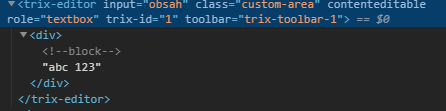
@javan so which PHP function do you recommend to use for escaping string like?
<div>normal text<span style="color: red;">red text</span>again normal text</div>
janvacek
on 1 Aug 2019

is translated to trix-editor like this:
janvacek
on 1 Aug 2019
Does the codepen link I shared above work for you? Here's a standalone version you can save locally and try: https://gist.github.com/javan/956d15d4196a64faea7d0c9c4f9a5a3f

javan
on 1 Aug 2019
idk how, but it fixed my problem. Thank you @javan
janvacek
on 4 Aug 2019
The likely problem here is the order in which the scripts are loaded.
These 2 scripts before the <trix-editor input="trix-input"></trix-editor>
<script src="https://cdnjs.cloudflare.com/ajax/libs/trix/1.2.0/trix.js"></script>
    <script>
      Trix.config.textAttributes.red = {
        style: { color: "red" },
        parser: element => element.style.color == "red",
        inheritable: true
      }
      addEventListener("trix-initialize", event => {
        const buttons = event.target.toolbarElement.querySelector(".trix-button-group--text-tools")
        buttons.insertAdjacentHTML("beforeend", `
          <button type="button" class="trix-button" data-trix-attribute="red" tabindex="-1">RED</button>
        `)
      })
    </script>
This does not work
<!DOCTYPE html>
<html lang="en" dir="ltr">
<head>
<meta charset="utf-8">
<title></title>
<link rel="stylesheet" href="https://cdnjs.cloudflare.com/ajax/libs/trix/1.2.0/trix.css">
</head>
<body>
<input type="hidden" id="trix-input" value="<div>abc <span style="color: red;">123</span></div>">
<trix-editor input="trix-input"></trix-editor>
</body>
<footer>
<script src="https://cdnjs.cloudflare.com/ajax/libs/trix/1.2.0/trix.js"></script>
    <script>
      Trix.config.textAttributes.red = {
        style: { color: "red" },
        parser: element => element.style.color == "red",
        inheritable: true
      }
      addEventListener("trix-initialize", event => {
        const buttons = event.target.toolbarElement.querySelector(".trix-button-group--text-tools")
        buttons.insertAdjacentHTML("beforeend", `
          <button type="button" class="trix-button" data-trix-attribute="red" tabindex="-1">RED</button>
        `)
      })
    </script>
</footer>
</html>
 hugomint
on 31 Mar 2020
hugomint
on 31 Mar 2020
@hugomint solution solved my issue, thanks!
 Danrod16
on 3 Sep 2020
Danrod16
on 3 Sep 2020
Related issues
 lanzhiheng
·
4Comments
lanzhiheng
·
4Comments
 plainspace
·
4Comments
plainspace
·
4Comments
 divyenduz
·
3Comments
divyenduz
·
3Comments
 acapro
·
3Comments
acapro
·
3Comments
 pars0097
·
4Comments
pars0097
·
4Comments
Most helpful comment
The likely problem here is the order in which the scripts are loaded.
These 2 scripts before the
<trix-editor input="trix-input"></trix-editor>This does not work