Trix: add file attachment in toolbar and custom preview
I try to add file attachment icon in toolbar and custom preview, it spent my lots time to find the solution. share my solution at here, hope it's useful for you .
1. add attachment icon to toolbar.
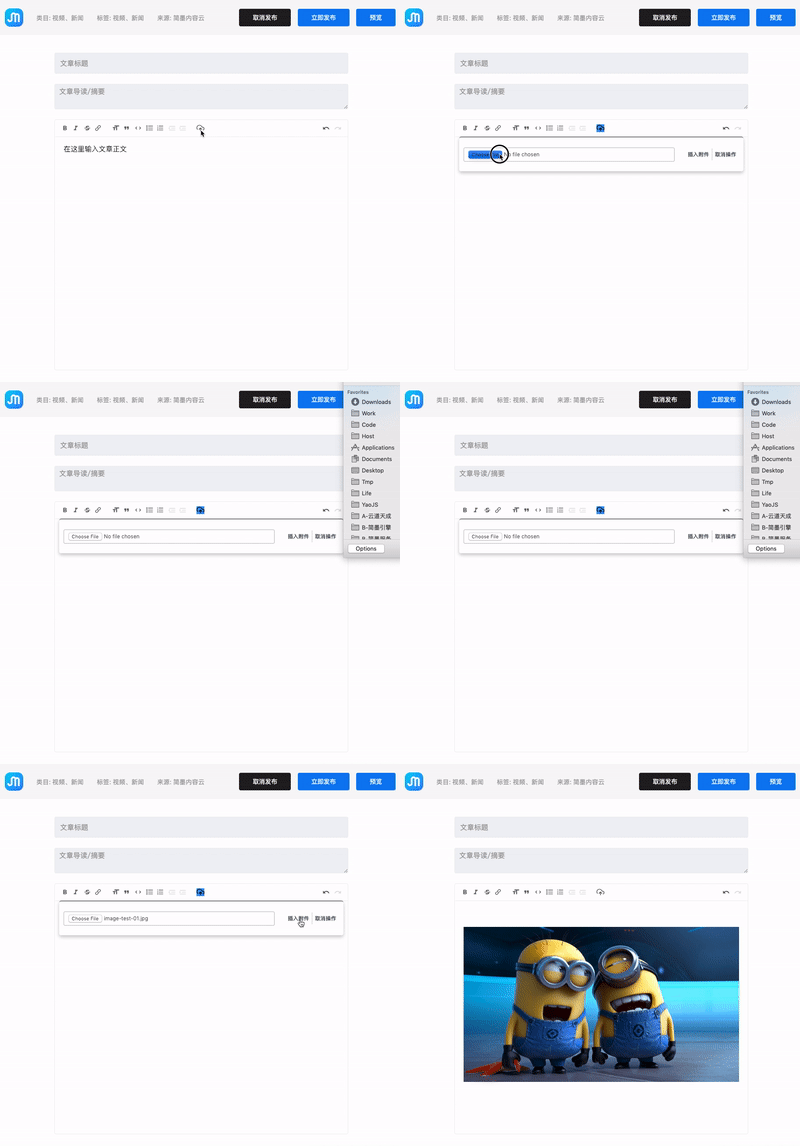
Javascript
        let toolBar = trix.toolbarElement;
        let spacer = toolBar.querySelector(".trix-button-group-spacer");
        let dialogElm = toolBar.querySelector(".trix-dialogs");

       // add a new block
        let blockElm = document.createElement("span");
            blockElm.setAttribute("class","trix-button-group trix-button-group--block-tools trix-button-group-custom");
            blockElm.setAttribute("data-trix-button-group", "block-tools");

          let trixId = trix.trixId;

        let buttonContent = `
            <button type="button"
                class="trix-button trix-button--icon trix-button--icon-attach"
                data-trix-attribute="attach"
                data-trix-key="+" title="附件" tabindex="-1"></button>
        `;

        let dialogContent = `
            <div class="trix-dialog trix-dialog--attach" data-trix-dialog="attach" data-trix-dialog-attribute="attach"  >
                <div class="trix-dialog__attach-fields">
                    <input type="file" class="trix-input trix-input--dialog" >
                    <div class="trix-button-group">
                        <input type="button" class="trix-button trix-button--dialog"
                            onclick="
                                var trix = document.querySelector('trix-editor[trix-id=\\'${trixId}\\']');
                                var fileElm = this.parentElement.parentElement.querySelector('input[type=\\'file\\']');
                                if ( fileElm.files.length == 0 ) {
                                    console.log('nothing selected');
                                    return;
                                }
                                var file = fileElm.files[0];
                                trix.editor.insertFile(file);
                            ";
                            value="插入附件" data-trix-method="removeAttribute"
                        >
                        <input type="button" class="trix-button trix-button--dialog" value="取消操作" data-trix-method="removeAttribute">
                    </div>
                </div>
            </div>
        `;
        // add attach icon button
        blockElm.insertAdjacentHTML("beforeend", buttonContent);
        // add dialog
        dialogElm.insertAdjacentHTML("beforeend", dialogContent);
css
.trix-button--icon-attach::before {
            background-image: url(data:image/svg+xml;base64,PHN2ZyB4bWxucz0iaHR0cDovL3d3dy53My5vcmcvMjAwMC9zdmciIHdpZHRoPSIyNCIgaGVpZ2h0PSIyNCIgdmlld0JveD0iMCAwIDI0IDI0IiBmaWxsPSJub25lIiBzdHJva2U9ImN1cnJlbnRDb2xvciIgc3Ryb2tlLXdpZHRoPSIyIiBzdHJva2UtbGluZWNhcD0icm91bmQiIHN0cm9rZS1saW5lam9pbj0icm91bmQiIGNsYXNzPSJmZWF0aGVyIGZlYXRoZXItdXBsb2FkLWNsb3VkIj48cG9seWxpbmUgcG9pbnRzPSIxNiAxNiAxMiAxMiA4IDE2Ij48L3BvbHlsaW5lPjxsaW5lIHgxPSIxMiIgeTE9IjEyIiB4Mj0iMTIiIHkyPSIyMSI+PC9saW5lPjxwYXRoIGQ9Ik0yMC4zOSAxOC4zOUE1IDUgMCAwIDAgMTggOWgtMS4yNkE4IDggMCAxIDAgMyAxNi4zIj48L3BhdGg+PHBvbHlsaW5lIHBvaW50cz0iMTYgMTYgMTIgMTIgOCAxNiI+PC9wb2x5bGluZT48L3N2Zz4=);
}
2. custom preview.
use attachment content filed to set attachment preview template.
( attachment upload see : https://trix-editor.org/js/attachments.js )

Javascript
let url = "your remote url "
/**
 *  on trix-attachment-add upload file to remote server
 */
elm.addEventListener("trix-attachment-add", (event) => {
           uploadFile(event.attachment), setProgress, setAttributes)
            function setProgress(progress) {
              attachment.setUploadProgress(progress)
            }

            function setAttributes(data) {
              console.log(attachment);
            }
});

function uploadFile(attachment, progressCallback, successCallback) {

            // Check File
            let file = attachment.file;

            var key = createStorageKey(file)
            var formData = createFormData(key, file)
            var xhr = new XMLHttpRequest()

            xhr.open("POST", url, true)

            xhr.upload.addEventListener("progress", function(event) {
                var progress = event.loaded / event.total * 100
                progressCallback(progress)
            })

            xhr.addEventListener("load", function(event) {
                let response = {};
                try {
                    response = JSON.parse( xhr.responseText );
                }catch( e ){
                    console.log('upload error');
                    attachment.remove();
                    return;
                }

                // failure
                if ( response.code != 0 || typeof response.data != "object" ) {
                    let message = response.message || "上传失败";
                    attachment.remove();
                    console.log( message );
                    return;
                }


                let data = response.data || {};
                setContent( attachment, data);
                successCallback(data);
            })

            xhr.send(formData);
        }

/**
 *  @param object attachment  struct of  attachment
 *  @param object data  remote server response data after upload.
 */
function setContent( attachment, data ) {

            let file = attachment.file;
            let attributes ={
                previewable: false,
                url: data.url,
                href: data.url
            };

            if (!data.mime ){
                data.mime = "application/file";
            }

            if ( data.mime.includes("image") ) { // image
                attributes["content"] = `
                    <span class="trix-preview-image" data-url="${data.url}"  data-name="${file.name}" >
                        <img src="${data.url}" />
                    <span>
                `;

            } else if ( data.mime.includes("video") ) { // video
                attributes["content"] = `
                    <span class="trix-preview-video"  data-url="${data.url}"  data-name="${file.name}" >
                        <video width="100%" height="auto" controls>
                            <source src="${data.url}" type="${data.mime}">
                        </video>
                    <span>
                `;

            } else {  // other
                attributes["content"] = `
                    <span class="trix-preview-file" data-url="${data.url}"  data-name="${file.name}" >
                        ${file.name}
                    <span>
                `;
            }

            attachment.setAttributes(attributes);
        }
css
.trix-preview-file {
  border: 1px solid red;
}

.trix-preview-video {
  border: 1px solid yellow;
}

.trix-preview-image {
  border: 1px solid green;
}
 trheyi
All 10 comments
It'd be nice to have it merged into Trix codebase! 🙂
 lucascaton
on 8 Feb 2019
lucascaton
on 8 Feb 2019
Hope it can merge :) It's really nice
 George-Miao
on 13 Feb 2019
George-Miao
on 13 Feb 2019
This doesn't seem to work for me. It says ReferenceError: trix is not defined in the console. This makes sense, because when I look through the Trix source, everything is stored under Trix, not trix.
I tried changing the code accordingly, but it turns out that Trix.toolbarElement also does not exist, and neither does Trix.trixId. Was this written for an older version of the code?
EDIT: turns out there is only a small piece of code missing to make this work:
let trix = document.querySelector("trix-editor");
All the required attributes are defined on that.
 PandaWhisperer
on 26 Mar 2019
PandaWhisperer
on 26 Mar 2019
Alright, after an hour or so I've managed to complete the code so that it can just be dropped into a project and should work right away. I also translated the button labels to English, and fixed the CSS for the dialog. Instead of making a new button group, I am adding the button just next to the "link" button.
JavaScript
document.addEventListener('trix-initialize', function(e) {
  let editor  = e.target;
  let toolbar = editor.toolbarElement;
  let ttools  = toolbar.querySelector(".trix-button-group--text-tools");
  let dialogs = toolbar.querySelector(".trix-dialogs");
  let trixId  = editor.trixId;

  let buttonContent = `
    <button type="button"
      class="trix-button trix-button--icon trix-button--icon-attach"
      data-trix-attribute="attach"
      data-trix-key="+" title="Attach file" tabindex="-1">
    </button>
  `;

  let dialogContent = `
    <div class="trix-dialog trix-dialog--attach" data-trix-dialog="attach" data-trix-dialog-attribute="attach">
      <div class="trix-dialog__attach-fields">
        <input type="file" class="trix-input trix-input--dialog">
        <div class="trix-button-group">
          <input type="button" class="trix-button trix-button--dialog"
            onclick="
              var trix = document.querySelector('trix-editor[trix-id=\\'${trixId}\\']');
              var fileElm = this.parentElement.parentElement.querySelector('input[type=\\'file\\']');
              if ( fileElm.files.length == 0 ) {
                console.log('nothing selected');
                return;
              }
              var file = fileElm.files[0];
              trix.editor.insertFile(file);
            "
            value="Attach" data-trix-method="removeAttribute">
          <input type="button" class="trix-button trix-button--dialog" value="Cancel" data-trix-method="removeAttribute">
        </div>
      </div>
    </div>
  `;
  // add attach icon button
  ttools.insertAdjacentHTML("beforeend", buttonContent);
  // add dialog
  dialogs.insertAdjacentHTML("beforeend", dialogContent);
});
CSS
.trix-button--icon-attach::before {
  background-image: url(data:image/svg+xml;base64,PHN2ZyB4bWxucz0iaHR0cDovL3d3dy53My5vcmcvMjAwMC9zdmciIHdpZHRoPSIyNCIgaGVpZ2h0PSIyNCIgdmlld0JveD0iMCAwIDI0IDI0IiBmaWxsPSJub25lIiBzdHJva2U9ImN1cnJlbnRDb2xvciIgc3Ryb2tlLXdpZHRoPSIyIiBzdHJva2UtbGluZWNhcD0icm91bmQiIHN0cm9rZS1saW5lam9pbj0icm91bmQiIGNsYXNzPSJmZWF0aGVyIGZlYXRoZXItdXBsb2FkLWNsb3VkIj48cG9seWxpbmUgcG9pbnRzPSIxNiAxNiAxMiAxMiA4IDE2Ij48L3BvbHlsaW5lPjxsaW5lIHgxPSIxMiIgeTE9IjEyIiB4Mj0iMTIiIHkyPSIyMSI+PC9saW5lPjxwYXRoIGQ9Ik0yMC4zOSAxOC4zOUE1IDUgMCAwIDAgMTggOWgtMS4yNkE4IDggMCAxIDAgMyAxNi4zIj48L3BhdGg+PHBvbHlsaW5lIHBvaW50cz0iMTYgMTYgMTIgMTIgOCAxNiI+PC9wb2x5bGluZT48L3N2Zz4=);
}

trix-toolbar .trix-dialog--attach {
  max-width: 600px;
}

trix-toolbar .trix-dialog__attach-fields {
  display: flex;
  align-items: baseline;
}

trix-toolbar .trix-dialog__attach-fields .trix-input {
  flex: 1;
}

trix-toolbar .trix-dialog__attach-fields .trix-button-group {
  flex: 0 0 content;
  margin: 0;
}
Thanks to @trheyi for posting the original version, without his work, this would have taken much longer.
PandaWhisperer
on 27 Mar 2019
@PandaWhisperer nice!
The rest of trix is using Trix.config.lang for button labels, enabling internationalized use. I'd guess the best approach for a plugin would be something like:
Trix.config.lang.filePreview ||= {};
Trix.config.lang.filePreview.attach ||= "Attach";
That way, if custom translations have been specified they won't get overridden by defaults.
 DanielHeath
on 3 Apr 2019
DanielHeath
on 3 Apr 2019
Thanks @DanielHeath. I'll try to make a version that's integrated with with Trix when I have time.
PandaWhisperer
on 8 Apr 2019
Alright. I think I got the correct code for the attachment feature, but #616 is currently blocking me from testing it. Help please?
PandaWhisperer
on 8 Apr 2019
Does the current version have this feature? It seems it's only drag & drop so far..
 juansecaro
on 19 Aug 2019
juansecaro
on 19 Aug 2019
Thanks, it saves my times.
 nyrf
on 20 Nov 2019
nyrf
on 20 Nov 2019
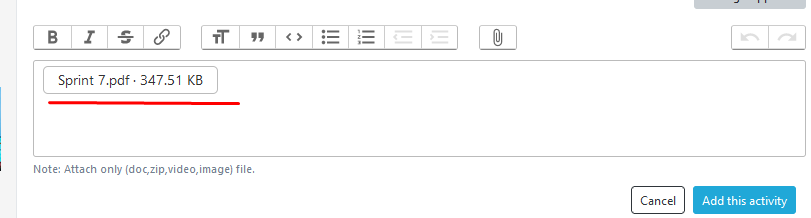
I need preview for .pdf attachment upload in trix basecamp.
 Sushma-tiwari
on 10 Jun 2020
Sushma-tiwari
on 10 Jun 2020
Related issues
 radcliff
·
5Comments
radcliff
·
5Comments
 lcsqlpete
·
3Comments
lcsqlpete
·
3Comments
 adamdebono
·
3Comments
adamdebono
·
3Comments
 andreimoment
·
3Comments
andreimoment
·
3Comments
 WhatFreshHellIsThis
·
4Comments
WhatFreshHellIsThis
·
4Comments
Most helpful comment
Alright, after an hour or so I've managed to complete the code so that it can just be dropped into a project and should work right away. I also translated the button labels to English, and fixed the CSS for the dialog. Instead of making a new button group, I am adding the button just next to the "link" button.
JavaScript
CSS
Thanks to @trheyi for posting the original version, without his work, this would have taken much longer.