Trix: Applying code tags to just a single word or phrase in a sentence
When selecting just a word or phrase and pressing the < > button, the entire sentence gets displayed as a code block.
Steps to Reproduce
- View the demo of Trix at https://trix-editor.org/
- Select the word "open-source" or any word / multi-phrase word
- Click the
< >button.
Details
- Trix version: https://trix-editor.org/
Expected Results
I would have expected an inline <code>open-source</code> block to be used just like the GitHub markdown editor allows you to do. In Trix terms, I would have expected the behavior to match the bold button.
Proposed Fix (in theory)
If text is selected, apply code tag to selected text, else apply code tag to full sentence.
 nickjj
All 7 comments
I agree that inline code formatting would be nice. I've wanted it too!
I would have expected an inline
<code>open-source</code>block to be used just like the GitHub markdown editor allows you to do. In Trix terms, I would have expected the behavior to match the bold button.
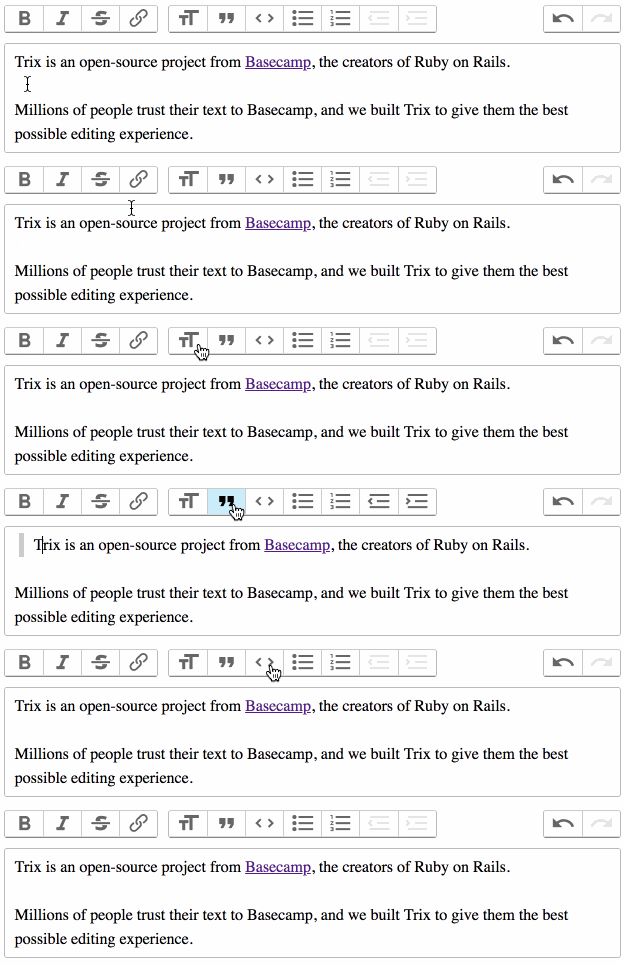
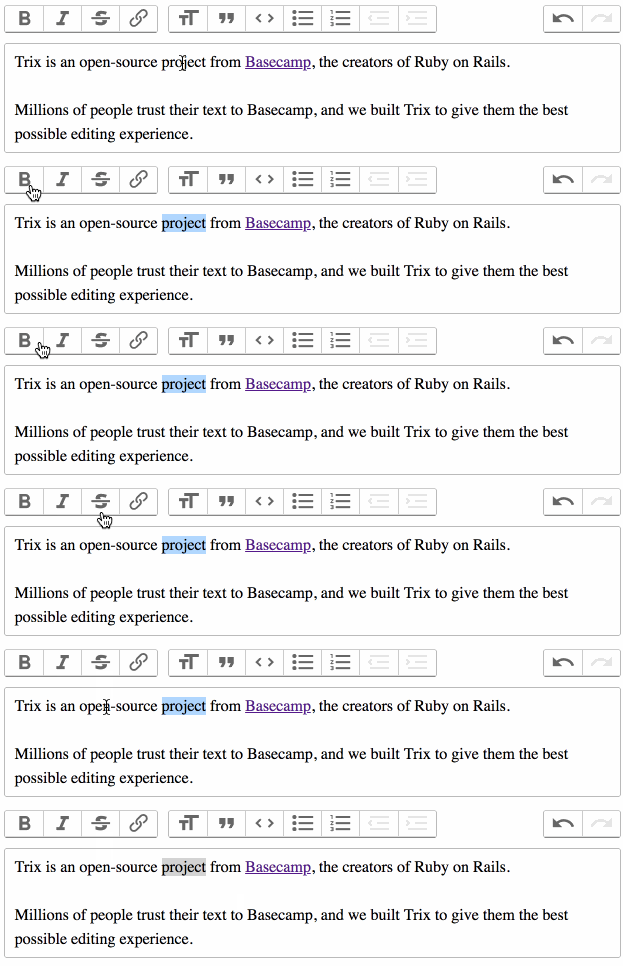
Just to clarify, Trix has two kinds of formatting attributes: text (inline) and block. The first group of toolbar buttons apply text formatting, and the second group applies block formatting. For the most part, the buttons in each group behave the same.
Block formatting expands the selection around the nearest
\ns or the containing block element
Text formatting applies to the selected range of text
Following those guidelines, inline code formatting would need to be implemented as a text attribute, and would need its own toolbar button in the first group. That's kind of clunky though since there'd be two code formatting buttons. Ideally, one button would just do the right thing, like you said.
I took a shot at implementing that as a plugin of sorts using Trix's events and editor API:
Trix.config.textAttributes.inlineCode = {
  tagName: "code",
  inheritable: true
}

addEventListener("trix-initialize", event => {
  const element = event.target
  const { toolbarElement, editor } = element

  const blockCodeButton = toolbarElement.querySelector("[data-trix-attribute=code]")
  const inlineCodeButton = blockCodeButton.cloneNode(true)

  inlineCodeButton.hidden = true
  inlineCodeButton.dataset.trixAttribute = "inlineCode"
  blockCodeButton.insertAdjacentElement("afterend", inlineCodeButton)

  element.addEventListener("trix-selection-change", _ => {
    const type = getCodeFormattingType()
    blockCodeButton.hidden = type == "inline"
    inlineCodeButton.hidden = type == "block"
  })

  function getCodeFormattingType() {
    if (editor.attributeIsActive("code")) return "block"
    if (editor.attributeIsActive("inlineCode")) return "inline"

    const range = editor.getSelectedRange()
    if (range[0] == range[1]) return "block"

    const text = editor.getSelectedDocument().toString().trim()
    return /\n/.test(text) ? "block" : "inline"
  }
})

 javan
on 4 Oct 2018
javan
on 4 Oct 2018
Hey, thanks a lot for supplying that plugin snippet for now. That works quite nicely for the time being.
Are you going to leave this open until you decide how to deal with having a single button for both a block and inline effect?
nickjj
on 5 Oct 2018
I'm going to close this since it's technically not a bug. Trix doesn't provide inline code formatting out of the box, and block code formatting is working as designed.
Thanks for bringing this up though! I'd like to add contextual single-button formatting in a future update.
javan
on 8 Oct 2018
Sorry for hijacking an existing issue. Is inline code formatting something the team would accept a pull request for? Also (a first timer here), how would this work in regards to Basecamp? If such a pull request was ever accepted, would the new feature be also added to Basecamp itself? Thanks!
 petros
on 21 Dec 2019
petros
on 21 Dec 2019
It generally seems to me that (regardless of trix's feature-set) given that Basecamp powers a lot of software companies, backtick style formatting would be a given. This is widely used for code, but also for variables, names, etc..
I'd love to see it in Basecamp :)
 nir0s
on 25 Jun 2020
nir0s
on 25 Jun 2020
I also use the backtick formatting in my daily writing with Trix. `foo` just isn't the same as foo.
 ccchapman
on 14 Jul 2020
ccchapman
on 14 Jul 2020
@javan are you going to accept PR on this?
 siscia
on 7 Sep 2020
siscia
on 7 Sep 2020
Related issues
 lcsqlpete
·
3Comments
lcsqlpete
·
3Comments
 WhatFreshHellIsThis
·
4Comments
WhatFreshHellIsThis
·
4Comments
 betorina
·
3Comments
betorina
·
3Comments
 divyenduz
·
3Comments
javan
·
4Comments
divyenduz
·
3Comments
javan
·
4Comments
Most helpful comment
It generally seems to me that (regardless of trix's feature-set) given that Basecamp powers a lot of software companies,
backtickstyle formatting would be a given. This is widely used for code, but also for variables, names, etc..I'd love to see it in Basecamp :)