ANSWER FURTHER BELOW
Is there a better way to set the color of the selection dynamically than overwriting the Trix-config ad-hoc? I'd like to add a color-picker.
Thank you!
<span style="background-color:#95070b" data-trix-color></span>
<span style="background-color:#fa141b" data-trix-color></span>
<span style="background-color:#fc9827" data-trix-color></span>
...
...
$(document).delegate("[data-trix-color]","click",function(){

    var color_hex = $(this).css('background-color');

    Trix.config.textAttributes.dynamicColor = {
        style: { color: color_hex },
      parser: function(element) {
            return element.style.color != null;
      }
    }

    trixEditor.activateAttribute("dynamicColor");
});
I'll leave this up for people searching: font color, colors, colour, colours, dynamic css properties
ANSWER FURTHER BELOW
 Cervenka
All 6 comments
To answer my own question:
Trix.config.textAttributes.foregroundColor = {
styleProperty: "color",
inheritable: 1
}
..
..
trixEditor.activateAttribute("foregroundColor", color_hex);
That's more or less what we do in Basecamp. Sorry for the lack of documentation!
 javan
on 23 Mar 2018
javan
on 23 Mar 2018
Here's a more complete version from Basecamp: https://gist.github.com/javan/a8a237f0db7648ba88d66cf9a50fa1f5
javan
on 23 Mar 2018
Thank you very much for open-sourcing the trix editor and this additional gist!
Cervenka
on 24 Mar 2018
@javan, I have tried using what you have offered in this issue but I feel like I don't have the whole thing. I took your coffeescript and translated it into js (that may be my problem for all I know) and put it all into an event listener for trix-initialize, along with some buttons like you created in your fiddle in issue #373.
All I can get to happen is a blank <span> to surround my selected text. What am I missing?
 robvitaro
on 5 Feb 2019
robvitaro
on 5 Feb 2019
Has anyone got this to work ?
I have extended the Trix toolbar so I can mark a selection, in this example the word TRIM red:
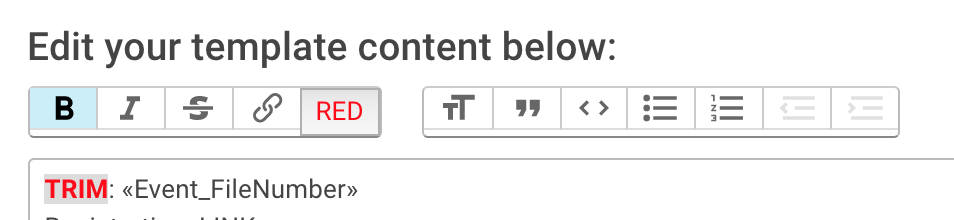
This works fine - and when I persist the editors content the generated HTML shows correctly as
<strong style="color: red;">TRIM</strong>
However when I then revisit the Trix Editor and provide the persisted HTML as the value for the input field - the red color is lost:

I did include the gist referenced above, i.e. the Javascript for the Trix configuration and the parser helper functions, i.e.
Trix.config.textAttributes.foregroundColor = {
  inheritable: true
  styleProperty: "color"
  parser: createColorParser()
}
But that did not seem to make a difference - and there is no errors showing in the JavaScript console, the color style property seems to be simply ignored on load.
I am using Trix 1.1.1
 patsch
on 18 Jul 2019
patsch
on 18 Jul 2019
Related issues
 plainspace
·
4Comments
plainspace
·
4Comments
 marpstar
·
5Comments
marpstar
·
5Comments
 pars0097
·
4Comments
pars0097
·
4Comments
 adueck
·
3Comments
adueck
·
3Comments
 divyenduz
·
3Comments
divyenduz
·
3Comments
Most helpful comment
Has anyone got this to work ?
I have extended the Trix toolbar so I can mark a selection, in this example the word TRIM red:
This works fine - and when I persist the editors content the generated HTML shows correctly as
<strong style="color: red;">TRIM</strong>However when I then revisit the Trix Editor and provide the persisted HTML as the value for the input field - the red color is lost:
I did include the gist referenced above, i.e. the Javascript for the Trix configuration and the parser helper functions, i.e.
But that did not seem to make a difference - and there is no errors showing in the JavaScript console, the color style property seems to be simply ignored on load.
I am using Trix 1.1.1