Trix: (Mobile Support)Trix editor does not support Chinese input keyboard on iOS
Steps to Reproduce
- please enable Chinese simplified Pinyin keyboard in iOS system preference
- Open trix-editor.org in Safari
- Clear all placeholder text in editor first. Use Chinese simplified Pinyin keyboard to type. Like 'nihao'(then click the first two characters on the selection line on the keyboard above) will normally turning the latin pinyin into two Chinese characters(你好) meaning Hello. Now, Trix is recording only pinyin after selection, the system keyboard is supposed to return the encoded Chinese characters, which the trix seems to escape them and force them to clear. The cursor will then jump to the front waiting for new input. Therefore, unless a user put a space in the beginning, trix will never record Chinese Character by using Chinese simplified Pinyin input method.
Details
- Trix version: trip-editor.org
- Browser name and version: Safari 10
- Operating system: iOS 10
screenshot
First I test the Chinese Pinyin input on Safari address text-area. (No cursor clearing and wiping)
then I test in trix editor, I can't write a complete sentence. Each time I tried to write down some characters, trix will force the cursor to the front.

 cndaniel
All 6 comments
Also confirmed on macOS Safari 10.1.1 for both Chinese and Japanese input methods.
After bisected the commits, I found that this issue started from 0.9.2.
0.9.0 don't have this issue but it has a different one.
 cqpx
on 18 Jul 2017
cqpx
on 18 Jul 2017
Thanks @cqpx. Does it only occur when the editor is empty?
 javan
on 18 Jul 2017
javan
on 18 Jul 2017
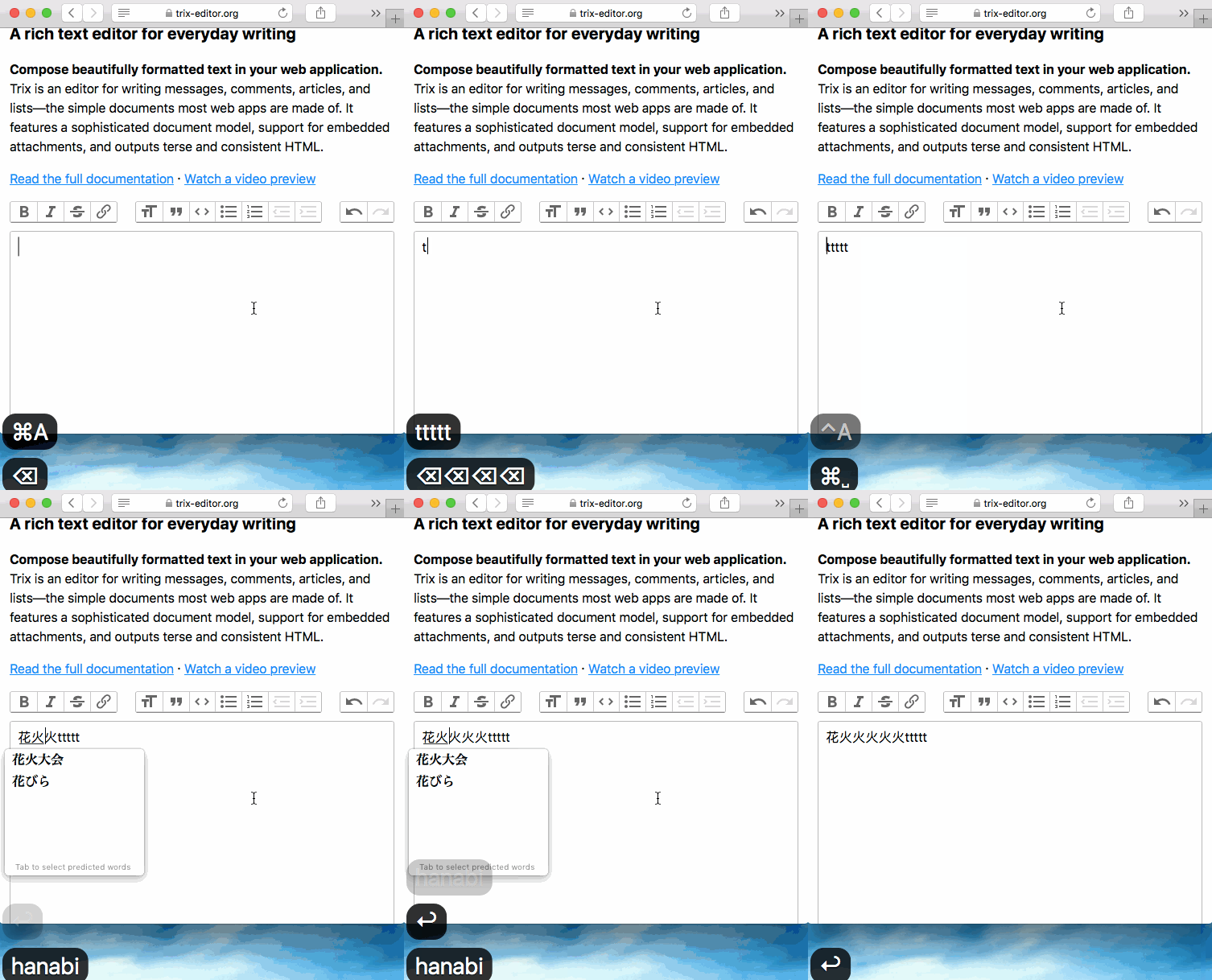
Sort of, please see my screenshot.
When I clear the text area with Delete key, it will leave a strange vertical line at the beginning of the text area.
When I start typing from the strange vertical line with either empty or filled editor,
- It will move cursor back to the beginning when I pressed Enter to confirm my selection (it should stay at the end so that I can continue typing)
- When I continue typing after the above step, the first character was swallowed and cursor moved to the beginning again
cqpx
on 19 Jul 2017
@javan
The problem should be here https://github.com/basecamp/trix/blob/f677a9429bb8838afb74783ae80019ec8b9608a3/src/trix/models/location_mapper.coffee#L113
When enter Chinese (Japanese should be the same), the walker.currentNode is not complete in Safari(I have test on OSX, iOS should be the same).
I'm trying to find a solution, but the progress is slow, so I write down the problem and hope to get some ideas or help.
Here is the log I collected:
In Chrome
_// Step 1: Type 'a'_
node <div>…</div>
trix.js:10055 nodeIsBlockStartComment(node) false
trix.js:10054 node <!--block-->
trix.js:10055 nodeIsBlockStartComment(node) true
trix.js:10054 node "a "
trix.js:10055 nodeIsBlockStartComment(node) false
trix.js:10054 node <div>…</div>
trix.js:10055 nodeIsBlockStartComment(node) false
trix.js:10054 node <!--block-->
trix.js:10055 nodeIsBlockStartComment(node) true
trix.js:10054 node "a "
trix.js:10055 nodeIsBlockStartComment(node) false
_// Step 2: Type space, get a '啊'_
trix.js:10054 node <div>…</div>
trix.js:10055 nodeIsBlockStartComment(node) false
trix.js:10054 node <!--block-->
trix.js:10055 nodeIsBlockStartComment(node) true
trix.js:10054 node "啊 "
trix.js:10055 nodeIsBlockStartComment(node) false
trix.js:10054 node <div>…</div>
trix.js:10055 nodeIsBlockStartComment(node) false
trix.js:10054 node <!--block-->
trix.js:10055 nodeIsBlockStartComment(node) true
trix.js:10054 node "啊 "
trix.js:10055 nodeIsBlockStartComment(node) false
In Safari
_// Step 1: Type 'a'_
node <div>…</div>
trix.js:10055 nodeIsBlockStartComment(node) false
trix.js:10054 node <!--block-->
trix.js:10055 nodeIsBlockStartComment(node) true
trix.js:10054 node "a "
trix.js:10055 nodeIsBlockStartComment(node) false
trix.js:10054 node <div>…</div>
trix.js:10055 nodeIsBlockStartComment(node) false
trix.js:10054 node <!--block-->
trix.js:10055 nodeIsBlockStartComment(node) true
trix.js:10054 node "a "
trix.js:10055 nodeIsBlockStartComment(node) false
_// Step 2: Type space, get a '啊'
// The <! - block -> was lost_
trix.js:10054 node <div>…</div>
trix.js:10055 nodeIsBlockStartComment(node) false
trix.js:10054 node "啊 "
trix.js:10055 nodeIsBlockStartComment(node) false
trix.js:10054 node <div>…</div>
trix.js:10055 nodeIsBlockStartComment(node) false
trix.js:10054 node "啊 "
trix.js:10055 nodeIsBlockStartComment(node) false
 biallo
on 18 Aug 2017
biallo
on 18 Aug 2017
By the way, I found another problem that might be related to this.
When you enter a lot of Chinese, the editor may lose focus when you execute undo.
If you continue to enter text at this time, they do not appear in the editor. But when you click the input area to get focus again, after you press any key, the content you just entered will appear in the editor as a lot of letters.
This problem occurs in both Safari and Chrome.
biallo
on 18 Aug 2017
This issue has been automatically marked as stale after 90 days of inactivity. It will be closed if no further activity occurs.
![stale[bot] picture](https://avatars.githubusercontent.com/in/1724?v=4&s=40) stale[bot]
on 17 Sep 2018
stale[bot]
on 17 Sep 2018
Related issues
 radcliff
·
5Comments
radcliff
·
5Comments
 adamdebono
·
3Comments
adamdebono
·
3Comments
 acapro
·
3Comments
acapro
·
3Comments
 benzkji
·
3Comments
benzkji
·
3Comments
 lcsqlpete
·
3Comments
lcsqlpete
·
3Comments
Most helpful comment
Sort of, please see my screenshot.
When I clear the text area with Delete key, it will leave a strange vertical line at the beginning of the text area.
When I start typing from the strange vertical line with either empty or filled editor,