Trix: Hidding <trix-toolbar> when the editor is not focused
Hello guys !
I'm just trying to hide the toolbar when the editor isn't focused. Im working with angular so im trying to use ng-show / ng-hide & "trix-focus" but it's not working.
Thank you by far.
Jérémy
 ptitdje45
All 7 comments
Hey Jérémy,
I’m not sure how to do it ‘the angular way’, but here’s how I’d do it with plain CSS and JavaScript.
First, hide all instances of trix-toolbar with CSS.
trix-toolbar { display: none; }
Then, use the trix-focus and trix-blur callbacks to show and hide the toolbar for the each instance that’s focused.
document.addEventListener("trix-focus", function(event) {
var toolbar, toolbar_id;
toolbar_id = event.target.getAttribute('toolbar');
toolbar = document.getElementById(toolbar_id);
toolbar.style.display = 'block';
});
document.addEventListener("trix-blur", function(event) {
var toolbar, toolbar_id;
toolbar_id = event.target.getAttribute('toolbar');
toolbar = document.getElementById(toolbar_id);
toolbar.style.display = 'none';
});
Hope this helps!
 joeldrapper
on 17 Nov 2016
joeldrapper
on 17 Nov 2016
Thanks @joeldrapper!
<trix-editor> elements hold a reference to their <trix-toolbar> so that can be simplified to:
document.addEventListener("trix-focus", function(event) {
event.target.toolbarElement.style.display = "block";
});
document.addEventListener("trix-blur", function(event) {
event.target.toolbarElement.style.display = "none";
});
 javan
on 17 Nov 2016
javan
on 17 Nov 2016
Hello everyone,
This solution breaks the "link" functionality, because upon clicking on link button, the focus moves to the url field and the whole toolbar disappears.
Checking if link was pressed on "trix-blur" event using event.target.toolbarElement.children[0].children[0].children[3].classList.contains('trix-active') works, but it's far from ideal.
It also requires more code if you're using multiple trix editors and it can all break easily.
Can anyone think of a better solution?
Thank you
 inod
on 2 Oct 2018
inod
on 2 Oct 2018
addEventListener("trix-blur", event => {
const { toolbarElement } = event.target
if (!toolbarElement.contains(document.activeElement)) {
toolbarElement.style.display = "none"
}
})
Hey all, everyone's contributions were great, and "worked," but I ran into a glitchy visual when tabbing between two Trix editors with this behavior, I'm guessing because there is a slight delay between when the blur event is handled and when the focus event is handled. In this example, it's causing the submit button to bounce around. (It's quite jarring in practice.)
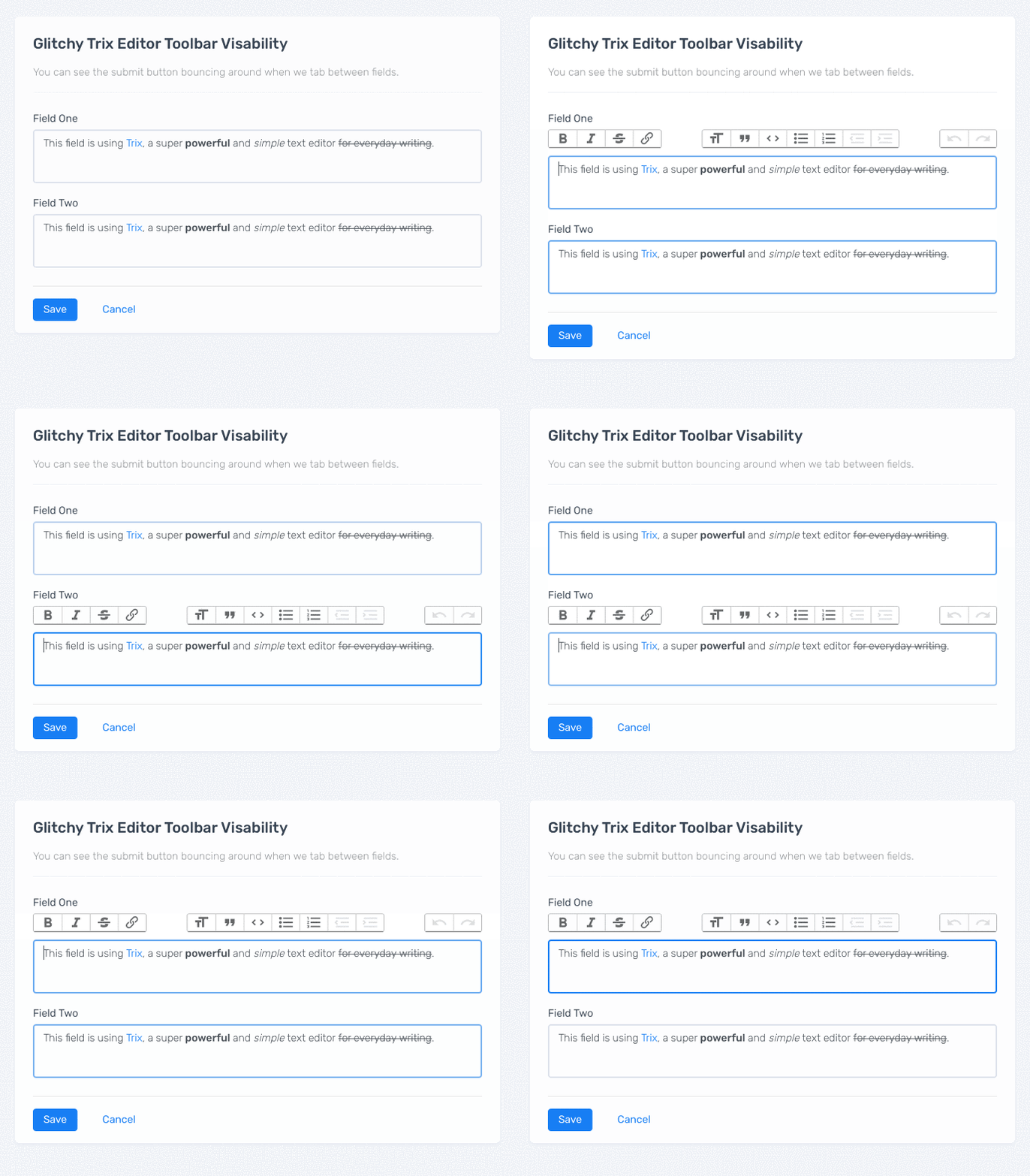
The fix was to slightly restructure the way the blur event is handled and make all the visual adjustments at once.
  function updateTrixToolbarVisability() {
    $("trix-editor").each(function (index, editorElement) {
      var toolbarElement = editorElement.toolbarElement;
      if (editorElement == document.activeElement) {
        $(toolbarElement).show();
      } else {
        // don't hide the toolbar if we've unfocused to focus on the link dialog.
        if (!toolbarElement.contains(document.activeElement)) {
          $(toolbarElement).hide();
        }
      }
    });
  }

  addEventListener("trix-focus", updateTrixToolbarVisability);
  addEventListener("trix-blur", updateTrixToolbarVisability);
The end result works like this:
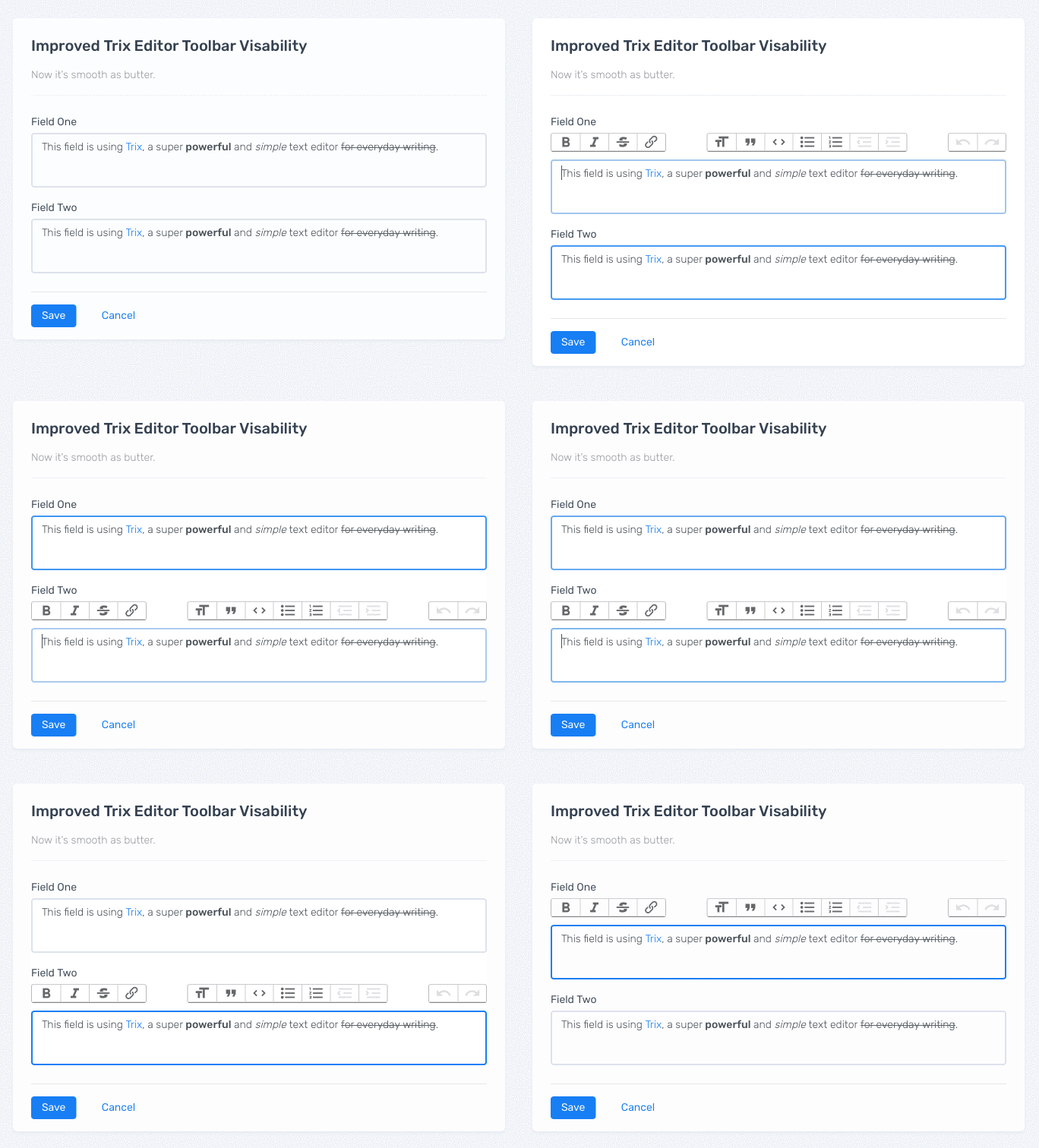
I hope this is helpful for someone! If this works for you, but you don't want the jQuery dependency or you can improve the code in some way, please feel free to contribute that back.
_("Visability" is not a word. Sorry!)_
 andrewculver
on 11 Nov 2018
andrewculver
on 11 Nov 2018
Visability is a perfectly good word for a programmer. Thanks for sharing your solution here. 🙌
joeldrapper
on 11 Nov 2018
Thanks for this! Is it possible to keep it display true after click outside it? So it is hidden at the beginning but after a click in the text area is shown, and then it keeps shown always, except page reload.
 borjasolerr
on 20 Apr 2020
borjasolerr
on 20 Apr 2020
Related issues
 souporserious
·
4Comments
souporserious
·
4Comments
 lanzhiheng
·
4Comments
lanzhiheng
·
4Comments
 radcliff
·
5Comments
radcliff
·
5Comments
 pars0097
·
4Comments
pars0097
·
4Comments
 benzkji
·
3Comments
benzkji
·
3Comments
Most helpful comment
Hey all, everyone's contributions were great, and "worked," but I ran into a glitchy visual when tabbing between two Trix editors with this behavior, I'm guessing because there is a slight delay between when the blur event is handled and when the focus event is handled. In this example, it's causing the submit button to bounce around. (It's quite jarring in practice.)
The fix was to slightly restructure the way the blur event is handled and make all the visual adjustments at once.
The end result works like this:
I hope this is helpful for someone! If this works for you, but you don't want the jQuery dependency or you can improve the code in some way, please feel free to contribute that back.
_("Visability" is not a word. Sorry!)_