Trix: Firefox replaces space after deleting word
In Firefox, after using option+backspace (on Mac) to delete a word, and then starting to type again, Trix will replace the previous space with typed characters.

Steps to Reproduce
- Type a few words
- Hit
option+backspaceto delete a single word - Start typing again
- The
spacethat was previously before the cursor was replaced by the new characters
Details
- Trix version: 0.9.8
- Browser name and version: Firefox 47.0.1
- Operating system: OS X 10.11.5
 zachwaugh
All 24 comments
It looks like this is a Firefox bug. The same thing happens in a plain contenteditable element.

Tested with Firefox 48.0 on OS X at http://data:text/html;charset=utf-8,<div contenteditable>foo bar baz</div>
 javan
on 8 Aug 2016
javan
on 8 Aug 2016
Oh no. ContentEditable :( What's that quote about staring into the abyss? I'll do some spelunking in Bugzilla to see if we already have a bug filed on this.
 callahad
on 8 Aug 2016
callahad
on 8 Aug 2016
Found several potentially related bugs, but nothing identical. I've filed Bug 1293498 for this.
It turns out you can trigger this (or a very similar bug) without deleting anything at all. If the element's text already has trailing whitespace, then attempts to append to that text via contenteditable will also remove the trailing space.
STR:
- Navigate to
data:text/html;charset=utf-8,<div contenteditable>foo </div> - Position your cursor as shown:
foo | - Type
bar
Expected: foo bar
Actual: foobar
You could _probably_ detect this within Trix and re-insert the space if necessary...
callahad
on 9 Aug 2016
Thanks @callahad!
You could probably detect this within Trix and re-insert the space if necessary...
In conditions like this where an unknown amount of text is going to be removed (a whole word vs a single character with backspace), we lean on the browser to Do The Right Thing™. We could implement our own delete-word behavior, but it gets tricky with JavaScript's lackluster support for unicode in regular expressions. It would be easier if you fixed Firefox instead. 😁
javan
on 9 Aug 2016
It would be easier if you fixed Firefox instead.
I'd absolutely prefer that as well. :) It just may take us a while since our editor component is currently undergoing an ownership transition.
We could implement our own delete-word behavior
As far as I can tell, delete-word actually _is_ working correctly. The problem is limited to appending characters to the end of an element with trailing whitespace, so you only have to worry about that insertion case.
...Which should make it a more tractable bug for both of us, if you choose to hack around this on your end in the meantime :)
callahad
on 9 Aug 2016
I like Basecamp 3 but have to say this is a really annoying bug. Writing about 50 Basecamp tasks/docs/discussions per day, probably 2,000 words daily, this bug of deleting the extra space costs me quite a bit of time plus lost effort in concentration.
I have not experienced this on any other forms when using Firefox, only Basecamp. Gmail, Slack, Yahoo, Docs - they all respect spaces.
It'd mean a lot to me if the Basecamp team were to resolve this :)
 jacket
on 23 Nov 2016
jacket
on 23 Nov 2016
I also figured out that using data:text/html;charset=utf-8,<div contenteditable>foo bar baz</div> and executing the following steps seems to "fix" the bug for this pageload:
- Append trailing space, such that sequence becomes
"foo bar baz " - Hit Ctrl + Backspace to delete
baz
Now further attempts to reproduce the original issue (like adding text to look if the space is deleted, adding more words to delete...) all fail for me.
 untitaker
on 15 Apr 2017
untitaker
on 15 Apr 2017
This seems to be an issue on Linux as well with Ctrl + Backspace. using Firefox 54.
It's quite bothersome.
 Hnasar
on 25 Jul 2017
Hnasar
on 25 Jul 2017
Just reporting that the same bug is seen using the latest available at the moment Firefox 58, again happening only with Basecamp and only description boxes (not happening on Title boxes).
I'd really appreciate a fix for this. :)
 tanev
on 30 Jan 2018
tanev
on 30 Jan 2018
This issue is caused by the presence of a bare space at the end of a block element. Firefox' editor doesn't behave consistently in this case.
Approach 1: Keep a
at the end of a block
Firefox generally tries to keep a
at the end of each contenteditable block, and editing works much better if it's there.
This can be implemented trivially in BlockView:
shouldAddExtraNewlineElement: ->
  true
This solves this issue, and it doesn't seem to cause any new editing problems in Firefox or Chrome. As a bonus, this will cause far fewer syncs in Firefox (because Firefox & Trix won't be fighting over the presence/absence of this final
). (Edit: this is what causes #563.)
Unfortunately, the test suite really doesn't like all the extra
's. I don't if they matter in practice for applications that use Trix.
Approach 2: Replace a final space by a nbsp
Turning the final space into a nbsp also solves the problem. PieceView/TextView already do this. But DocumentView doesn't consider space/nbsp differences to be significant, so this nbsp unfortunately doesn't get rendered.
This can be solved by tweaking the ignoreSpaces regexp in DocumentView, without causing undue extra syncs in other browsers.
I'll submit a pull request for the second approach.
 pdewacht
on 3 Mar 2019
pdewacht
on 3 Mar 2019
Thanks Javan!
jacket
on 4 Mar 2019
Reopened via https://github.com/basecamp/trix/pull/615 😔
javan
on 8 Apr 2019
Any news on this? It still happens in Firefox 70 in Ubuntu.
 DavidBM
on 9 Dec 2019
DavidBM
on 9 Dec 2019
Confirmed, this issue still exists in Firefox.
jacket
on 9 Dec 2019
Confirmed https://bugzilla.mozilla.org/show_bug.cgi?id=1293498 is still an open Firefox bug.
javan
on 9 Dec 2019
Would it make sense to just apply the fix for Firefox? This is a broad bug. And a very annoying in the concrete case of Basecamp.
DavidBM
on 9 Dec 2019
Would it make sense to just apply the fix for Firefox?
That would be the ideal way to fix this. :) I appreciate that you volunteered!
javan
on 9 Dec 2019
yes haha. But I meant to apply a conditional fix in the library JS code given how big is the bug.
DavidBM
on 9 Dec 2019
This seems to be fixed now. (I am using Basecamp in Firefox 75.0 on Ubuntu).
Can anyone confirm this?
Edit: The POC in the linked bug on bugzilla still exhibits the unexpected behavior. Has this been addressed in trix after all?
Edit: Never mind. This seems to have been a fluke; it is still broken. Strangely, I can still observe the correct behavior in one window, but not in another one.
 justfortherec
on 29 Apr 2020
justfortherec
on 29 Apr 2020
The bug still exists. I just replicated it in Firefox 75.0 on Ubuntu. I can only replicate it on Basecamp - the bug doesn't occur on other sites, e.g. Github.
jacket
on 29 Apr 2020
It's really strange ... I can definitely see it in one window:
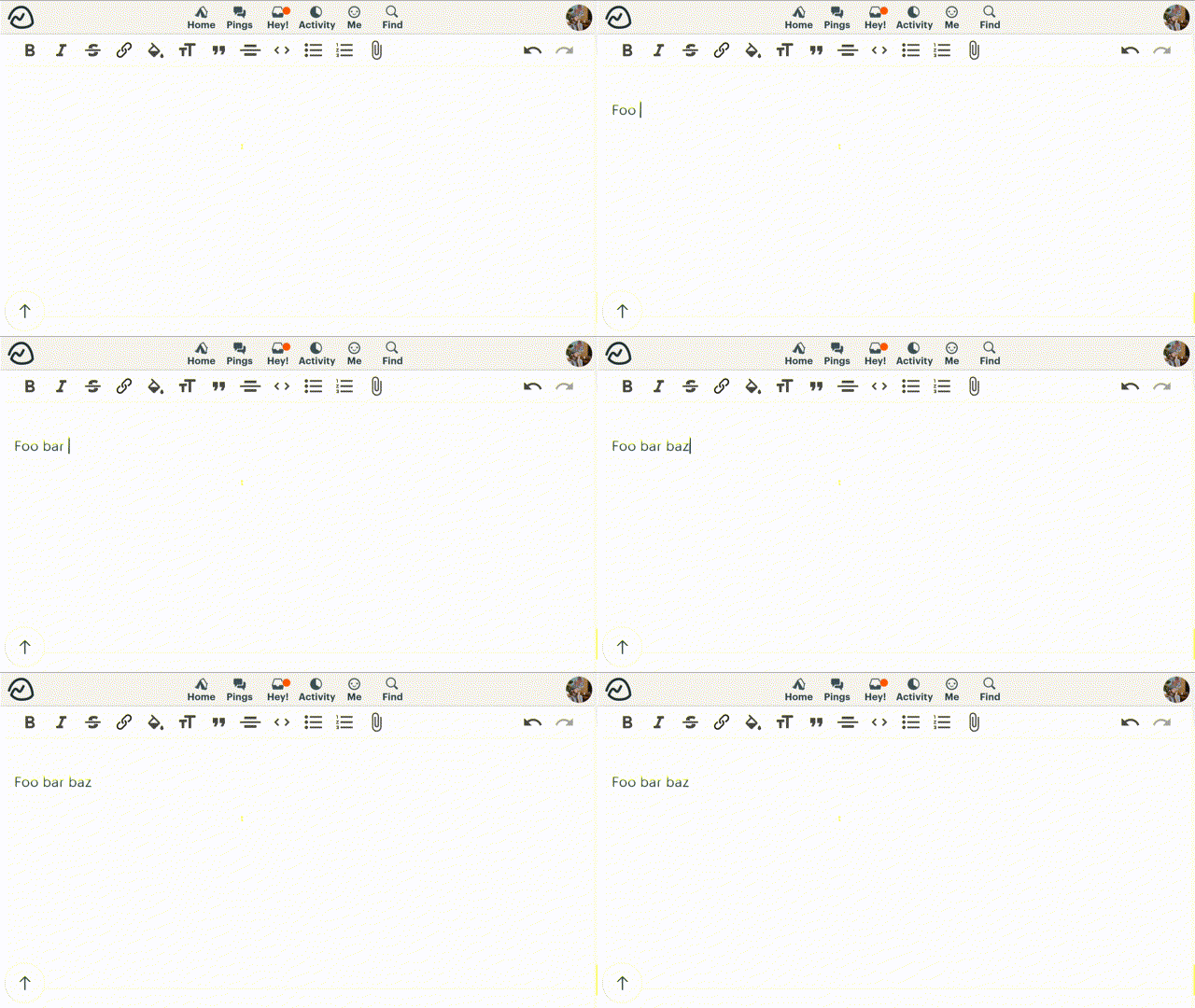
But yes, unfortunately, the problem still persists in other windows.
justfortherec
on 29 Apr 2020
Also still seeing this in Firefox 78.0a1 on Windows, in Basecamp.
 tekacs
on 22 May 2020
tekacs
on 22 May 2020
I'm also seeing this in Firefox 76 on Linux
 ryantrinkle
on 20 Jul 2020
ryantrinkle
on 20 Jul 2020
Still happening in Firefox 84.0.2
 mig42
on 21 Jan 2021
mig42
on 21 Jan 2021
Related issues
 divyenduz
·
3Comments
divyenduz
·
3Comments
 betorina
·
3Comments
betorina
·
3Comments
 pars0097
·
4Comments
divyenduz
·
4Comments
pars0097
·
4Comments
divyenduz
·
4Comments
 lcsqlpete
·
3Comments
lcsqlpete
·
3Comments
Most helpful comment
The bug still exists. I just replicated it in Firefox 75.0 on Ubuntu. I can only replicate it on Basecamp - the bug doesn't occur on other sites, e.g. Github.