Trix: What is the best way to extend the toolbar?
Hi,
I am trying to extend the functionality of the default toolbar by adding additional buttons, with and without dialogs (similar to the link dialog).
I have seen #28, however it does not address adding specific customised functionality, nor is it documented elsewhere.
What is the best approach to do this? Does Trix expose any settings to easily do this?
Thanks.
 ablamunits
All 21 comments
In my case, i added buttons for H1 and H2 by extending the toolbar.
You can refer to https://github.com/ktkaushik/trix/commit/56b9fa0a6518cecd5ef16768e84e8789b6e426c9 on my fork as a starting point.
 ktkaushik
on 15 Dec 2015
ktkaushik
on 15 Dec 2015
I really didn't need the fork. I could have ideally just extended the properties like below -
 Trix.config.textAttributes.heading = { inheritable: true, tagName: 'h1' };
 Trix.config.textAttributes.subHeading = { inheritable: true, tagName: 'h2' };
Same goes for lang.coffee
Trix.config.lang.heading = 'Heading'
This will render the buttons but it fails to maintain the Active state of the button among other smaller bugs is what i've noticed. Eventually, i resorted to just using my own fork.
I eventually modified the HTML which was getting parsed from toolbar.coffee https://github.com/ktkaushik/trix/commit/56b9fa0a6518cecd5ef16768e84e8789b6e426c9#diff-e81c72224eb47f34bc1db10ab473cad0R12
Do comment here to let us know if you find a better way to deal with this.
ktkaushik
on 15 Dec 2015
This will render the buttons but it fails to maintain the Active state
Since those are block elements, try making them block attributes in Trix:
Trix.config.blockAttributes.heading = { tagName: 'h1' };
To add a new button without modifying Trix, you could do something like:
buttonHTML = "<button type=\"button\" class=\"heading\" data-attribute=\"heading\" title=\"Heading\">Heading</button>";
groupElement = Trix.config.toolbar.content.querySelector(".block_tools");
groupElement.insertAdjacentHTML("beforeend", buttonHTML);
There's no official way to extend the toolbar currently, which is why there's no documentation for it. We hope to make it easier soon.
 javan
on 15 Dec 2015
javan
on 15 Dec 2015
thanks @javan. This helps me as well.
ktkaushik
on 15 Dec 2015
I edited trix itself (which requires rebuilding to update the /dist files your page uses) and this seemed to work well:
In trix/src/trix/config/block_attributes.coffee I added
  h1:
    tagName: "h3"
  h2:
    tagName: "h4"
  h3:
    tagName: "h5"
i'm actually inserting lesser headings to preserve the hierarchy of my page headings when this content is displayed elsewhere.
and then I've a custom toolbar (<trix-editor toolbar="id of my toolbar here">) with preferred buttons including:
<button type="button" class="h1" data-attribute="h1" data-key="1" aria-label="Heading level 1">H1</button>
<button type="button" class="h2" data-attribute="h2" data-key="2" aria-label="Heading level 2">H2</button>
<button type="button" class="h3" data-attribute="h3" data-key="3" aria-label="Heading level 3">H3</button>
 heidiv
on 15 Dec 2015
heidiv
on 15 Dec 2015
@heidiv, you can avoid rebuilding Trix by defining those attributes in your app:
Trix.config.blockAttributes.h1 = { tagName: "h3" }
@javan yes, thank you. Is there a simple way to add a toolbar button with a dialog?
heidiv
on 16 Dec 2015
Read this discussion after I modified trix.js for supporting more buttons
h1: {
                tagName: "h1",
                inheritable: !0
            },
Thanks!
 abtevrythng
on 17 Dec 2015
abtevrythng
on 17 Dec 2015
Thanks for the helpful replies, guys. It's really appreciated.
@heidiv, I have managed to add a toolbar button with a custom dialog using a similar solution to what @javan has provided above, in regards to adding buttons. And so, I have done something like this:
  var buttonHTML = "<button type=\"button\" class=\"open-dialog\" data-attribute=\"myDialog\" title=\"Dialog\">Dialog</button>";
  var groupElement = Trix.config.toolbar.content.querySelector(".text_tools");
  groupElement.insertAdjacentHTML("beforeend", buttonHTML);
And then created a new dialog where data-dialog is set to the button's data-attribute like this:
  var myDialogHtml =
  `<div class="dialog my-dialog" data-dialog="myDialog">
      <div class="dialog-content">
         A fresh dialog!
      </div>
    </div>`;
  var dialogElement = Trix.config.toolbar.content.querySelector(".dialogs");
  dialogElement.insertAdjacentHTML("beforeend", myDialogHtml);
This seems to work pretty well for me, and doesn't require rebuilding.
ablamunits
on 19 Dec 2015
This ticket contains very useful information — cheers everyone involved.
I have defined heading and subheading block attributes as suggested:
Trix.config.blockAttributes.heading = { tagName: 'h2' };
Trix.config.blockAttributes.subHeading = { tagName: 'h3' };
and then added the corresponding buttons to the toolbar.
I am running into a couple of side-effects that seem related to the way block elements are handled.
The first one is: pressing the enter key at the end of a heading maintains its state active.
This behaviour is consistent with other elements (e.g.: users need to press the enter key twice to close lists), but toggling the heading mode off after pressing the enter key affects the whole element — including the section to the left of the line break. Moving the caret before the line break and then toggling the mode on/off affects only the section up to the line break:

Ideally, the active state for headings (and subheadings) ought to deactivate when pressing the enter key at the end of the block, letting users type text in the default style. Is this something that I can manage on our end without rebuilding Trix?
The second issue is: activating a heading and then activating a subheading ends up generating a subheading tag within the heading tag:

Ideally, toggling between heading and subheading states would replace the associated tag in the markup. I would like to avoid CSS trickeries and heavy javascript content manipulation, but I'm open to suggestions.
Thanks!
 jdilelle
on 20 Dec 2015
jdilelle
on 20 Dec 2015
The second issue is: activating a heading and then activating a subheading ends up generating a subheading tag within the heading tag:
Currently trying to find a fix for this myself. It doesn't seem like there are any hooks within the core that will let us handle this properly, but I could be wrong.
 ajb
on 21 Dec 2015
ajb
on 21 Dec 2015
Planning to address these issues and make configuring / customizing the toolbar more straightforward in Trix 1.0 via #143. Please move any further discussion to the PR. Thanks!
javan
on 23 Dec 2015
Thanks @ablamunits
heidiv
on 7 Jan 2016
All the examples here that inject html into the toolbar (buttonHTML) no longer work with the newest master, because data-attribute was changed to data-trix-attribute.
 antpaw
on 19 Mar 2016
antpaw
on 19 Mar 2016
how add file upload button ???
 amuatelembe
on 24 Oct 2016
amuatelembe
on 24 Oct 2016
@amuatelembe
Hope you figured this out; if not, and for others, change line:
https://gist.github.com/pmhoudry/a0dc6905872a41a316135d42a5537ddb#file-trixupload-js-L14
To something like, if you're using font-awesome:
button.innerHTML = '<i class="fa fa-cloud-upload" aria-hidden="true" style="color:#8d8d8d;font-size:22px;"></i>';

 aperkins81
on 14 Mar 2017
aperkins81
on 14 Mar 2017
@heidiv, you can avoid rebuilding Trix by defining those attributes in your app:
Trix.config.blockAttributes.h1 = { tagName: "h3" }
Can we do this anywhere in our app? Or perhaps after a certain event?
 angarc
on 17 Jul 2019
angarc
on 17 Jul 2019
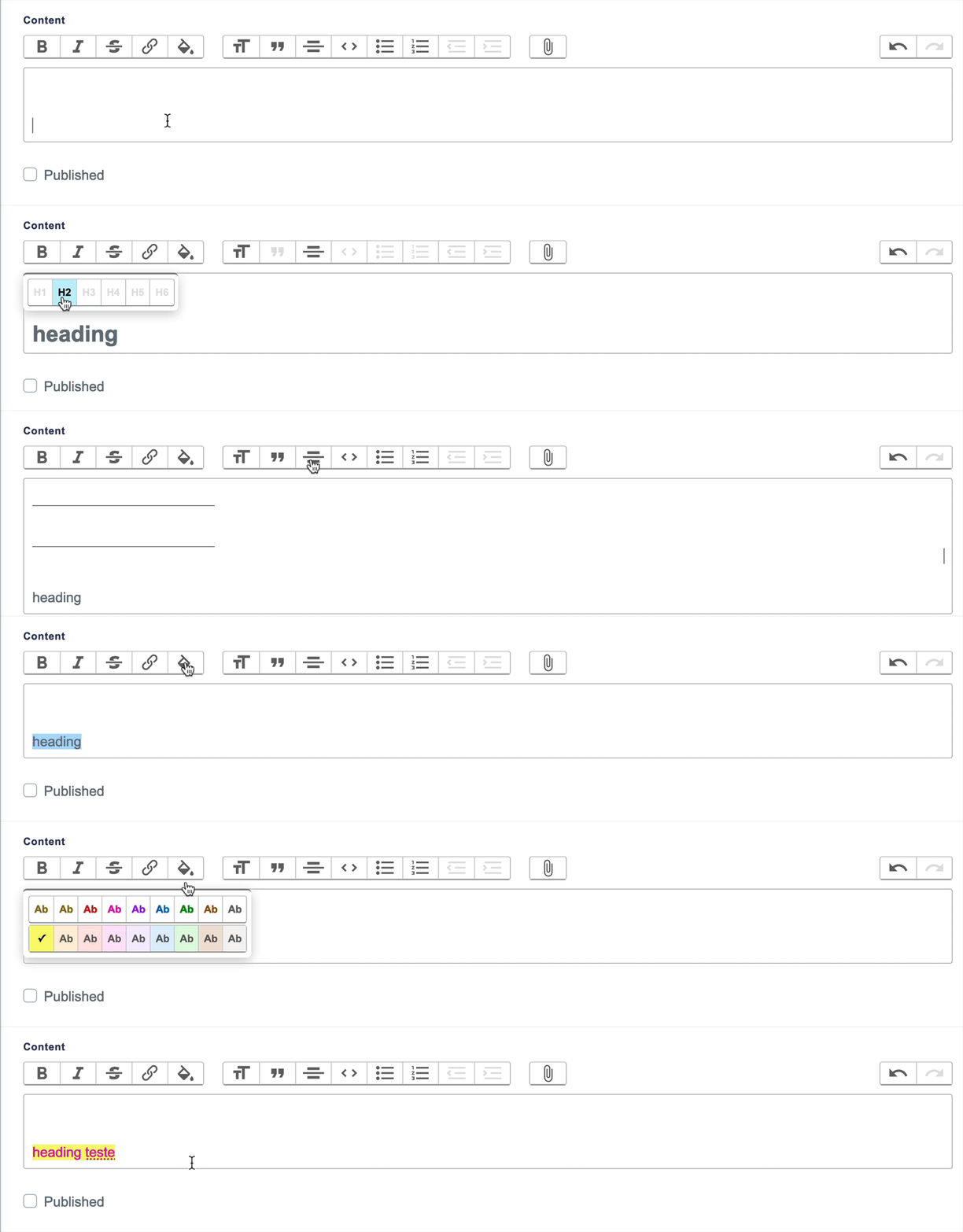
 lazaronixon
on 9 Jan 2020
lazaronixon
on 9 Jan 2020
@lazaronixon How is this applicable to my Rails project?
 modreoci
on 14 Apr 2020
modreoci
on 14 Apr 2020
https://github.com/lazaronixon/trix-extensions looks pretty good. Did anyone figure out how to use it in a Rails 6 app with existing Rich text with trix editor?
 Kinselan
on 24 Dec 2020
Kinselan
on 24 Dec 2020
https://github.com/lazaronixon/trix-extensions looks pretty good. Did anyone figure out how to use it in a Rails 6 app with existing Rich text with trix editor?
It is basically download repository and extract it to your rails project and add require("richtext") to /javascript/packs/application.js
lazaronixon
on 24 Dec 2020
Related issues
 marpstar
·
5Comments
marpstar
·
5Comments
 pars0097
·
4Comments
pars0097
·
4Comments
 binchentx
·
5Comments
binchentx
·
5Comments
 adamdebono
·
3Comments
adamdebono
·
3Comments
 souporserious
·
4Comments
souporserious
·
4Comments
Most helpful comment
how add file upload button ???