Trivy: JUnit not output as valid XML
Description
Using the JUnit template results in invalid XML due to special characters not being properly encoded, removed or replaced. This is highlighted in Azure DevOps when using the PublishTestResults task. Example: https://dev.azure.com/lgulliver/ContainerScanning/_build/results?buildId=143&view=logs&j=12f1170f-54f2-53f3-20dd-22fc7dff55f9&t=d1601c4c-45d5-58f9-2d01-127ffe91cde0&l=11
What did you expect to happen?
Output to xml file is valid and can be imported using the Publish Test Results task.
What happened instead?
Characters are escaped, but not in a way that makes the JUnit report valid. For example:
<testcase classname="gcc-8-base-8.3.0-6" name="[MEDIUM] CVE-2019-15847" time="">
            <failure message="gcc: POWER9 \"DARN\" RNG intrinsic produces repeated output" type="description">"The POWER9 backend in GNU Compiler Collection (GCC) before version 10 could optimize multiple calls of the __builtin_darn intrinsic into a single call, thus reducing the entropy of the random number generator. This occurred because a volatile operation was not specified. For example, within a single execution of a program, the output of every __builtin_darn() call may be the same."</failure>
</testcase>
This particular example is attempting to escape the " character inside the <failure message=""> node, which results in the error:
Error : 'DARN' is an unexpected token. Expecting whitespace. Line 32, position 45
Another example is the below:
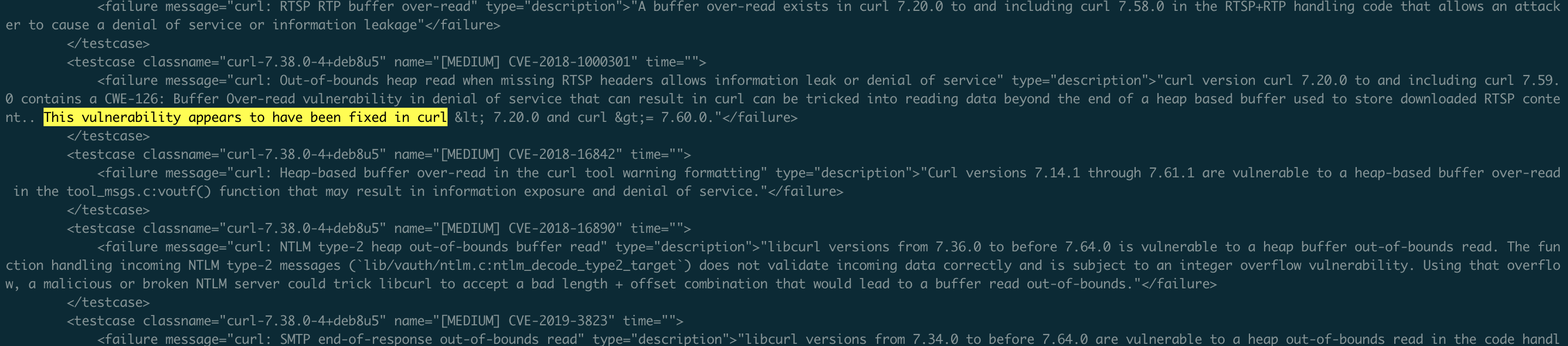
<testcase classname="curl-7.38.0-4+deb8u5" name="[MEDIUM] CVE-2018-1000301" time="">
            <failure message="curl: Out-of-bounds heap read when missing RTSP headers allows information leak or denial of service" type="description">"curl version curl 7.20.0 to and including curl 7.59.0 contains a CWE-126: Buffer Over-read vulnerability in denial of service that can result in curl can be tricked into reading data beyond the end of a heap based buffer used to store downloaded RTSP content.. This vulnerability appears to have been fixed in curl < 7.20.0 and curl >= 7.60.0."</failure>
</testcase>
Where even though the description is in ", the < character is still read as the start of a tag resulting in reports not able to be imported.
Output of trivy -v:
Version: 0.9.1
Additional details (base image name, container registry info...):
This is my copy of the tpl file: https://github.com/lgulliver/ContainerScanning/blob/master/templates/junit.tpl
This is my build YAML: https://github.com/lgulliver/ContainerScanning/blob/master/azure-pipelines.yml
 lgulliver
All 15 comments
@lgulliver Thank you for the detailed report!
Could you look into it, @rahul2393?
 knqyf263
on 3 Jul 2020
knqyf263
on 3 Jul 2020
@knqyf263 so for special characters should we just replace it with empty?
 rahul2393
on 3 Jul 2020
rahul2393
on 3 Jul 2020
@knqyf263 so for special characters should we just replace it with empty?
Would it be possible to output them as their ASCII equivalents? i.e. < though I’m not sure this would fix the issue when it comes to the quote example I gave.
lgulliver
on 3 Jul 2020
ok let me try to replace characters with ASCII equivalent and see what it returns
rahul2393
on 3 Jul 2020
@knqyf263 After the PR failure title and description will be escaped and updated test to include these scenarios here
rahul2393
on 5 Jul 2020
@lgulliver We fixed this issue in #551. It would be appreciated if you test it.
knqyf263
on 6 Jul 2020
I've pulled latest from master built and run it but I'm getting the same result:
        <testcase classname="gcc-8-base-8.3.0-6" name="[MEDIUM] CVE-2019-15847" time="">
            <failure message="gcc: POWER9 \"DARN\" RNG intrinsic produces repeated output" type="description">"The POWER9 backend in GNU Compiler Collection (GCC) before version 10 could optimize multiple calls of the __builtin_darn intrinsic into a single call, thus reducing the entropy of the random number generator. This occurred because a volatile operation was not specified. For example, within a single execution of a program, the output of every __builtin_darn() call may be the same."</failure>
        </testcase>
I'm running trivy image --format template --template "@templates/junit.tpl" -o junit-report.xml liamgu/azuredevopscontainersdemo:74 as my command and its yielding the same result with it trying to escape " inside of node attribute with \ which is resulting in invalid output.
lgulliver
on 6 Jul 2020
In addition to the above, tested scanning the ruby:2.4.0 image and that resulted in the same issue too with the < character:
<testcase classname="curl-7.38.0-4+deb8u5" name="[MEDIUM] CVE-2018-1000301" time="">
            <failure message="curl: Out-of-bounds heap read when missing RTSP headers allows information leak or denial of service" type="description">"curl version curl 7.20.0 to and including curl 7.59.0 contains a CWE-126: Buffer Over-read vulnerability in denial of service that can result in curl can be tricked into reading data beyond the end of a heap based buffer used to store downloaded RTSP content.. This vulnerability appears to have been fixed in curl < 7.20.0 and curl >= 7.60.0."</failure>
        </testcase>
Build for this snippet: https://dev.azure.com/lgulliver/ContainerScanning/_build/results?buildId=169&view=results
Here's the full XML output from both runs in case it's useful: https://gist.github.com/lgulliver/7ab0884f358819ba715652ca03bc18ab
I think I'm building Trivy fine. It certainly runs, though I'm new to using Go. Just in case, this is my build definition: https://github.com/lgulliver/ContainerScanning/blob/master/azure-pipelines-build-trivy.yml
lgulliver
on 6 Jul 2020
@knqyf263 correct me if I am wrong, I the path to tpl correct here https://github.com/lgulliver/ContainerScanning/blob/master/azure-pipelines-build-trivy.yml#L23 It should be --template "@contrib/junit.tpl" right?
rahul2393
on 6 Jul 2020
I guess if we’re building from source, it’s included in what’s cloned but when installing say 0.9.1 from the dev package, @contrib doesn’t exist which is why one stuck with my example here - it will already have cloned my ContainerScanning repo which includes the tpl file, and it’s an exact copy of the one from the Trivy repo
lgulliver
on 6 Jul 2020
@lgulliver

On my local, I built and checked on the master branch the result was valid XML with escaped chars but the path should be contrib not templates
cc: @knqyf263 can you please confirm too
rahul2393
on 7 Jul 2020
@rahul2393 Templates is a folder in my repo that gets checked out as part of the build process. It has a copy of junit.tpl in because I found when running it in Azure DevOps on Ubuntu agents with the template arg set as --template "@contrib/junit.tpl", I get the error FATAL unable to write results: Error retrieving template from path: open contrib/junit.tpl: no such file or directory
lgulliver
on 7 Jul 2020
@rahul2393 I recreated my copy of the tpl file and it worked! https://dev.azure.com/lgulliver/ContainerScanning/_build/results?buildId=174&view=ms.vss-test-web.build-test-results-tab
lgulliver
on 7 Jul 2020
So issue fixed right @lgulliver
cc: @knqyf263 we can close this in that case
rahul2393
on 7 Jul 2020
@lgulliver I'm sorry for the late reply. The path contrib/ or templates doesn't matter, but as you already did, you needed to pull the latest junit.tpl.
@rahul2393 Thank you for the great support! Let me close this issue.
knqyf263
on 7 Jul 2020
Related issues
 06kellyjac
·
5Comments
06kellyjac
·
5Comments
 lizrice
·
5Comments
lizrice
·
5Comments
 angelbarrera92
·
3Comments
angelbarrera92
·
3Comments
 jonpulsifer
·
5Comments
jonpulsifer
·
5Comments
 dendi
·
3Comments
dendi
·
3Comments