Trivy: error in image scan: failed to analyze image: failed to extract files: missing signature key
Hello,
I'm trying to run a scan using the Docker image and get this error.
These are the commands I ran:
~bash
mkdir ~/.cache/trivy
docker run -v /home/ktr/.cache/trivy:/root/.cache knqyf263/trivy elabftw/elabimg:3.2.0
~
If I try with "python:3.4-alpine" it works fine, so I'm guessing it's because this image is only tagged locally.
What is this error and how can it be fixed?
A git grep "missing signature key" didn't return anything in the trivy repo so I'm not sure where to start looking!
Cheers,
~Nico
 NicolasCARPi
All 10 comments
That error occurs when fails to authenticate container registry servers.
trivy checks a local image first.
It seems there is no target image on your local machine.
Please run docker images elabftw/elabimg:3.2.0.
 tomoyamachi
on 21 May 2019
tomoyamachi
on 21 May 2019
The following lines are what connect to container registry.
https://github.com/knqyf263/fanal/blob/af48380166ef3663d4670987be89828ebd204476/extractor/docker/docker.go#L170-L183
tomoyamachi
on 21 May 2019
The image is there (locally):

NicolasCARPi
on 21 May 2019
Thanks.
Please run the following commands.
$ docker rmi -f knqyf263/trivy
$ docker run --rm -v /var/run/docker.sock:/var/run/docker.sock \
  -v /home/ktr/.cache/trivy:/root/.cache knqyf263/trivy elabftw/elabimg:3.2.0
Ok so it looks like it worked, because now the error is "error in image scan: failed to scan libraries: failed to analyze libraries: failed to analyze libraries: invalid yarn.lock format: Invalid yarn.lock format" which is another issue.
Does that mean that in order to scan a local image one would need to also mount the docker socket? It would be best if this was not required, as giving access to docker socket is equivalent to giving unrestricted root access to the container.
NicolasCARPi
on 21 May 2019
Does that mean that in order to scan a local image one would need to also mount the docker socket?
I think so... Please let me know any better solutions.
BTW, Would you show me your yarn.lock file?
The error occurs when parsing yarn.lock. I will fix it.
tomoyamachi
on 21 May 2019
Here is the yarn.lock.
I see that you already adapted the command in the README! :+1:
NicolasCARPi
on 21 May 2019
I fixed it!
Please wait until next release version.
tomoyamachi
on 21 May 2019
@NicolasCARPi
v0.1.1 released!
docker run --rm ... knqyf263/trivy:0.1.1 <container>
tomoyamachi
on 22 May 2019
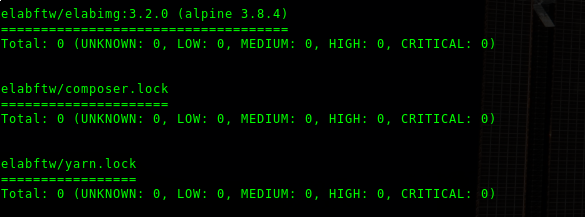
@tomoyamachi thanks, it works fine now! :)
NicolasCARPi
on 22 May 2019
Related issues
 negbie
·
7Comments
negbie
·
7Comments
 nycalex
·
6Comments
nycalex
·
6Comments
 pealtrufo
·
6Comments
pealtrufo
·
6Comments
 jonrau1
·
6Comments
jonrau1
·
6Comments
 angelbarrera92
·
3Comments
angelbarrera92
·
3Comments
Most helpful comment
@tomoyamachi thanks, it works fine now! :)