Triplea: Bots Throwing Error When Saving Game
Reported here that bots are throwing errors and freezing up: https://forums.triplea-game.org/topic/716/bot-63-stuck
Cause
This is probably happening due to memory issues as the stack trace points to https://github.com/triplea-game/triplea/blob/master/game-core/src/main/java/games/strategy/io/IoUtils.java#L72. This is where the save game is written to in memory stream.
Error
TripleA engine version 1.9.0.0.10042
Loading map: , from: C:\Users\prast\triplea\downloadedMaps
Loading resources from the following paths: [C:\Users\prast\triplea\downloadedMaps, G:\10042\TripleA\assets]
Loading map: domination_1914_no_mans_land, from: C:\Users\prast\triplea\downloadedMaps\domination_1914_no_mans_land-master.zip
Loading resources from the following paths: [C:\Users\prast\triplea\downloadedMaps\domination_1914_no_mans_land-master.zip, G:\10042\TripleA\assets]
Loading map: domination_1914_no_mans_land, from: C:\Users\prast\triplea\downloadedMaps\domination_1914_no_mans_land-master.zip
Loading resources from the following paths: [C:\Users\prast\triplea\downloadedMaps\domination_1914_no_mans_land-master.zip, G:\10042\TripleA\assets]
Error: Not found:games.strategy.engine.framework.ServerGame.SERVER_REMOTE
games.strategy.engine.message.RemoteNotFoundException: Not found:games.strategy.engine.framework.ServerGame.SERVER_REMOTE
at games.strategy.engine.message.UnifiedMessengerHub.messageReceived(UnifiedMessengerHub.java:89)
at games.strategy.net.ServerMessenger.notifyListeners(ServerMessenger.java:477)
at games.strategy.net.ServerMessenger.messageReceived(ServerMessenger.java:310)
at games.strategy.net.nio.NioSocket.messageReceived(NioSocket.java:119)
at games.strategy.net.nio.Decoder.loop(Decoder.java:89)
at java.lang.Thread.run(Thread.java:748)
Caused by: java.lang.IllegalStateException: remote not found
at java.lang.Thread.getStackTrace(Unknown Source)
at games.strategy.engine.message.MessengerException.fillInInvokerStackTrace(MessengerException.java:19)
at games.strategy.engine.message.UnifiedInvocationHandler.invoke(UnifiedInvocationHandler.java:56)
at com.sun.proxy.$Proxy8.getSavedGame(Unknown Source)
at games.strategy.engine.framework.ClientGame.saveGame(ClientGame.java:202)
at games.strategy.triplea.ui.menubar.FileMenu.lambda$createSaveMenu$0(FileMenu.java:52)
at games.strategy.ui.SwingAction$1.actionPerformed(SwingAction.java:65)
at javax.swing.AbstractButton.fireActionPerformed(Unknown Source)
 ron-murhammer
All 55 comments
The method calls that lead down to that method are the following:
- https://github.com/triplea-game/triplea/blob/master/game-core/src/main/java/games/strategy/engine/framework/ClientGame.java#L202
- https://github.com/triplea-game/triplea/blob/master/game-core/src/main/java/games/strategy/engine/framework/ServerGame.java#L153
- https://github.com/triplea-game/triplea/blob/master/game-core/src/main/java/games/strategy/io/IoUtils.java#L72
ron-murhammer
on 14 Apr 2018
@ssoloff Any thoughts on this PR: https://github.com/triplea-game/triplea/pull/2469
That looks to be one of the only changes that could have impacted saveGame over the last year.
ron-murhammer
on 14 Apr 2018
@ron-murhammer Sorry, I don't see anything that jumps out at me as being suspicious. With respect to GameDataManager, the behavior after that PR appears to be almost identical to the behavior before the PR. The only differences I see are the following:
- The old code pre-allocates 25 kB for the buffer, whereas the new code uses the JDK default buffer size.
- The old code did not flush the
ObjectOutputStreamto theByteArrayOutputStreambefore callingByteArrayOutputStream#toByteArray(). That shouldn't affect memory pressure; it would simply mean an incomplete stream would be written tosinkifObjectOutputStreamhas anything buffered internally.
Did anyone happen to create a save game from their client when the bot ran out of memory (as the client runs with a larger heap, it shouldn't encounter an OOM error)? It would be trivial to look at the uncompressed save game and see if it's just really big.
 ssoloff
on 14 Apr 2018
ssoloff
on 14 Apr 2018
@ssoloff
If you pull the bot 72 log from today (sorry I don't know how )( @roiex does ) you should have a log file
 prastle
on 14 Apr 2018
prastle
on 14 Apr 2018
@prastle You have root access to the bot servers right?
If so, pulling the logs is easy: journalctl -u triplea-bot@<bot_number>, however this will show you all logs that are present since the last log rotation (probably a couple of weeks ago), so in order to reduce the scope of those logs you can limit it using the --since and --until flags followed by a timestamp to only show the logs that were logged in this time window.
All Times are in UTC.
Example:
Bot 73 from 1.2.1018 0:00:00 until 2.3.2018 22:30:23 (sorry for the european formatting :P) would be journalctl -u triplea-bot@73 --since "2018-02-01 0:00:00" --until "2018-03-02 22:30:23", of course you can omit the --until flag, I believe you can also write * instead of the bot number to list the logs of al bots on this server.
 RoiEXLab
on 14 Apr 2018
RoiEXLab
on 14 Apr 2018
If the problem turns out to be that the save games are simply too large, here's a potential fix that uses the file system instead of memory as the intermediate medium to hold the save game to ensure the final destination is not overwritten (when it's a file) in the case an error occurs:
diff --git a/game-core/src/main/java/games/strategy/engine/framework/GameDataManager.java b/game-core/src/main/java/games/strategy/engine/framework/GameDataManager.java
index 1f98a1ae4..068e4633f 100644
--- a/game-core/src/main/java/games/strategy/engine/framework/GameDataManager.java
+++ b/game-core/src/main/java/games/strategy/engine/framework/GameDataManager.java
@@ -3,8 +3,10 @@ package games.strategy.engine.framework;
 import static com.google.common.base.Preconditions.checkNotNull;

 import java.io.BufferedInputStream;
+import java.io.BufferedOutputStream;
 import java.io.File;
 import java.io.FileInputStream;
+import java.io.FileOutputStream;
 import java.io.IOException;
 import java.io.InputStream;
 import java.io.ObjectInputStream;
@@ -16,12 +18,13 @@ import java.util.zip.GZIPOutputStream;

 import javax.swing.JOptionPane;

+import org.apache.commons.io.IOUtils;
+
 import games.strategy.engine.ClientContext;
 import games.strategy.engine.GameEngineVersion;
 import games.strategy.engine.data.GameData;
 import games.strategy.engine.delegate.IDelegate;
 import games.strategy.engine.framework.headlessGameServer.HeadlessGameServer;
-import games.strategy.io.IoUtils;
 import games.strategy.triplea.UrlConstants;
 import games.strategy.util.Version;

@@ -156,9 +159,13 @@ public final class GameDataManager {
       final GameData data,
       final boolean saveDelegateInfo)
       throws IOException {
-    // write internally first in case of error
-    final byte[] bytes = IoUtils.writeToMemory(os -> {
-      try (ObjectOutputStream outStream = new ObjectOutputStream(os)) {
+    final File tempFile = File.createTempFile(GameDataManager.class.getSimpleName(), GameDataFileUtils.getExtension());
+    try {
+      // write to temporary file first in case of error
+      try (OutputStream os = new FileOutputStream(tempFile);
+          OutputStream bufferedOutStream = new BufferedOutputStream(os);
+          OutputStream zippedOutStream = new GZIPOutputStream(bufferedOutStream);
+          ObjectOutputStream outStream = new ObjectOutputStream(zippedOutStream)) {
         outStream.writeObject(ClientContext.engineVersion());
         data.acquireReadLock();
         try {
@@ -172,11 +179,14 @@ public final class GameDataManager {
           data.releaseReadLock();
         }
       }
-    });

-    // now write to file
-    try (OutputStream zippedOut = new GZIPOutputStream(sink)) {
-      zippedOut.write(bytes);
+      // now write to sink (ensure sink is closed per method contract)
+      try (InputStream is = new FileInputStream(tempFile);
+          OutputStream os = new BufferedOutputStream(sink)) {
+        IOUtils.copy(is, os);
+      }
+    } finally {
+      tempFile.delete();
     }
   }
I haven't tested this beyond simply saving and reloading a game.
ssoloff
on 14 Apr 2018
@ssoloff Yeah, I wouldn't think it should matter since I think a larger save game is like 1MB which shouldn't really impact a 320MB JVM much.
ron-murhammer
on 14 Apr 2018
Thanks @ roi but it appears they are running out of memory. Since relaunch they are fine. Would it be simpler to close a few bot servers and double their memory to warclub size? Since we have lots of extra bots atm anyways?
prastle
on 14 Apr 2018
Other option reduce each bot server to two bots?
prastle
on 14 Apr 2018
Is this a memory leak situation or a poison pill?
Do we know the repro steps to simulate this, could we re-iterate them kindly?
I'm curious if this is a problem after any given save, or if the problem builds up over time.
 DanVanAtta
on 14 Apr 2018
DanVanAtta
on 14 Apr 2018
Its a time build up. can't repro
prastle
on 14 Apr 2018
easy answer all bots reboot when empty once a day and see if that solves it? I don't think that is the issue tho. I think the issue occurs when long games of big maps no reload. JMHO.
prastle
on 14 Apr 2018
Pursuing the leak angle, I captured a heap dump of Bot 61, which has been running for a while. Here's the top of the heap histogram:
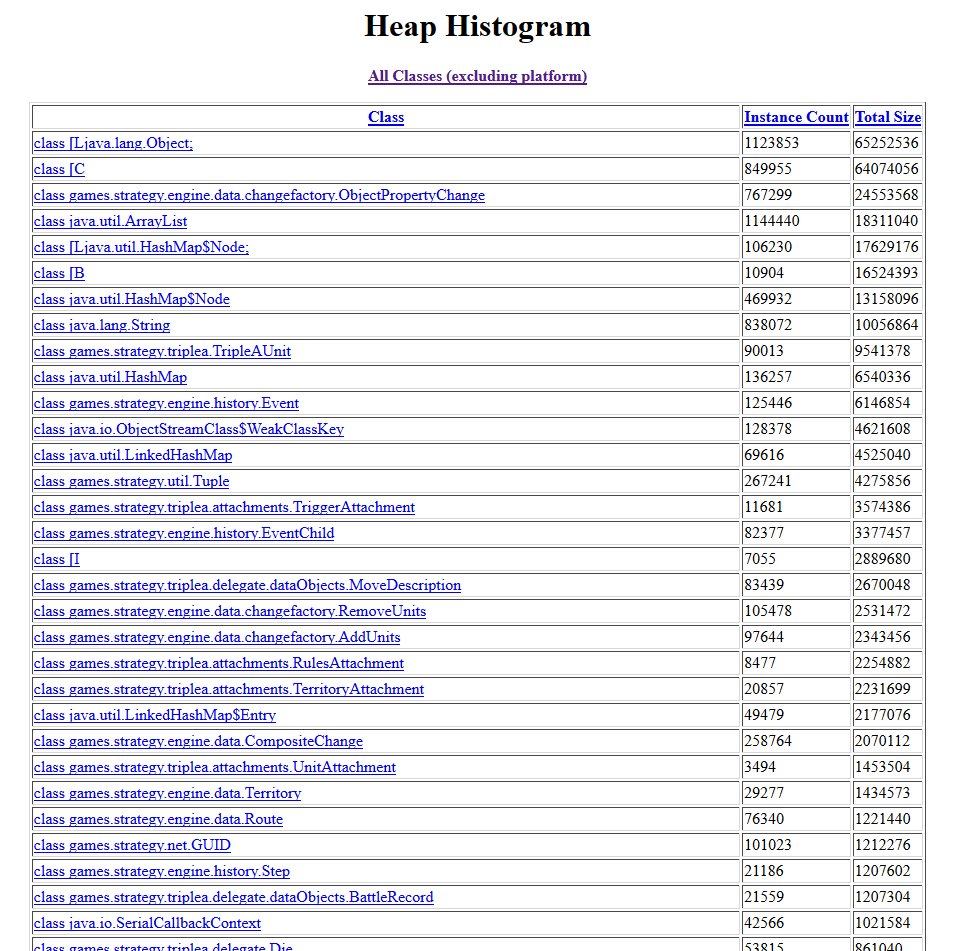
What I thought was more interesting is the fact that there are 107 instances of GameData in the heap. That seems like a lot of instances for a single bot, but I really have no reference on that. Since GameData is basically the root of everything, that might explain why there's so many other objects outstanding (e.g. ObjectPropertyChange).
I don't appear to have enough horsepower to do a thorough analysis of the heap dump. If someone else wants to take a look, I left a copy of the JDK on the 60_GA_USA bot (45.79.205.242) at _/home/triplea/programs/jdk1.8.0_162/_, which contains the jmap tool.
ssoloff
on 14 Apr 2018
@ssoloff Yeah, that seems a bit strange as I don't see any reason there should be 100+ GameData instances on the bot. My guess is something is holding onto a reference to GameData which shouldn't, therefore, causing a leak as GameData is cloned for various things.
ron-murhammer
on 15 Apr 2018
I was watching a r17 game of tww in a bot the other day and it seemed fine. So it's probably not the game saves themselves of long term games.
 General-Dru-Zod
on 15 Apr 2018
General-Dru-Zod
on 15 Apr 2018
One item I thought I'd mention, no idea if it is related or coincidental. Bots issue seemed to coincide with the 2GB vm change 16 days ago. However I must say love to not have to bother changing it anymore. :)
General-Dru-Zod
on 15 Apr 2018
@General-Dru-Zod Probably because that change allows players to play more than 1-2 rounds of TWW without reloading which is allowing the memory to build up in the bot. I think save games are fine since I haven't noticed their size increasing but most likely their is a memory leak related to not removing references to game data clones.
ron-murhammer
on 15 Apr 2018
@ssoloff Did you put the heap dump you took somewhere so I can take a look? Or do I need to take another one?
ron-murhammer
on 15 Apr 2018
@ron-murhammer Yeah, I copied it locally and deleted it off the bot afterwards (it was huge; over 500 MiB).
I was using jmap and jhat earlier. jhat seems to take forever to generate certain reports when the heap dump is large.
Another possibility that I found to be easier was to connect to the bot using SSH with X Forwarding enabled (ssh -X) and run jvisualvm locally on the bot. That seemed to perform much better. Since it's only sending screen bitmaps and mouse/keyboard input over the X connection, the latency isn't too bad with Linode.
The only problem is that jvisualvm makes it really easy to create multiple heap dumps, so you just have to make sure you regularly clean them up or you may exhaust disk space when they are 500 MiB a pop. :smile:
ssoloff
on 15 Apr 2018
@ssoloff Ok, mind uploading it somewhere? I've usually used jmap for taking heap dumps then use something like eclipse MAT to analyze them.
ron-murhammer
on 15 Apr 2018
@ron-murhammer At my upload speed, that's going to take a while. :disappointed:
I just created a new dump file on 60_GA_USA (45.79.205.242) at _/home/triplea/bot-61.bin_. (For reference, the command I ran was: /home/triplea/programs/jdk1.8.0_162/bin/jmap -dump:format=b,file=bot-61.bin 14597.)
ssoloff
on 15 Apr 2018
@ssoloff Cool. I just pulled it down and deleted it from the bot server. If anyone else wants it then I can upload it somewhere. I'll try to take a look at it tomorrow if no one else has made further progress on tracking this down.
ron-murhammer
on 15 Apr 2018
So looking through the heap dump, I'm pretty sure the issue is with the OOL cache in BattleCalculator: https://github.com/triplea-game/triplea/blob/master/game-core/src/main/java/games/strategy/triplea/delegate/BattleCalculator.java#L49
The only place this cache is cleared is from AI code so if there are no AI players like in a lobby bot game and you play for many rounds on a map with large game data then the cache will just keep growing. Since it caches UnitTypes which hold a reference to GameData it slowly accumlates GameData instances which on large maps are fairly large (1-2MB).
I think this issue has probably been around a long time but probably has surfaced due to other changes and more games like TWW being played more in the lobby. The recent change to increase default client JVM memory to 2GB probably allowed TWW games to be played for several rounds without restarting.
The simplest fix for this would be to clear the cache after each phase which is essentially what the AI already does. That should keep the references to unique game data objects to a minimum and avoid unbounded cache growth.
In theory, this should be able to be reproduced even locally as long as you play a game with no AI players. But since local games now have a default of 2 GB of memory, it would take a really long game to ever reach that even on a map like TWW but you should be able to at least see the memory consistently grow turn after turn. But given most PBF/PBEM and local games are played in short sessions or have AI players, it would have almost a 0% chance of ever causing a OOM on them.
ron-murhammer
on 15 Apr 2018
A data point, I'm connecting brand new bots to newest test lobby and am seeing instability, they are periodically cycling in/out with OOM, simply after being loaded and connected to bots, no games being played.
This can potentially suggest it is just map parsing. At the moment I have the bots loading every map including WarOfRelics, I'm not sure if that is making the situation worse so it can be observed more often, or if it is not related. It does seem these test bots are dying relatively frequently. The latest bot that i connected is particularly not stable for some reason and keeps cycling in and out as the process OOM. I am also running 3 bots on that and am seeing pretty frequent OOM. Seems that 3 bots + all maps including war of relics can make the situation worse.
I've got version 9687 running on this bot, the very latest is also impacted. I'll try to later today walk the version number back to see if I can pinpoint a stable one.
From logs (now in papertrail for this host), we can see the JVM process suicides after it runs out of memory:
Apr 15 17:35:30 bot25_ca run_bot.sh[5500]: Headless Start
Apr 15 17:35:30 bot25_ca run_bot.sh[5500]: Apr 15, 2018 5:35:30 PM games.strategy.engine.framework.headlessGameServer.HeadlessGameServer <init>
Apr 15 17:35:30 bot25_ca run_bot.sh[5500]: INFO: Game Server initialized
Apr 15 17:35:31 bot25_ca run_bot.sh[5500]: Apr 15, 2018 5:35:31 PM games.strategy.engine.chat.ChatController joinChat
Apr 15 17:35:31 bot25_ca run_bot.sh[5500]: INFO: Chatter:Bot01_bot25_ca port:4001 ip:173.255.243.147 is joining chat:games.strategy.engine.framework.ui.ServerStartup.CHAT_NAME
Apr 15 17:35:31 bot25_ca run_bot.sh[5500]: host:66.175.213.79 port:7000
Apr 15 17:35:33 bot25_ca run_bot.sh[5500]: Waiting for users to connect.
Apr 15 17:35:40 bot25_ca kernel: [UFW BLOCK] IN=eth0 OUT= MAC=f2:3c:91:30:3b:e3:84:78:ac:0d:a6:41:08:00 SRC=66.175.213.79 DST=173.255.243.147 LEN=60 TOS=0x00 PREC=0x00 TTL=60 ID=62726 DF PROTO=TCP SPT=41880 DPT=4001 WINDOW=29200 RES=0x00 SYN URGP=0
Apr 15 17:35:43 bot25_ca kernel: java invoked oom-killer: gfp_mask=0x14200ca(GFP_HIGHUSER_MOVABLE), nodemask=(null), order=0, oom_score_adj=0
Apr 15 17:35:43 bot25_ca kernel: java cpuset=/ mems_allowed=0
Apr 15 17:35:43 bot25_ca kernel: CPU: 0 PID: 5590 Comm: java Not tainted 4.15.12-x86_64-linode105 #1
Apr 15 17:35:43 bot25_ca kernel: Hardware name: QEMU Standard PC (i440FX + PIIX, 1996), BIOS rel-1.11.0-0-g63451fca13-prebuilt.qemu-project.org 04/01/2014
Apr 15 17:35:43 bot25_ca kernel: Call Trace:
Apr 15 17:35:43 bot25_ca kernel:  dump_stack+0x5c/0x7c
Apr 15 17:35:43 bot25_ca kernel:  dump_header+0x78/0x28f
Apr 15 17:35:43 bot25_ca kernel:  ? do_try_to_free_pages+0x2c8/0x340
Apr 15 17:35:43 bot25_ca kernel:  oom_kill_process+0x217/0x430
Apr 15 17:35:43 bot25_ca kernel:  ? oom_badness+0xeb/0x160
Apr 15 17:35:43 bot25_ca kernel:  out_of_memory+0xf9/0x4a0
Apr 15 17:35:43 bot25_ca kernel:  __alloc_pages_nodemask+0xe7b/0xfa0
Apr 15 17:35:43 bot25_ca kernel:  filemap_fault+0x3d8/0x4e0
Apr 15 17:35:43 bot25_ca kernel:  ext4_filemap_fault+0x2c/0x40
Apr 15 17:35:43 bot25_ca kernel:  __do_fault+0x20/0x60
Apr 15 17:35:43 bot25_ca kernel:  __handle_mm_fault+0x529/0xb10
Apr 15 17:35:43 bot25_ca kernel:  handle_mm_fault+0xf1/0x1b0
Apr 15 17:35:43 bot25_ca kernel:  __do_page_fault+0x222/0x440
Apr 15 17:35:43 bot25_ca kernel:  ? async_page_fault+0x2f/0x50
Apr 15 17:35:43 bot25_ca kernel:  async_page_fault+0x45/0x50
Apr 15 17:35:43 bot25_ca kernel: RIP: 14128f8:          (null)
Apr 15 17:35:43 bot25_ca kernel: RSP: fc0a7a00:00007f43eced4dc0 EFLAGS: 7f43fc0a7a28
Apr 15 17:35:43 bot25_ca kernel: Mem-Info:
Apr 15 17:35:43 bot25_ca kernel: active_anon:112753 inactive_anon:112802 isolated_anon:0
                                  active_file:22 inactive_file:12 isolated_file:0
                                  unevictable:0 dirty:2 writeback:9 unstable:0
                                  slab_reclaimable:2814 slab_unreclaimable:4918
                                  mapped:203 shmem:189 pagetables:1584 bounce:0
                                  free:1946 free_pcp:69 free_cma:0
Apr 15 17:35:43 bot25_ca kernel: Node 0 active_anon:451012kB inactive_anon:451208kB active_file:88kB inactive_file:48kB unevictable:0kB isolated(anon):0kB isolated(file):0kB mapped:812kB dirty:8kB writeback:36kB shmem:756kB writeback_tmp:0kB unstable:0kB all_unreclaimable? no
Apr 15 17:35:43 bot25_ca kernel: Node 0 DMA free:3884kB min:60kB low:72kB high:84kB active_anon:4648kB inactive_anon:6860kB active_file:0kB inactive_file:4kB unevictable:0kB writepending:0kB present:15992kB managed:15908kB mlocked:0kB kernel_stack:0kB pagetables:16kB bounce:0kB free_pcp:0kB local_pcp:0kB free_cma:0kB
Apr 15 17:35:43 bot25_ca kernel: lowmem_reserve[]: 0 958 958 958
Apr 15 17:35:43 bot25_ca kernel: Node 0 DMA32 free:3900kB min:3928kB low:4908kB high:5888kB active_anon:446364kB inactive_anon:444348kB active_file:88kB inactive_file:48kB unevictable:0kB writepending:44kB present:1032056kB managed:987396kB mlocked:0kB kernel_stack:2272kB pagetables:6320kB bounce:0kB free_pcp:276kB local_pcp:276kB free_cma:0kB
Apr 15 17:35:43 bot25_ca kernel: lowmem_reserve[]: 0 0 0 0
Apr 15 17:35:43 bot25_ca kernel: Node 0 DMA: 2*4kB (ME) 3*8kB (U) 3*16kB (U) 5*32kB (UME) 9*64kB (UE) 6*128kB (UM) 1*256kB (U) 2*512kB (ME) 1*1024kB (E) 0*2048kB 0*4096kB = 3888kB
Apr 15 17:35:43 bot25_ca kernel: Node 0 DMA32: 1*4kB (H) 3*8kB (M) 0*16kB 1*32kB (H) 0*64kB 2*128kB (H) 2*256kB (H) 2*512kB (H) 0*1024kB 1*2048kB (H) 0*4096kB = 3900kB
Apr 15 17:35:43 bot25_ca kernel: 311 total pagecache pages
Apr 15 17:35:43 bot25_ca kernel: 92 pages in swap cache
Apr 15 17:35:43 bot25_ca kernel: Swap cache stats: add 242588, delete 242496, find 78592/111684
Apr 15 17:35:43 bot25_ca kernel: Free swap  = 0kB
Apr 15 17:35:43 bot25_ca kernel: Total swap = 262140kB
Apr 15 17:35:43 bot25_ca kernel: 262012 pages RAM
Apr 15 17:35:43 bot25_ca kernel: 0 pages HighMem/MovableOnly
Apr 15 17:35:43 bot25_ca kernel: 11186 pages reserved
Apr 15 17:35:43 bot25_ca kernel: [ pid ]   uid  tgid total_vm      rss pgtables_bytes swapents oom_score_adj name
Apr 15 17:35:43 bot25_ca kernel: [ 1925]     0  1925     8375      223   102400       46             0 systemd-journal
Apr 15 17:35:43 bot25_ca kernel: [ 1979]     0  1979    10523        0   114688      230         -1000 systemd-udevd
Apr 15 17:35:43 bot25_ca kernel: [ 2258]   100  2258    25081        0   102400       68             0 systemd-timesyn
Apr 15 17:35:43 bot25_ca kernel: [ 3366]     0  3366     7137       18    94208       59             0 systemd-logind
Apr 15 17:35:43 bot25_ca kernel: [ 3374]   104  3374    65157       71   147456      215             0 rsyslogd
Apr 15 17:35:43 bot25_ca kernel: [ 3388]     0  3388    68937       24   176128      152             0 accounts-daemon
Apr 15 17:35:43 bot25_ca kernel: [ 3389]  1001  3389    58686        0   114688      363             0 node_exporter
Apr 15 17:35:43 bot25_ca kernel: [ 3392]   106  3392    10726       44   122880       68          -900 dbus-daemon
Apr 15 17:35:43 bot25_ca kernel: [ 3408]   109  3408    73675        0   311296      451          -900 postgres
Apr 15 17:35:43 bot25_ca kernel: [ 3412]     0  3412     7252       18   106496       54             0 cron
Apr 15 17:35:43 bot25_ca kernel: [ 3430]     0  3430    16380        0   167936      181         -1000 sshd
Apr 15 17:35:43 bot25_ca kernel: [ 3444]     0  3444     3985        0    77824       40             0 agetty
Apr 15 17:35:43 bot25_ca kernel: [ 3449]     0  3449     3939        0    73728       37             0 agetty
Apr 15 17:35:43 bot25_ca kernel: [ 3452]   109  3452    73675        0   266240      439             0 postgres
Apr 15 17:35:43 bot25_ca kernel: [ 3453]   109  3453    73675        0   270336      446             0 postgres
Apr 15 17:35:43 bot25_ca kernel: [ 3454]   109  3454    73675        0   262144      440             0 postgres
Apr 15 17:35:43 bot25_ca kernel: [ 3455]   109  3455    73784        0   286720      514             0 postgres
Apr 15 17:35:43 bot25_ca kernel: [ 3456]   109  3456    37421        0   253952      466             0 postgres
Apr 15 17:35:43 bot25_ca kernel: [ 3459]     0  3459    73052      701   200704     1694             0 fail2ban-server
Apr 15 17:35:43 bot25_ca kernel: [ 3488]     0  3488    23841       23   229376      225             0 sshd
Apr 15 17:35:43 bot25_ca kernel: [ 3490]     0  3490     9526        7   106496      504             0 systemd
Apr 15 17:35:43 bot25_ca kernel: [ 3491]     0  3491    15356        0   155648      546             0 (sd-pam)
Apr 15 17:35:43 bot25_ca kernel: [ 3508]     0  3508     5640        2    81920      465             0 bash
Apr 15 17:35:43 bot25_ca kernel: [ 3521]     0  3521    10676       68   135168       52             0 journalctl
Apr 15 17:35:43 bot25_ca kernel: [ 5500]  1000  5500     3132        1    65536       52             0 run_bot.sh
Apr 15 17:35:43 bot25_ca kernel: [ 5506]  1000  5506   565765    71055  1126400    35993             0 java
Apr 15 17:35:43 bot25_ca kernel: [ 5566]  1000  5566     3132        1    69632       53             0 run_bot.sh
Apr 15 17:35:43 bot25_ca kernel: [ 5571]  1000  5571   561371    83705  1052672    17024             0 java
Apr 15 17:35:43 bot25_ca kernel: [ 5595]  1000  5595     3132       49    65536        0             0 run_bot.sh
Apr 15 17:35:43 bot25_ca kernel: [ 5597]  1000  5597   561473    68866   786432        1             0 java
Apr 15 17:35:43 bot25_ca kernel: Out of memory: Kill process 5506 (java) score 339 or sacrifice child
Apr 15 17:35:43 bot25_ca kernel: Killed process 5506 (java) total-vm:2263060kB, anon-rss:284220kB, file-rss:0kB, shmem-rss:0kB
Apr 15 17:35:43 bot25_ca kernel: oom_reaper: reaped process 5506 (java), now anon-rss:0kB, file-rss:0kB, shmem-rss:0kB
Apr 15 17:35:43 bot25_ca run_bot.sh[5500]: /home/triplea/bots/1.9.0.0.9687/run_bot.sh: line 55:  5506 Killed                  java -server -Xmx320m -Djava.awt.headless=true -classpath "bin/*" games.strategy.engine.framework.headlessGameServer.HeadlessGameServer -Ptriplea.game.host.console=false -Ptriplea.game= -Ptriplea.server=true -Ptriplea.port=${BOT_PORT} -Ptriplea.lobby.host=${LOBBY_HOST} -Ptriplea.lobby.port=${LOBBY_PORT} -Ptriplea.name=${BOT_FULL_NAME} -Ptriplea.lobby.game.hostedBy=${BOT_FULL_NAME} [email protected] -Ptriplea.lobby.game.comments="${COMMENT}" -Ptriplea.lobby.game.reconnection=172800 -PmapFolder=/home/triplea/maps
Apr 15 17:35:43 bot25_ca systemd[1]: [email protected]: Main process exited, code=exited, status=137/n/a
Apr 15 17:35:43 bot25_ca systemd[1]: [email protected]: Unit entered failed state.
Apr 15 17:35:43 bot25_ca systemd[1]: [email protected]: Failed with result 'exit-code'.
Apr 15 17:35:43 bot25_ca systemd[1]: [email protected]: Service hold-off time over, scheduling restart.
Apr 15 17:35:43 bot25_ca systemd[1]: Stopped TripleA Bot 01.
Apr 15 17:35:43 bot25_ca systemd[1]: Started TripleA Bot 01.
@DanVanAtta Are you sure that is the same problem? I don't think we've seen any issues in the production lobby with just starting up bots only when they were playing large maps for several rounds.
ron-murhammer
on 15 Apr 2018
Not same problem
prastle
on 15 Apr 2018
Well, any OOM is a major problem, and we previously had not seen any kind of OOM at all before. There is a difference in that this bot is loading an additional map that comes with 100's of thousands of attachment objects. We did also change how we did attachment loading not that long ago, it could be that when parsing maps we are now holding on to those references. It's just a theory, but that could put pressure on memory usage.
For the low 100 count of game data objects it would be interesting to see if it needs time for those to build up, or if we see those on load.
DanVanAtta
on 15 Apr 2018
I restart the bots in production all the time and don't have any issues until they have been used for a bit. Example
prastle
on 15 Apr 2018
Ye red has this posted but notice wirkey's comments today ^^
prastle
on 15 Apr 2018
@DanVanAtta Agree. My point was I think your finding deserves a different bug issue so we can track resolution of each problem separately as they don't appear related at this point.
ron-murhammer
on 15 Apr 2018
I believe oom-killer comes into play when the _machine_ is running low on memory, not necessarily when a Java process runs out of heap space (i.e. an OutOfMemoryError being raised inside the JVM).
We saw this on Travis about a year ago when our Gradle processes were being killed in the middle of a build because, due to a Travis configuration error, multiple Gradle processes were running with -Xmx4G on a 4 GiB host (the configuration error was that they should have been running with -Xmx2G). Our Gradle processes were not running out of memory--they were using as much heap as they were told they could use. However, the host couldn't keep up with the pressure, and oom-killer was kicking in regularly and usually chose our Gradle processes to kill because they were scored the highest for reclaiming memory.
So it just may be that there are too many processes running on that 1 GiB Linode. For example, I don't think we normally run Postgres on the production bot hosts, but there's multiple postgres processes running on bot25_ca. That could be the difference that pushes it over the edge.
ssoloff
on 15 Apr 2018
Hmm, there is a psql running, that should not be, but it is only consuming <0.1% of memory. Otherwise we have just the 3 bot instances, all of which is pretty standard. I'm surprised if an extra PSQL with that little memory usage is putting us over the edge.
DanVanAtta
on 16 Apr 2018
The log seems to indicate oom-killer is not kicking in due to RSS pressure but because the host ran out of swap space:
Apr 15 17:35:43 bot25_ca kernel: Free swap  = 0kB
Apr 15 17:35:43 bot25_ca kernel: Total swap = 262140kB
It looks like bot25_ca is configured to only use 256 MiB of swap, whereas all of the production bots (except for botserver80_CA_USA) use 4 GiB of swap.
ssoloff
on 16 Apr 2018
256 MB of swap should be enough to buffer needed memory usage. Not enough swap does not sound like a root cause problem to me, and if it were a problem we should have seen it when bots were set up previously unless something new has been introduced.
It's not clear to what extent if at all the different problems are related, so we should be careful of red herrings.
I am concerned I was not aware that we updated bots for 4GB of swap and that we did not also update the documentation for that either: https://github.com/triplea-game/lobby/#deploy-ubuntu-image :|
DanVanAtta
on 16 Apr 2018
Yes @DanVanAtta , @RoiEXLab upped the swap months ago when we had the previous bot problems and they were reduced to four bots per server. I guess CA was missed it needs to be upped as well.
prastle
on 16 Apr 2018
Actually, CA is ok--I just didn't read the text carefully enough. :smile: While the disk name is "256MB Swap Image", it does have 4 GiB allocated.
ssoloff
on 16 Apr 2018
@ssoloff COOL! So i guess the prob with pre release server is lack of swap and production/pre issues w ill be fixed when the other oom is solved.
prastle
on 16 Apr 2018
I'm not sure if that is the problem, "lack of swap" is likely more masking other issues. When bots start swapping we would expect performance to drop by a significant amount, disk reads magnitudes slower than memory, performance drops of 100-1000x are common for systems that start to access their swap.
DanVanAtta
on 16 Apr 2018
I hear ya and thus why I asked for more ram. But it was decided this was the cheapest easiest fix was my understanding. Now we are down to three bots per server and still same issue.
prastle
on 16 Apr 2018
ya, the way the way the servers are priced, getting another server is as cost effective as getting more ram.
We need to gather more information about this problem:
- which bots have seen the problem? This could help us pinpoint if it was a specific release or a long running problem
- need a repro case
DanVanAtta
on 16 Apr 2018
Sadly all of them. It isn't a bot issue. It's an engine and or map issue. It only occurs on TWW and possibly other Big maps. TWW appears to be the culprit only because it is played the most. I would guess Iron war or a long Global would cause same problems.
prastle
on 16 Apr 2018
@DanVanAtta , @ron-murhammer The swap was done to allow us to be able to have four bots per server and it was done before the new engine and maps were released. Perhaps we should drop them to two bots per server? to test?
prastle
on 16 Apr 2018
Also @ all I just noticed bot 80 CA is missing from lobby so perhaps look at that one if ya can. Just trying to help.
prastle
on 16 Apr 2018
Some data:
Versions 9859 and 9687 are confirmed impacted. Scraping last 10 million lines of all bot logs we see these results looking for the word 'memory':
Apr 13 19:33:30 botserver40_DE run_bot[26115]: Exception in thread "Triplea, start server game" java.lang.OutOfMemoryError: Java heap space
Apr 14 15:07:20 botserver40_DE run_bot[30798]:         at games.strategy.io.IoUtils.readFromMemory(IoUtils.java:60)
Apr 14 17:33:44 botserver40_DE run_bot[30798]:         at games.strategy.io.IoUtils.readFromMemory(IoUtils.java:60)
Apr 14 21:10:41 botserver40_DE run_bot[30798]:         at games.strategy.io.IoUtils.readFromMemory(IoUtils.java:60)
Apr 14 17:32:49 localhost run_bot[18502]:         at games.strategy.io.IoUtils.readFromMemory(IoUtils.java:60)
Apr 14 17:32:02 localhost run_bot[28113]:         at games.strategy.io.IoUtils.readFromMemory(IoUtils.java:60)
Apr 11 18:40:22 BotServer_NJ_70 run_bot[9966]:         at games.strategy.io.IoUtils.readFromMemory(IoUtils.java:60)
Apr 12 23:10:22 BotServer_NJ_70 run_bot[9966]: Exception in thread "Timer-0" java.lang.OutOfMemoryError: Java heap space
Apr 12 23:10:26 BotServer_NJ_70 run_bot[9966]: Exception: java.lang.OutOfMemoryError thrown from the UncaughtExceptionHandler in thread "Timer-0"
Apr 12 23:10:28 BotServer_NJ_70 run_bot[9966]: Exception in thread "Triplea, start server game" java.lang.OutOfMemoryError: Java heap space
Apr 13 19:13:55 botserver80_CA_USA run_bot[20983]: Exception in thread "Timer-0" java.lang.OutOfMemoryError: Java heap space
Apr 13 19:14:55 botserver80_CA_USA run_bot[20983]: Exception in thread "Headless Server Waiting For Users To Connect And Start" java.lang.OutOfMemoryError: Java heap space
Apr 13 19:15:41 botserver80_CA_USA run_bot[20983]: Exception in thread "NIO Reader - Server" java.lang.OutOfMemoryError: Java heap space
Apr 13 21:58:32 botserver90_TX_USA run_bot[6367]:         at games.strategy.io.IoUtils.writeToMemory(IoUtils.java:77)
Apr 13 21:58:32 botserver90_TX_USA run_bot[6367]:         at games.strategy.io.IoUtils.writeToMemory(IoUtils.java:77)
Apr 13 21:58:33 botserver90_TX_USA run_bot[6367]: Caused by: java.lang.OutOfMemoryError: Java heap space
Apr 13 21:58:49 botserver90_TX_USA run_bot[6367]: java.lang.OutOfMemoryError: Java heap space
Apr 13 21:59:22 botserver90_TX_USA run_bot[6367]: Exception in thread "NIO Reader - Server" java.lang.OutOfMemoryError: Java heap space
Apr 13 21:59:25 botserver90_TX_USA run_bot[6367]: Exception in thread "NIO Writer - Server" java.lang.OutOfMemoryError: Java heap space
Apr 13 21:59:27 botserver90_TX_USA run_bot[6367]: Exception in thread "Triplea, start server game" java.lang.OutOfMemoryError: Java heap space
Apr 13 21:59:27 botserver90_TX_USA run_bot[6367]: Exception in thread "Timer-0" java.lang.OutOfMemoryError: Java heap space
Apr 14 21:09:31 botserver90_TX_USA run_bot[8540]:         at games.strategy.io.IoUtils.readFromMemory(IoUtils.java:60)
Apr 15 20:46:44 botserver90_TX_USA run_bot[13730]: Exception in thread "Triplea, start server game" Exception in thread "Timer-0" java.lang.OutOfMemoryError: Java heap space
Apr 15 20:46:44 botserver90_TX_USA run_bot[13730]: java.lang.OutOfMemoryError: Java heap space
Bot versions are:
40_DE 9859
70_NJ 9859
80_CA 9687
90_TX 9687
We can conclude this is a problem with at least the latest release.
Updating label to 'production p1': this is a production problem, but game is still overall playable for the majority so at least not a P0.
DanVanAtta
on 16 Apr 2018
Nice job boss :) Think I rename you chief detective :)
prastle
on 16 Apr 2018
@DanVanAtta I still think we are looking at 2 completely different issues here. Can you cut a separate issue for looking at the memory issues you are seeing on the staging lobby bots with map parsing?
ron-murhammer
on 16 Apr 2018
I suggest someone run a mock game of tww in a bot and see if we can reproduce it that way.
General-Dru-Zod
on 16 Apr 2018
It has also occurred in other maps @General-Dru-Zod and all bots pretty much. todays reload that I did was a global
prastle
on 16 Apr 2018
Its simple to find for any mod admin dev just look for a bot in progress with 0 players or 1 ;)
prastle
on 16 Apr 2018
@ron-murhammer red I think staging lobby fixed when he increases their swap. Issue in production or stable will be current issue. jmho
prastle
on 16 Apr 2018
courtesy @ron-murhammer a bot memory leak will be fixed.
The problem I'm seeing is likely to be too much memory demand on server, extra swap would simulate more memory and would fix the problem. I can see that not being related and will try allocated less memory per bot server.
I'm in progress of rolling out new bot servers with new infrastructure scripts. We can roll those out with the next version with fix and then retire the current bot servers as people roll onto the new incoming bot servers.
DanVanAtta
on 16 Apr 2018
One final comment on this for the night. When I analyzed the bot heap dump, >97% of the memory was being retained by the OOL cache! While I'm sure some portion of that would be retained regardless, my gut is that probably >80% of that was just the OOL cache. So in theory if there aren't any other memory leaks (which I didn't see any other major offenders), bots could possibly run with much less memory like say 100MB instead of 320MB!
Just image running 10 bots per server instead of 3-4 :) But let's definitely do some testing and see what memory usage actually looks like.
ron-murhammer
on 16 Apr 2018
- Latest version with patch is deployed to an all new set of bots that have been added to lobby
- All old bots except one have been powered down (the last one needs to empty out)
- New bots are on infrastructure control, can be adjusted by updating this file and restarting service: https://github.com/triplea-game/infrastructure/blob/master/roles/host_control.sh
Current configuration is with 4 bots and less memory. It seems 5 should have fit but kernel killed the process sometime, and 4 with more memory caused the update process to OOM.
My theory on current memory bottleneck is having enough to load the initial maps. I was seeing OOM when starting bots with less than 128MB of memory.
DanVanAtta
on 16 Apr 2018
Ya 5 didn't work in past safely THANKS guys! @ron-murhammer @DanVanAtta
prastle
on 16 Apr 2018
Gonna close this now and can always reopen if we see any further issues.
ron-murhammer
on 20 Apr 2018
Related issues
 Cernelius
·
8Comments
Cernelius
·
8Comments
 drockken
·
6Comments
DanVanAtta
·
6Comments
ron-murhammer
·
6Comments
General-Dru-Zod
·
5Comments
drockken
·
6Comments
DanVanAtta
·
6Comments
ron-murhammer
·
6Comments
General-Dru-Zod
·
5Comments
Most helpful comment
So looking through the heap dump, I'm pretty sure the issue is with the OOL cache in BattleCalculator: https://github.com/triplea-game/triplea/blob/master/game-core/src/main/java/games/strategy/triplea/delegate/BattleCalculator.java#L49
The only place this cache is cleared is from AI code so if there are no AI players like in a lobby bot game and you play for many rounds on a map with large game data then the cache will just keep growing. Since it caches UnitTypes which hold a reference to GameData it slowly accumlates GameData instances which on large maps are fairly large (1-2MB).
I think this issue has probably been around a long time but probably has surfaced due to other changes and more games like TWW being played more in the lobby. The recent change to increase default client JVM memory to 2GB probably allowed TWW games to be played for several rounds without restarting.
The simplest fix for this would be to clear the cache after each phase which is essentially what the AI already does. That should keep the references to unique game data objects to a minimum and avoid unbounded cache growth.
In theory, this should be able to be reproduced even locally as long as you play a game with no AI players. But since local games now have a default of 2 GB of memory, it would take a really long game to ever reach that even on a map like TWW but you should be able to at least see the memory consistently grow turn after turn. But given most PBF/PBEM and local games are played in short sessions or have AI players, it would have almost a 0% chance of ever causing a OOM on them.