Hi there,
I'm unable to check for new fields, the site gets frozen there... someone with same issue?
screen doesnt finish loading..
thx!
 kyrenya
All 32 comments
Hello @kyrenya
Could you please provide your system information?
Tripal version, Drupal version and PHP version.
Thanks!
 almasaeed2010
on 15 Jan 2019
almasaeed2010
on 15 Jan 2019
yes, of course! sorry
Drupal core 7.61
Tripal 7.x-3.0
Drush version 7.4.0
php 7.2
Ubuntu 18.04
kyrenya
on 15 Jan 2019
I installed a new tripal site on the same environment and the fields check works for me. Are you using any custom tripal modules?
almasaeed2010
on 15 Jan 2019
nop, I only added the functional ones: blast and interpro
the strange thing is that I also have other site with a minified version of my data, where the check fields works perfectly fine. But in this big one, it doesnt. The other stuff like manage field and manage display also work fine, the trouble is only with check new fields :S .
kyrenya
on 15 Jan 2019
hmmm you might need to update your tripal version to the latest master branch. I recall this issue was fixed not long ago. Do you know how to get tripal from github instead?
almasaeed2010
on 15 Jan 2019
sorry I was thinking in your comment above.. and I've just remembered at some point, I had an issue with the mRNA and gene fields, I wanted to unpublish everything, but that was not possible (or I didnt know how to do it..), and making it one by one was not fine (65000 entries approx), so I ended up making the dirty thing of deleting the field and creating it again.. (I completely forgot about that until you mentioned it now..), so in fact, my mRNA and gene fields are custom ones.. and probably your first shot was correct and the problem is there, thanks for pointing it out.. is possible to fix them??
kyrenya
on 15 Jan 2019
Yeah tripal does not offer a way to delete from Chado yet but you can clear orphaned pages using tripal. Try visiting /admin/content/bio_data/unpublish then choose mRNA to see if there are any "orphaned" content. If there is, you should clear it.
almasaeed2010
on 15 Jan 2019
Thanks, I'll take a look.. anyway I'm checking right now the fields issues in other fields, and I have the same trouble.. so maybe the problem is not because of the custom ones...
kyrenya
on 15 Jan 2019
If that doesn't fix the issue, I'd definitely try upgrading tripal next.
almasaeed2010
on 15 Jan 2019
ok,
so now specific question to do that.
I installed tripal with the rapid installation method in the documentation..
in order to update my tripal version to the latest master branch, is this process the right way to proceed?
go to /var/www/html/sites/all/modules and git clone https://github.com/tripal/tripal.git there?
kyrenya
on 15 Jan 2019
Yes. You just have to backup the old version before running the git command (you can simply move the tripal folder to another location).
almasaeed2010
on 15 Jan 2019
cool, thanks!
kyrenya
on 15 Jan 2019
Hello @kyrenya
Just to follow up. Did upgrading work for you?
almasaeed2010
on 17 Jan 2019
nop, it didn't. I suspect that maybe the reason was the fact that mRNA and gene fields were custom ones, and I ended up building again the site from scratch, because managing fields was not working at all, even with the upgrading. No trouble by now with the new built. Thank you!
kyrenya
on 17 Jan 2019
other point to comment in the same line:
I've created a custom field: CDS, and I am experimenting also issues with the check new fields option, and also in managing display, I have the problem that I cannot choose Full Mode instead of Teaser, any help with that?
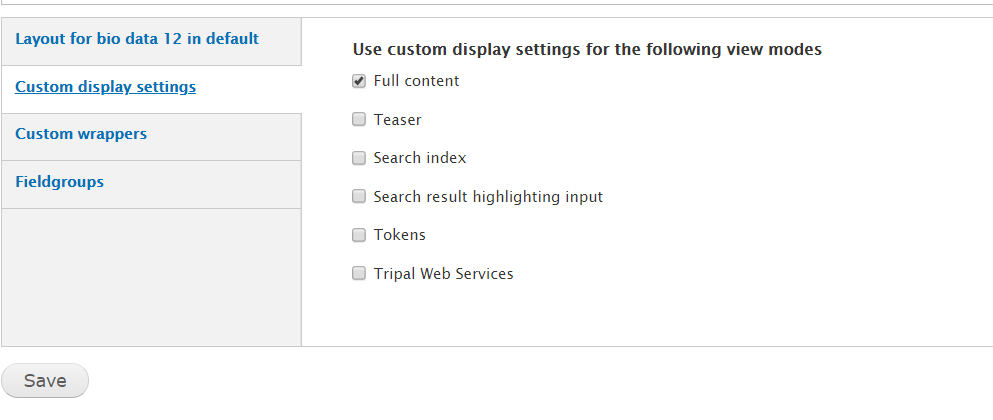
when I click Save.. the page never finishes loading.. so I cannot change the view.
which by the way I need, because is the only way that I can visualize blast and Interpro alignments correctly --> issue: https://github.com/tripal/tripal_analysis_blast/issues/8
Thanks thanks a lot for all the support!
kyrenya
on 17 Jan 2019
I think tripal content only supports full mode, not teaser mode.
 bradfordcondon
on 19 Jan 2019
bradfordcondon
on 19 Jan 2019
I have other tripal content pages as teaser, is the default mode I think, and they work fine. I only changed to full in mRNA content because of interpro and blast visualisation issues.. But now I'm not able to go back to teaser mode...
kyrenya
on 19 Jan 2019
Hi @kyrenya, I've also noticed issues when clicking save on the Structure > Manage Display page for Tripal Content Types. Do you end up with the same page time out when changing the order of fields on the manage display page and then clicking save? Also, is it consistent or does it sometimes work?
 laceysanderson
on 19 Jan 2019
laceysanderson
on 19 Jan 2019
Exactly! I’ve observed that behaviour too!
kyrenya
on 19 Jan 2019
This seems to be a performance related issue due to scanning directories for Tripal Field files.
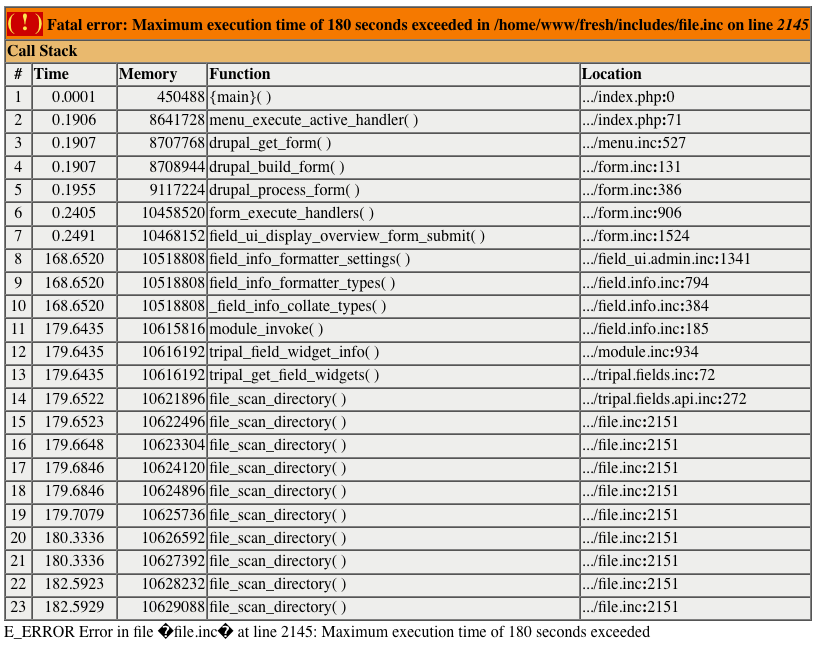
Specifically, the following calls
tripal/api/tripal.fields.api.inc:190:    $field_files = file_scan_directory($fields_path, '/.*\.inc$/');
tripal/api/tripal.fields.api.inc:211:    $field_files = file_scan_directory($fields_path, '/.*\.inc$/');
tripal/api/tripal.fields.api.inc:257:    $field_files = file_scan_directory($fields_path, '/.*_widget\.inc$/');
tripal/api/tripal.fields.api.inc:275:    $field_files = file_scan_directory($fields_path, '/.*_widget\.inc$/');
tripal/api/tripal.fields.api.inc:354:    $field_files = file_scan_directory($fields_path, '/.*_formatter\.inc$/');
tripal/api/tripal.fields.api.inc:372:    $field_files = file_scan_directory($fields_path, '/.*_formatter\.inc$/');
If these are commented out and $field_files = array(); is added (see 823-debugging.patch), the performance improves enough for the page to complete. I'll continue to look into ways to improve the performance here since the steps described here are not a good permanent solution but rather a debugging step.
NOTE: tripal_get_field_types(), tripal_get_field_widgets(), tripal_get_field_formatters() are each called 15 times during save on the structure > manage display page. Since each one uses file_scan_directory 2X it's no wonder we're having performance issues.
laceysanderson
on 19 Jan 2019
Thanks a lot, I'm gonna try!
kyrenya
on 19 Jan 2019
it seems to work, because now changes are supposed to be loaded, but got some bugs, i.e, I have configured the Organism Image label to be hidden, and is still displayed..
Thanks for your help, I'll come back to this in monday :) have a very nice weekend !
kyrenya
on 19 Jan 2019
See branch 823-file_scan_performance for my current progress... [NOT READY FOR TESTING]
laceysanderson
on 20 Jan 2019
ok, I'll be paying attention to that! Thx!
kyrenya
on 22 Jan 2019
It's ready to test now! I'll be creating a PR for it in the next hour or so. I was just confirming that another bug I observed was not caused by this fix :-) 👍
laceysanderson
on 22 Jan 2019
I've submitted the PR here. It would be great if you could test it @kyrenya :-)
laceysanderson
on 22 Jan 2019
sure! stupid question, should I just make a git pull in my tripal module, to update it and then make the test? or shall I change manually any file before? Thx so much for taking care of this! I will let you know if it works for me as soon as I can test it! :)
kyrenya
on 22 Jan 2019
#while in the root of your tripal folder on your site
git pull
git checkout 823-file_scan_performance
that should be it (dont think you need to clear cache looking at it)
bradfordcondon
on 22 Jan 2019
ok, I think I have it! got this!

thx thx
kyrenya
on 22 Jan 2019
no problem. dont forget to check out the main branch again (7.x-3.x) when the fix has been merged so you can continue to get updates.
bradfordcondon
on 22 Jan 2019
perfect! fields managing and display working much better! Thanks so much!
kyrenya
on 22 Jan 2019
this has been merged. Thank you @laceysanderson for the fix and @kyrenya for bringing the issue to our attention!
bradfordcondon
on 24 Jan 2019
Related issues
 spficklin
·
7Comments
spficklin
·
7Comments
 mpoelchau
·
7Comments
bradfordcondon
·
4Comments
almasaeed2010
·
9Comments
mpoelchau
·
7Comments
bradfordcondon
·
4Comments
almasaeed2010
·
9Comments
 Ferrisx4
·
6Comments
Ferrisx4
·
6Comments
Most helpful comment
ok, I think I have it! got this!

thx thx