Trilium: Import files pdf failing in 0.45.4 and 0.45.5
Hi,
Using 0.45.4 and 0.45.5 in Linux, importing pdf files doesn't work. Trying to do so from a note, the popup opens, but when we confirm the import, nothing happens (no mention neither in logs), and the popup just closes without importing.
Thanks
 Potjoe-97
All 6 comments
hi.
Whats the size of ur pdfs?
Wheres the log?
Can u provide a small screencast?
 zDEFz
on 23 Nov 2020
zDEFz
on 23 Nov 2020
Hi @zDEFz,
I did not provide any logs because there is nothing relevant to me about the event, but here it is :
15:23:36.623 GET /api/backend-log took 5ms
15:23:50.559 Pushing 1 sync changes in 104ms
15:23:50.561 Nothing to push
15:23:50.683 Pulled 1 changes starting at entityChangeId=40609 in 121ms and applied them in 1ms, 0 outstanding pulls
15:23:50.864 Finished pull
15:23:50.865 Nothing to push
15:23:51.019 Content hash computation took 17ms
15:23:51.021 Content hash checks PASSED
15:23:58.850 GET /api/backend-log took 6ms
In this case the file is 139 ko.
What tool should I use for screencasting ?
Thanks for your help
Potjoe-97
on 23 Nov 2020
To note: I'm not the maintainer, but I raised a couple of issues already.
I think only thing matters that you document the whole process thoroughly, including the affecting file supplied.
I personally use a tool of my choice and then upload to https://streamable.com/ and then post the link here. It's quick and accurate.
zDEFz
on 23 Nov 2020
I also raised some issues, zadam is doing such a great work maintining this software.
I usually try to document issues with much more details, but I've been struck by the absence of logs relative to the issue this time.
Here is the streamcast : https://streamable.com/0enkkc
And here is the name of the file "Polycopié 4 De saint Paul à Austin.pdf".
Potjoe-97
on 23 Nov 2020
Thats funny. Yea, the log is important. It simply says that it skipped the file. Does the same occur when you drag the file into your node? Does the same occur if you drag the file into?
If you rename a file to your choice to "Polycopié 4 De saint Paul à Austin.pdf" and import it, does the same happen again?
If you remove all the special characters "é" and "à", does the same still occur?
If you package the file as a zip, and then import does it then work? I stumbled across something similar, where I simply had to zip my file/s then it worked.
I'm on macOS, might behave a little different, but not entirely sure.
Can you provide the file?
zDEFz
on 23 Nov 2020
Hi, I was able to reproduce this and it seems to come down to the file name. This shows up in the chrome console:
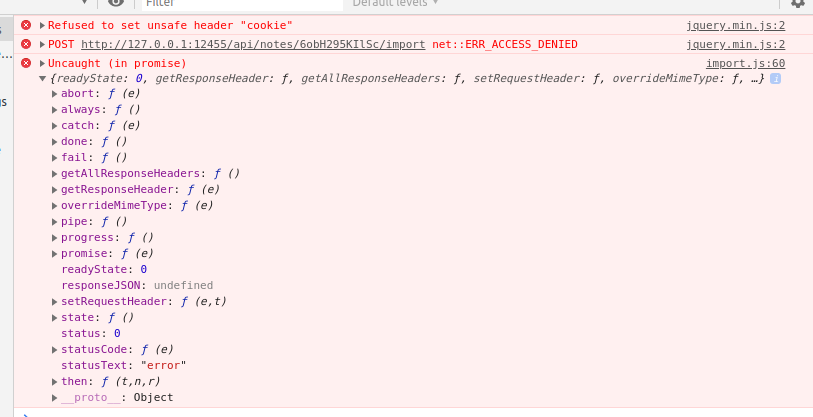
When I remove non-ASCII characters the upload seems to succeed.
This error does not seem to come from the application code, I tried to google and found electron/electron#24850 which fits the behavior well.
Proposed fix is to upgrade electron - this is planned but it's not a small task and will come in later versions. So now the workaround is to rename the file :-/
 zadam
on 23 Nov 2020
zadam
on 23 Nov 2020
Related issues
 gerroon
·
5Comments
gerroon
·
5Comments
 hrzboy
·
5Comments
hrzboy
·
5Comments
 apg-dev
·
5Comments
apg-dev
·
5Comments
 thbkrshw
·
4Comments
gerroon
·
5Comments
thbkrshw
·
4Comments
gerroon
·
5Comments
Most helpful comment
Hi, I was able to reproduce this and it seems to come down to the file name. This shows up in the chrome console:
When I remove non-ASCII characters the upload seems to succeed.
This error does not seem to come from the application code, I tried to google and found electron/electron#24850 which fits the behavior well.
Proposed fix is to upgrade electron - this is planned but it's not a small task and will come in later versions. So now the workaround is to rename the file :-/