Trident: ANF on AKS with trident is not working as expected
Describe the bug
A clear and concise description of what the bug is.
Environment
Provide accurate information about the environment to help us reproduce the issue.
Trident version:
+----------------+----------------+
| SERVER VERSION | CLIENT VERSION |
+----------------+----------------+
| 20.01.0 | 20.01.0 |
+----------------+----------------+Trident installation flags used:
./tridentctl install -n trident
Container runtime:
docker://3.0.10+azure
docker://3.0.7Kubernetes version:
1.15.10 and 1.14.7
aks-nodepool1-97552802-vmss000000 Ready agent 141d v1.15.10 10.240.0.4Ubuntu 16.04.6 LTS 4.15.0-1077-azure docker://3.0.10+azure
aks-nodepool1-97552802-vmss000001 Ready agent 141d v1.15.10 10.240.0.5Ubuntu 16.04.6 LTS 4.15.0-1071-azure docker://3.0.10+azure
aks-nodepool2-97552802-vmss000001 Ready agent 113d v1.14.7 10.240.0.7Ubuntu 16.04.6 LTS 4.15.0-1077-azure docker://3.0.7
aks-nodepool2-97552802-vmss00000d Ready agent 111d v1.14.7 10.240.0.13Ubuntu 16.04.6 LTS 4.15.0-1077-azure docker://3.0.7
aks-nodepool3-97552802-vmss000000 Ready agent 113d v1.14.7 10.240.0.9Ubuntu 16.04.6 LTS 4.15.0-1077-azure docker://3.0.7
aks-nodepool3-97552802-vmss000001 Ready agent 113d v1.14.7 10.240.0.10Ubuntu 16.04.6 LTS 4.15.0-1077-azure docker://3.0.7
aks-nodepool3-97552802-vmss000002 Ready agent 84d v1.14.7 10.240.0.6Ubuntu 16.04.6 LTS 4.15.0-1077-azure docker://3.0.7 Kubernetes orchestrator:
AKSKubernetes enabled feature gates:
OS:
Ubuntu 16.04.6 LTS- NetApp backend types: azure-netapp-files
To Reproduce
I followed the instructions here to enable ANF on AKS for dynamically provisioning
https://netapp-trident.readthedocs.io/en/stable-v20.01/kubernetes/deploying.html#install-trident
anf.json
{
"version": 1,
"storageDriverName": "azure-netapp-files",
"subscriptionID": "3ed18b6a-eeb7-407b-a781-d434ea8e5bc4",
"tenantID": "72f988bf-86f1-41af-91ab-2d7cd011db47",
"clientID": "xxx",
"clientSecret": "xxx",
"location": "eastus",
"serviceLevel": "Premium",
"virtualNetwork": "Vnet-anf",
"subnet": "my-subnet"
}
storage-class-basic.yaml
apiVersion: storage.k8s.io/v1
kind: StorageClass
metadata:
name: anf-test
provisioner: csi.trident.netapp.io
parameters:
backendType: "azure-netapp-files"
june@Azure:~/trident-installer/sample-input$ ../tridentctl -n trident get backend
+------------------------+--------------------+--------------------------------------+--------+---------+
| NAME | STORAGE DRIVER | UUID | STATE | VOLUMES |
+------------------------+--------------------+--------------------------------------+--------+---------+
| azurenetappfiles_fc9e8 | azure-netapp-files | 1f951b06-b98d-4f12-97c6-a62b75d5ec71 | online | 0 |
+------------------------+--------------------+--------------------------------------+--------+---------+
june@Azure:~/trident-installer/sample-input$ ../tridentctl -n trident get storageclass anf-test -o json
{
"items": [
{
"Config": {
"version": "1",
"name": "anf-test",
"attributes": {
"backendType": "azure-netapp-files"
},
"storagePools": null,
"additionalStoragePools": null
},
"storage": {
"azurenetappfiles_fc9e8": [
"azurenetappfiles_fc9e8_pool"
]
}
}
]
}
Expected behavior
When I tried to create pvc with below yaml
kind: PersistentVolumeClaim
apiVersion: v1
metadata:
name: anftest
spec:
accessModes:
- ReadWriteOnce
resources:
requests:
storage: 1Gi
storageClassName: anf-test
It failed with below error message:
june@Azure:~/trident-installer/sample-input$ kubectl describe pvc anftest
Name: anftest
Namespace: default
StorageClass: anf-test
Status: Pending
Volume:
Labels:
Annotations: volume.beta.kubernetes.io/storage-provisioner: csi.trident.netapp.io
Finalizers: [kubernetes.io/pvc-protection]
Capacity:
Access Modes:
VolumeMode: Filesystem
Mounted By:
Events:
Type Reason Age From Message
---- ------ ---- ---- -------
Normal Provisioning 36s (x9 over 4m51s) csi.trident.netapp.io_aks-nodepool3-97552802-vmss000001_d9bf7315-dce5-4148-bf49-eafa79a20049 External provisioner is provisioning volume for claim "default/anftest"
Normal ProvisioningFailed 36s (x9 over 4m51s) csi.trident.netapp.io encountered error(s) in creating the volume: [Failed to create volume pvc-d8d30cfc-f4e6-4446-b3b3-d21596d0df4d on storage pool azurenetappfiles_fc9e8_pool from backend azurenetappfiles_fc9e8: no capacity pools found]
Warning ProvisioningFailed 36s (x9 over 4m51s) csi.trident.netapp.io_aks-nodepool3-97552802-vmss000001_d9bf7315-dce5-4148-bf49-eafa79a20049 failed to provision volume with StorageClass "anf-test": rpc error: code = Unknown desc = encountered error(s) in creating the volume: [Failed to create volume pvc-d8d30cfc-f4e6-4446-b3b3-d21596d0df4d on storage pool azurenetappfiles_fc9e8_pool from backend azurenetappfiles_fc9e8: no capacity pools found]
Normal ExternalProvisioning 0s (x21 over 4m51s) persistentvolume-controller
not sure which part is going wrong
 JuneZhao
All 23 comments
I am experiencing the same issue.
AKS version 1.15.10
Ubuntu 16.04
Trident Version 20.01.0





 masonhuemmer
on 16 Apr 2020
masonhuemmer
on 16 Apr 2020
in order to use ANF, you also need to setup a "capacity pool" in your ANF subscription.
Trident will create a volume within one of the pools you have.
The following link will tell you more about this:
https://docs.microsoft.com/en-us/azure/azure-netapp-files/azure-netapp-files-set-up-capacity-pool
 YvosOnTheHub
on 16 Apr 2020
YvosOnTheHub
on 16 Apr 2020
@YvosOnTheHub Indeed, we need capacity, but what is the netapp account name be used in this case? Where to set netapp account name? I have this in your instructions but nowhere to mention accoutn name
anf.json
{
"version": 1,
"storageDriverName": "azure-netapp-files",
"subscriptionID": "3ed18b6a-eeb7-407b-a781-d434ea8e5bc4",
"tenantID": "72f988bf-86f1-41af-91ab-2d7cd011db47",
"clientID": "xxx",
"clientSecret": "xxx",
"location": "eastus",
"serviceLevel": "Premium",
"virtualNetwork": "Vnet-anf",
"subnet": "my-subnet"
}
JuneZhao
on 16 Apr 2020
@JuneZhao I believe this has to be done when setting up your ANF service in your Azure portal.
Did you go through the following procedure?
https://docs.microsoft.com/en-us/azure/azure-netapp-files/azure-netapp-files-create-netapp-account
YvosOnTheHub
on 16 Apr 2020
@YvosOnTheHub That has already been done I have already created the azure netapp account in my subscription, the problem is how this trident can use this one?
testanf
JuneZhao
on 16 Apr 2020
an ANF subscription is tied to one NetApp Account. You wont need to specify it to Trident.
Since you have entered all 3 different Azure ID + Secret in the Trident Backend file, Trident will know where to create volumes, as long as there is already a Capacity Pool provisioned in ANF
YvosOnTheHub
on 16 Apr 2020
@YvosOnTheHub the question is even though I created the ANF account and created capacity pool for the account but still the error was reported, where is issue and where to check where goes wrong?
My netapp account is
testanf
JuneZhao
on 16 Apr 2020
did you also "Delegate a subnet" for ANF ?
Also, Kubernetes needs to be able to reach ANF.
In my tests, I have delegated a subnet for ANF in the Kubernetes vNET
YvosOnTheHub
on 16 Apr 2020
@YvosOnTheHub that has been done already for delegate part, I dont see any issue from ANF perspective at least or any activity logged.
What do you mean by kubernetes needs to be able to reach ANF? Can you elaborate more on this part?
JuneZhao
on 16 Apr 2020
as Trident is installed in the Kubernetes cluster, network connectivity needs to be enabled between AKS & ANF.
But as Trident's backed has been created, looks like you are fine there ...
Let me check on my side... or maybe someone else will have a hint
YvosOnTheHub
on 16 Apr 2020
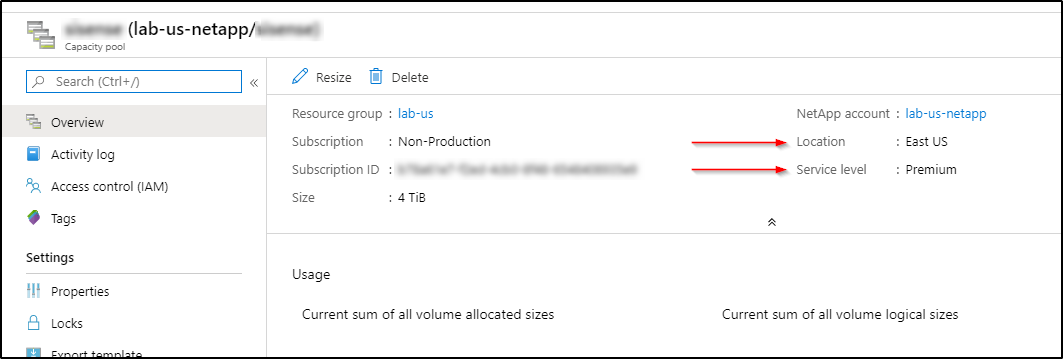
The capacity pool should be on the same location (i.e. East US on ANF == eastus in the backend json),
and service level (i.e. Premium) and the same subnet as specified in the backend configuration.
 NA-Scott
on 16 Apr 2020
NA-Scott
on 16 Apr 2020
I am not sure I understand. The backend configuration is correct.
I have the location for ANF setup in the same location as AKS.
The subnet set in the backend configuration is in the same VNET as AKS.
So do we need to setup volumes in the capacity pool so that NetApp is on the same subnet as Kubernetes?
Volumes in a Capacity Pool are the only resource in Azure where we can configure them to join the subnet specified in the backend configuration.
This would mean we would have to statically add the volumes before we are able to utilize Trident.
However, even adding the volumes to the designated subnet, Trident was still unable to see the volumes. The same error was being thrown.
Trident was not able to detect the existing volumes in the Capacity Pool.
masonhuemmer
on 16 Apr 2020
I am not sure I understand. The backend configuration is correct.
I have the location for ANF setup in the same location as AKS.
The subnet set in the backend configuration is in the same VNET as AKS.So do we need to setup volumes in the capacity pool so that NetApp is on the same subnet as Kubernetes?
Volumes in a Capacity Pool are the only resource in Azure where we can configure them to join the subnet specified in the backend configuration.
This would mean we would have to statically add the volumes before we are able to utilize Trident.
However, even adding the volumes to the designated subnet, Trident was still unable to see the volumes. The same error was being thrown.Trident was not able to detect the existing volumes in the Capacity Pool.
@masonhuemmer The error that you reported in your previous message was "no capacity pools found". Trident calls the Azure API to get a capacity pool using the location, serviceLevel, and subnet. A matching capacity pool was not found for those three parameters.
 gnarl
on 16 Apr 2020
gnarl
on 16 Apr 2020
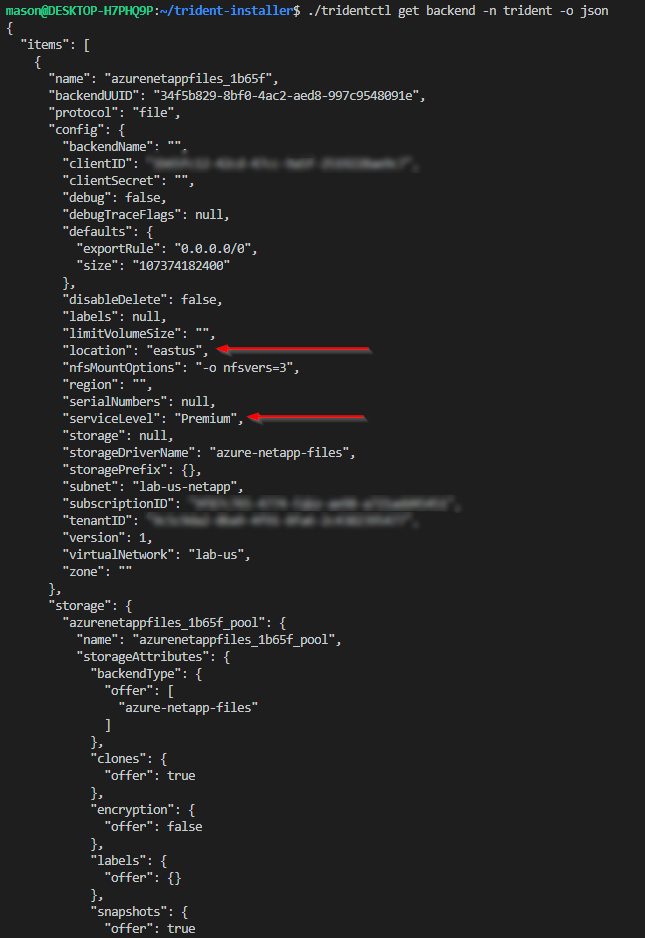
@JuneZhao The "no capacity pools" found error occurs when a capacity pool isn't found that matches the location, serviceLevel, and subnet parameters.
gnarl
on 16 Apr 2020
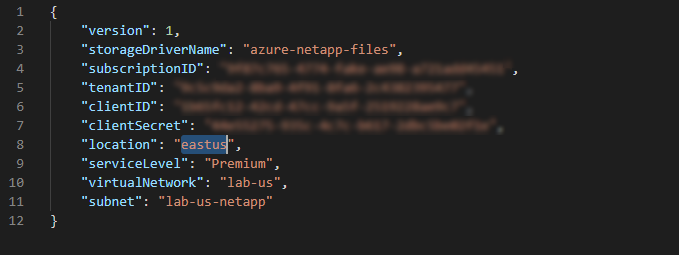
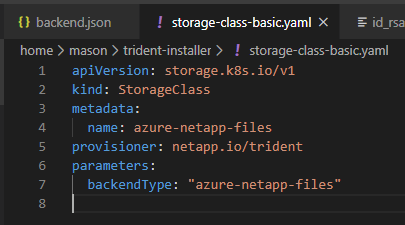
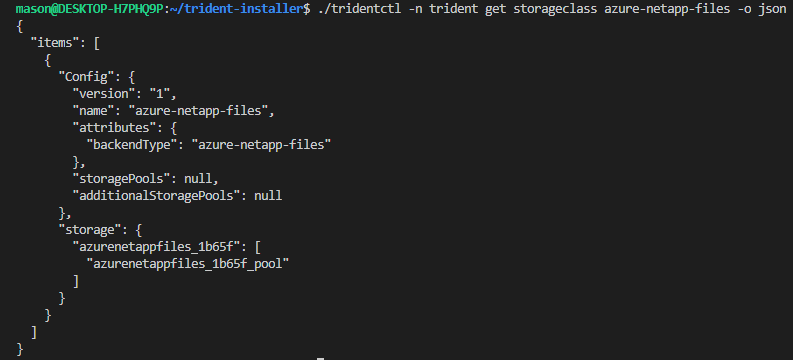
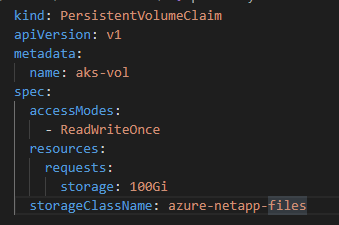
Please see screenshots below.
Backend Configuration
Capacity Pool
masonhuemmer
on 16 Apr 2020
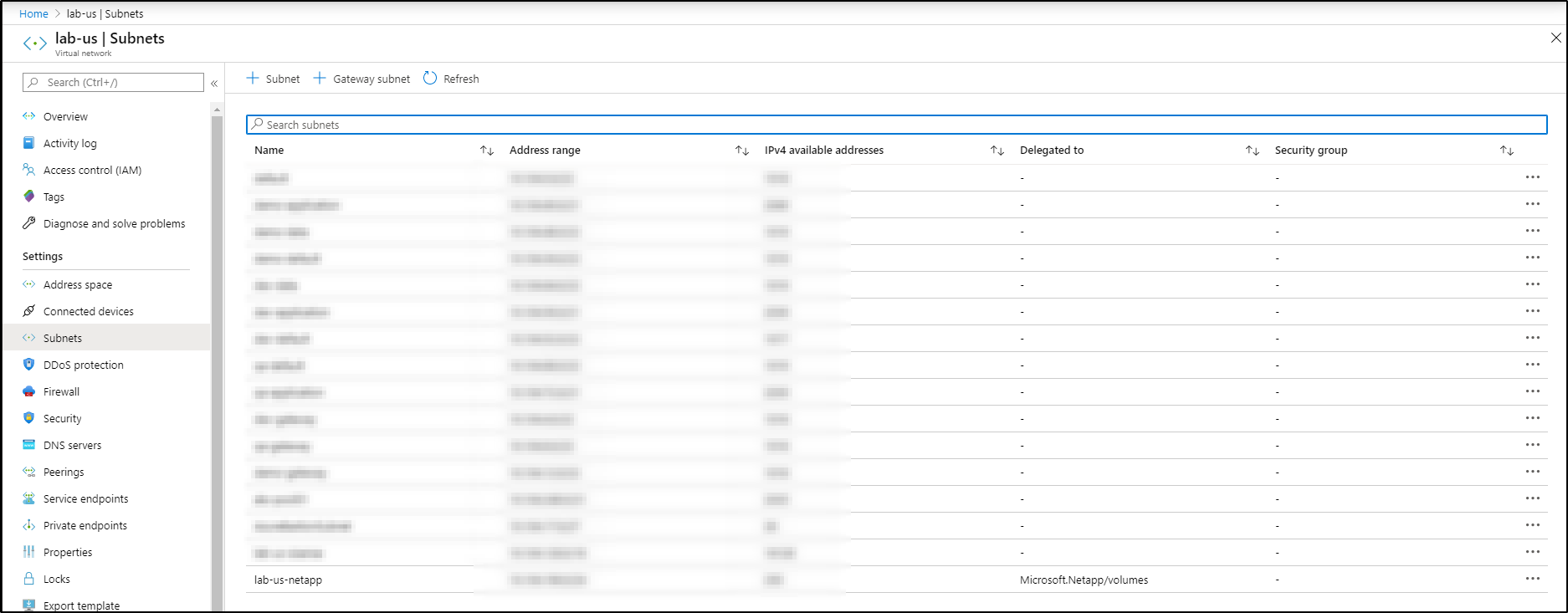
Even after creating a volume in the capacity pool and assigning it to the lab-us-netapp subnet, Trident was still unable to provision a volume. It threw the same error.


masonhuemmer
on 17 Apr 2020
@masonhuemmer - in the original screenshot of the logs that I got in my email notifications (which is different from above - so assuming you edited it) I notice the line under the no capacity pools error, is that no resource groups were found - this suggests potentially a different connectivity issue to your Azure account - could be slightly wrong credentials or something similar?
This is the screenshot I am talking about:

 obassett
on 18 Apr 2020
obassett
on 18 Apr 2020
Yes I noticed it too.
I copied the incorrect credentials for my service principal account when I
stood up another instance of Trident.
However, even after correcting it and using the original account I created,
I still continue to get the same error.
I have verified my credentials are correct and do have access to NetApp.
On Fri, Apr 17, 2020 at 7:28 PM obassett notifications@github.com wrote:
- in the original screenshot of the logs that I got in my email
notifications (which is different from above - so assuming you edited it) I
notice the line under the no capacity pools error, is that no resource
groups were found - this suggests potentially a different connectivity
issue to your Azure account - could be slightly wrong credentials or
something similar?This is the screenshot I am talking about:
[image: image]
https://nam10.safelinks.protection.outlook.com/?url=https%3A%2F%2Fuser-images.githubusercontent.com%2F41191289%2F79623118-7302fb80-8155-11ea-8d49-9e2d6d4f7d85.png&data=02%7C01%7C%7Cc1957d440bf44a14c20908d7e32f65cd%7C84df9e7fe9f640afb435aaaaaaaaaaaa%7C1%7C0%7C637227665015213859&sdata=YMnYSTaQKwGgLRWUD18faJyJuA9pLoGoltPB8cD%2FVxM%3D&reserved=0—
You are receiving this because you were mentioned.
Reply to this email directly, view it on GitHub
https://nam10.safelinks.protection.outlook.com/?url=https%3A%2F%2Fgithub.com%2FNetApp%2Ftrident%2Fissues%2F379%23issuecomment-615520957&data=02%7C01%7C%7Cc1957d440bf44a14c20908d7e32f65cd%7C84df9e7fe9f640afb435aaaaaaaaaaaa%7C1%7C0%7C637227665015213859&sdata=o6kY17RpMeCwEGfSr8M6RlAK0VM3TC7d1gTlGi4ppTM%3D&reserved=0,
or unsubscribe
https://nam10.safelinks.protection.outlook.com/?url=https%3A%2F%2Fgithub.com%2Fnotifications%2Funsubscribe-auth%2FAL34BJNF3P24KBADRNQS7BDRNDX2JANCNFSM4MJDUFVQ&data=02%7C01%7C%7Cc1957d440bf44a14c20908d7e32f65cd%7C84df9e7fe9f640afb435aaaaaaaaaaaa%7C1%7C0%7C637227665015223853&sdata=5X3u0n9bXo7WlOQOuvjv7yP6CSZhTIjlW15mfRjGsQc%3D&reserved=0
.
masonhuemmer
on 18 Apr 2020
@obassett @gnarl Can you provide me with the detailed right configuration for ANF in aks so that we can test where might go wrong? We dont know which part go wrong from the instructions that we followed
JuneZhao
on 20 Apr 2020
Can you verify that Trident will work in Azure Kubernetes Service (AKS)?
From what I am seeing in other online communities is that users are deploying to AKS-Engine, which is quite different than AKS.
masonhuemmer
on 20 Apr 2020
@JuneZhao and @masonhuemmer please contact us on our Slack channel #containers in the netapppub.slack.com workspace. We do have customers that are successfully using AKS but are unable to determine why you have not been successful so far.
gnarl
on 21 Apr 2020
FYI - requested @masonhuemmer to capture debugging logging:
# tridentctl uninstall -n trident -d
# tridentctl install -n trident -d
Please provide the complete syntax used to install Trident, ie --custom-yaml, etc..
................
Received response below from @masonhuemmer:
"For whatever reason, I ran through the exact setup.
However, I was able to get it to work now.
I am not sure if this was an issue on Azure's side or what.
But, it is working now."
 crossond
on 27 Apr 2020
crossond
on 27 Apr 2020
@JuneZhao closing this as there hasn't been a recent update on the status of your ANF configuration.
gnarl
on 19 May 2020
Related issues
 fmj3fmj3
·
3Comments
fmj3fmj3
·
3Comments
 arndt-netapp
·
6Comments
arndt-netapp
·
6Comments
 uberspot
·
3Comments
gnarl
·
5Comments
uberspot
·
3Comments
gnarl
·
5Comments
 mircster
·
6Comments
mircster
·
6Comments