Treestyletab: Looking for: Bigger pinned tabs and their favicons
I'm looking for a way to have my pinned tabs more prominently.
What I mean by that is that I would like them to be bigger than they are now, whether they remain on top of the tabs (where they are now), or they're arranged vertically somehow with some kind of separate bar or frame (add-in/plugin, but only if it already exists).
Ideally, I would want them to remain where they are, hoping that they could just be modified via CSS code.
If you could provide me with the CSS indicators for the pinned tabs, their favicons, the default values for margins/paddings etc, I think I should be able to modify them to my liking (assuming their size isn't hardcoded or something).
I'm aware that favicons are mostly just 16x16 pixels in size. (Can they be vectorized / enlarged?)
Also, I'm fine with having to limit the number of pinned tabs per row, in case their increased size may require this.
 harl
harl
All 6 comments
@harl you could probably start by looking at base.css starting here: https://github.com/piroor/treestyletab/blob/5deb5f84606038b36ff250da3695558a2dff7834/webextensions/sidebar/styles/base.css#L433
There is a block a little further down with some items you might be able to make changes:
https://github.com/piroor/treestyletab/blob/5deb5f84606038b36ff250da3695558a2dff7834/webextensions/sidebar/styles/base.css#L466-L473
 irvinm
on 3 May 2021
irvinm
on 3 May 2021
I think @harl need to change a secret option faviconizedTabScale under TST options => Development => All Configs. It is 1.75 by default, it means that the height of a pinned tab is 175% of its favicon, thus if the favicon has 16px height, a faviconized tab will have 16 * 1.75 = 28px height.
A CSS variable --faviconized-tab-size is a mirror of the calculated value. TST positions faviconized tabs based on the calculated value, but changing the CSS variable value does not affect to the value calculated by TST. So if you change only the CSS variable, TST cannot place pinned tabs at correct positions. The recommended way is:
- Set
faviconizedTabScaleto a larger size, for example 2.75 (then tabs will have 16 * 2.75 = 44px height). - Set a custom user style as:
css tab-item.faviconized { --favicon-size: 24px; } - Reopen the sidebar to apply updated configs.
 piroor
on 3 May 2021
piroor
on 3 May 2021
@harl does that meet your need? If so, can you close this item?
irvinm
on 5 May 2021
Thanks a lot to both of you for your answers. Haven't had the time to get back to this sooner, sorry for that.
When I set faviconizedTabScale to 2.25 and do this:
tab-item.faviconized {
  --favicon-size: 33px;
  height: var(--favicon-size);
  width: var(--favicon-size);
  padding: 0px;
}
then I pretty much get what I had in mind. The tabs are bigger and most of the favicons fill out the tabs.
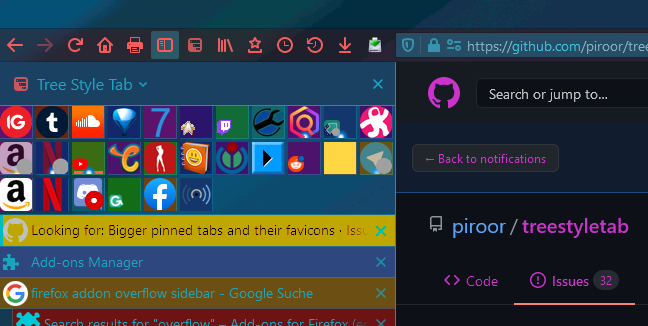
Of course, some of the favicons are now still just 16x16 pixels in size and thus they get tucked into the lower left corner of the pinned tabs. I've tried to force them into the centre by limiting the tabs' dimensions, but that didn't really work out (and it would make them even smaller than usual, harder to see and click, so that's not a solution anyway).
(The calc() function often doesn't have the desired effect, as it seems to get overridden by the other stuff.)
Is there a way to manipulate the (minimum) size of those non-vectorised favicons?
or at least align all favicons to the middle/centre anchor?
harl
on 7 May 2021
How about applying enlarged size to the image element, like:
tab-item.faviconized tab-favicon img,
tab-item.faviconized tab-favicon .favicon-default::before {
  height: var(--favicon-size);
  width: var(--favicon-size);
}
That's good!
And it works for the non-pinned tabs as well.
Thanks again. :)
Add.: Closing this issue as it's solved for me.
harl
on 7 May 2021
Related issues
 Evotron
·
3Comments
Evotron
·
3Comments
 mikeaustin
·
3Comments
mikeaustin
·
3Comments
 allixx
·
4Comments
allixx
·
4Comments
 stapuft
·
4Comments
Evotron
·
3Comments
stapuft
·
4Comments
Evotron
·
3Comments