Treestyletab: Solo tab drag behaviour does not apply correctly when dragged via the Firefox tab bar
Short description
The tag drab behaviour "move solo tab" does not work in the Firefox tab bar (outside TST)
Steps to reproduce
- Start Firefox with clean profile.
- Install TST.
- Set drag behaviour any of the "move solo tab" options
Open three tabs, with the second tab a child of the first:
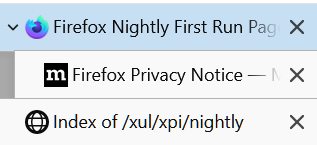

Drag the parent tab to be the last tab via the TST sidebar
Result:


- Revert back to the step 4 layout
- Drag the parent tab to be the last tab via the Firefox tab bar
Result:
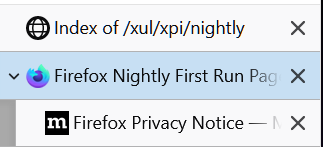

Expected result
Expected layout after dragging parent to be after child:
This works correctly if the drag action is executed on the TST sidebar.
Actual result
When the drag action is executed on the main Firefox tab bar, the entire tree is moved despite the drag action being set to "move solo tab".
Environment
- Platform (OS): Windows
- Version of Firefox: 89.0a1 (2021-04-14)
- Version (or revision) of Tree Style Tab: 3.6.5.11204
 BobVul
All 7 comments
Also, as an additional/related feature request, would it be possible to have a separate set of options for the Firefox tab bar?
Ideally I would like a setup where:
- When dragged via TST, move the entire tree
- When dragged via Firefox tab bar, move solo tab
BobVul
on 15 Apr 2021
Hmm, it looks the time to restructure those options again.
All possible behaviors for closed parent tab are:
- T1: Close descendants too
- T2: Replace closed parent with a dummy tab and keep the tree
- T3: Promote the first child as the new parent always
- T4: Promote all children as the level of the closed parent always
- T5: Promote the first child when a root tab was closed, otherwise promote all children
- T6: Liberate child tabs from the tree
All possible behaviors for moved parent tab are:
- U1: Move descendants too
- U2: Replace moved parent with a dummy tab and keep the tree
- U3: Promote the first child as the new parent always
- U4: Promote all children as the level of the moved parent always
- U5: Promote the first child when a root tab was moved, otherwise promote all children
- U6: Liberate child tabs from the tree
All possible operation cases are:
- A: Operations in the sidebar
- A1: for collapsed tree
- consistently T1
- consistently U1
- A2: for expanded tree
- configurable with T1-6
- consistently U1
- B: Operations out of the sidebar (native tab bar, keyboard shortcut, or other addons), with invisible sidebar
- B1: for collapsed tree
- configurable with T1-6
- configurable with U1-6
- B2: for expanded tree
- configurable with T1-6
- configurable with U1-6
- C: Operations out of the sidebar (native tab bar, keyboard shortcut, or other addons), with visible sidebar
- C1: for collapsed tree
- configurable with T1-6
- configurable with U1-6
- C2: for expanded tree
- configurable with T1-6
- configurable with U1-6
Possible modes (recommended configuration set) are:
- D: Consistent mode: apply TST behaviors around tabs same to the one in the sidebar always.
- A1 consistently T1 and U1
- A2 consistently U1, configurable with T2-5
- B1 and C1 consistently same to A1
- B2 and C2 consistently same to A2
- E: Parallel mode: apply TST behaviors only for specific cases, otherwise operate the tab as a solo tab.
- A1 consistently T1 and U1
- A2 consistently U1, configurable with T2-5
- B1 consistently same to B2
- B2 configurable with T2-5 and U1-5
- C1 consistently same to B2
- C2 consistently same to B2
- F: Custom: full configurable
- A1 consistently T1 and U1
- A2 consistently U1, configurable with T1-6
- B1 configurable with T1-6 and U1-6
- B2 configurable with T1-6 and U1-6
- C1 configurable with T1-6 and U1-6
- C2 configurable with T1-6 and U1-6
 piroor
on 15 Apr 2021
piroor
on 15 Apr 2021
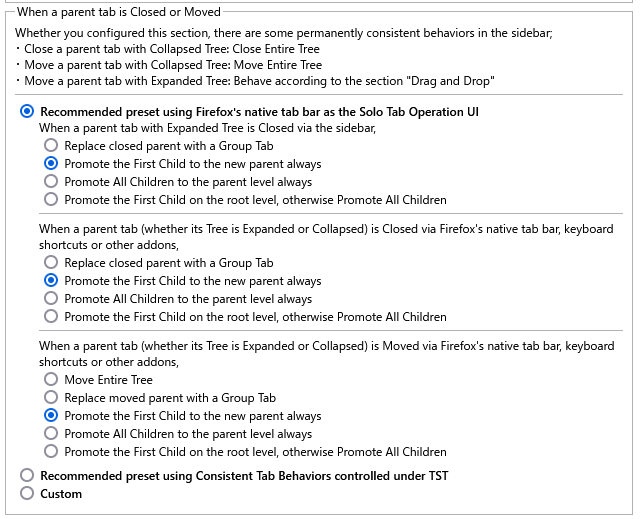
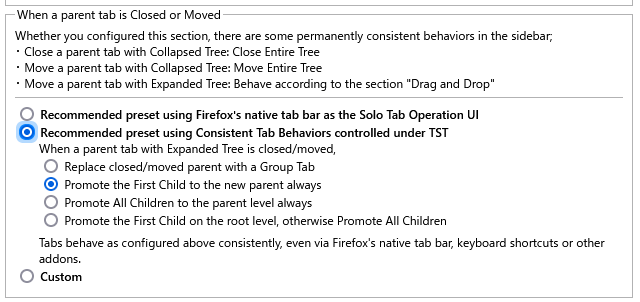
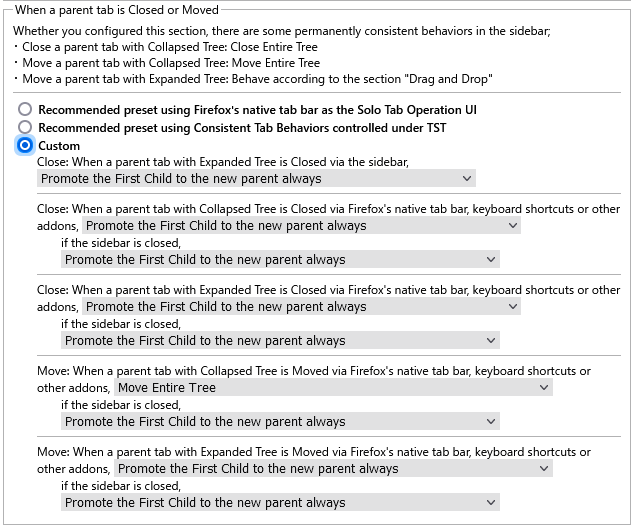
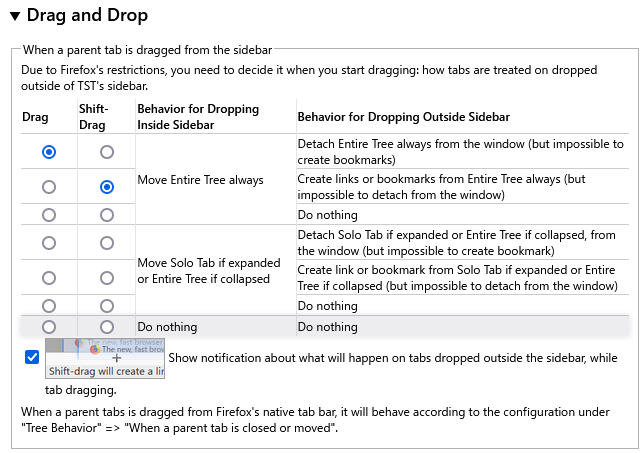
Screenshots:
"when a parent tab is closed or moved":
"drag and drop":
piroor
on 16 Apr 2021
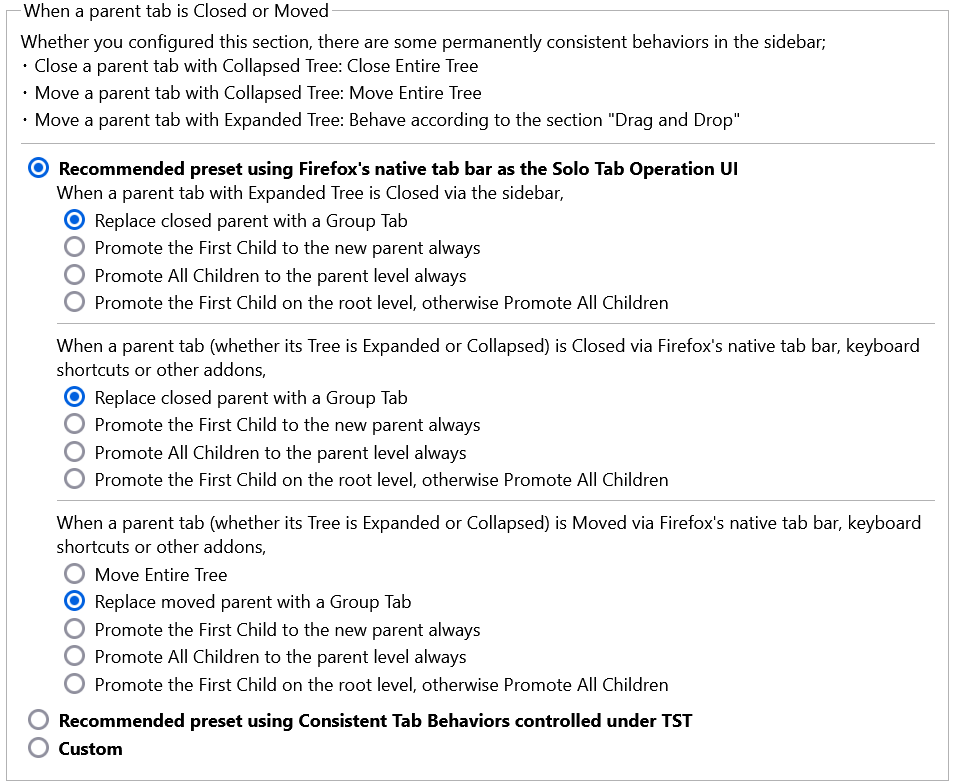
On the new version you can configure behaviors around tabs moved via Firefox's tab bar. However please note that the option affects to other cases also: keyboard shortcuts or other addons. This is due to restrictions of the WebExtensions API framework.
piroor
on 18 Apr 2021
Thank you! The new version (from CI artifacts) works perfectly as desired :)
BobVul
on 18 Apr 2021
@BobVul 3.8.0 has been released. Can you verify if this has been fixed and close this item?
 irvinm
on 5 May 2021
irvinm
on 5 May 2021
Yup, all works as expected on release version.
Thanks again!
BobVul
on 5 May 2021
Related issues
 stapuft
·
4Comments
stapuft
·
4Comments
 azizLIGHT
·
4Comments
azizLIGHT
·
4Comments
 Keith94
·
3Comments
Keith94
·
3Comments
 viking2
·
3Comments
viking2
·
3Comments
 mikeaustin
·
3Comments
mikeaustin
·
3Comments
Most helpful comment
Yup, all works as expected on release version.
Thanks again!