Treestyletab: [Feature Request] Keyboard shortcut to show/hide tab bar
Alternatively, could you provide the code to toggle it, so I could make a keyboard shortcut myself using Keyconfig add-on.
By the way, I found that clicking on the grippy does not work consistently to show/hide the tab bar. The behavior is like described in #538.
My environment: Windows 7, Firefox 38.0.1, Tree Style Tab 0.15.2015030601.
 rubaboo
All 13 comments
Actually, if you hold the Ctrl key, while the tab bar is hidden, it is shown.
Don't know if this helps, but looks like the event (aEvent.ctrlKey) is defined here:
content/treestyletab/content-utils-autohide.js
modules/window.js
And actions that use this event are here:
modules/browser.js
modules/base.js
modules/tabbarDNDObserver.js
 hposca
on 28 May 2015
hposca
on 28 May 2015
Showing the tab bar with Ctrl down is different in that it is overlayed on top of content. It is meant to be temporary. I, on the other hand, want to have the bar mostly open, but hide it when the content is too wide.
rubaboo
on 28 May 2015
@piroor why is this out-of-purpose? Many extensions offer keyboard shortcut triggers.
 AndydeCleyre
on 8 Sep 2016
AndydeCleyre
on 8 Sep 2016
I would like to see this implemented.
 Mooninaut
on 19 Nov 2016
Mooninaut
on 19 Nov 2016
This would be a great improvement.
 yang-zhang
on 2 May 2017
yang-zhang
on 2 May 2017
To anyone still looking for this feature, Hide Tabbar extension seems to work.
 josduj
on 21 Aug 2017
josduj
on 21 Aug 2017
Now you can toggle TST's sidebar panel with F1 key, on TST 2.0.x.
 piroor
on 6 Nov 2017
piroor
on 6 Nov 2017
Is there any way to change which key? I use F1 for my dropdown terminal.
 YodaEmbedding
on 19 Nov 2017
YodaEmbedding
on 19 Nov 2017
Sadly it is impossible for now. The keyboard shortcut is hard coded here:
and it can't be reassigned dynamically. There are number of bugs around keyboard shortcut and one of them can solve it:
piroor
on 19 Nov 2017
F1 works great for hiding it, thanks for posting that here. It would be helpful if that appeared in the menu bar under View, Sidebar, so I could have discovered it without having to land here. :)
 dmusican
on 1 Feb 2018
dmusican
on 1 Feb 2018
I'm closing this. Thank you for fixing it. And thanks to other commenters for their support.
rubaboo
on 16 Jun 2018
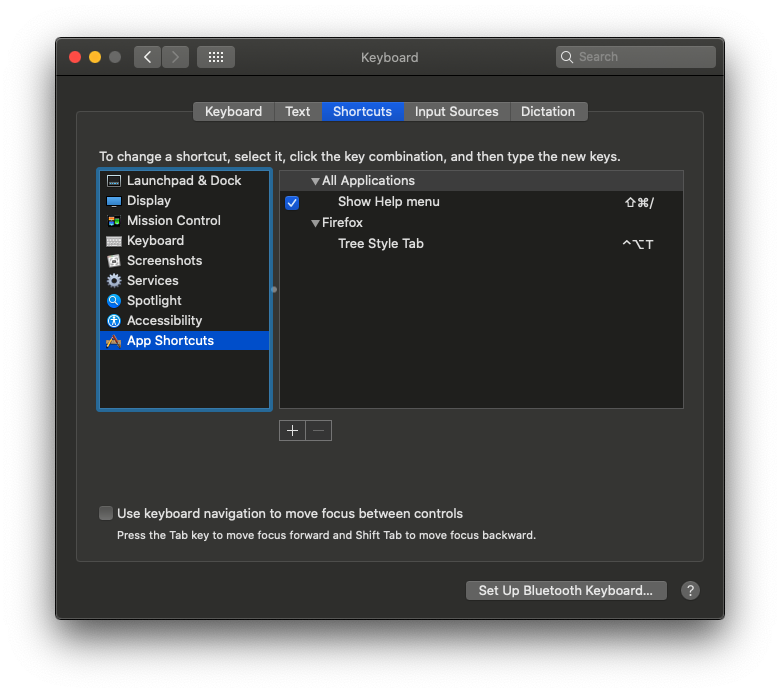
For anyone else discovering this via Google search: if you're on a Mac, you can do this from the Keyboard prefpane. System Preferences -> Keyboard -> Shortcuts -> App Shortcuts
Screenshot shows Cmd+Shift+3 because I was trying to take a screenshot, but you can set it to anything.

 stevelandeyasana
on 11 Dec 2018
stevelandeyasana
on 11 Dec 2018
I did the above (Keyboard > App Shortcuts) and it worked ... for a day? Now the same shortcut is sitting there in the menu, but it does not work in Firefox to open/close the tabs on the left side. I even deleted it, redid it the same way, and it still does not work...any ideas?
 d8aninja
on 2 Aug 2020
d8aninja
on 2 Aug 2020
Related issues
 array
·
4Comments
array
·
4Comments
 Evotron
·
3Comments
Evotron
·
3Comments
Evotron
·
3Comments
Evotron
·
3Comments
 waldyrious
·
4Comments
waldyrious
·
4Comments
 azizLIGHT
·
4Comments
azizLIGHT
·
4Comments
Most helpful comment
Now you can toggle TST's sidebar panel with F1 key, on TST 2.0.x.