Treestyletab: Pinned tabs start collapsing
Short description
Pinned tabs start collapsing and require mousing over to show, and after moving the mouse away they collapse again.
Steps to reproduce
I'm not sure how to reproduce it reliably. It happens intermittently and when it does, I have to restart firefox to fix it.
Expected result
Pinned tabs should not collapse.
Actual result
Pinned tabs collapse.
Environment
- Platform (OS): Arch Linux
- Version of Firefox: 83.0
- Version (or revision) of Tree Style Tab: 3.6.3
 txtsd
txtsd
All 25 comments
 irvinm
on 8 Dec 2020
irvinm
on 8 Dec 2020
Yea it's the same issue. I'm trying the fix suggested in https://github.com/piroor/treestyletab/issues/2778#issuecomment-739638089
txtsd
on 8 Dec 2020
Can you close this item when you get a chance @txtsd? (Unless the fix doesn't work for you)
irvinm
on 8 Dec 2020
Yea, give me a few days to test it. I can't reliably reproduce so I need that time to confirm. I'll close it myself after.
txtsd
on 8 Dec 2020
I'm not sure how to reproduce it reliably. It happens intermittently and when it does, I have to restart firefox to fix it.
Basically this behavior is designed to be applied for these cases:
- When you open a new blank tab on Firefox 84 and later. It shows the bookmarks toolbar, then the sidebar contents are shifted down as the height of the toolbar. TST applies negative margin to cancel the shifting.
- When you are in the fullscreen mode (F11 key on Windows or Linux) and your mouse is pointing the top edge of the screen. It shows the native tab bar and the nvigation toolbar, then the sidebar contents are shifted down as the height of those toolbars. TST applies negative margin to cancel the shifting.
The common trigger is a changing of the height of the sidebar contents. It can be applied unexpectedly if there are something mechanisms changing the height of the Firefox window, on your environment. Do you have any idea about possible triggers?
 piroor
on 9 Dec 2020
piroor
on 9 Dec 2020
I'm using Firefox 83, and I have the tab bar on the top hidden via userChrome.css so neither of those should affect me.
The only other thing I can think of is that my number of tabs were so high that TST needed a vertical scrollbar to be able to display them. But it happened later when I got rid of most of the tabs too.
txtsd
on 9 Dec 2020
This caused my lots of confusion in the last week.
I was about to open an issue but wasn't sure it's really a TST thing and didn't wanted to add noise, because also to me it wasn't clear when this behaviour started. And "my fix" back then was to open a window, move the pins and the tabs, it worked.. did not autohide. Until I noticed it starts to autohide again.
I'm now trying the workaround in https://github.com/piroor/treestyletab/issues/2778 but somehow I wish I would not have had this experience in the first place: "suddenly" the pinned tabs are gone, there was no notice nothing and I was "missing tabs" which caused me quite some angst 😢
 mfn
on 11 Dec 2020
mfn
on 11 Dec 2020
I've tried these steps but I couldn't reproduce the problem:
- Setup Arch Linux.
- Start Firefox 83.
- Install TST 3.6.3.
- Go to about:config and activate userChrome.css.
- Go to Firefox's profile directory, and prepare userChrome.css with the rule to hide the top tab bar: 7 lines at https://github.com/piroor/treestyletab/wiki/Code-snippets-for-custom-style-rules#hide-horizontal-tabs-at-the-top-of-the-window-1349-1672-2147
- Restart Firefox.
- Browser for a while, open new tabs via Ctrl-T, open new tabs from links, in non-fullscreen mode.
Is there any difference from your environment @txtsd ? Do you know any more hint to reproduce the problem with this environment?
piroor
on 16 Dec 2020
I've experienced this as well with TST 8.3.8 on both macOS with Firefox 81 and Windows with Firefox 83. Unfortunately I don't have a reliable way to reproduce it, although I can say that it only seems to happen when I have a large number of tabs open.
The provided "suppressGap..." config option has fixed it for now.
 erik-hasse
on 16 Dec 2020
erik-hasse
on 16 Dec 2020
I've exposed the option for experts with the commit 01f91d6. However I still need more help to research what is the trigger the behavior is unexpectedly applied.
piroor
on 17 Dec 2020
I'm ready to close this since the suggested fix works. Should I leave it open for you to track the cause?
txtsd
on 17 Dec 2020
I still hope to fix the problem fundamentally even if there is a workaround. If you OK, could you help me with collecting debug logs? Steps:
- Go to TST's options.
- Turn on the checkbox: "Development" => "Debug mode"
- Turn off all checkboxes under "Detailed logging".
- Turn on "Log with timestamp" and "sidebar/gap-canceller".
- Go to "about:debugging".
- Choose "This Firefox" and click "Inspect" button in the item "Tree Style Tab" under "Extensions".
- A debugger tab is opened, then detach it to another window.
- Choose the "Console" tab in the debugger tab.
- Put the debugger tab window beside the main window, like this screenshot:
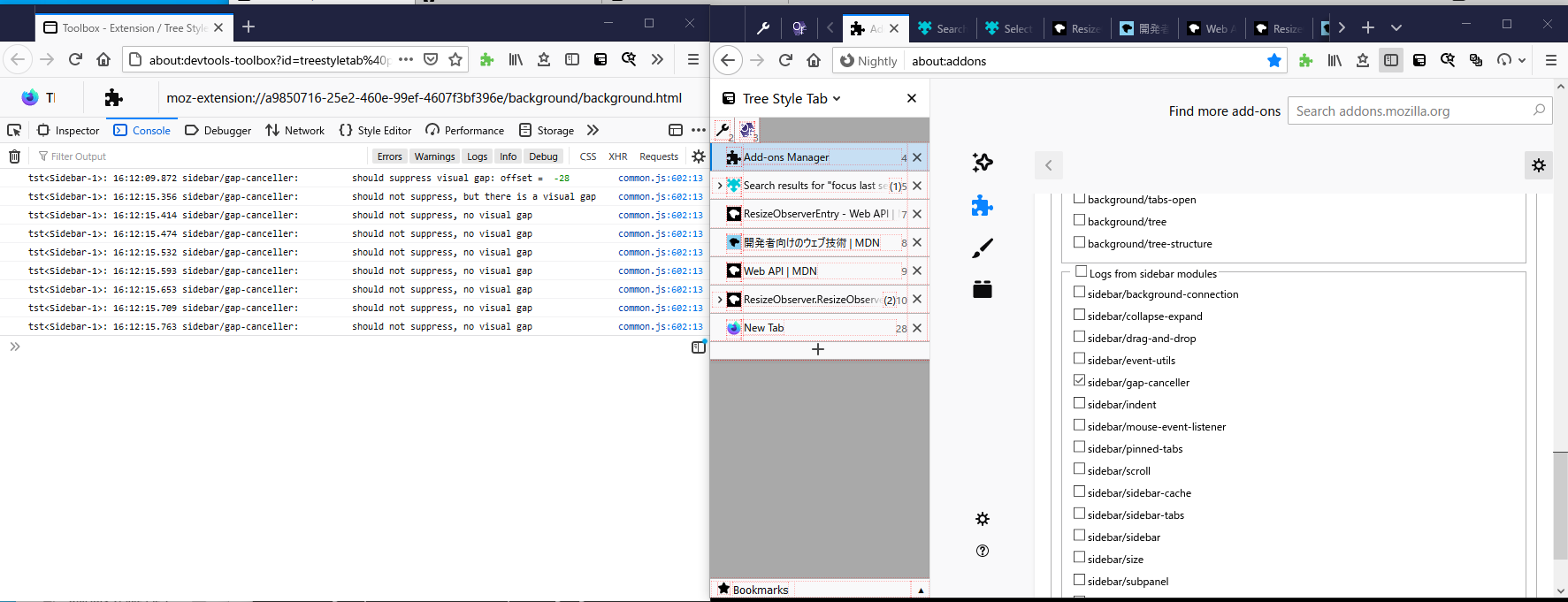 (the left window is the debugger, the right window is the main.)
 - Back to the main window, and browse the Web until the problem happens.
On my case, expected logs are:
- When a new blank tab is opened...
should suppress visual gap: offset = -28(only once)
- When a non-new tab is selected...
should not suppress, but there is a visual gap(only once)should not suppress, no visual gap(multiple times)
- When the fullscreen mode is activated with the F11 key:
should suppress visual gap: offset = 0(only once)
- When the navigation toolbar becomes visible with mousemove on a fullscreen mode:
should suppress visual gap: offset = -74(only once)
- When the navigation toolbar becomes hidden with mousemove on a fullscreen mode:
should suppress visual gap: offset = 0(only once)
I hope to know what logs are reported before and when you see the problem, and what action you did when a log like should suppress visual gap: offset = -* appears. A screencast with these windows together will help me to research more.
piroor
on 18 Dec 2020
After some thinking, I've realized that there is a possible trigger.
@txtsd Did you change the TST's option "New Tabs Beahvior" => "Basic control for New Blank Tabs" => "Guess a newly opened tab as opened by..." ? TST detects a new tab opened with the URL as a "new blank tab", so if you change the URL from the default about:newtab, TST may misunderstand that regular tabs with the URL as "new blank tab"s and shifts the sidebar contents.
piroor
on 18 Dec 2020
No it's still about:newtab
txtsd
on 18 Dec 2020
The commit 749cd59 should fix the mis-shifted sidebar contents problem when the window is placed at coordinates like (*,0). It may help you if you saw the problem only at a problem placed at the top edge of the screen (ex. maximized).
piroor
on 21 Dec 2020
When the tabs are not autohiding:
- When a new blank tab is opened...
- no output
- When a non-new tab is selected...
- no output
- When the fullscreen mode is activated with the F11 key and the navigation bar hides:
should not suppress, but there is a visual gap
should suppress visual gap: offset =  0
should suppress visual gap: offset =  -1
- After exiting from fullscreen mode:
should suppress visual gap: offset =  -58
should not suppress, no visual gap
should not suppress, no visual gap
should not suppress, no visual gap
should not suppress, no visual gap
should not suppress, no visual gap
should not suppress, no visual gap
should not suppress, no visual gap
should not suppress, no visual gap
When the navigation toolbar becomes visible with mousemove on a fullscreen mode:
(At this point, after toggling the navigation toolbar, and the pinned tabs hiding, they started to autohide even after coming out of fullscreen mode, and the first two scenarios still did not generate any output)should suppress visual gap: offset = -32(only once)
When the navigation toolbar becomes hidden with mousemove on a fullscreen mode:
should suppress visual gap: offset = 0(only once)
txtsd
on 21 Dec 2020
@txtsd Thank you for a research! The result looks similar to logs collected at #2786 so I think the fix in TST 3.6.4 may affect to your case. If you still see the problem, could you collect logs again? (TST 3.6.4 reports more detailed logs.)
piroor
on 22 Dec 2020
I'll collect logs if it happens again~
txtsd
on 22 Dec 2020
@piroor I still have this error with 2.6.5 using Nightly 86.0a1 (2021-01-12). Both on Windows 10 and Ubuntu 20.04. Disabling suppressGapFromShownOrHiddenToolbar fixes it. This problem has been existing for like 3, 4 weeks.
It happens every time I open a new tab with Ctrl+T or the + button.
I followed your advise to collect some logs. Here is the screenshot:
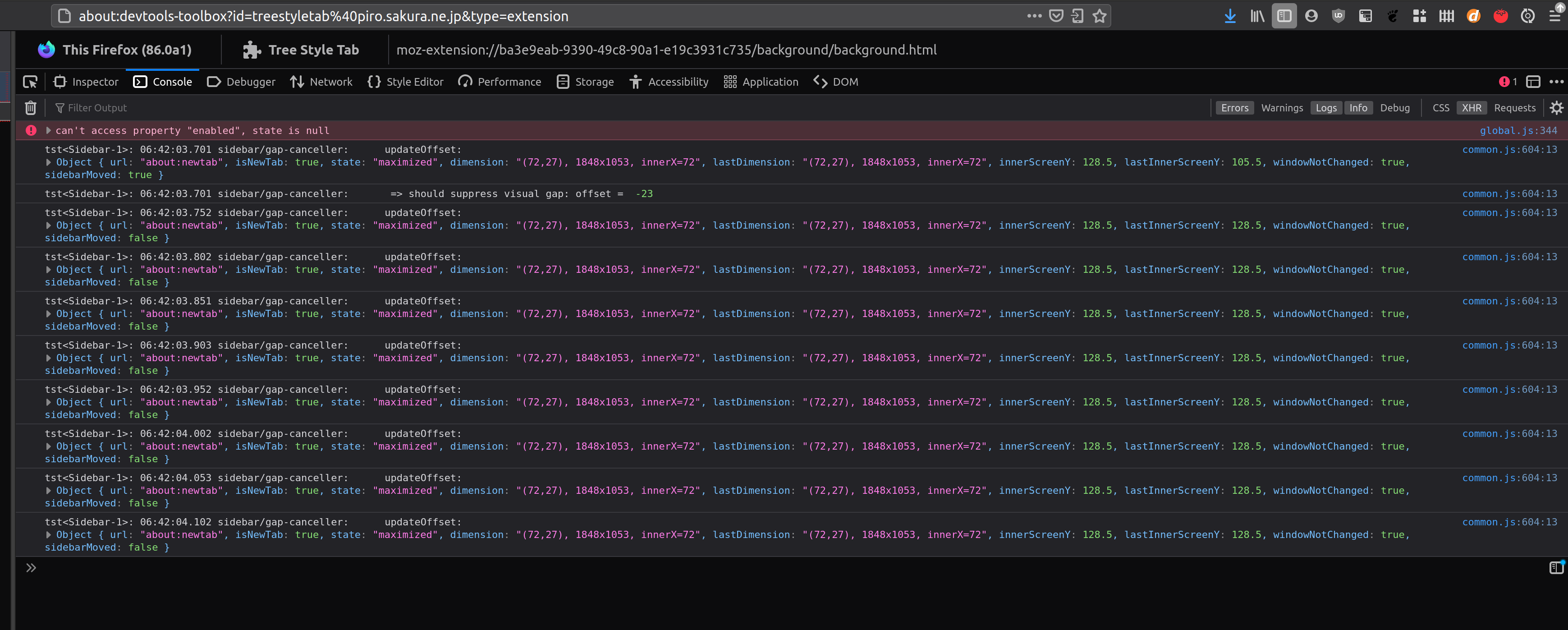
Here is how it looks:
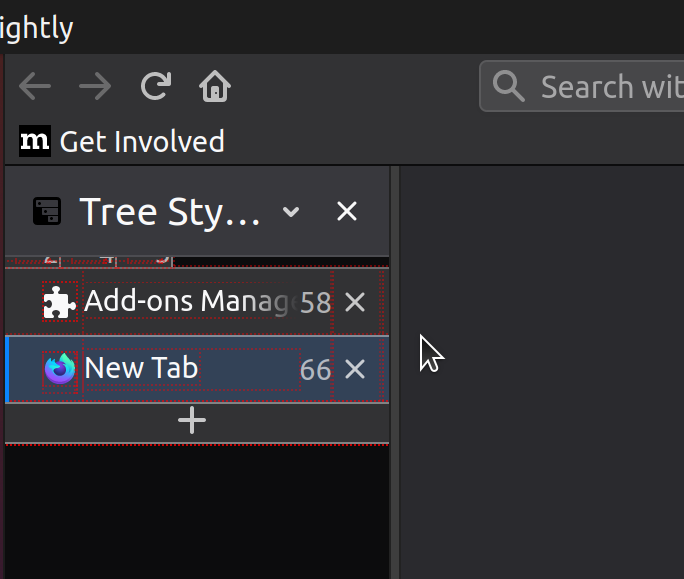
The pinned tabs only show when hovering over them, which results in now output in the console.
Once I click on the first(!) tab below the pinned tab, the pinned tabs show:
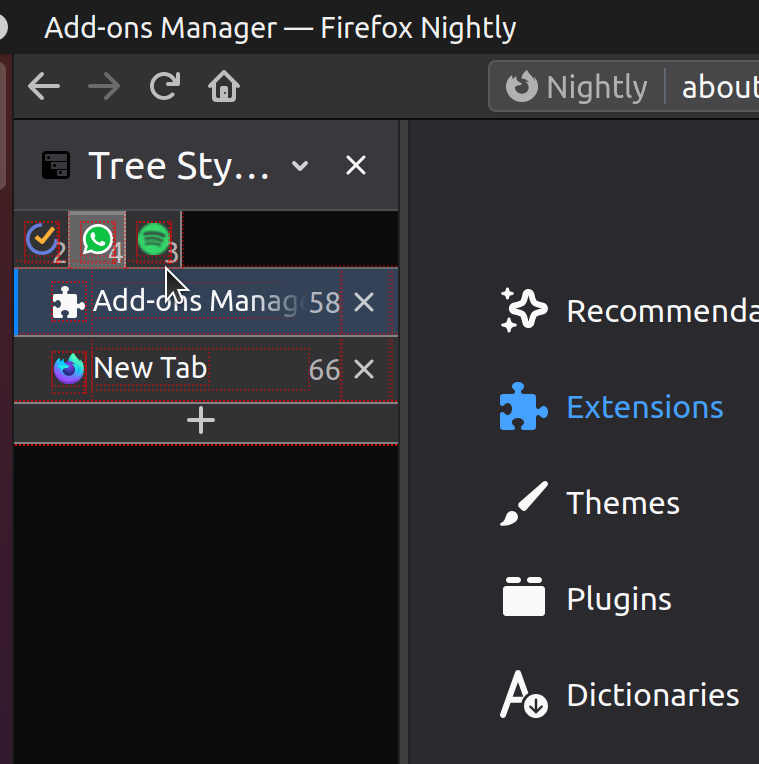
The log is then:
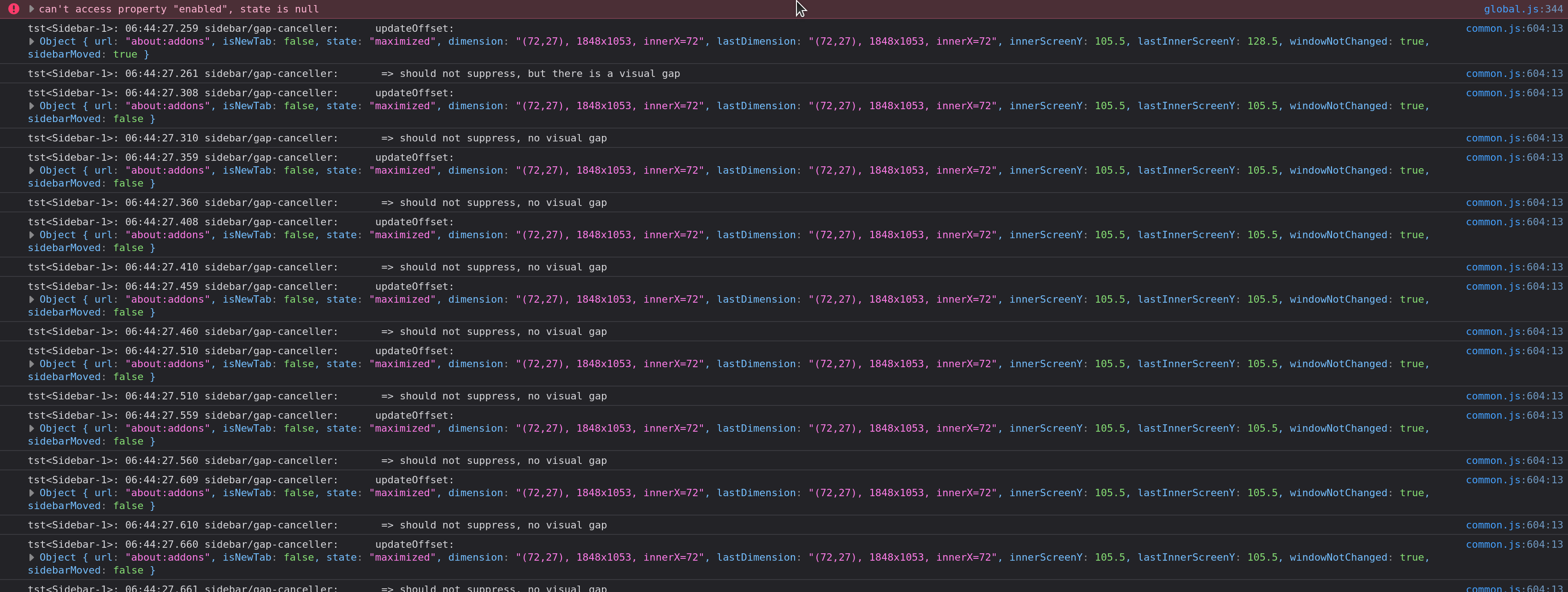
Here's my userChrome:
/* siehe https://github.com/piroor/treestyletab/wiki/Code-snippets-for-custom-style-rules#hide-horizontal-tabs-at-the-top-of-the-window-1349-1672-2147 */

#main-window[tabsintitlebar="true"]:not([extradragspace="true"]) #TabsToolbar > .toolbar-items {
  opacity: 0;
  pointer-events: none;
}
#main-window:not([tabsintitlebar="true"]) #TabsToolbar {
    visibility: collapse !important;
}

/* siehe https://github.com/piroor/treestyletab/wiki/Code-snippets-for-custom-style-rules#reduce-minimum-width-of-the-sidebar-1373 */
#sidebar {
  min-width: 25px !important;
}
 jnachtigall
on 15 Jan 2021
jnachtigall
on 15 Jan 2021
@jnachtigall This issue is about the problem happening on regular tabs (for example Google search result tabs, Firefox's options tab, and others) except new blank tabs opened via Ctrl-T. Sidebar contents shifted for blank tabs is the intentional result. In your second screenshot, the bookmarks toolbar is shown by Firefox for the current tab (a blank new tab opened by Firefox). TST's tabs are shifted to keep vertical coordinates of tabs while you operate tabs in the sidebar despite the current tab is a blank new tab or not. Did you talk about this behavior?
piroor
on 15 Jan 2021
Uh, yes, maybe I got it confused. Anyway, disabling the "Show bookmarks toolbar" on new tabs setting fixes "my" problem of pinned tabs getting hidden.
jnachtigall
on 17 Jan 2021
@jnachtigall Honestly I think that the option (showing the bookmarks toolbar always) is the best solution for TST users. I also did that.
piroor
on 20 Jan 2021
@txtsd is this still an ongoing issue or can you close this item?
irvinm
on 8 Feb 2021
I'm using the workaround so I'm not sure if the problem is actually fixed.
Seems like @piroor might still want more data to investigate why it happens. They may close it if they believe they've fixed the problem.
txtsd
on 8 Feb 2021
With recent commits, now TST applies this behavior only for focus changes triggered by mouse operations, by default. It should reduce unexpectedly applied cases more, so I think it is the time to close this issue.
piroor
on 9 Feb 2021
Related issues
 Zer0t3ch
·
27Comments
Zer0t3ch
·
27Comments
 SXZ1
·
26Comments
SXZ1
·
26Comments
 ssokolow
·
27Comments
ssokolow
·
27Comments
 nyanpasu
·
28Comments
nyanpasu
·
28Comments
 azizLIGHT
·
33Comments
azizLIGHT
·
33Comments