Treestyletab: Unable to `Bookmark this Tree` because of permissions
Short description
When I right click and hit Bookmark this Tree I get a notification saying Failed to get permissions to create bookmarks. Please click here to grant extra permissions. but clicking on it does nothing.
Steps to reproduce
- Start Firefox with clean profile.
- Install TST.
- Right click on a tab > Tree of tabs > Bookmark this Tree...
- See Permissions error
Expected result
TST should request these permissions when installing so the experience is seamless when bookmarking a tree of tabs
Actual result
Fails to prompt for permission
Environment
- Platform (OS): Arch Linux
- Version of Firefox: 83 release/stable
- Version (or revision) of Tree Style Tab: 3.6.2
 txtsd
txtsd
All 12 comments
I've setup an ArchLinux environment (with Xfce4) and tried the operation. I think I've understood what you meant.
This is a screenshot what I saw.
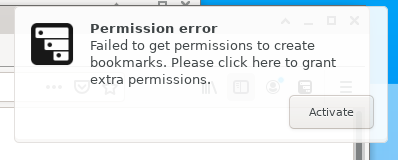
When I click the notification itself, it becomes just closed and nothing happen. When I click the "Activate" button, TST opens the options page to grant the permission as I expected.
This looks to be a bug of Firefox itself. TST registers a listener for notifications.onClicked (notifications.onButtonClicked is not supported on Firefox) but actually the listener is called only when we click the "Activate" button in the notification.
 piroor
on 30 Nov 2020
piroor
on 30 Nov 2020
On Windows the notification popup has no button and clicking on the notification itself opens the options page as I expected.
piroor
on 30 Nov 2020
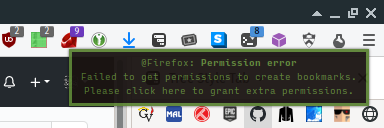
I use dunst for notifications and it doesn't support buttons so none are shown.
txtsd
on 30 Nov 2020
Why don't you request these permissions at install time instead of dynamically?
txtsd
on 30 Nov 2020
I found the option under Context Menu and enabled it. You can close this issue if you don't think you can enhance this UX.
txtsd
on 30 Nov 2020
Why don't you request these permissions at install time instead of dynamically?
There are some reasons:
- Some people cannot install TST if it requests too many permissions due to their company's security policy. Thus I list only critical permissions statically in the
manifest.json. - The method
permissions.request()is callable only from some limited cases due to security reasons. Sadly the event handler for the context menu is out of allowed cases.
I found the option under Context Menu and enabled it.
Yes, the notification should open the options page and scrolls to the section when it is clicked. And it works as expected for me on Windows and Ubuntu. Thus I thought that it is a problem of WebExtensions API provided by Firefox itself or the notification provider of the platform.
piroor
on 30 Nov 2020
That's absolutely fair. Thanks for explaining it well!
txtsd
on 30 Nov 2020
I misunderstood the restriction, permissions.request() is callable from the context menu actually.
But there is another restriction. When I called permissions.request() the permission popup does not appear, if the context menu is opened on a background tab. The requester is unexpectedly bound to the context tab instead of the active tab, so the popup is shown when I activate the tab after the context menu is closed. Hmm...
piroor
on 1 Dec 2020
1679925 - Permission requesting popup is unexpectedly bound to the context tab instead of the active tab when permissions.request() is called from the context menu on a background tab
https://bugzilla.mozilla.org/show_bug.cgi?id=1679925
piroor
on 1 Dec 2020
When I click the notification itself, it becomes just closed and nothing happen. When I click the "Activate" button, TST opens the options page to grant the permission as I expected.
The "Activate" button is defined here:
https://searchfox.org/mozilla-central/rev/168c45a7acc44e9904cfd4eebcb9eb080e05699c/toolkit/system/gnome/nsAlertsIconListener.cpp#181
Firefox's notification popup on Linux is implemented based on "libnotify". Sadly it looks to provide only an ability to handle an action bundled to a button, instead of a handler for clicking on the notification popup itself.
https://developer.gnome.org/libnotify/0.7/NotifyNotification.html#notify-notification-add-action
This looks to be a reason why clicking of the notification itself is ignored on my case.
On the other hand, dunst looks to override Firefox's notification with its own one. Dunst has ability to customize button actions via its config file, I think this looks to mean that Firefox's default button handler for the "Activate" button is ignored while dunst is running. If my understanding is correct, dunst is not compatoble to Firefox's full-featured notifications and it is a problem of dunst itself.
piroor
on 1 Dec 2020
I've reported an issue to Dunst: https://github.com/dunst-project/dunst/issues/786
piroor
on 1 Dec 2020
There are important information to use Dunst with Firefox: https://github.com/dunst-project/dunst/issues/786#issuecomment-736351219 and https://github.com/dunst-project/dunst/issues/786#issuecomment-736452341
- Middle click on the notification will trigger the default action (on TST's notification it will be treated as a click on the button in a notification.)
A keyboard shortcut (Ctrl-Shift-period by default) will show the "context menu" for the notification, then you can trigger the default action from the menu. Please note that this feature depends on another softwareDefine a custom keyboard shortcut with a command linedmenu(so you'll need to install it at first.)dunstctl actionfor the desktop environment.- Edit the line
mouse_left_click = close_currentin the~/.config/dunst/dunstrcasmouse_left_click = do_action, close_current, then the notification will behave like the one on Windows and other platforms: clicking on the notification triggers the default action before it is closed.
piroor
on 1 Dec 2020
Related issues
 nyanpasu
·
28Comments
nyanpasu
·
28Comments
 ssokolow
·
27Comments
ssokolow
·
27Comments
 Zer0t3ch
·
27Comments
Zer0t3ch
·
27Comments
 cebas
·
29Comments
cebas
·
29Comments
 Dimas-sc
·
32Comments
Dimas-sc
·
32Comments