Treestyletab: Do not automatically follow the browser for dark theme
Noticed this "Always apply browser's theme to the sidebar (on Mixed, Plain and Vertigo)." in the release notes, changes the theme which I specifically chose for the non-inverted colour theme.
Could there be an checkbox for this instead?
 alexkoay
All 14 comments
Workaround stylesheet to deactivate browser theme colors:
https://github.com/piroor/treestyletab/issues/2662#issuecomment-665806899
Description of the background why I removed the option:
https://github.com/piroor/treestyletab/issues/2662#issuecomment-665815487
 piroor
on 30 Jul 2020
piroor
on 30 Jul 2020
I definitely see the point in following the browser in the default theme(s). Maybe it would make sense though to have an explicit light theme, just as there is an explicit dark theme. Right now you can choose between "Plain" and "Plain Dark" for example. What I propose is to have "Plain", "Plain Light", and "Plain Dark". That way, the default could follow the browser, but still have the option to force either dark or light mode depending on preference.
 auno
on 30 Jul 2020
auno
on 30 Jul 2020
@auno Sorry but I'm negative to add new built-in theme anymore. The theme "Plain Dark" was originally introduced as a variation friendly to the "Dark" Firefox theme because when I added it Firefox didn't provide ability to get colors really used on Firefox UI. Today regular "Plain", "Mixed" and "Vertigo" are rendered with dark colors cited from Firefox's "Dark" theme, so possibly it is the time to remove the "Plain Dark" from the list of built-in theme of TST.
piroor
on 30 Jul 2020
@piroor It seems "Plain" theme takes wrong colors from browser. After update (to 3.5.17) my TST toolbar turned high contrast black and white, while "Plain" was selected. In browser itself theme is "Dark" so all my sidebar content (bookmarks, history) is drawn in shades of gray(rgb(56, 56, 61) to be precise), except TST - in the same sidebar - which is almost pure black - rgb(12, 12, 13).
I find this behavior inconsistent to the idea of inheriting browser theme colors.
 Mesqalito
on 3 Aug 2020
Mesqalito
on 3 Aug 2020
@Mesqalito I've found some bugs around parsing of color values provided by a built-in Firefox theme "Dark", and I realized that in most cases "toolbar" color is suitable for tabs. A new version 3.5.19 will contain the fix, now it is waiting for a review.
piroor
on 4 Aug 2020
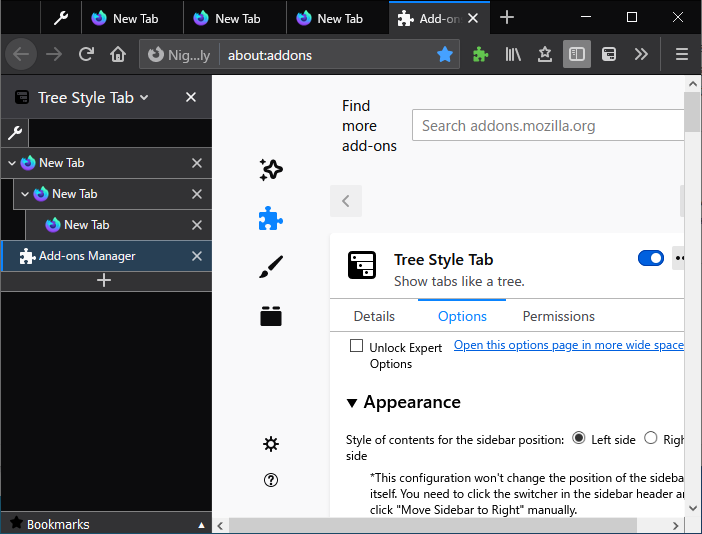
Screenshot on the latest development build:
piroor
on 4 Aug 2020
Looks great.
Also, why background is black on your screenshot? Is it taken from theme also? Because I couldn't find any element in Firefox with that color - background of Bookmarks and History is gray.
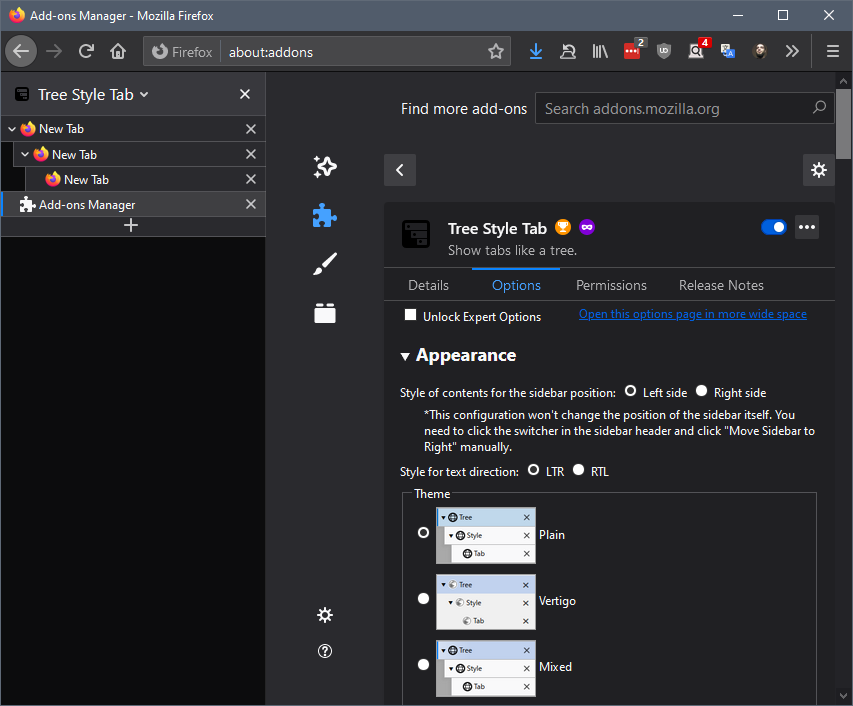
Upd: I've found it - it's the color of drag area when you remove title bar. But is it intended?
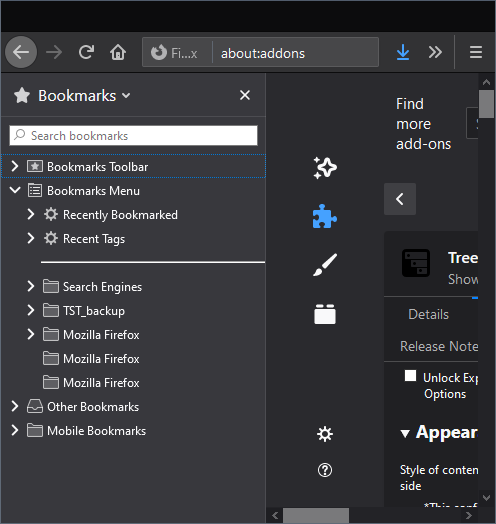
Upd2: TBH, I don't see any sense in explicit TST themes at all if TST can correctly inherit browser theme - any theme, actually. It's just some thing that user shouldn't even think about when installing your plugin - it could just work out of the box. And we still have an ability to use custom CSS to style anything (which is synced between FF instances, btw, cool).
Mesqalito
on 4 Aug 2020
Upd: I've found it - it's the color of drag area when you remove title bar. But is it intended?
Yes. The background of tabs is colored with frame (formerly named accentcolor) of the active theme.
https://developer.mozilla.org/en-US/docs/Mozilla/Add-ons/WebExtensions/manifest.json/theme#colors
piroor
on 4 Aug 2020
I now see the point - I had native tab bar hidden so this color never appeared. This though brings in a dilemma - how to treat tabs on sidebar - as sidebar menu or as tabs, which browser paints differently. I believe there would be both who would want it to look like tabs and like sidebar menu. So that would be a meaningful choice of "themes", or even choice of kind of styling inheritance - "none", "as tab bar", "as sidebar".
Mesqalito
on 4 Aug 2020
I agree that sidebar-like appearance is good for some people, but I have no plan to make it a built-in option.
Basically TST's UI is designed to behave like the tab bar, thus I think that an appearance like the tab bar is reasonable. And, I have a policy about TST's UI options: if it is easily done by CSS or it is not critical issue, I don't implement it as a built-in option, and the user style rules option will be good alternative for such purposes. This is important for me to keep TST's maintainability - less codes will reduce cost of maintenance.
piroor
on 6 Aug 2020
That's why I suggest you to remove themes as they are now ;-)
Mesqalito
on 7 Aug 2020
@piroor Anything more to do with this one?
 irvinm
on 18 Aug 2020
irvinm
on 18 Aug 2020
OK, I've decided to remove Vertigo and Mixed. I've added user style rules for people who like them:
https://github.com/piroor/treestyletab/wiki/Mixed-theme-(patch-for-the-theme-%22Plain%22)
https://github.com/piroor/treestyletab/wiki/Vertigo-theme-(patch-for-the-theme-%22Plain%22)
piroor
on 18 Aug 2020
Workaround style rules for the main topic of this issue: https://github.com/piroor/treestyletab/wiki/Code-snippets-for-custom-style-rules#disable-browser-theme-colors-and-images-2662
And side topics were already fixed.
Now I think this issue can be closed.
piroor
on 18 Aug 2020
Related issues
 Evotron
·
3Comments
Evotron
·
3Comments
 ElhemEnohpi
·
4Comments
ElhemEnohpi
·
4Comments
 NightSharp
·
3Comments
NightSharp
·
3Comments
 array
·
4Comments
array
·
4Comments
 mreppen
·
3Comments
mreppen
·
3Comments
Most helpful comment
@piroor It seems "Plain" theme takes wrong colors from browser. After update (to 3.5.17) my TST toolbar turned high contrast black and white, while "Plain" was selected. In browser itself theme is "Dark" so all my sidebar content (bookmarks, history) is drawn in shades of gray(rgb(56, 56, 61) to be precise), except TST - in the same sidebar - which is almost pure black - rgb(12, 12, 13).
I find this behavior inconsistent to the idea of inheriting browser theme colors.