Treestyletab: Firefox theme background image suddenly used for TST
Short description
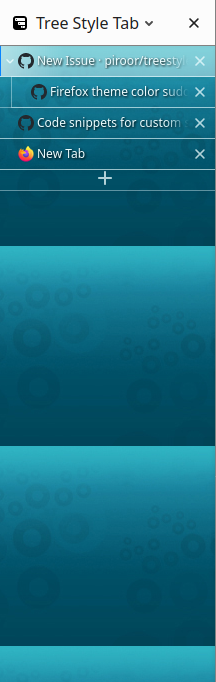
I just had TST update and my Firefox theme background image now repeats in the TST sidebar background with the Mixed theme. Since Firefox theme background images were never intended for this use and to be repeated vertically, it looks completely unreadable now. It was plain gray before, as the TST theme chooser's little image also shows. How do I undo this unwanted breaking change?
Reminds me of a very similar past breaking change which only used Firefox theme colors, not the background image: https://github.com/piroor/treestyletab/issues/2197.
Expected result
Gray background as before the update.
Actual result
Repeating Firefox theme background image:
Environment
- Platform (OS): Xubuntu 18.04
- Version of Firefox: 78.0.2
- Version (or revision) of Tree Style Tab: 3.5.14
 sim642
All 9 comments
I noticed now that while switching TST theme, the Mixed theme initially loads with the previous and expected gray background. After 0.5s it loads the Firefox theme background image instead. So clearly the solid gray is still part of TST but gets dynamically overridden by the Firefox theme image.
sim642
on 29 Jul 2020
As a workaround, you can expand the background image to cover the sidebar area with this styles declaration:
#background {
background-position: left;
background-size: cover;
}
Screenshot:
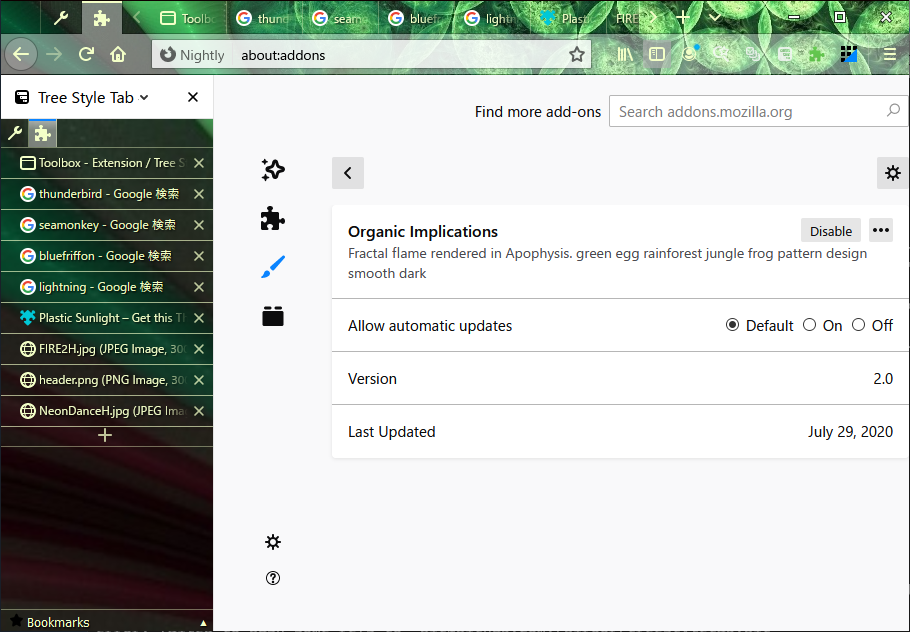
I've introduced this as a part of the builtin style with the commit e4b6f7b.
And, if you don't like to apply background images to the sidebar, this will help you:
#background {
background-image: none !important;
/* and you can override the background color also.
background-color: darkgray !important;
*/
}
 piroor
on 29 Jul 2020
piroor
on 29 Jul 2020
Thanks for the quick reply! The CSS workarounds improve the situation but even with an overridden gray background color it doesn't look exactly as it did before (and it doesn't look like what the TST theme icon shows). The background (image or color) shows through the tab rows themselves as opposed to them being lighter gray and the active one being light blue.
When switching between TST themes, it momentarily loads without any Firefox theming applied with the previous and expected colors. I just want to still have that. When the Firefox theming is applied, the tab rows' backgrounds become transparent etc, which is nothing like what the Mixed theme icon shows.
sim642
on 29 Jul 2020
OK, here is an example to unset all colors and images cited from the browser theme:
:root {
  --browser-background: unset;
  --browser-bg-base: unset;
  --browser-bg-less-lighter: unset;
  --browser-bg-lighter: unset;
  --browser-bg-more-lighter: unset;
  --browser-bg-lightest: unset;
  --browser-bg-less-darker: unset;
  --browser-bg-darker: unset;
  --browser-bg-more-darker: unset;
  --browser-fg: unset;
  --browser-fg-active: unset;
  --browser-border: unset;
  --browser-header-url: unset;
  --browser-bg-url: unset;
  --browser-bg-for-header-image: unset;
  --browser-bg-hover-for-header-image: unset;
  --browser-bg-active-for-header-image: unset;
  --browser-textshadow-for-header-image: unset;
  --browser-tab-highlighter: unset;
  --browser-loading-indicator: unset;
  --theme-colors-frame: unset;
  --theme-colors-tab_background_text: unset;
  --theme-images-theme_frame: unset;
}
I removed the option to ignore browser theme on TST 3.5.14 for simplification.
Basically I think that TST's sidebar should behave as a part of Firefox's UI, so TST's tabs should be shown with colors same to Firefox's UI when you change the theme of the Firefox. This is a message from TST: "this area is browser's UI". Colors mismatched to Firefox itself will show TST's UI as an alien (foreigner) and it will remind the fact to users needlessly: TST's UI is just a fake. I really want to suppress such a feeling of strangeness, because I don't like UI different from the standard UI on the "platform".
(So I thought that the background of tabs should be dark purple same to Firefox's native tab bar, but sadly it was too dark and stressful for me on the sidebar. This is the reason why it is darkgray by default.)
piroor
on 29 Jul 2020
Thank you again! That seems to do exactly what I wanted and how it looked previously. I understand the motivation for the change but I'm just very used to how it looked for years.
I'm satisfied with the workaround and feel free to close the issue then. Since there may be others like me who don't like such change, it may be good to also put that unsetting CSS also to the wiki page for custom CSS.
sim642
on 29 Jul 2020
I've added the workaround to the snippets. I hope it helps people having same demand.
https://github.com/piroor/treestyletab/wiki/Code-snippets-for-custom-style-rules#disable-browser-theme-colors-and-images-2662
piroor
on 29 Jul 2020
@piroor
that fix doesn't seem to work with dark theme in developer edition 80.0b1

 Zelman88
on 30 Jul 2020
Zelman88
on 30 Jul 2020
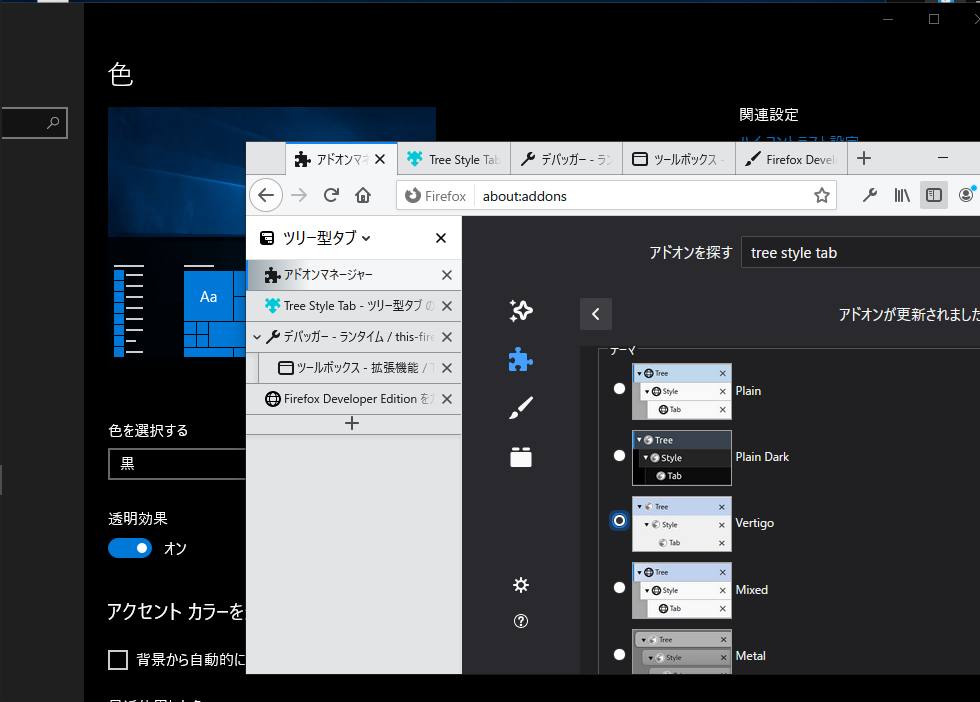
@Zelman88 The dark color on your case is applied specially for the Dark color scheme of the platform itself. It is applied always even if you choose the "Light" theme of Firefox itself, hmm... (Updated) On TST 3.5.15 and olders some colors are not calculated correctly, and I've introduced a fix with the commit c39e0e9. Now you'll see better colors when you choose the "Light" theme with the Dark color scheme of the platform.
Screenshot (Windows 10, Dark mode, "Light" Firefox theme, "Mixed" TST theme, TST latest development build):
piroor
on 30 Jul 2020
Related issues
 Lej77
·
4Comments
Lej77
·
4Comments
 mreppen
·
3Comments
mreppen
·
3Comments
 allixx
·
4Comments
allixx
·
4Comments
 Evotron
·
3Comments
Evotron
·
3Comments
 ElhemEnohpi
·
4Comments
ElhemEnohpi
·
4Comments
Most helpful comment
OK, here is an example to unset all colors and images cited from the browser theme: