Treestyletab: Changes in Tree Style Tree Broke "tst-in-separate-window" Addon
Please see the issue posted here:
https://github.com/Lej77/tree-style-tab-in-separate-window/issues/6
The author of tst-in-separate-window" responded:
Tree Style Tab's sidebar just shows a special web page provided by Tree Style Tab. This extension simply determines that web page's URL and opens it in a tab which is then moved to a new window. When I made this extension it did indeed work as you describe (the separate window and the sidebar were both kept up to date) but changes in Tree Style Tab has since caused this new behavior. It seems that Tree Style Tab expects there to only be a single "sidebar" web page which is a reasonable expectation but it unfortunately makes the user experience with this extension a lot worse.
I can't think of a simple fix via changes to this extension (I would have to essentially re implement the sidebar page myself which seems like a lot of work). Maybe Tree Style Tab could make a simple change to allow for having several "sidebar" web pages open at once again but I have no idea how difficult that would be.
Can this issue be fixed in TST?
p.s. This is also a follow up of the issue as described here:
https://github.com/piroor/treestyletab/issues/2617
 viking2
All 21 comments
I made a comment in #2617 that describes how My Tree Style Tab in Separate Window extension works.
 Lej77
on 21 Jun 2020
Lej77
on 21 Jun 2020
Hmm, currently TST's sidebar page is strongly bundled to the window itself internally. Something extra mechanism to change the tracking target window looks to be required. Not only on the sidebar page, it is required on the background page side.
 piroor
on 21 Jun 2020
piroor
on 21 Jun 2020
- 954d031ba55cc22ff071cb5877d0989a2ee3f397
- e246b1a5682a1599e6e7facf58f4bc0fc7fdf7b6
- 5f2e39fe242767f6b384b5cb249d1265fab4c6db
- 10b92743a0dc52ab1792b5df62ed490a6b929e49
With these changes now you can open sidebar page safely for a specific window with the URL parameter windowId, like moz-extension://xxxxxxxx-xxxx-xxxx-xxxx-xxxxxxxxxxxxx/sidebar/sidebar.html?style=mixed&windowId=1
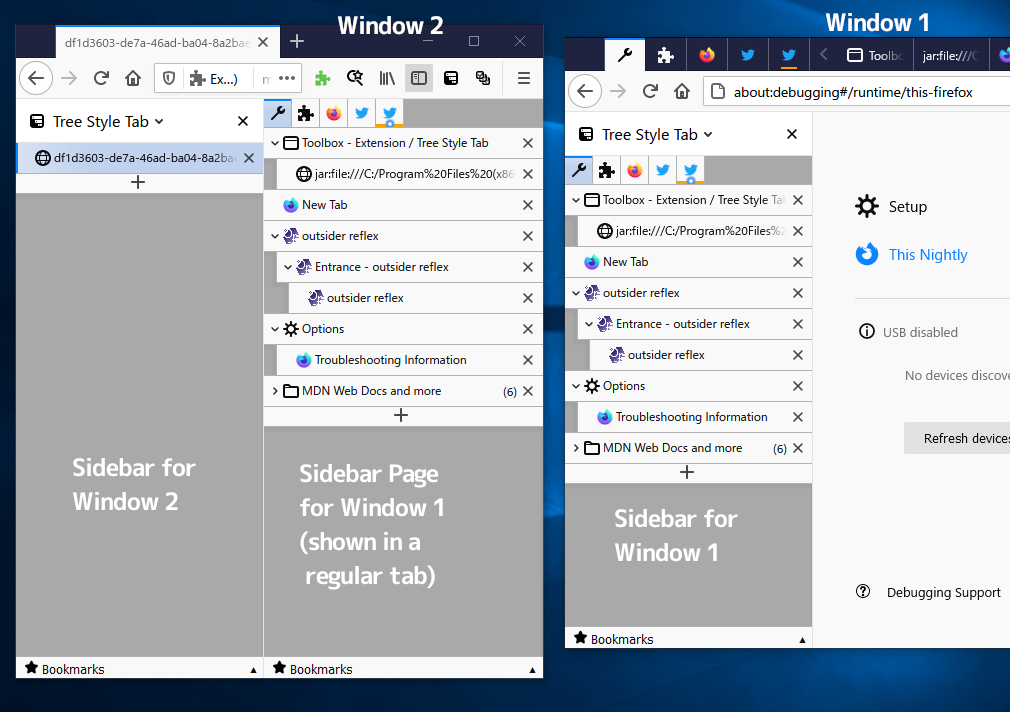
piroor
on 21 Jun 2020
@piroor ,
I must say that I am really impressed with how quickly your respond to the issues posted here! (Domo Arigato!)
However, I am not clear on what you described above.
I assume that the modifications were meant for @Lej77 to update the "tree-style-tab-in-separate-window" extension?
Or can I use this directly myself to view my RSS "sidepanel" and TST in the same window?
If so, where can I get the extension code "xxxxx...."?
viking2
on 21 Jun 2020
@piroor Wow, thanks! Actually specifying the window id would allow me to greatly simplify the extension's logic. But what is the style=mixed query parameter supposed to do? Does it specify the Tree Style Tab theme? Is it necessary or optional? I can probably figure it out but any clarification would be appreciated!
@viking2 It seems Tree Style Tab will be updated to fix the issue of the sidebar not updating when the new window is opened (I might need to make a small change to my extension for this to work but maybe not). Tree Style Tab will also allow specifying what window an opened "sidebar" page should track which will allow me to open such a page in a new window directly instead of opening it in the window it should track and then moving the page/tab to a new window. This should fix some auto scroll annoyances and also make the new window open quicker!
Lej77
on 21 Jun 2020
I assume that the modifications were meant for @Lej77 to update the "tree-style-tab-in-separate-window" extension?
Sorry for less information, my previous comment aimed this.
Or can I use this directly myself to view my RSS "sidepanel" and TST in the same window?
Currently I have no plan to add a command to undock the sidebar to TST itself. because it needs more codes (actually tree-style-tab-in-separate-window did that) but I won't use it by myself.
If so, where can I get the extension code "xxxxx...."?
You can know the internal ID of TST itself via some methods.
- Looking at
about:debugging - Opening
ext+treestyletab:startupor something TST's contents in a regular tab.
piroor
on 21 Jun 2020
But what is the style=mixed query parameter supposed to do?
Ah, I forgot to remove it from the example. It is optional. If you don't add the parameter TST detects the chosen style automatically. TST just uses the parameter internally because waiting for user preferences are completely loaded takes some time.
piroor
on 21 Jun 2020
@piroor Okay, that makes sense! Thank you!
Lej77
on 21 Jun 2020
I've added a new shorthand URI ext+treestyletab:tabbar. On the next release you just load ext+treestyletab:tabbar?windowId=..., then TST automatically redirects it to the real URL.
piroor
on 4 Jul 2020
@piroor Thanks! I didn't think about such a change but this would mean that I don't need to figure out Tree Style Tab's internal id by parsing URLs which should make my extension a lot simpler to use since users don't need to grant it the tabs permission!
Lej77
on 4 Jul 2020
@piroor I was testing the development build of the new 3.5.6 version of Tree Style Tab and I noticed that the ext+treestyletab:tabbar?windowId=3 URI seems to be redirected to moz-extension://xxxxxxxx-xxxx-xxxx-xxxx-xxxxxxxxxxxx/sidebar/sidebar.html?ext%2Btreestyletab%3Atabbar%3FwindowId%3D3. The same happens without the windowId query parameter. If I specify the full URI moz-extension://xxxxxxxx-xxxx-xxxx-xxxx-xxxxxxxxxxxxx/sidebar/sidebar.html?windowId=1 it works though (and it controls the expected window). So it seems that the redirection doesn't work correctly or perhaps the development build is broken in some way?
Lej77
on 5 Jul 2020
@Lej77 Sorry I missed the redirection with query parameters. The commit e48be28 should fix it.
piroor
on 5 Jul 2020
@piroor Thanks!
Lej77
on 5 Jul 2020
I have released a new version (v5.0) of my Tree Style Tab in Separate Window extension. Thanks to all these changes it no longer needs to determine TST's internal id which means that it doesn't need to request the "tabs" permission the first time it is used (it is optional since the user could also manually enter TST's internal id).
The new ?windowId=3 query parameter allows opening the "sidebar" page directly in a new window instead of the old behavior that opened it as a new tab in the current window and then moved it to a new window. This should be faster and also means that opening the "sidebar" window won't cause the TST sidebar to scroll back to the currently active tab.
Lej77
on 6 Jul 2020
Thank you for the update!
I've tried the new version of Tree Style Tab in Separate Window and realized that tab context menu commands are not available on separate windows. It is because TST's simulated menu items are restricted just on sidebar panel. After the commit 83bc320 you can use those menu items on TST's tabbar always.
piroor
on 6 Jul 2020
Wow, thank you! I just tested the latest development version of Tree Style Tab and it works perfectly!
Lej77
on 6 Jul 2020
Sorry, but I don't know how to check which commits are included in the signed version. How do I do that?
I have TST 3.5.7. Does this include commit 83bc320 ?
I still can't see the menu in TST-in-Separate-Window (v. 5.0)
viking2
on 9 Jul 2020
@viking2 the commit your referenced is not in 3.5.7. It will be in the next version.
If you want to see if that commit fixes the issue, you could create a temporary profile and load the nightly TST build.
 irvinm
on 9 Jul 2020
irvinm
on 9 Jul 2020
@viking2 One workaround for accessing the normal context menu items that you could try to use until the next TST version is released is to hold down the ctrl key while right clicking, this will open Tree Style Tab's "fake" context menu which has all the normal context menu items but no items that were added by other extensions. Note that if you have the Tab Unloader for Tree Style Tab extension installed then you might need to change its settings so that it doesn't unload tabs when you right click them while holding a modifier key.
Lej77
on 9 Jul 2020
@viking2 can you try with the latest and close this item if resolved?
irvinm
on 15 Jul 2020
@viking2 can you try with the latest and close this item if resolved?
Works now. Thanks both of you!
viking2
on 15 Jul 2020
Related issues
 mreppen
·
3Comments
mreppen
·
3Comments
 Evotron
·
3Comments
Evotron
·
3Comments
Evotron
·
3Comments
Evotron
·
3Comments
 ElhemEnohpi
·
4Comments
ElhemEnohpi
·
4Comments
 emceekain
·
3Comments
emceekain
·
3Comments
Most helpful comment
Works now. Thanks both of you!