Treestyletab: Clicking on tab title randomly opens it in new window
Sometimes when clicking on a tab title, it is opened in a new window. It's been like this for the past couple of months and it is very irritating.
This seems to occur randomly and I've no idea how to reproduce it. I'm sure I'm not doing anything weird like clicking and dragging.
It looks similar to https://github.com/piroor/treestyletab/issues/949 but the key difference is that it happens when I clicking on the tab title.
I'm on FF 74.0 and TST 3.4.6 on Win10 Pro/64 v1909.
Short description
Steps to reproduce
- Start Firefox with clean profile.
- Install TST.
4.
Expected result
Actual result
Environment
- Platform (OS):
- Version of Firefox:
- Version (or revision) of Tree Style Tab:
 mr-brunes
All 5 comments
This looks same to #2185. It is due to Firefox's unsolved bugs:
 piroor
on 14 Mar 2020
piroor
on 14 Mar 2020
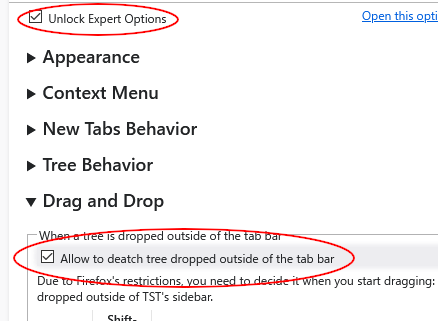
If you never want to detach tabs by drag and drop, there is an option to deactivate detaching of tabs from the window with such operations. It may suppress this annoying issue:
piroor
on 14 Mar 2020
Useful info thanks. I have a 4k monitor and Logitech trackball, which might be relevant, but in any case I see that #2185 is closed now.
The trouble with disabling the drag'n'drop option is that I find dragging a tab to be very useful function, not least when a tab gets randomly opened in a new window! ;-) Alternatively an 'undo' style Ctrl-Z function would be very handy.
Any other suggestions to try?
mr-brunes
on 14 Mar 2020
Alternatively an 'undo' style Ctrl-Z function would be very handy.
It looks useful for non TST users also. In old days I developed an extension named "Undo Tab Operations". It was outdated and didn't migrate to WebExtensions. But, today it looks to be able to be implemented better based on WebExtensions API. I hope someone implement such an addon, then I'll make TST compatible with it.
Any other suggestions to try?
Sorry but I think there is nothing can be done for now... This problem is clearly depends on Firefox's bug, and due to the behavior of the problem, I cannot do any workaround on TST side - except disabling the detach-on-drop feature.
piroor
on 14 Mar 2020
@piroor I think we should close this for now.
 irvinm
on 9 May 2020
irvinm
on 9 May 2020
Related issues
 emceekain
·
3Comments
emceekain
·
3Comments
 woj-tek
·
3Comments
woj-tek
·
3Comments
 nneonneo
·
4Comments
nneonneo
·
4Comments
 ElhemEnohpi
·
4Comments
ElhemEnohpi
·
4Comments
 Andrade
·
3Comments
Andrade
·
3Comments
Most helpful comment
If you never want to detach tabs by drag and drop, there is an option to deactivate detaching of tabs from the window with such operations. It may suppress this annoying issue:
