Treestyletab: Drag/drop inside a website detaches first tab
Short description
Once in a while, when I select a text within a website and drag it for very short time (mostly by mistake, I'd like to select the text for tracking my reads) TST decides to detach my first tab to separate window. Mouse never leaves to the TST area or outside of the browser. This happens regardless of active tab is the first one or not, always the first tab detaches.
Steps to reproduce
(Sadly I am not able to reproduce this every time, this happens once in few days that I am not able to understand the main reason, sorry for the weirdness)
- Start Firefox with clean profile.
- Install TST.
- Open multiple tabs
- Select a text and drag/drop for very short time
Expected result
TST should not activate
Actual result
I have a new window with the first tab
Environment
- Platform (OS): Linux 5.3.8 NixOS
- Version of Firefox: 69.0.2 (64-bit)
- Version (or revision) of Tree Style Tab: 3.2.1
 seqizz
All 14 comments
I couldn't reproduce this on my environment (Windows 10). Is this Linux specific?
Anyway I've never written any code to open new tab with a drag-and-drop on the content area. Thus I think it should be caused by Firefox or other reasons.
 piroor
on 4 Nov 2019
piroor
on 4 Nov 2019
Yeah, this can be platform or even WM/DE specific (I am on plasma desktop btw). I also sometimes can't even drag selected text on the content area so it might be even a firefox bug.
Let's see if anyone else realizes such issue :slightly_smiling_face:
seqizz
on 4 Nov 2019
I've got another report about (maybe) same problem on Windows 10 via Twitter. This looks a non-platform specific...
Could you upload a screen cast? It possibly give me some hints to debugging.
piroor
on 9 Nov 2019
And, if you OK could you collect debug logs of TST? Steps:
- Go to TST's options.
- Check "Debug mode" under the "Development" section.
- Expand the list of logged modules and check only the module "sidebar/drag-and-drop".
- Go to about:debugging.
- Click "This Firefox".
- Click "Inspect" of the item for TST.
- Activate the "Console" tab.
Then logs from drag and drop module will appear in the console. If the detaching of the tab is produced by TST, something information will appear in the console.
And there is a workaround for the problem: TST Options => "Drag and Drop" => "Drag" => "Do nothing" should prevent unexpected tab detaching, if the problem is produced by TST.
piroor
on 9 Nov 2019
Hi again,
I set up the debugging, but sadly I cannot reproduce the issue while recording. It happens once in few days generally but I'll try to find a way to produce it reliably and send a recording with logs if I can :+1: maybe it's an issue with some specific page or some other weird case is effecting the behavior.
seqizz
on 9 Nov 2019
Happened again. While I couldn't reproduce with the same action to record, good thing I left the debugging on, so here is the console output:
tst<Sidebar-1>: 08:49:56.726 sidebar/drag-and-drop:      onDragEnd,
Object { mDraggingOnSelfWindow: false, mDraggingOnDraggedTabs: false, dropEffect: "none" }
common.js:377:13
tst<Sidebar-1>: 08:49:56.726 sidebar/drag-and-drop:     finishDrag common.js:377:13
tst<Sidebar-1>: 08:49:56.978 sidebar/drag-and-drop:     workaround for bug 1548949: detect dragged tabs are handled by me or not.
Object { handledBySomeone: false, draggedTabs: "1573484106456-35013/3", lastDroppedTabs: "" }
common.js:377:13
tst<Sidebar-1>: 08:49:56.980 sidebar/drag-and-drop:     dragend at:
Object { windowX: 1734, windowY: 66, windowW: 187, windowH: 1098, eventScreenX: 1103, eventScreenY: 404, eventClientX: 0, eventClientY: 0, fixedEventScreenX: 1103, fixedEventScreenY: 404, … }
common.js:377:13
tst<Sidebar-1>: 08:49:56.982 sidebar/drag-and-drop:     trying to detach tab from window common.js:377:13
Unhandled Error:  Error: "Invalid tab ID: 47" createErrorSuppressor@moz-extension://fc8e22f8-488b-4dc4-8c42-7991b86fa201/common/api-tabs.js:117:34
onUpdated@moz-extension://fc8e22f8-488b-4dc4-8c42-7991b86fa201/background/api-tabs-listener.js:263:24
api-tabs.js:145:17
Just dragged a link for a short while within the page and got the tab detached.
seqizz
on 12 Nov 2019
@seqizz Thanks a lot! Hmm, the log really says that drag and drop was invoked on the sidebar...
Extracted event coordinates from the log:
windowX: 1734,
windowY: 66,
windowW: 187,
windowH: 1098,
eventScreenX: 1103,
eventScreenY: 404,
eventClientX: 0,
eventClientY: 0,
fixedEventScreenX: 1103,
fixedEventScreenY: 404,
From this information I thought that you put the sidebar at the right side of the window as the figure following:
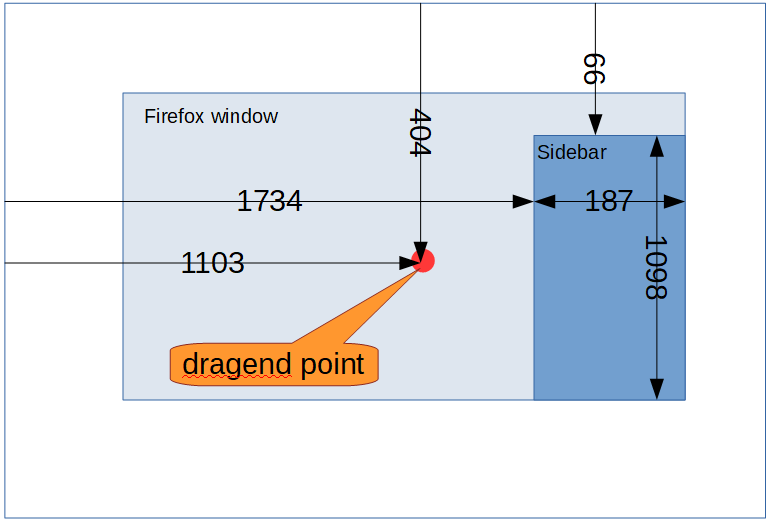
Is it true?
And, could you paste more logs, lines starting with onDragStart, onDragOver, onDrop and onDragEnd?
piroor
on 12 Nov 2019
Yep, that seems accurate.
Hmm, that's odd, I can't see any start with close timestamp. Here is the wider log:
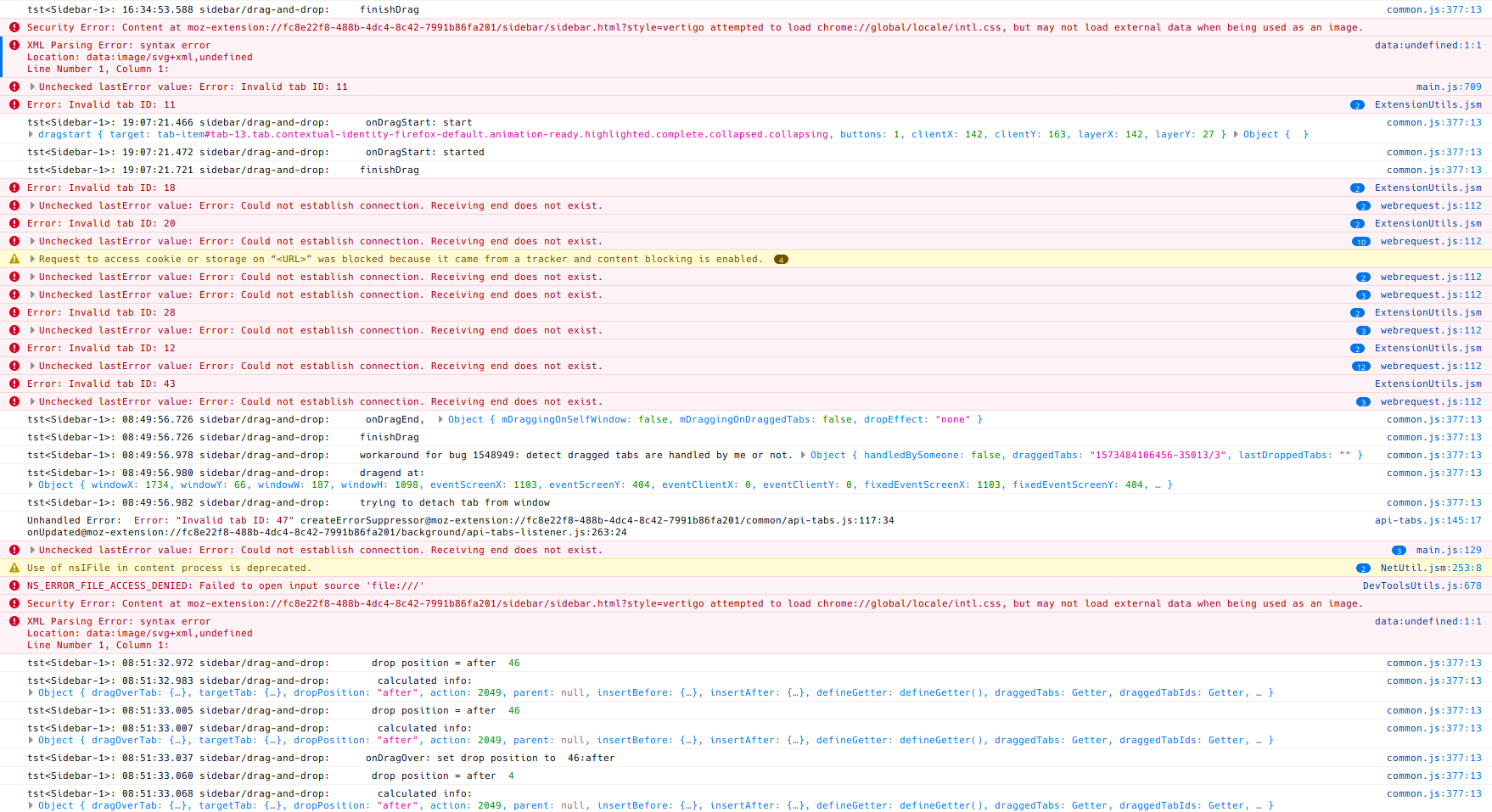
Text: https://gist.github.com/seqizz/5361dfe2d2a68a50f3e8a6a2ad33da92
seqizz
on 12 Nov 2019
Thanks! Hmm, this looks very similar to a zombie session problem I met at macOS (1476195 - Dragstart on a child process produces zombie drag session in the parent process and breaks subsequent drag-and-drops on macOS). The bug happened because Firefox failed to cancel drag session at the chrome process side when the mouse button is released. Firefox's drag and drop behavior is fragile a little especially when the drag session is invoked across the chrome process and child processes.
And I unintentionally reproduced this problem on my environment (Windows 10). On my case, a zombie drag session might be produced when I started to drag a tab and dropped it immediately, and after that I couldn't drag-and-drop tabs anymore while the zombie session was alive - the drag action looked to be canceled immediately. This status is very similar to the case: bug 1476195. After that I tried to drag a link in the content area and dropped it immediately, then the zombie drag session looked to be canceled and a dragend event was unexpectedly dispatched at the sidebar. I think this is same to the problem happening on your environment.
piroor
on 12 Nov 2019
Sadly there is no workaround. I need to research more inside Firefox and write a patch...
piroor
on 12 Nov 2019
Sounds like some thing/action should clean the stale drag sessions.
Alright then, thanks for digging. I'll be watching :eyes:
seqizz
on 12 Nov 2019
piroor
on 12 Nov 2019
As I described at the bug, the problem you saw looks already partially fixed on Nightly 72.0a1.
piroor
on 12 Nov 2019
Thanks for all your hard work.
I'm sad that issue seems to not be 100% resolved by Mozilla.
I had incidents when from unknown reason my current tree tab (sometimes even 200+ tabs) just "decided" to go to another window. That took big tall on my Intel N3450 (Atom CPU).
Now I'm almost sure that it is connected to "zombie drag" issue of FireFox (even up to date version 77.0.1). As a precaussion I changed default behavior of TST to move tree tab to another window when it is dragged outside of sidebar.
Are you able to share "sidebar-example.xpi" again. I can't download it from that issue attachment.
 Githubwoman
on 27 Jun 2020
Githubwoman
on 27 Jun 2020
Related issues
 mikeaustin
·
3Comments
mikeaustin
·
3Comments
 NightSharp
·
3Comments
NightSharp
·
3Comments
 thomasetter
·
3Comments
thomasetter
·
3Comments
 waldyrious
·
4Comments
waldyrious
·
4Comments
 mreppen
·
3Comments
mreppen
·
3Comments
Most helpful comment
As I described at the bug, the problem you saw looks already partially fixed on Nightly 72.0a1.