Treestyletab: Tab close buttons partially obstructed by invisible element
Short description
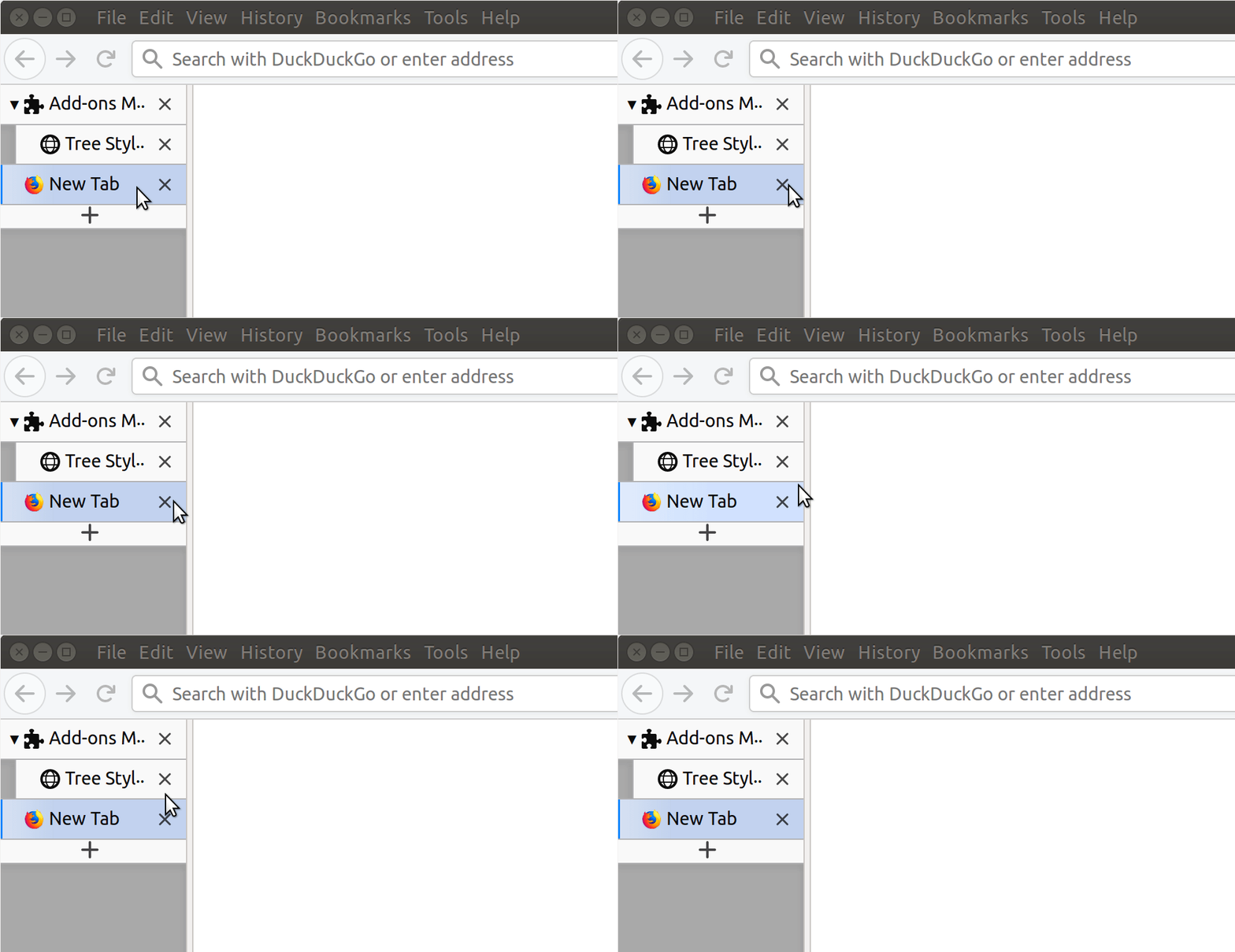
The tab close buttons seem to be partially or completely obstructed by an invisible element. Clicking on tab close buttons or on tabs does not work across the obstructed area.
Steps to reproduce
- Start Firefox with clean profile.
- Install TST.
- Create a large enough number of containers (e.g.
100) using long enough names (e.g.ABCDEFGHIJKLMNOPQRSTUVXYZabcdefghijklmnopqrstuvxyz1234). To simplify testing you can copy the attached containers.json file into your profile directory and restart Firefox.
Notes:
- The problem only happens when the list of containers is long enough such that a long click on the new tab button results in a containers list pop-up that has a scroll bar. Given that the scroll bar position matches the obstructed area, I suspect the scroll bar might be the invisible element.
- The problem only happens when at least one container has a long name, e.g.:
- "ABCDEFGHIJKLMNOPQRSTUVXYZabcdefghijklmnopqrstuvxyz1234" (54 characters) triggers the problem
- "ABCDEFGHIJKLMNOPQRSTUVXYZ1234" (25 characters) triggers the problem
- "abcdefghijklmnopqrstuvxyz1234" (25 characters, narrower text) doesn't trigger the problem.
- In my earlier attempts to reproduce the problem on my system it helped to reduce the width of the side bar.
Expected result
Clicking on the tab close button works across the whole surface area of the button.
Actual result
Clicking on the tab close button works only on a subsection of the surface area of the button.
In the animation below I am only moving the cursor across the screen without clicking any buttons.
Environment
- Platform (OS): Ubuntu 16.04 and MacOS 10.14
- Version of Firefox: 69
- Version (or revision) of Tree Style Tab: 3.1.8
 Valentin-N
All 9 comments
Thanks. Finally I've realized that there is an invisible scrollbar below the unresponsive area, and I've introduced some changes to prevent producing of such invisible scrollbars.
 piroor
on 2 Oct 2019
piroor
on 2 Oct 2019
Finally this has been identified as a regression at Firefox 69.
1585880 - "pointer-events: none" does not affect to scrollbars generated by "overflow" property
piroor
on 3 Oct 2019
Apologies if this isn't the preferred place, but it seems i'm experiencing a similar issue, but in another location on tabs.
A mouse-over of any of the TST tabs results in a dead spot, in the same location on all tabs. Moving the cursor several pixels left or right results in expected action i.e. the tab brightens, indicating available activity e.g. click to focus. Movement back to the dead zone results in the tab going back to default inactive state. The dead spot is vertically the same, up and down across each, and all tabs.
JIC: a.) I have the sidebar opened to the right side of the browser window, b.) i have tab close buttons on the left side of the tabs, and c.) it is not an issue with the default browser horizontal tabs.
Windows 7x64 | Firefox 69.0.2 | TST 3.1.8
Thanks for taking my issue, and for a most enjoyable and richly productive addon!
 drsvp
on 13 Oct 2019
drsvp
on 13 Oct 2019
@drsvp Could you try the development build?: https://github.com/piroor/treestyletab/blob/master/README.md#development-builds If yours equals to this, you won't be able to reproduce the problem anymore with the build.
piroor
on 14 Oct 2019
@piroor The linked development build fixes the dead zone issue for me, yes. It is no longer reproducible with the linked development build installed. Thanks!
drsvp
on 14 Oct 2019
piroor: after a Ffox restart this morning, i returned to the development build page and used the build to reinstall TST. i got the following in Ffox about:debugging: "Warning details
Reading manifest: Error processing variable_color_icons: An unexpected property was found in the WebExtension manifest.
Extension ID [email protected]
Internal UUID 69e07469-ed63-4dfc-9278-9217a217edfe "
i clicked the Reload button and TST reloaded, but the dead zone in each tab reported earlier is back for me. ?
[Ffox 69.0.2 x64]
drsvp
on 19 Oct 2019
@drsvp The warning you saw is not critical and unrelated to the problem. And I cannot reproduce the problem with the latest development build on Firefox 69.0.3 (64bit), Windows 10.
piroor
on 21 Oct 2019
i wanted to report back, that after updating TST to v3.2.1 just now (from Ffox addons update notification), my issue with small dead areas on all tabs is once again no longer an issue.
[jic, just prior to the TST update, i also had updated Ffox(x64) to v70.0.1 and restarted the browser, but was still seeing the dead spots]
Thank you piroor!
drsvp
on 2 Nov 2019
@piroor please close this one.
 irvinm
on 10 Feb 2020
irvinm
on 10 Feb 2020
Related issues
 Andrade
·
3Comments
Andrade
·
3Comments
 NightSharp
·
3Comments
NightSharp
·
3Comments
 stapuft
·
4Comments
stapuft
·
4Comments
 Lej77
·
4Comments
Lej77
·
4Comments
 waldyrious
·
4Comments
waldyrious
·
4Comments