Treestyletab: Options menu scaled way down
Short description
The Firefox options menu for the extension is incredibly small to the point where I cannot read most of the text without straining myself, and zooming does not solve the issue.
EDIT: I think it might have something to do with my laptop having an UHD display, because on my desktop the menu does not display this behavior.
Steps to reproduce
- Start Firefox Developer Edition with clean profile.
- Install TST.
- Go to settings for the extension and select
Options
Expected result
The text to be visible and as large as, if not larger than, the option box above the menu.
Actual result
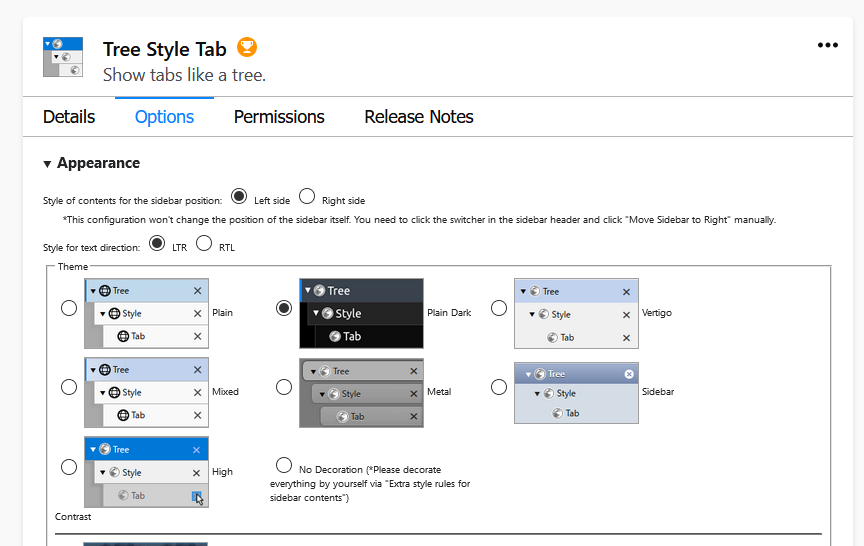
Environment
- Platform (OS): Windows 10
- Version of Firefox: 69.0b6 (64-bit)
- Version (or revision) of Tree Style Tab: 3.1.5
 ajmeese7
All 13 comments
I have the same situation with a 4k monitor. Either use "Control and +" a few times on that page to make it larger or use an addon like "Fixed Zoom" to increase the size of all of your pages.
 irvinm
on 30 Jul 2019
irvinm
on 30 Jul 2019
@irvinm zooming in doesn't work. The rest of the page's size increases while the size of the options menu remains constant
ajmeese7
on 31 Jul 2019
Wow ... you are right. Sorry, I thought that would help.
irvinm
on 31 Jul 2019
Testing this out with a bunch of my extensions, it looks like any addon that hooks its options directly into the about:addon page does not respond to scaling requests from the browser although some parts of the page DO respond to the scaling ... just not the parts related to the addon configuration. If clicking on options brings up a new page in the form of moz-extension://xxx, the entire page properly responds to scaling requests.
I am wondering if this is actually more of a Firefox defect. @piroor will need to chime in on this one.
irvinm
on 31 Jul 2019
I've tested this and odd behavior appears around inline options page of multiple addons. Not only TST, I've seen this problem with the Simple Tab Groups addon.
 piroor
on 5 Aug 2019
piroor
on 5 Aug 2019
1571614 - Miss-synchronization of the zoom level at an inline options page and the addon manager page
https://bugzilla.mozilla.org/show_bug.cgi?id=1571614
I've filed a bug.
piroor
on 6 Aug 2019
It has been resolved as a duplicated bug of:
1398481 - WebExtensions - Embedded add-on options page does not zoom when Add-ons Manager (about:addons) page is zoomed
https://bugzilla.mozilla.org/show_bug.cgi?id=1398481
piroor
on 6 Aug 2019
Sucks that they haven't fixed this yet. Thanks for creating a bug report though! Hopefully they'll get around to it eventually.
ajmeese7
on 6 Aug 2019
@ajmeese7 I might have a workaround for you. If you go into the options for TST and look under "Development" options (last section), there is a link for "Tree Style Tab Options". In my case that link is "moz-extension://90fe5206-35eb-4d30-bdee-1b4dbd492755/options/options.html#!"
That page DOES respond to scaling requests (some of the controls don't scale, but the text and graphics do) so you could see it better. Just a suggestion. You could bookmark that link for easy access as well.
irvinm
on 8 Aug 2019
One more info. TST 3.1.6 and later supports a custom URI ext+treestyletab:options as a shorthand to open the options page in a tab.
piroor
on 8 Aug 2019
Everyone, this will be fixed in FF86. (2021-02-23)
irvinm
on 20 Dec 2020
@piroor I think this can be closed as well.
irvinm
on 24 Feb 2021
Thank you for a reminder!
piroor
on 24 Feb 2021
Related issues
 Evotron
·
3Comments
Evotron
·
3Comments
 azizLIGHT
·
4Comments
azizLIGHT
·
4Comments
 waldyrious
·
4Comments
waldyrious
·
4Comments
 stapuft
·
4Comments
stapuft
·
4Comments
 hotsphink
·
4Comments
hotsphink
·
4Comments
Most helpful comment
One more info. TST 3.1.6 and later supports a custom URI
ext+treestyletab:optionsas a shorthand to open the options page in a tab.