Treestyletab: New tabs opened in incorrect position when there are some hidden tabs
Short description
New tabs opened in incorrect position when there are some hidden tabs
Steps to reproduce
- Start Firefox with clean profile.
- Install TST.
- Install Tree Unloader for Tree Style Tab
- In option page of Tree Unloader, turn on tab hiding and grant required permissions
- Open 2 tabs A and B
- Unload B with Tree Unloader. Although B is hidden in the actual tab bar, it is still visible in TST sidebar.
- Open a new child tab C from tab A
The tree structure now looks like this:
B (hidden)
\-C
A has a twisty while B does not. Clicking on the twisty collapses C like expected.
Expected result
\-C
B (hidden)
C should be the next tab of A
Actual result
C becomes the next tab of B.
Why I suspect this is a issue of TST instead of Tree Unloader
- This issue does not exist until one or two weeks ago, when TST was updating frequently, and Tree Unloader was last updated at last year.
- I also tested TST with another tab hiding add-on (Hide Tabs), and had a similar result.
Environment
- Platform (OS): Windows 10 Home 64-bit
- Version of Firefox: Firefox 66.0 64-bit
- Version (or revision) of Tree Style Tab: 2.8.6
 Kenqr
Kenqr
All 25 comments
This looks a problem of "Tab Unloader for Tree Style Tab". Basically TST hides hidden tabs in its sidebar, but "Tab Unloader for Tree Style Tab" contains a code to remove the "hidden" class from TST's tab in the sidebar and makes the tab visible intentionally: https://github.com/Lej77/tab-unloader-for-tree-style-tab/commit/d55e92d3ce5c496f636881a36694637a91f1fbcb#diff-49afbade97980fbe595a4f98fa509a9eR3599
 piroor
on 28 Mar 2019
piroor
on 28 Mar 2019
TST intentionally ignores existence of tabs hidden by other addons. To prevent problems like this, TST appends "hidden" class to such tabs and hides them in the sidebar. Appearing of tab C next to B is a designed behavior of TST - TST expects that the tab B is invisible and C looks to be opened next to A.
piroor
on 28 Mar 2019
so its an expected result of hiding tabs, and there is no fix, because it is working as expected?
 stapuft
on 1 Apr 2019
stapuft
on 1 Apr 2019
On TST side, the current behavior is by design. However, such a conflict is unexpected. So I think that there are two directions of "fix":
- Change TST's behavior to put new child tab C before an invisible tab B. (But this looks hard for me, because it looks chaos-ful for me.)
- Change the behavior of the Tab Unloader for Tree Style Tab to unreveal hidden tabs.
Anyway, revealing of hidden tabs on the current version of TST is quite unexpected, and I cannot guarantee anything on such a situation.
piroor
on 1 Apr 2019
ok, i understand, thank you for the response, i will live with the bug, my computer is low on ram, and i have many tabs open at once, so hiding and unloading them, really allows my computer to run faster with less ram overhead from firefox and a hundred tabs open at once.
i have to say, i love your extension! it has made browsing so much better for me, specifically because of the ability to hide my tabs, but still see them. so having to reorder a child tab every now and then, doesnt really bother me any,. and on a side note, it only seems to do this for me after about an hour or so into browsing, before then i can open tabs, without them being ordered incorrectly.
but even after being miss-ordered, i can take the tab out of the group (by using the context menu "move tab to start"/"move tab to end" option), then manually dragging the tab back to the correct parent tab. it usually then stays where it is supposed to be.
stapuft
on 1 Apr 2019
I've introduced changes to determine the position to insert tabs. I hope that those changes solve this problem.
piroor
on 2 Apr 2019
Thank you for updating!
Opening a link as a new child tab seems to work correctly on a new profile now.
But on my old profiles, some parent tabs still open link as child tabs in incorrect position. I can't reproduce this behavior in a new profile, though.
However, I have found that pressing Ctrl+T to open a new tab may open the new tab in incorrect position in some cases:
- Start Firefox with clean profile.
- Install
TSTandTab Unloader for Tree Style Tab. - In option page of TST, change
Behavior for new tab actions (other toolbar buttons, keyboard shortcuts, and others)toOpen new blank tab as a child of the current tab. - In option page of Tab Unloader, turn on
Tab Hidingand granttabHidepermission. - Open a new window and press Ctrl+T two times.
A (new tab)
\-B (new tab)
  \-C (new tab)
- Drag & Drop C to previous position of B, therefore C becomes the previous sibling of B.
\-C (selected)
\-B
- Middle click on B to unload it.
\-C (selected)
\-B (unloaded)
- Press Ctrl+T, and new tab is opened in incorrect position.
\-C (selected)
\-B (unloaded)
  \-D (child of C)
Also reproduced this problem with TST+Hide Tabs with similar steps.
Kenqr
on 9 Apr 2019
@Kenqr Thanks, the case should be fixed with the commit a55011e.
piroor
on 12 Apr 2019
I close this because outdated.
piroor
on 1 May 2019
Thank you for updating, but I was still having problem in some situations.
I didn't report this because I couldn't reproduce the problem in a new profile until today.
I am not sure if you fix bugs about changing about:config. If you do, here's the steps to reproduce the problem:
- Start Firefox with a clean profile.
- Install
TSTandTab Unloader for Tree Style Tab. - In option page of
Tab Unloader for Tree Style Tab, turn onTab Hidingand granttabHidepermission. - In
about:config, changebrowser.tabs.insertAfterCurrenttotrue. - Create two tabs and rearrange them as parent and child.
\-B
- Middle click on B to unload it.
A (selected)
\-B (unloaded)
- Create a new tab with one of the following ways. New tab will be created between A and B, but is not a child of A.
- Press
Ctrl + T - Input a new address in address bar and press
Alt+Enter. - Middle click on a bookmark
- Press
C (selected)
\-B (unloaded, child of A)
- In option page of TST, change
Behavior for new tab actions (other toolbar buttons, keyboard shortcuts, and others)toOpen new blank tab as a child of the current tab. - Close tab C.
A (selected)
\-B (unloaded)
- Create a new tab with
Ctrl+Tworks correctly now, but opening a new tab form address bar or bookmark still has the same problem.
C (selected)
\-B (unloaded, child of A)
Tested on Firefox 67.0.1 and Tree Style Tab 3.0.15
Kenqr
on 5 Jun 2019
Thanks. I hope that this has been fixed with the commit 9cdeafb. However there are some unknown regressions, so I need to do more dogfooding.
piroor
on 5 Jun 2019
@Kenqr can you comment if this is resolved or not? If so, can you close?
 irvinm
on 24 Jun 2019
irvinm
on 24 Jun 2019
I were not aware that I can close issues created by me. Thanks for reminding me.
I think the issue is resolved, thanks for updating.
But I have found another issue around new tab behavior.
Although it has nothing to do with hidden tabs, it is also about changing browser.tabs.insertAfterCurrent, so I will post it here without creating a new issue.
- Start Firefox with a clean profile.
- Install
TST. - In option page of TST, change
Behavior for new tab actions (other toolbar buttons, keyboard shortcuts, and others)toOpen new blank tab as a child of the current tab. - In
about:config, changebrowser.tabs.insertAfterCurrenttotrue. - Press
Ctrl+Nto create a new window and thenCtrl+Tto create a new tab.
\-B
- Drag B to the position before A.
B (focused)
A
- Press
Ctrl+T, and new tab C did not become a child of B as it should. (C will become a child of B correctly ifbrowser.tabs.insertAfterCurrentis set to default valuefalse.)
C
A
@Kenqr thanks for the update. I am glad to hear the first issue is resolved.
I also use browser.tabs.insertAfterCurrent = true AND Behavior for new tab actions (other toolbar buttons, keyboard shortcuts, and others) = Open new blank tab as a child of the current tab but normally don't use CTRL+T at all.
In my brief testing of your scenario, I see something even stranger.
- Starting with TAB A, click
CTRL+Tto create new TAB B. The new tab is created as a sibling, not a child for me.
B
- Starting over, if right click on a link in TAB A and select
Open Link in New Tab, I get a child tab (B) as I would expect. Even without leaving TAB A, if I NOW clickCTRL+TI get child TAB C. The strange behavior is thatCTRL+Tbehaves differently (for me) depending if there is already a child tab or not.
---C
---B
@Kenqr The behavior you said was an intentional result, introduced as a fix for #2054. However I've realized that TST can treat new tabs opened next to the current tab with the option of Firefox more better, with the commit 2de79a2. Now new tab opened with Ctrl-T becomes the next sibling or the first child when you set browser.tabs.insertAfterCurrent=true, even if you choose "as sibling" or "as an independent tab" for the new tab option of TST.
piroor
on 28 Jun 2019
@Kenqr how are things with the current version of TST?
irvinm
on 11 Jul 2019
I think the previous issue is fixed. Thanks for updating.
But I found another problem (again).
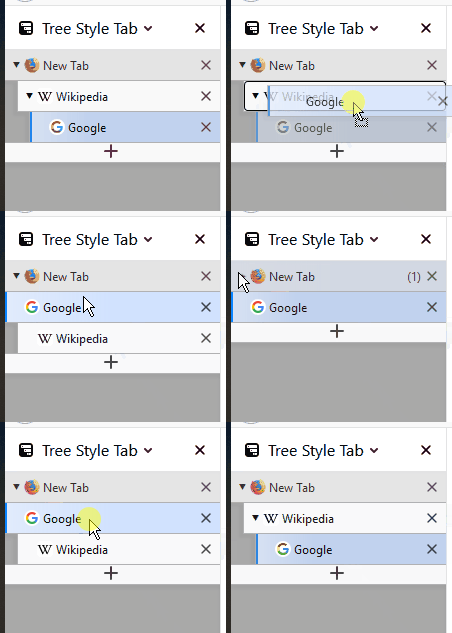
Steps to reproduce:
- Start Firefox with a clean profile.
- Install
TSTandTab Unloader for Tree Style Tab - In option page of Tab Unloader, turn on
Tab Hidingand granttabHidepermission. - In a new window, create 3 tabs, rearrange them like the graph below and middle click on A to unload it.
A (unloaded)
\-B
  \-C
- Drag & Drop C to previous position of B, and C become a root tab in the middle of another tree.
A (unloaded, root)
C (another root)
\-B (child of A)
- In option page of Firefox, check
General/Startup/Restore previous session - Restart Firefox, and the tree structure is lost.
C
B
I have lost part of my tree structures a few times before, and I think that corrupted tree structures could be the cause of it.
Kenqr
on 12 Jul 2019
@Kenqr I've confirmed that it happens when TST keeps tree structure for hidden tabs. With the commit 46d1ea2 TST allows you to attach a dropped tab to hidden parent tab, because sometimes there are hidden parent tab like your case.
piroor
on 7 Aug 2019
I think the issue is resolved now.
Thank you for updating for those minor use cases.
Kenqr
on 28 Aug 2019
I have found that tabs may appear at wrong position after drag & drop recently, probably related to recent updates.
Steps to reproduce:
- Start Firefox with a clean profile.
- Install
TSTandTab Unloader for Tree Style Tab - In option page of Tab Unloader, turn on
Tab Hidingand granttabHidepermission. - Create 4 root tabs in a new window.
- Middle click on third tab to unload it.
- Drag second tab onto first tab, and it will appear at third position, while being a child of first tab.

TST version 3.2.5
Firefox version 70.0.1
In addition to that, tab may disappear after drag & drop in my main profile, but I can't reproduce this in a new profile.
Kenqr
on 28 Nov 2019
@Kenqr can you confirm if you are still seeing the problem with current Firefox and TST?
irvinm
on 10 Feb 2020
Yes, I'm still seeing this problem in TST 3.3.5 and Firefox 72.0.2.
Kenqr
on 11 Feb 2020
@Kenqr Sorry for this large delay. I've introduced some changes to fix odd behaviors at cases like yours. I hope the problem goes away...
piroor
on 20 Feb 2020
@Kenqr, have you had a chance to try out 3.3.6? Any improvement?
irvinm
on 26 Feb 2020
After testing, I think the issue is solved in 3.3.6.
Thank you for updating!
Kenqr
on 26 Feb 2020
Related issues
 mikeaustin
·
3Comments
mikeaustin
·
3Comments
 waldyrious
·
4Comments
waldyrious
·
4Comments
 mreppen
·
3Comments
mreppen
·
3Comments
 woj-tek
·
3Comments
woj-tek
·
3Comments
 hotsphink
·
4Comments
hotsphink
·
4Comments
Most helpful comment
@Kenqr The behavior you said was an intentional result, introduced as a fix for #2054. However I've realized that TST can treat new tabs opened next to the current tab with the option of Firefox more better, with the commit 2de79a2. Now new tab opened with Ctrl-T becomes the next sibling or the first child when you set
browser.tabs.insertAfterCurrent=true, even if you choose "as sibling" or "as an independent tab" for the new tab option of TST.