Treestyletab: Closing multiple tabs quickly has UI lag
Short description
When I close a single tab with middle-click, it closes quickly and without UI lag.
But when I close two tabs quickly after each other with middle-click, there is significant UI lag (I suspect ~500 ms) which makes Firefox feel non-snappy.
If I wait 1 second between the two tab closes, then each individual one is fast.
I suspect there's some timeout or delay going on.
(I have ~800 open tabs (not-loaded) but I think I've observed it with only a few tabs as well.)
Steps to reproduce
- Start Firefox with clean profile.
- Install TST.
- Open a couple tabs
- Try to close them quickly with middle-click.
Environment
- Platform (OS): Ubuntu 16.04
- Version of Firefox: 65.0a1 (2018-11-30) (64-bit)
- Version (or revision) of Tree Style Tab: tried 2.8.6 and 2.8.6.7835
 nh2
nh2
All 18 comments
I was wrong: It depends a lot on tab count.
After reducing the tabs from 800 to 100, the UI lag disappears.
Perhaps something in the tab-closing depends on the open tab count?
nh2
on 8 Dec 2018
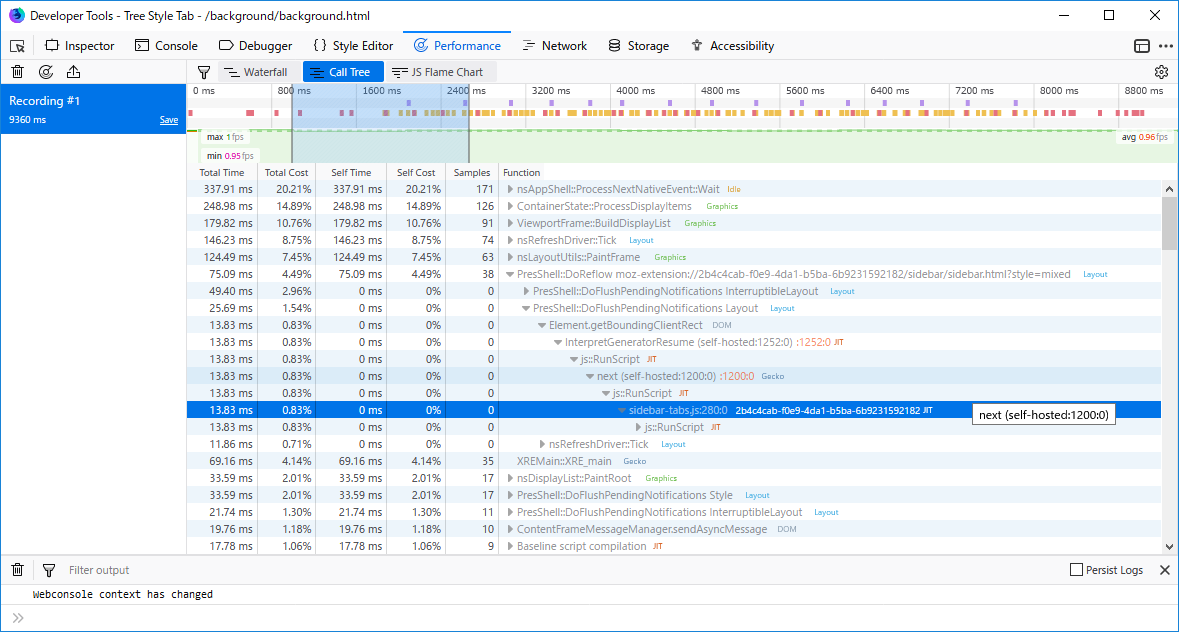
I've tried with 900+ tabs, but I couldn't find ouf any bottle neck on TST. Here is the performance profile when I've tried to close multiple tabs by middle click.
profile.zip
I can optimize TST when there is any serious bottle neck, but the result says that optimization is not easy for me...
 piroor
on 10 Dec 2018
piroor
on 10 Dec 2018
Could you collect a performance profile on your environment?
https://github.com/piroor/treestyletab/wiki/How-to-inspect-tree-of-tabs#how-to-collect-performance-profile
piroor
on 10 Dec 2018
I have collected two profiles: profiles.zip
I think the profile accounting is not accurate:
When the UI hangs, the profile viewer shows a large drop in FPS, which is what I observe.
But in the relevant section in the timeline, the GCs shown there are displayed as having taken only af few ms, and in between there's empty space (suggesting the browser did ... nothing there?):
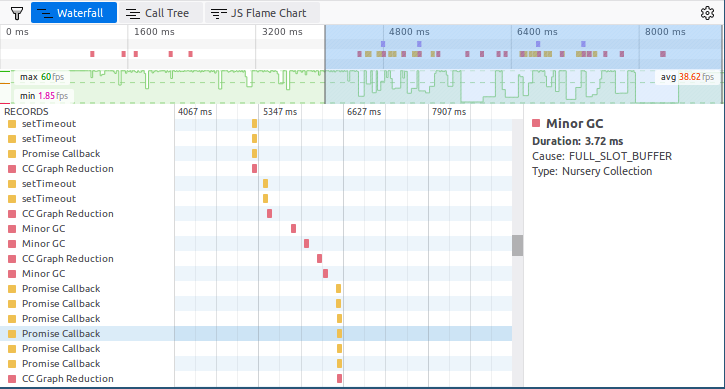
Notice the Minor GC parts in the middle, and the massife FPS drop in the middle of the selected blue time section at the top.
nh2
on 12 Dec 2018
@nh2 are you still seeing issues with the current version? (Lots of changes in TST since December 2018) If no longer an issue, please close this item. If still a problem, maybe collect another performance profile and post it?
 irvinm
on 12 May 2019
irvinm
on 12 May 2019
Here's another profile I took right now, showing the same thing with 400 tabs:
tst-profile-tab-closing-2019-05-13.json.zip
While many tabs close reasonably well, sometimes there's still a big hang and a frame drop to 3 FPS.
Note it may well be that this isn't TST's fault that that Firefox is simply doing something (e.g. GC), but it would still be good to find out what exactly is going on so that we can either fix it in Firefox or minimise that occurrence being triggered from TST.
nh2
on 13 May 2019
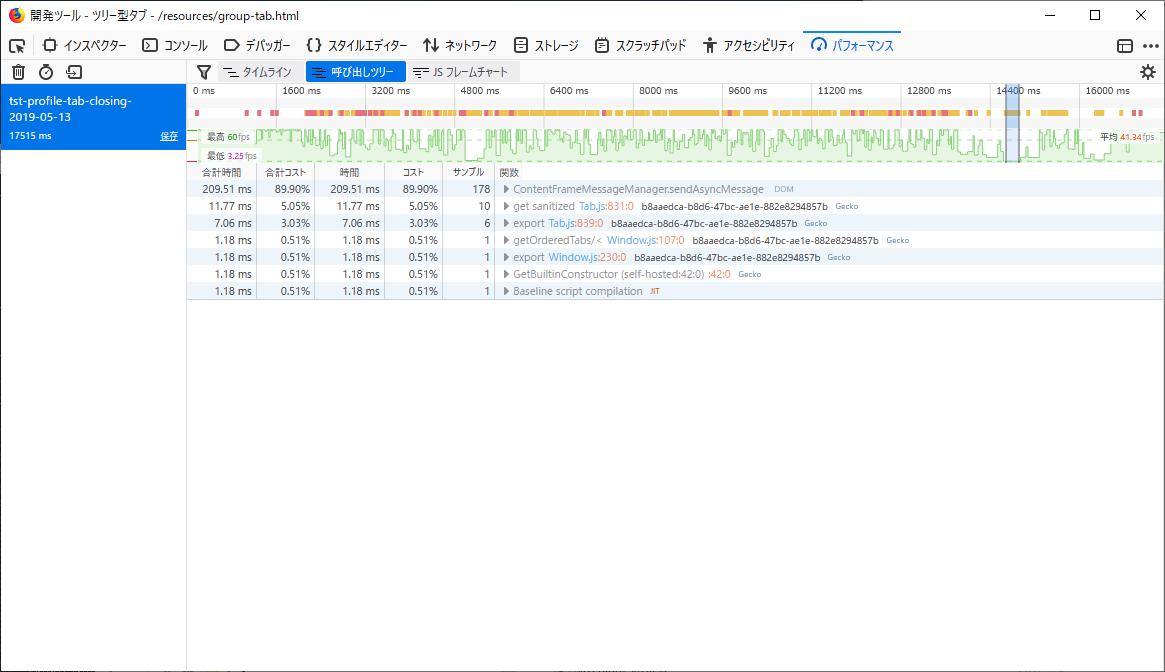
@nh2 On this performance profile, where is the time range I should inspect? While Firefox is frozen or lagged the graph would be flatten at the bottom. Could you attach screenshots with selected the time range like:
piroor
on 13 May 2019
@nh2 For example, this range (in the screenshot I attached) indicates that function calls for reserveToCacheTree() (defined in background-cache.js) eat 209msec, and it is about 90% of the range. It means that the function was very slow.
piroor
on 13 May 2019
@piroor Yes, you guessed that right: As far as I can judge, the lags happen exactly at those points where the FPS graph drops very low, like in the part you've selected, and the place just after 4800ms.
nh2
on 13 May 2019
Hmm, if storing of caches triggers lagging on your environment, I have no good solution to optimize the process for now...
Could you try to disable TST's cache? (TST's options => Advanced => Optimize tree restoration with cache) The cache system was introduced on TST 2.x for better performance around startup and showing/hiding of the sidebar, because TST 2.x was designed based on DOM elements and regenerating of DOM elements were too heavy. On the other hand, TST 3.x was restructured based on pure JS and accessing to DOM elements are now minimized. If you get good performance without cache, it is unnecessary anymore.
piroor
on 14 May 2019
@nj2 any updates? (PS. I usually run about 1000 tabs and I don't use the cache)
irvinm
on 24 Jun 2019
I have now also encountered and filed a Firefox upstream performance issue "Multi-second UI jank/freeze in ConnectionProxy::Create".
With severe bugs like that destroying general Firefox performance, it's very difficult for me to tell whether TST has a problem (because of this, or in addition) or not :confused:
nh2
on 24 Jun 2019
Thanks for the update @nh2. I looked over the comments in that report and glad to see it is getting some discussion and traction. Hopefully they can help out, but it is likely to take a while before anything is resolved. Thanks again.
irvinm
on 24 Jun 2019
@piroor do you want to label this "bug of Firefox itself" or do anything more from your side?
@nh2 looks like with your help they are still progressing the issue. I see they raised the priority to a P2.
irvinm
on 11 Jul 2019
Anyway I agree that TST has some bad performance problem on various points, due to unoptimized design of TST itself. Such bottlenecks should be resolved, but performance problems not happening on my environment are hard to be resolved because I need to research codes with less hint - even if I change codes based on an expectation, it may decrease performance oppositely.
@mh2 Could you close this issue, and reopen this if the bug of Firefox is fixed but the performance problem is still there?
piroor
on 8 Aug 2019
@nh2 can you review piroor's request? (Close item and reopen if fixed and still an issue)
irvinm
on 16 Sep 2019
@piroor I think we can close this. No updates from OP since June 24.
irvinm
on 8 Nov 2019
Sorry for the delay,
Could you close this issue, and reopen this if the bug of Firefox is fixed but the performance problem is still there?
Yes, absolutely. Thank you!
nh2
on 8 Nov 2019
Related issues
 mreppen
·
3Comments
mreppen
·
3Comments
 viking2
·
3Comments
viking2
·
3Comments
 azizLIGHT
·
4Comments
azizLIGHT
·
4Comments
 stapuft
·
4Comments
stapuft
·
4Comments
 Andrade
·
3Comments
Andrade
·
3Comments