Treestyletab: Tree Structure got randomized
Just had a weird bug,
I was playing BF4 through the battlelog page and when the game closed I noticed that a sub-tree of tabs suddenly was not where it should've been anymore. I don't know exactly what triggered that but I tried dragging it back where it belonged, but the tree structure didn't change. After that I restarted Firefox and then it went completely haywire.
Every one of my 140 tabs was suddenly a child of the one before. So basically I ended up with a 140 level deep tree... and on top of that the tabs were all stuck in place, like as before when the bug started, I could drag the tab and it would display where it would be landing, but the structure wouldn't change.
In the end I had to completely close all tabs and reload from a backup.
I'm on Firefox 62.0.3 Win7 x64 and using TST 2.5.4 in conjunction with Simple Tab Groups.
 rfreytag1
All 24 comments
And it happened again... Started as before, suddenly a sub-tree out of order and after a restart the whole tree is messed up. Now with the added bonus that every restart yields a different random tree.
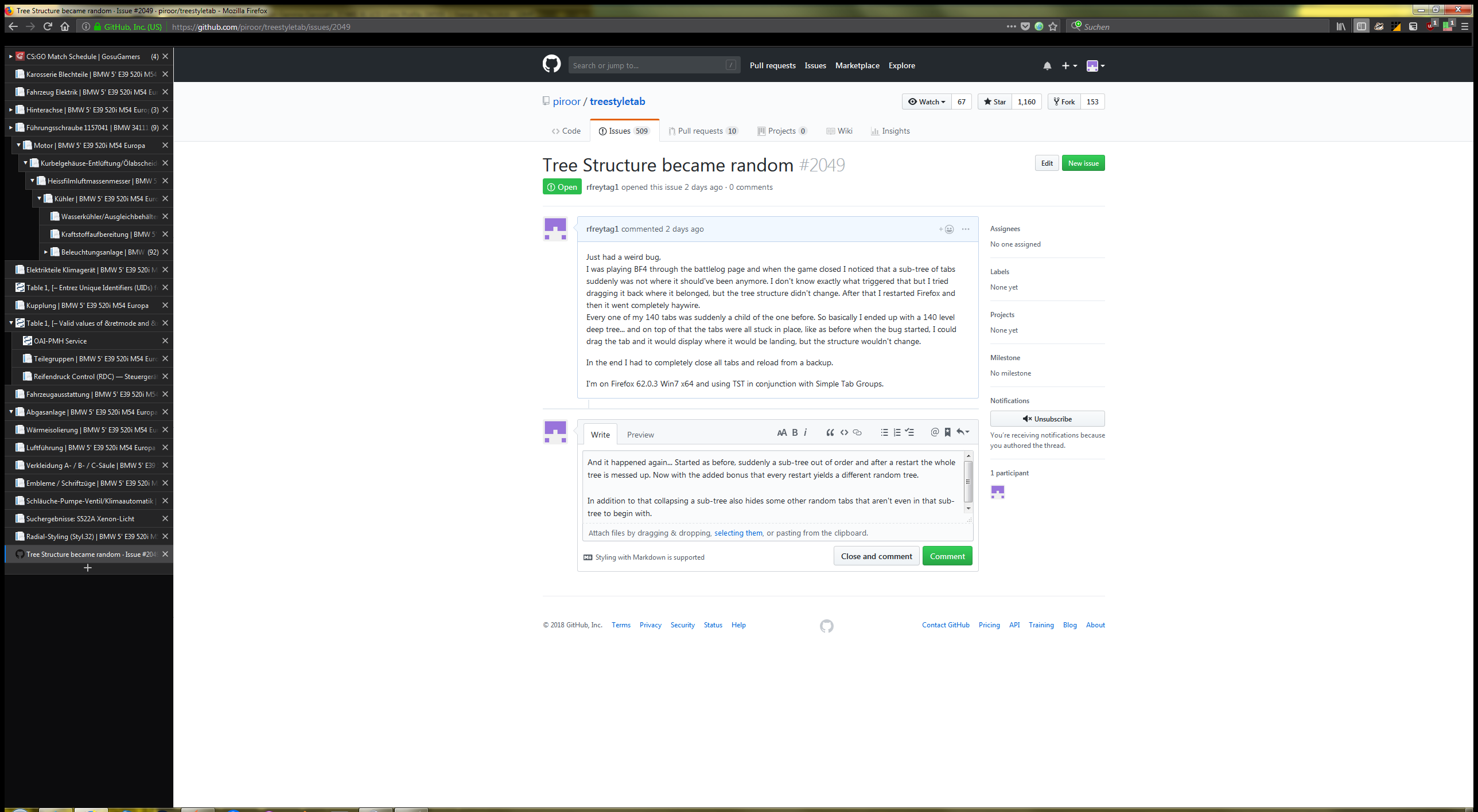
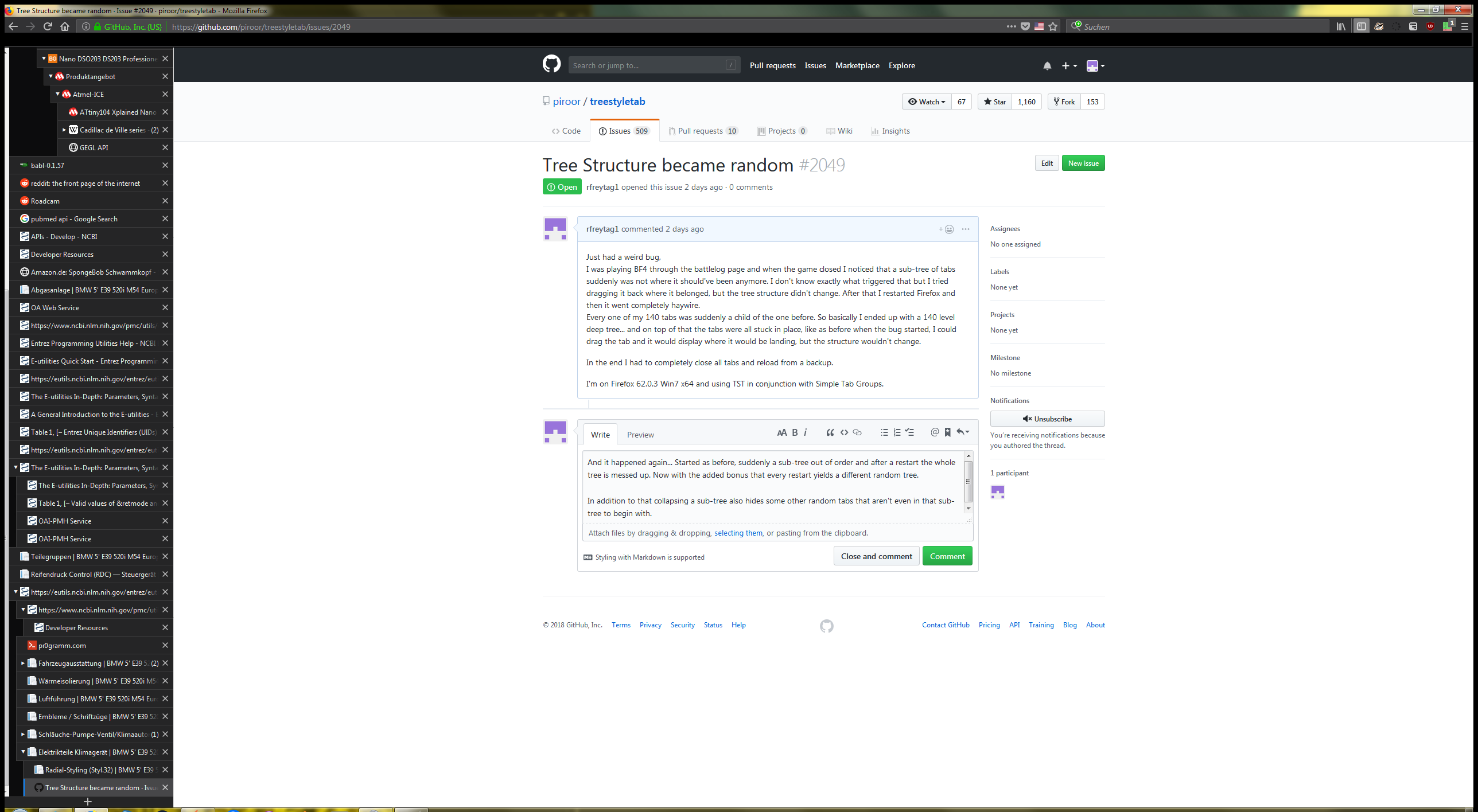
In addition to that collapsing a sub-tree also hides some other random tabs that aren't even in that sub-tree to begin with.
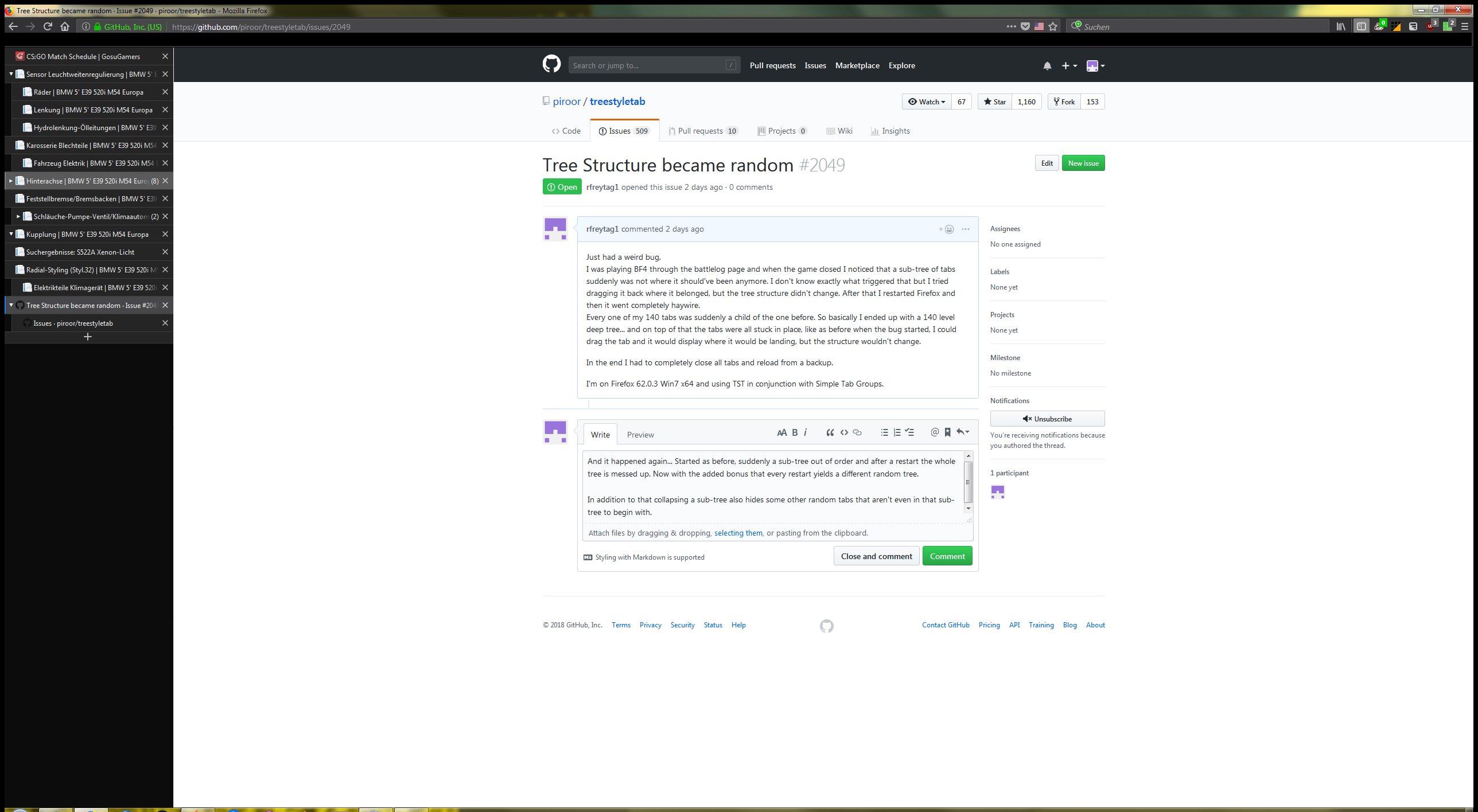
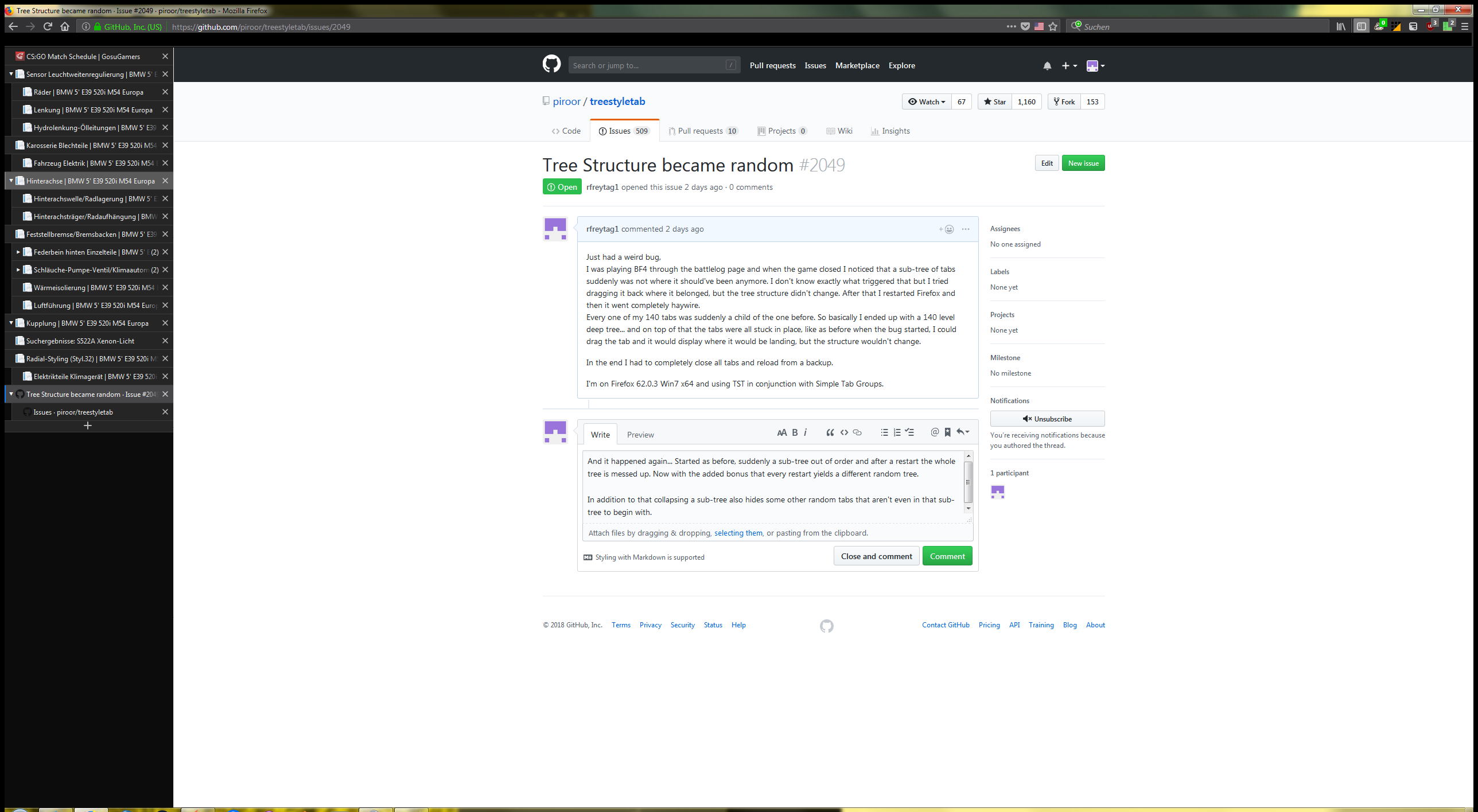
EDIT: this time it happened after waking my PC from hibernation, not sure if that has anything to do with that though.
EDIT 2: alright, I'm removing TST from my Firefox for now. I just had everything reordered, was gone for a couple of minutes and when I came back the same problem again...
How to reproduce? I have absolutely no clue, it just randomly happens.
rfreytag1
on 13 Oct 2018
I think that such a problem can be caused by broken cache of TST itself. Unchecking and re-checking the checkbox TST's options => Advanced => "Optimize tree restoration with cache" will clear broken cache and rebuild tree from information stored in the browser's session data. Could you try that on the next time you saw this problem?
 piroor
on 14 Oct 2018
piroor
on 14 Oct 2018
I actually tried that the third time that happened and it didn't seem to do anything unfortunately.
rfreytag1
on 17 Oct 2018
In my case (FF 63.0b14, TST 2.6.1), toggling the TST cache option did not help, either. I still see display artifacts, like child/ancestor tabs being expanded not directly below their parent tab, but with other tabs in-between (ancestors from other root tabs). Or child tabs even being expanded above its root tab (seems like the tree/parent relation got updated for the moved subtree, but not the position of the moved subtree's root node the flat tab list). Tabs that were previously children of a root folder tab (i.e. of a ...resources/group-tab) became root tabs via cache on/off (their own children/subtree structure was still okay). Moving tabs via drag&drop sometimes fixes such issues locally, but sometimes moving (i.e. dropping dragged tabs at a different place) does nothing at all.
I did not report this yet, because I cannot reproduce its cause, either. I guess that it has its origin in moving subtrees per drag&drop while the CPU is busy and Firefox laggy. I.e., maybe it is an async problem. Maybe also restoring previously closed tabs (Ctrl+Shift+T) plays a role, or quickly closing them again before they were fully restored (clicking on their X in the tree). But I am not sure...
As for help/ideas: I think it would help debugging immensely, if we kept track of four pointers/numbers locally with each tab for control purposes:
- predecessor tab (NaN if first tab in window)
- successor tab (NaN if last tab in window)
- parent tab (NaN if a root tab in the window)
- and the tree/indentation level.
With these numbers that effectively realize a robust double-linked list with a tree structure, the cause might be easier to find (by retrospectively comparing the actual tab position with its should-be position in the tree given by these four numbers). Of course, tab move&close&creation events have to be hooked at low level in Firefox to keep these four numbers always up-to-date. Ideally, we could even repair a corrupted tree structure via such a decentralized and independent tree index?
 orthoceros
on 18 Oct 2018
orthoceros
on 18 Oct 2018
Happens quite reliably with every ff restart, even with TST's cache turned off permanently in settings.
Basically all the tree structure changes made after startup are lost (or just partially so/jumbled somewhat) after restart.
Also affects the last selected tab, which frequently ends up somewhere in the middle of sidebar after restart.
Curiously, some trees are not affected and do not get jumbled at all even after multiple restarts.
My current suspicion is that tabs/trees selected with multiple tab handler + move unloaded tabs for tst are more prone to this than those loaded and moved one by one.
TST 2.6.4, ff 64b and lots of tabs.
 Argolics
on 27 Oct 2018
Argolics
on 27 Oct 2018
I think that such a problem can be caused by broken cache of TST itself. Unchecking and re-checking the checkbox TST's options => Advanced => "Optimize tree restoration with cache" will clear broken cache and rebuild tree from information stored in the browser's session data. Could you try that on the next time you saw this problem?
Finally found this issue-page with that solution. I have a lot of tabs open at any one time and my tree was messed up for a long time (months!). Restarting FireFox didn't help and selecting all tabs, copy all URI's, closing tabs and reopening only helped for a very short time. As soon as I wanted to move a tab, I either couldn't (I drop the tab somewhere and it stayed in place) or it moved to a different place than intended.
After trying to move tabs, when opening new tabs from the tabs I tried to move (but failed, because they stayed in place), the new tabs would open near where I initially tried to move the parent tab to. So now I ctrl-click a link and I have to search in my tree where the tab had been opened. Madness.
Clearing the broken cache with the aforementioned checkbox finally solved my issue. I hope it stays solved.
 youri--
on 3 Dec 2018
youri--
on 3 Dec 2018
I still cannot reproduce this problem on my environment. Sorry but I need more help to narrow down conditions to reproduce. Please describe a complete scenario to reproduce the problem always on your environment from scratch, like:
- Prepare an Windows 10 PC.
- Install Firefox 64. (It is the latest release now)
- Start Firefox with clean profile.
- Install TST 2.6.8.
- Go to https://mozilla.org/
- Open the "Firefox" link in new child tab three times.
- ...
I mainly use Windows 10 and Ubuntu 16.04TS, but if required I'll do testing on macOS also.
piroor
on 11 Dec 2018
- Use Ubuntu 16.04
- Use Firefox 63.0.3
- Start Firefox with a clean profile
- Install TST 2.6.8
- Install "Google search link fix" (forces Google search results to point to the destination address instead of a Google MITM link)
- Install "Temporary Containers"
- Go to Temporary Containers preferences
7.1 On the General tab tick "Automatic Mode" and "Random Container Color"
7.2 On the Isolation tab, Global sub-tab, for the "Mouse Clicks on Links should open new Temporary Containers" section select "Always" for all 3 settings - Search for "test" on google.com
- Middle click on the first 3 results, making sure they point to unique domains. This should result in 3 child tabs under the Google tab, each child tab in a unique container. Wait for the pages to load.
Google tab
   1st child tab
   2nd child tab
   3rd child tab
- Move the 3rd child tab to become a child of the 1st child tab
Expected results:
Google tab
   1st child tab
       3rd child tab
   2nd child tab
Actual results:
Google tab
   1st child tab
   2nd child tab
       3rd child tab
 Valentin-N
on 11 Dec 2018
Valentin-N
on 11 Dec 2018
@Valentin-N Thanks a lot! I've successfully reproduced the problem with two combinations: TST 2.6.8 + Firefox 64.0 and TST master/HEAD + Firefox 64.0.
piroor
on 12 Dec 2018
@Valentin-N Finally I've realized that there are multiple problems on this case.
- The order of TST's tab elements and Firefox's native tabs were not synchronized when they were opened. This looks fixed by 4d38dd99efbc87ec0959b653c793faeb01bbdc18.
- After you drag and drop a tab, TST didn't update the order of tab elements. This lloks fixed by 6d6584b4882b5b4d50e89e166b50d8b0bd0fa938.
Could you try again with the latest development build?: https://github.com/piroor/treestyletab/blob/master/README.md#development-builds
piroor
on 12 Dec 2018
From my testing so far it seems this problem is fixed. Thank you.
Valentin-N
on 12 Dec 2018
I tried your new version today with a large tabs tree that easily got corruption in the past, just by working with it. I have spent an hour(!) of heavy tabs resorting via dragging&dropping and re-grouping via group tab sub folders now. I am very happy to report that it finally worked well! Also very fast when used together with the "Move unloaded tabs for Tree Style Tab" addon. This is a HUGE improvement in terms of reliability. Thank you very much! :)
I also restarted Firefox and tested the old (current official) version: I easily got a corrupt tree again with weird reordering/restructuring (after some D&D, some grouping and then disabling and re-enabling the TST sidebar). So, the first thing I will do after every Firefox restart from now on is to debug-load this new TST version! :)
orthoceros
on 12 Dec 2018
Is the new version deployed?
rfreytag1
on 27 Dec 2018
Yes, the newest version is 2.7.7.
piroor
on 28 Dec 2018
oh... because I still had issues two days ago. Sometimes the cache option toggling fixed it, sometimes not. For now I also removed the Simple Tab Groups addon to see if it changes anything and I'm not sure yet, but seems not to make a difference.
rfreytag1
on 29 Dec 2018
Hi rfreyag1, since the above fix I only had tree corruption issues once when dragging and dropping between multiple FF windows. Since I am now using a single window, it seems to be reliable. Are you using multiple windows (in the same FF profile)? If so, could you try if it gets better after moving all tabs from other windows into folder/group tabs within a single window? (Then toggle the cache, switch the cache off and restart FF before beginning your test.) Maybe, it is worth a try; good luck.
orthoceros
on 29 Dec 2018
I was reading up some 18 fresh tabs of a topic, for which I already had a tree open elsewhere (that tree was restored after closing and opening Firefox). So I expanded that bigger, but currently unloaded tree, selected the so far independent root of today's 18 tabs and moved it into a subnode of the unloaded root (appending at the end of the first level child list). Then I hibernated the computer over night.
Next day launching from hibernate, TST got updated automatically to 3.0.7 the whole tree went blank for a short time, only showing a moving dot. When it came back, the root of those 18 tabs was toplevel again (along with all the unloaded siblings, previously grouped under the same root). Moreover my subtree was now in the middle somewhere between it's supposed siblings. I already got a strange feeling of deja-vue.
But it got really weird, as I right-clicked the root of the 18 and cloned it. The clone was inserted between the root and it's children, but it was not indented and did not have the triangle for folding children. So I dragged the clone out above the root. I altered the URL and looked up, what I had in mind, before closing the clone and returning to the tree. But on close of the clone, the subtree went haywire.
See animated screenshot.

Internal root nodes got detached from their children, but they still fold those children, even though, there are other tabs in between. Also there is an off by one-error: e.g. tab labeled "Detectors" (now the last of the animated children) previously was the parent of "File:Detectors2.png". The same for the pair: "repair" and "XML/XLS" ... so each root was sucked into the previous subtree.
Next, I dragged the root of the 18 out of the sidebar, to create a fresh window, so I could send you the offending subtree without all my other open tabs. But this operation rejoined the children with their parent. Only the off by one remained - e.g. the former parent were promoted to the latest child of their predecessor.
This is Firefox 66.0.3 on Kubuntu 18.10
 private-lock
on 19 Apr 2019
private-lock
on 19 Apr 2019
@private-lock There are multiple problems you've seen: 1) randomized order of tabs, 2) failed to detach a tree from the window. TST 3.0.8 I've released yesterday contains some changes around initialization and synchronization of the order of tabs, so those problems may be affected. If those problems still there with TST 3.0.8, could you narrow down conditions (steps) to reproduce those problems and create issues for each?
piroor
on 25 Apr 2019
I confirm, I got the 3.0.8 just minutes ago. Thanx for the quick reaction ... I'll have a look out for more disturbances of the tree-force :-) On the other hand, I might as well re-learn how to close a tab from time to time. Since I use your addon, that number skyrocketed.
private-lock
on 25 Apr 2019
@rfreytag1 can you confirm if things are working for you now with the current version? If so, can you close the defect?
 irvinm
on 8 May 2019
irvinm
on 8 May 2019
I observed a little irregularity today. TST was deactivated since the weekend due to Armag-Add-on. Today FF 66.0.4 shipped and I restarted. There are 3 windows with about 200 tabs total. One minimal tree
- A
- B
- C
- D
- B
A was folded (trigangel to the right) and B and D were hidden, but C was visible. So I unfolded A and C got surrounded by B and D. Next I folded A again and B, C, D were hidden as expected. Those tabs predate my previous post ... so haven't touched them in 13 days. They only caught my attention, because C wasn't supposed to be visible.
I closed Firefox and restarted again, this time, I didn't observe any unexpectedly unfolded tabs. This is still TST 3.0.10 ... for some reason, the update to 3.0.11 wasn't picked up automatically even though there have been updates today. So I manually triggered an update check, as I write this to look up the version.
private-lock
on 8 May 2019
I have seen this behavior sometimes on a reset where some of the tabs that should be hidden in a collapsed tree are visible after a restart. For me, I don't even need to restart the browser to fix it. Just "expand" the root of the tree and collapse it again and it should fix itself. [This works in my case]
Obviously this is just a timing issue as the structure is still maintained and the act of expanding\collapsing cleans up the UI. [In my case, I am using TSTs "folder tabs" as the root of the tree so I can even see what TST thinks is under that tab visually]
irvinm
on 9 May 2019
@irvinm seems to be stable now. Only had a short reoccurence, but that was around the same time @private-lock had issues. Since then it seems to work fine.
Thanks for the fixes!
rfreytag1
on 10 May 2019
@private-lock The "unexpectedly unfolded" tabs problem should be tracked in another issue. If you OK, when you find out a minimal steps to reproduce that, please create a new issue for that.
piroor
on 11 May 2019
Related issues
 azizLIGHT
·
4Comments
azizLIGHT
·
4Comments
 waldyrious
·
4Comments
waldyrious
·
4Comments
 emceekain
·
3Comments
emceekain
·
3Comments
 hotsphink
·
4Comments
hotsphink
·
4Comments
 stapuft
·
4Comments
stapuft
·
4Comments
Most helpful comment
@Valentin-N Finally I've realized that there are multiple problems on this case.
Could you try again with the latest development build?: https://github.com/piroor/treestyletab/blob/master/README.md#development-builds