Treestyletab: [feature request] Allow easier disabling of default keyboard shortcuts
Short description
I came here looking for a fix to #1995 initially, but my own attempts at fixing this problem have brought me to write this feature request. In my eyes it's half bug (because I hope the current functionality isn't intended this way) and half feature-request, but let me explain:
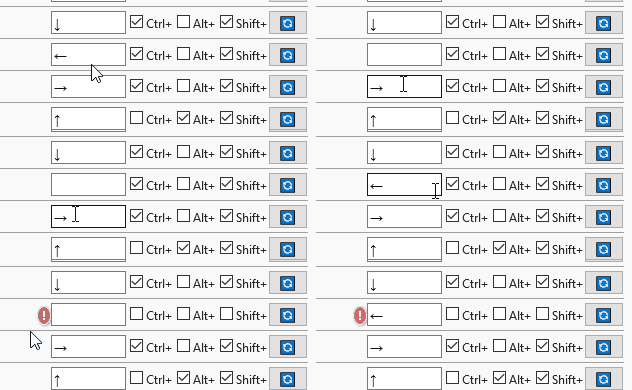
When I want to get rid of a particular keyboard shortcut in Tree Style Tab that I happen to trigger unintentionally, I cannot simply "empty" its field and remove the trigger entirely, because the key input field always reverts to the previously saved value if I leave it empty and the reset button brings back the default values. In some instances I could get it to show undefined which prompted the red warning label, but I'm not sure how to reproduce that.
This only leaves the option to set an existing but unused key combination as a shortcut. It works, but it's certainly not ideal when this has to be done for ten shortcuts I would never find myself using. There is always the possibility that these may be again triggered by mistake in the future.
Nice things to have in addition to a proper method of disabling these pre-existing shortcuts:
- A way to better distinguish between active and disabled shortcuts.
- A way to tell why a custom shortcut doesn't work. Give the user more information about the conflict, if that's possible.
Environment
- Platform (OS): Windows 10
- Version of Firefox: 61.0.2 (64-bit)
- Version (or revision) of Tree Style Tab: 2.5.0
 ElDani82
All 13 comments
+1 vote a checkbox to enable/disable specific shortcut
or at least an option to delete the key in the input box. Currently it's just impossible and drives me nuts since I can't even turn it off:
 damat
on 18 Aug 2018
damat
on 18 Aug 2018
Not sure if it's quite what this request is about, but I'd be interested in a way to disable _all_ of Tree Style Tabs' keyboard shortcuts. I really value TST as an extension, but as a keyboard heavy user I already use almost all of the mappings it's defined for other things.
As I use Ctrl+Tab & Ctrl+Shift+Tab or Ctrl+PageUp & Ctrl+PageDown (depending on mood) to navigate tabs quite happily, I don't think I'm going to get much value out of adding more specific shortcuts (at least in the short term).
Like others, I already use most of the mappings that have been chosen for _other_ things (mostly selecting text by word), so the shortcuts as they stand are unfortunately a net negative for me.
 PeterJCLaw
on 18 Aug 2018
PeterJCLaw
on 18 Aug 2018
This looks a problem of Firefox's WebExtensions API itself. It doesn't accept blank shortcut definition as the input of browser.commands.update(). See also:
https://dxr.mozilla.org/mozilla-central/rev/4e56a2f51ad739ca52046723448f3129a58f1666/toolkit/components/extensions/Schemas.jsm#987
This logic always throw an error for blank shortcut because it doesn't match to any valid shortcut pattern.
 piroor
on 18 Aug 2018
piroor
on 18 Aug 2018
https://dxr.mozilla.org/mozilla-central/rev/4e56a2f51ad739ca52046723448f3129a58f1666/browser/components/extensions/parent/ext-commands.js#299
I think the commands API should provide browser.commands.clear() or something special feature to do that, or browser.commands.update() should accept blank shortctut.
Update: this problem is already tracked on the bugzilla.mozilla.org.
1475043 - Allow commands.update() to un-set a shortcut, disabling the command
https://bugzilla.mozilla.org/show_bug.cgi?id=1475043
piroor
on 18 Aug 2018
Ouch, that's quite a big omission in the API. I don't suppose an extension can tell whether a command was invoked via a keyboard shortcut (rather than by some other mechanism)?
If it can, then a workaround might be to allow disabling the shortcuts by actually ignoring the commands when called. Clearly not a nice solution, but could work until the API is fixed.
PeterJCLaw
on 18 Aug 2018
Sorry, I'm negative to introduce something mechanism like that - it will make things too complex and worse.
Another workaround idea is: remove all default keyboard shortcut definitions from the manifest.json and define default shortcuts on the initial startup of the addon itself. browser.commands.reset() correctly clears shortcut. However this workaround will avoid the "reset to default shortcut" feature, so I'm still negative.
piroor
on 18 Aug 2018
Can we please have a setting to disable all TST keyboard bindings? Or, having keybindings opt-in until this is all sorted out?
 dubrowgn
on 18 Aug 2018
dubrowgn
on 18 Aug 2018
Can we please have a setting to disable all TST keyboard bindings? Or, having keybindings opt-in until this is all sorted out?
Came to say the same thing. ctrl + shft+ right/left I use all the time to highlight text... now it changes tabs. 🙃
 GollyJer
on 18 Aug 2018
GollyJer
on 18 Aug 2018
This extension now conflicts with default system wide shortcuts (ctrl+shift+right/left). Add a way to get rid of these useless shortcuts. You've made Firefox unusable.
 bigbellyburger
on 19 Aug 2018
bigbellyburger
on 19 Aug 2018
Workaround for now: remap those essential arrow hotkeys to something like Alt + Ctrl + E or any other letter. It's highly unlikely they are used somewhere else.
Stupid? Yes. But still works.
damat
on 19 Aug 2018
As a workaround, I've introduced a mechanism to provide deassignable default shortcut to the library. It is already available on 2.5.1 so you can unassign shortcut by hitting Escape key. (For more details, see also https://github.com/piroor/webextensions-lib-shortcut-customize-ui/blob/master/README.md#basic-usage-initialization )
piroor
on 19 Aug 2018
Thanks for that! For some reason, I'm still unable to disable one of the keyboard options (which is also used quite often for word navigation) - each time I clear it using esc and close the options screen, it comes back. Is there another way to clear that preference, eg. by editing a config file somewhere? I don't know why this one specific option keeps coming back.

Edit: After trying to just use esc a bunch of times, I was able to get it to stick by using the reset button (which turned it into "undefined"), and then using esc again. Maybe it was just stuck in a weird state from me trying to change it earlier.
 ibrahima
on 21 Aug 2018
ibrahima
on 21 Aug 2018
I close this because outdated.
piroor
on 1 May 2019
Related issues
 ElhemEnohpi
·
4Comments
ElhemEnohpi
·
4Comments
 Keith94
·
3Comments
Keith94
·
3Comments
 NightSharp
·
3Comments
NightSharp
·
3Comments
 stapuft
·
4Comments
stapuft
·
4Comments
 allixx
·
4Comments
allixx
·
4Comments
Most helpful comment
As a workaround, I've introduced a mechanism to provide deassignable default shortcut to the library. It is already available on 2.5.1 so you can unassign shortcut by hitting Escape key. (For more details, see also https://github.com/piroor/webextensions-lib-shortcut-customize-ui/blob/master/README.md#basic-usage-initialization )