Treestyletab: TST 2.5.0 100% cpu FF 61.0.2 (64-bit) MacOS 10.12.6
Short description
Noticed that my firefox today after auto-updating the TST addon to Version 2.5.0 was causing my Mac to run warm, checked activity monitor to see _FirefoxCP WebExtension_ process pegged at 100%. Disabled all other extensions and only enabled TST and the CPU usage spikes to 100%. Downgraded to TST Version 2.4.24 and the CPU spike is gone.
Steps to reproduce
- Start Firefox with clean profile.
- Install TST 2.5.0
- CPU usage spikes, showing 100% _FirefoxCP WebExtension_
Expected result
Low/minimal cpu usage.
Actual result
CPU usage spikes, showing 100% _FirefoxCP WebExtension_
Environment
- Platform (OS): MacOS 10.12.6
- Version of Firefox: 61.0.2
- Version (or revision) of Tree Style Tab: 2.5.0
 michael-w3
All 18 comments
Just updated to version 2.5.0 and getting the same huge CPU spikes on MacOS 10.11.6 with firefox 61.0.2
 mistaneat
on 17 Aug 2018
mistaneat
on 17 Aug 2018
Could you collect performance profile? See also: https://github.com/piroor/treestyletab/wiki/How-to-inspect-tree-of-tabs#how-to-start-debugger-for-tree-style-tab
 piroor
on 17 Aug 2018
piroor
on 17 Aug 2018
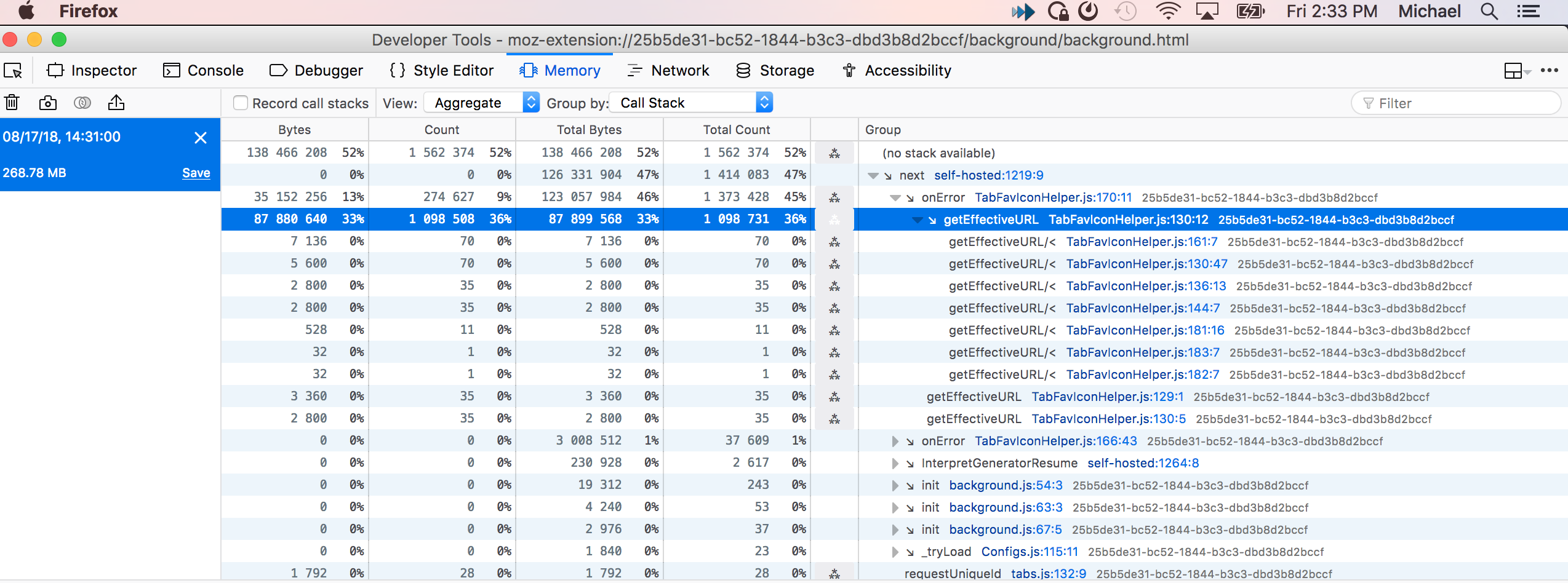
I would if i could figure out how to, there is no Performance tab in the Debugger for me, only a Memory tab. I took a snapshot using the Memory tab, View Aggregate, view by Call Stack. See millions of calls in attached screenshot, is that all you need?
michael-w3
on 17 Aug 2018

Saw this in the normal performance profile, but couldn't get much more info out of it.
mistaneat
on 17 Aug 2018
I had this issue as well, Arch Linux, Firefox Developer edition 62.0b16 and b17. I also noticed very large memory usage by the FF main process (~5.0GiB). I tried refreshing the cache, and also played around with the debug options. There was no continuous logging of anything, so nothing obvious stuck in a loop. From a fresh start, I did notice many hundreds of 'could not access dead object' errors, so I thought that maybe it was related to unloaded tabs. I closed all my unloaded tabs, and the problem went away permanently, and I cannot reproduce it anymore. I know that this is not super helpful for tracking down the issue, but maybe someone else can carefully start closing some of their tabs one by one (or maybe activate them one by one) and find a trigger that makes it go away.
 DmitriK
on 17 Aug 2018
DmitriK
on 17 Aug 2018

Got a bit more info and it looks like the same thing michael-w3 saw in memory profile
mistaneat
on 17 Aug 2018
Just a guess, this looks like a recursive function call, onError which if it continues to be an error, would explain the 100% cpu as it never exits.
https://github.com/piroor/webextensions-lib-tab-favicon-helper/blob/f202a69137cbaa1eb780cf1eb8b2a35f2d4eab30/TabFavIconHelper.js#L170
michael-w3
on 17 Aug 2018
I have this same problem on macOS 10.13.6, Firefox 61.0.2, Tree Style Tab 2.5.0.
Based on @michael-w3's comment, I looked for unloaded tabs that had errored out or did not have a favicon and loaded them. The CPU issue went away after this.
 calculon0
on 18 Aug 2018
calculon0
on 18 Aug 2018
@michael-w3 The "Performance" tab looks need to be activated from configurations of the remote debugger itself. Anyway, I got that there is unexpected recursive function call. Thanks!
piroor
on 18 Aug 2018
I've introduced some changes to make the favicon mechanism safe for such a recursion. Could you try the development build? https://github.com/piroor/treestyletab#development-builds
piroor
on 18 Aug 2018
I have the same problem in Firefox Beta 62.0b17 .
I installed the extension from a local checkout (rev 84bc4e779bea0be0b856b743980f6675ea260c95) via about:debugging.
The CPU usage issue is not fixed for me.
A downgrade to version 2.4.24 does fix the issue, though.
Thanks for your work, Stefan
 sfleiter
on 18 Aug 2018
sfleiter
on 18 Aug 2018
I've done some more changes. How about the latest one? (Note: recent changes happen on external libraries, so you'll need to run git submodule update for the cloned repository.)
Anyway, the debugging is very hard for me because I still cannot reproduce this problem on my PC. There are too many possible triggers. For example:
- Broken session information (TST holds "last effective favicon" information to the session data)
- Some webpages with special favicons
- Some addons which reload tabs
I need concrete steps to reproduce the problem on a clean profile...
piroor
on 18 Aug 2018
Hi.
I have same problem with Firefox 61.0.2.
I've tried ~latest~ previous nightly version.
I've checked value of effectiveFaviconData.url, aTab.url, effectiveFaviconData.favIconUrl and aURL on near this line.
https://github.com/piroor/webextensions-lib-tab-favicon-helper/blob/master/TabFavIconHelper.js#L178
I could see same URL is passed repeatedly. (not URL for each tab)
Then I've checked Tab of this URL.
It had warning icon as favicon. (maybe broken favicon?)
I've closed this tab and reopened it.
Now CPU usage problem is resolved.
Then I've removed nightly version and install 2.5.0.
It works fine.
I guess root cause of this problem is broken? favicon.
 goru
on 18 Aug 2018
goru
on 18 Aug 2018
Thanks for the next update Piroor,
with rev 4c0464e767538b912bf2609b2bb51e75733041bc it is fixed for me!
Great work and thanks again, Stefan
sfleiter
on 18 Aug 2018
Just tested out the nightly build, version 2.5.0.7445 and the CPU usage problem is resolved.
Platform (OS): MacOS 10.12.6
Version of Firefox: 61.0.2
Thanks for this great extension, and your work on fixing this.
michael-w3
on 19 Aug 2018
OK, I've released 2.5.1. I hope it solves this problem on all environment.
piroor
on 19 Aug 2018
Confirmed: 2.5.1 also fixes the issue for me.
Thanks again!
sfleiter
on 19 Aug 2018
I close this because outdated.
piroor
on 1 May 2019
Related issues
 array
·
4Comments
array
·
4Comments
 ElhemEnohpi
·
4Comments
ElhemEnohpi
·
4Comments
 Evotron
·
3Comments
Evotron
·
3Comments
 nneonneo
·
4Comments
nneonneo
·
4Comments
 azizLIGHT
·
4Comments
azizLIGHT
·
4Comments
Most helpful comment
I've done some more changes. How about the latest one? (Note: recent changes happen on external libraries, so you'll need to run
git submodule updatefor the cloned repository.)Anyway, the debugging is very hard for me because I still cannot reproduce this problem on my PC. There are too many possible triggers. For example:
I need concrete steps to reproduce the problem on a clean profile...