Treestyletab: Wrong tree order when you close parent while children are opened
If you have a tree
1
2
3
and you open very fast 5 links in tab 1 with middle click and FF is slow. Then tree looks
like
1
.....1.1
.....1.2
.....1.3
2
3
When you now close 1 before all children are opened the tree looks like
1.1
.....1.2
.....1.3
2
.....1.4
.....1.5
3
It is impossible to move 1.4 to 1.1. You first have to move it to e.g. 3 and then to 1.1.
If you collapse 1.1, 1.4 and 1.5 will also vanish.
 Tragen
All 11 comments
The commit fa5368f may affect to this problem, but I couldn't test that.
 piroor
on 21 May 2018
piroor
on 21 May 2018
I think it's still not working.
When I open many links very fast, everything looks good first but when I open new tabs in one of the child tabs, they are opened at random places. And when I close this tab and do an undo close, the tab opens at a random location.
Tragen
on 8 Jun 2018
Following this, because I've also been seeing unusably broken trees for at least a month.
I don't even try opening tabs "very fast"; normal usage is enough to have tabs opening and moving all over the place.
I'm using right now 8 windows with about 400 tabs. The broken behavior seems to happen independently of how many tabs there are already in a given window.
I've looked into submitting debug info but it's too involved. Will keep trying to put apart some time for that, though.
 hmijail
on 9 Jun 2018
hmijail
on 9 Jun 2018
@hmijail In your case there are 8 * 400 = 3200 tabs in the background page. TST is designed to manage all tabs by the single background page as the master process. So it takes more time to do everything, ex. finding a tab by its id from those 3200 tabs. If you don't see the problem with more smaller number of tabs, then I still think that it is caused by "slowing down" itself. Could you try again with new blank profile of Firefox itself? If you successfully reproduce this problem without such too much tabs, it will help me to research what causes it.
piroor
on 10 Jun 2018
Actually I meant 400 tabs in total, across the 8 windows!
Anyway, as commented in https://github.com/piroor/treestyletab/issues/1918#issuecomment-395959005, my latest test does reliably create a broken tree with a blank profile and only TST loaded: just press Cmd+T (macOS' shortcut for new tab) for 10 seconds, and instead of about 100 empty tabs in the root level, you'll get a couple of trees with a random number of tabs in each of them.
hmijail
on 10 Jun 2018
@hmijail
just press Cmd+T (macOS' shortcut for new tab) for 10 seconds, and instead of about 100 empty tabs in the root level, you'll get a couple of trees with a random number of tabs in each of them.
I think that's not a bug, go to TST settings and try to disable this pref:
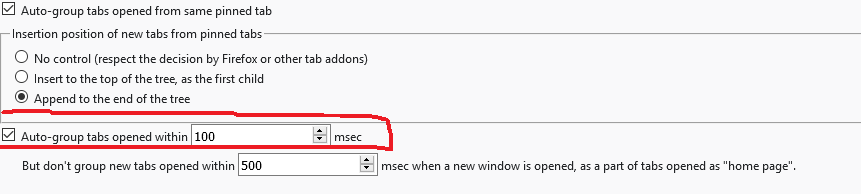
 SXZ1
on 10 Jun 2018
SXZ1
on 10 Jun 2018
@SXZ1 good catch, disabling that preference the tabs get all created at the root level.
Oh well, there goes my test case.
hmijail
on 10 Jun 2018
Now 9861ea4 and 363bc94 should make things around new tab creation robust. On the other hand, this change can make things more slower, for example session restoration with large number of tabs. I need further testing with the latest development build: https://piro.sakura.ne.jp/xul/xpi/nightly/treestyletab-we.xpi
piroor
on 10 Jun 2018
New tab creation looks good so far, but closing a tab and undo closing puts the restored tab at a random location in a big and old tree. I don't know if it's related to this bug.
Tragen
on 29 Aug 2018
@Tragen can you confirm is you are still seeing issues with the current build of TST? There have been many changes since August 2018. If no longer an issue, can you close this issue?
 irvinm
on 12 May 2019
irvinm
on 12 May 2019
Looks like it's working now.
Tragen
on 12 May 2019
Related issues
 NightSharp
·
3Comments
NightSharp
·
3Comments
 waldyrious
·
4Comments
waldyrious
·
4Comments
 azizLIGHT
·
4Comments
azizLIGHT
·
4Comments
 viking2
·
3Comments
viking2
·
3Comments
 Andrade
·
3Comments
Andrade
·
3Comments