Treestyletab: Tabs from pinned tabs append to the end not working
Short description
The option "Append to the end of the tree" in case of new tabs from pinned tabs is ignored. This happens in version 2.4.3 and works in version 2.4.1.
Steps to reproduce
- Start Firefox with clean profile.
- Install TST.
- Tick option "Append to the end of the tree" under "Insertion position of new tabs from pinned tab".
- Uncheck "Auto-group tabs opened from same pinned tab".
- Pin a tab.
- Open a link from the just pinned tab as a new tab.
Expected result
The new tab's position is at the end of the tree.
Actual result
The new tab's position is at the top of the tree.
Environment
- Platform (OS): ArchLinux
- Version of Firefox: 57.0.2
- Version (or revision) of Tree Style Tab: 2.4.3
 Sesshu
All 22 comments
I'm observing the same issue on Firefox 58.0b11 with TST 2.4.3.
 simu
on 13 Dec 2017
simu
on 13 Dec 2017
Thanks. Recent commits should fix this problem.
 piroor
on 13 Dec 2017
piroor
on 13 Dec 2017
Hi @piroor when can we expect for a new release which include this fix ?
 rabin-io
on 17 Dec 2017
rabin-io
on 17 Dec 2017
This is not fixed in 2.4.5 in FF 58.0. If "Auto-group tabs opened from same pinned tab" is _unchecked_ it still opens new tabs at the top of the tree.
It does appear to be working for the case when auto-group is checked.
 awused
on 26 Jan 2018
awused
on 26 Jan 2018
Sorry I missed about non-grouped case. The commit 881ef50 should fix this for me.
piroor
on 26 Jan 2018
Please is this happening again?
I have the newest 3.6.3 and can't seem to make new tabs go to the bottom.
They appear there, but immediately are moved to the top.
 rsalmei
on 8 Dec 2020
rsalmei
on 8 Dec 2020
@rsalmei Did you try the option?: TST options => New Tabs Behavior => Insertion position of new child tabs (will appear as root tabs) from pinned tabs => The end of the tree.
piroor
on 9 Dec 2020
Thanks @piroor, but yes, it is selected as you say.
It's odd, but I've noted some urls do open at the end as configured, and some after opening there, immediately close and re-open at the top... 🤔
rsalmei
on 12 Dec 2020
@rsalmei I think that there are some more unknown triggers - Firefox's about:config settings, other addons, and TST's options. Could you narrow down steps to reproduce with a clean profile? Or, could you send your Firefox profile without critical private information (login information and others) to me? (If you OK, please contact me via email: [email protected])
piroor
on 16 Dec 2020
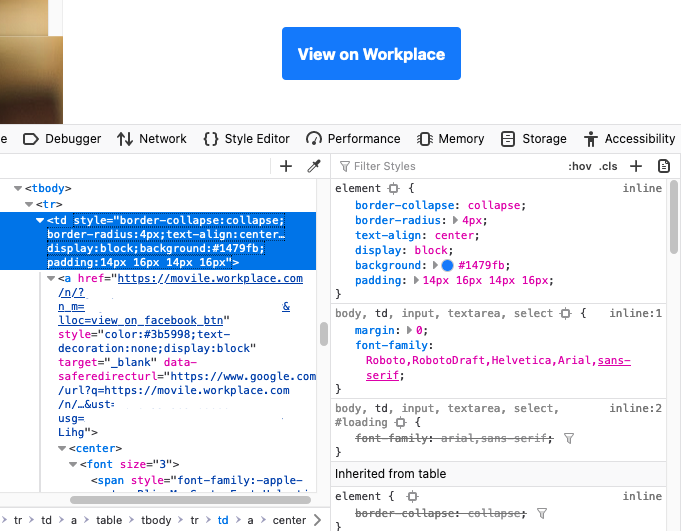
Hey @piroor, I've found a link that consistently opens at the top in emails from my company. Their links are inside a table, don't know if it is any different from others though. Here:
rsalmei
on 12 Jan 2021
@rsalmei Hmm, I've tested with a link with target="_blank" but couldn't reproduce the problem. I think new tabs from the link on your case are possibly opened by the event listener (JavaScript) instead of the link handler of Firefox itself.
piroor
on 15 Jan 2021
@rsalmei Could you confirm that the link in https://jsfiddle.net/piro_or/c539dfmv/ is opened as expected if the tab is pinned, with the config?: TST Options => New Tabs Behavior => Insertion position of new child tabs (will appear as root tabs) from pinned tabs => The end of the tree.
piroor
on 15 Jan 2021
Hey @piroor, thank you, I'm sorry I'm took so long.
Unfortunately it is not that yet, your test does work. I've made a video showing.
edit: removed the video, as it contained my work email.
rsalmei
on 26 Jan 2021
@rsalmei Thank you for testing! Hmm, I've created a testing accont on workplace.com and tried the "View on Workplace" button in an email from workplace.com on pinned Gmail tab, but new tabs are opened at the end of the tab bar as I expected. Do you use any other addon related to workplace.com or Gmail?
piroor
on 9 Feb 2021
@rsalmei Ah, I got it! This problem is triggered by the Facebook Container. I missed that the unexpectedly behaved tab in your screencast has the container icon in the address bar. What happens when the problem appears is:
- Firefox opens a new tab X near the opener pinned tab, with the
openerTabIdinformation. - TST starts handling of the tab X asynchronously, and it is detected as "a tab opened from a pinned tab".
- Facebook Container starts handling of the tab X.
- TST moves the tab X to the end of the tab bar according to the configuration for new tabs from pinned tabs.
- Facebook Container closes the tab X and opens a new tab Y with Facebook specific container, without
openerTabIdinformation (important!), at the position the tab X was initially placed. - TST starts handling of the tab Y asynchronously, and it is detected as "a solo tab opened without any opener information".
- TST treats the tab Y according to the configuration for new tabs from any other trigger.
If Facebook Container reopens the tab Y with correct openerTabId information, both TST and Facebook Container should work together as expected.
piroor
on 10 Feb 2021
Wow, that's nice @piroor!! 👏
Yeah, the Facebook container icon was on the screencast all along, but nice catch!
And nice explanation of what does happen behind the curtains.
In the last step, which configuration would that be? "new tabs from any other trigger"
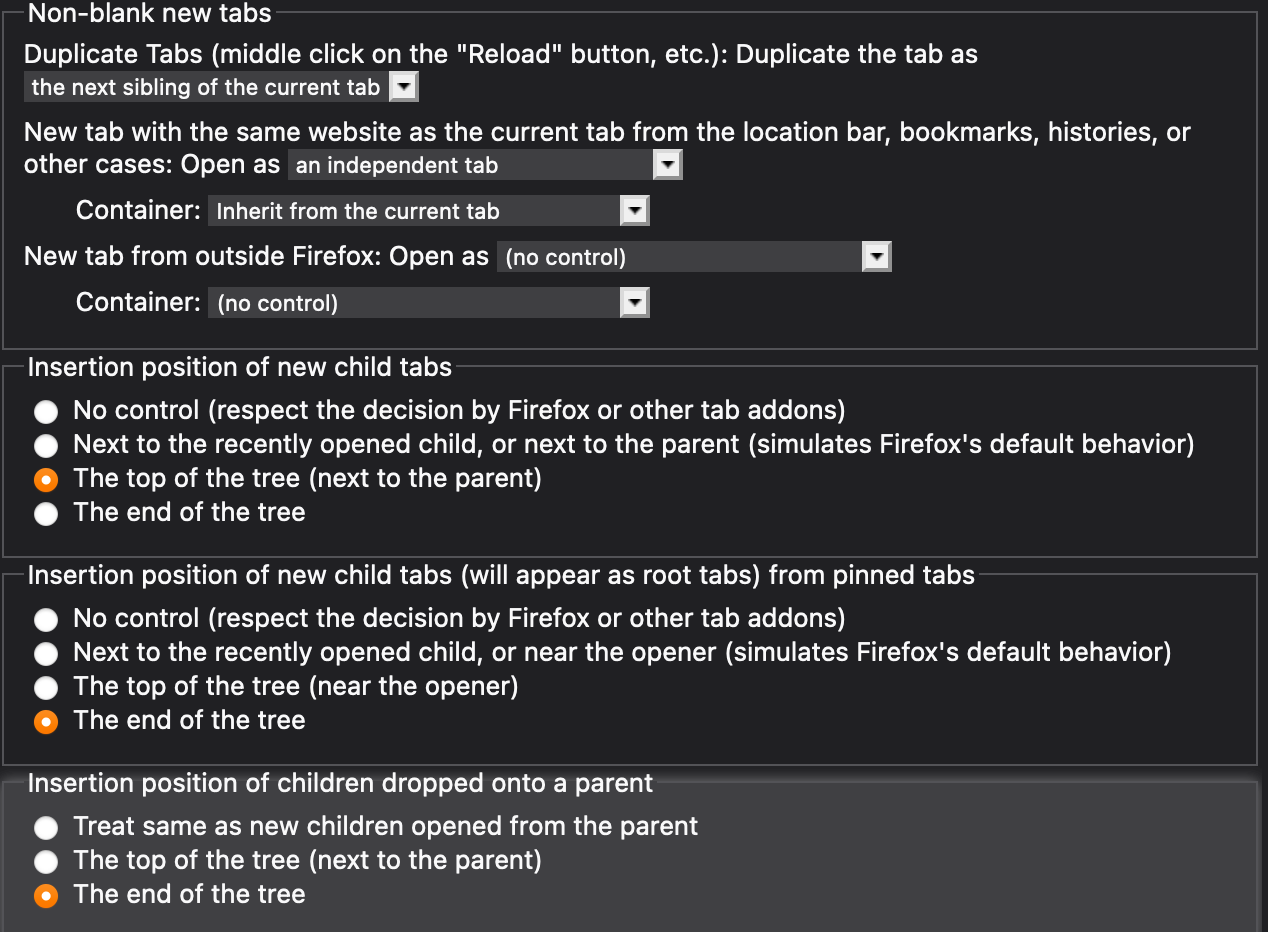
Could I fix it with some other config? I currently use:
rsalmei
on 10 Feb 2021
The option "Tabs from any other trigger" => "Open as: an independent tab" should affect to this case. Please note that the option is hidden by default and you need to activate expert options.
However, the option affects to various cases, including tabs opened by other addons. I'm afraid of too many side effects.
piroor
on 10 Feb 2021
Humm, I didn't know there was some even more advanced options, hidden by default...
I see. What do you suggest then?
Is it possible to fix it some other way?
Probably you'll have to open an issue on Facebook Container somehow, so they pass the correct openerTabId, right?
rsalmei
on 10 Feb 2021
Probably you'll have to open an issue on Facebook Container somehow, so they pass the correct openerTabId, right?
This looks to be the most right way. Such a change will improve compatibility of Facebook Container to other tab-related addons not only TST.
piroor
on 10 Feb 2021
Ok, thank you for your time!
And congrats on the coolest addon ever! I'm a tabaholic, always with a few hundred tabs open, and couldn't do it without it.
rsalmei
on 10 Feb 2021
I've reported this to Facebook Container's issue tracker.
https://github.com/mozilla/contain-facebook/issues/727
piroor
on 10 Feb 2021
Oops, I said too early.... 😞
~Hey, workplace links now are flashing (Facebook Container) but being reopened at the same location!~
~Something was fixed or worked around! 🎉~
rsalmei
on 4 Mar 2021
Related issues
 Evotron
·
3Comments
Evotron
·
3Comments
 stapuft
·
4Comments
stapuft
·
4Comments
 nneonneo
·
4Comments
nneonneo
·
4Comments
 viking2
·
3Comments
viking2
·
3Comments
 Lej77
·
4Comments
Lej77
·
4Comments
Most helpful comment
Hi @piroor when can we expect for a new release which include this fix ?