Treestyletab: Draw nesting lines along the side of the tree
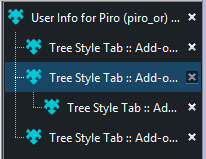
Can there be an option to show lines connecting child tabs to the parent tabs? For example:
 Keith94
All 9 comments
Because TST's tabs are not nested (they are flat and rendered like a tree only by their indent), it seems hard to do. Here is a carcass of my experiment:
.tab {
  overflow: visible
}
.tab[data-level]:not([data-level="0"])::before {
  content: " ";
  border: dotted;
  border-width: 0 0 1px 1px;
  width: 0.5em;
  height: var(--tab-height);
  position: absolute;
  bottom: 1em;
  z-index: 1000;
  pointer-events: none;
}
 piroor
on 28 Sep 2017
piroor
on 28 Sep 2017
That looks pretty good actually, thanks. I'll use it in the meantime :)
Keith94
on 28 Sep 2017
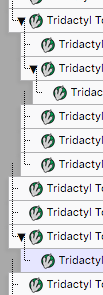
@Keith94 or anyone else following this issue, have you worked out a way to get the horizontally stacked lines, in particular? Just in case it's different, this is what I see with the above CSS (OS X El Capitan; Firefox 65.0; TST 2.7.19):
 braham-snyder
on 19 Feb 2019
braham-snyder
on 19 Feb 2019
@piroor I think we can close this. The CSS fix isn't perfect, but probably the best solution for now.
 irvinm
on 12 May 2019
irvinm
on 12 May 2019
This would still be immensely useful to me, and -- while I might be totally off-base here -- my guess is this is one of those things many other people would also find hugely useful if they saw it.
Even prepending eg dots would be amazing if you ask me:
a zeroth-level tab
. a first-level tab
. another first-level tab
.. a second-level tab
... a third-level tab
. yet another first-level tab
Thanks for the feedback @braham-snyder. I will let @piroor make the decision if he wants or can do anything more around this.
irvinm
on 12 May 2019
I've tried to implement @braham-snyder's idea with custom CSS:
.tab {
  overflow: visible
}
.tab[data-level]:not([data-level="0"])::before {
  font-size: calc(var(--indent-size) * 0.33);
  left: calc(var(--indent-size) * 1.2);
  letter-spacing: calc(var(--indent-size) * 0.66);
  opacity: 0.5;
  pointer-events: none;
  position: absolute;
  z-index: 1000;
}
.tab[data-level][data-level="1"]::before {
  content: "●";
  transform: translateX(calc(var(--indent-size) * -1));
}
.tab[data-level][data-level="2"]::before {
  content: "●●";
  transform: translateX(calc(var(--indent-size) * -2));
}
.tab[data-level][data-level="3"]::before {
  content: "●●●";
  transform: translateX(calc(var(--indent-size) * -3));
}
.tab[data-level][data-level="4"]::before {
  content: "●●●●";
  transform: translateX(calc(var(--indent-size) * -4));
}
.tab[data-level][data-level="5"]::before {
  content: "●●●●●";
  transform: translateX(calc(var(--indent-size) * -5));
}
.tab[data-level][data-level="6"]::before {
  content: "●●●●●●";
  transform: translateX(calc(var(--indent-size) * -6));
}
.tab[data-level][data-level="7"]::before {
  content: "●●●●●●●";
  transform: translateX(calc(var(--indent-size) * -7));
}
.tab[data-level][data-level="8"]::before {
  content: "●●●●●●●●";
  transform: translateX(calc(var(--indent-size) * -8));
}
.tab[data-level][data-level="9"]::before {
  content: "●●●●●●●●●";
  transform: translateX(calc(var(--indent-size) * -9));
}
Screenshot:

piroor
on 14 May 2019
Anyway currently I have no plan to implement this appearance as a built-in feature (and it is impossible due to current architecture), so I close this.
piroor
on 14 May 2019
FWIW, I found a single number in the overflow like this is faster for me to read than the dots:
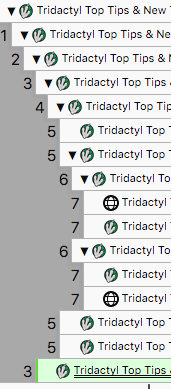
CSS:
.tab {
  overflow: visible
}
.tab[data-level]:not([data-level="0"])::before {
  font-size: calc(var(--indent-size) * 1.3);
  // TODO no big deal, but why doesn't this work?
  // font-size: 12px;
  left: calc(var(--indent-size) * -1.1);
  opacity: 1;
  pointer-events: none;
  position: absolute;
  z-index: 1000;
  // top: 5px;
}
.tab[data-level][data-level="1"]::before {
  content: "1";
  transform: translateX(calc(var(--indent-size) * 0.1));
}
.tab[data-level][data-level="2"]::before {
  content: "2";
}
.tab[data-level][data-level="3"]::before {
  content: "3";
}
.tab[data-level][data-level="4"]::before {
  content: "4";
}
.tab[data-level][data-level="5"]::before {
  content: "5";
}
.tab[data-level][data-level="6"]::before {
  content: "6";
}
.tab[data-level][data-level="7"]::before {
  content: "7";
}
.tab[data-level][data-level="8"]::before {
  content: "8";
}
.tab[data-level][data-level="9"]::before {
  content: "9";
}
.tab[data-level][data-level="10"]::before {
  content: "A";
}
.tab[data-level][data-level="11"]::before {
  content: "B";
}
.tab[data-level][data-level="12"]::before {
  content: "C";
}
.tab[data-level][data-level="13"]::before {
  content: "D";
}
.tab[data-level][data-level="14"]::before {
  content: "E";
}
.tab[data-level][data-level="15"]::before {
  content: "F";
}
.tab[data-level][data-level="16"]::before {
  content: "G";
}
.tab[data-level][data-level="17"]::before {
  content: "H";
}
I had also tried using vertical line characters like | instead of ●, but I still found the numbered approach above easier for me to read.
I did not try color-coding each | or ● though, which could in fact be best.
braham-snyder
on 15 May 2019
Related issues
 stapuft
·
4Comments
stapuft
·
4Comments
 azizLIGHT
·
4Comments
azizLIGHT
·
4Comments
 allixx
·
4Comments
allixx
·
4Comments
 ElhemEnohpi
·
4Comments
ElhemEnohpi
·
4Comments
 Lej77
·
4Comments
Lej77
·
4Comments
Most helpful comment
Anyway currently I have no plan to implement this appearance as a built-in feature (and it is impossible due to current architecture), so I close this.