Treestyletab: TST slow with many tabs (about:performance )
Short description
FF is slow with a lot of open tabs (1300).
When You look in about:performance and you do nothing,
you can see that TST is constantly running and using CPU.
Steps to reproduce
- Start Filrefox with clean profile.
- Install TST.
- Open 1300 tabs and build some trees
- Restart FF and click on some tabs so only about 50 tabs are running
Expected result
TST shouldn't use any CPU as long as you don't do anything with FF
Actual result
Tree Style Tab may currently be slowing down Firefox
Full name: [email protected].
Impact on framerate: 8/10 (634 alerts).
CPU usage: 4%.
System usage: 1%.
Blocking process calls: 0%.
Measure start: 5574 seconds ago.
Processes: 8052 (parent)
Environment
- Platform (OS): Windows 10 x64 v10.0.10586
- Version of Firefox: FF48 x64
- Version (or revision) of Tree Style Tab: 0.17.2016061501
 Tragen
All 14 comments
I think 1300 tabs are simply too many for Firefox. On the Browser Console I opened 1300 tabs by the code: for (var i = 0, maxi = 1300; i < maxi; i++) { gBrowser.addTab('http://www.google.com/search?q=tab'+i); }, then my Firefox becomes very slow even if there is no addon.
 piroor
on 11 Aug 2016
piroor
on 11 Aug 2016
I'm curious, why would you want to open 1300 tabs?
 ivocarvalho
on 11 Aug 2016
ivocarvalho
on 11 Aug 2016
It depends. 10 windows with 130 tabs each is much faster than one window with 1300 tabs.
This happens fast when you have a lot of open discussions and researches.
Tragen
on 11 Aug 2016
OK, I 've tried again with 10 windows with 130 tabs each prepared by this script:
for (let i = 0, maxi = 10; i < maxi; i++) {
  openDialog('chrome://browser/content/browser.xul', '_blank', 'chrome,all,dialog=no', (function() {
    let uris = Cc["@mozilla.org/supports-array;1"].createInstance(Ci.nsISupportsArray);
    for (let i = 0, maxi = 130; i < maxi; i++) {
      let uri = Cc["@mozilla.org/supports-string;1"].
                 createInstance(Ci.nsISupportsString);
      uri.data = 'http://www.google.com/search?q=tab'+i;
      uris.AppendElement(uri);
    }
    return uris;
  })());
}
Then my Firefox becomes seriously slow down with no addon - it seems a problem of Firefox itself, not TST. I still think that Firefox is not designed to work such too much tabs.
piroor
on 11 Aug 2016
One might consider filing this to bugzilla and see what they say.
 TheSweetLily
on 11 Aug 2016
TheSweetLily
on 11 Aug 2016
Even with less amount of tabs it is pretty slow.
Tree Style Tab may currently be slowing down Firefox
Full name: [email protected].
Impact on framerate: 7/10 (13 alerts).
CPU usage: 133%.
System usage: 2%.
Blocking process calls: 0%.
Measure start: 9 seconds ago.
Processes: 3132 (parent)
And I have around 50-100 tabs. Performance issues occur when I have a lot of top level tabs (almost the whole tab bar is filled) with 5-10 tabs inside.

 Cassandra-d
on 23 Sep 2016
Cassandra-d
on 23 Sep 2016
I'm not sure if it's related to the number of tabs I have. I always restore an old session. Almost none of the tabs have been viewed / loaded since restarting Firefox.
I have 2 windows and 69 mostly-top-level tabs.
Any suggestions?
Tree Style Tab may currently be slowing down Firefox.
Full name: [email protected].
Impact on framerate: 9/10 (90 alerts).
CPU usage: 87%.
System usage: 1%.
Blocking process calls: 0%.
Measure start: 229 seconds ago.
Processes: 75461 (parent)
 yunesj
on 28 Oct 2016
yunesj
on 28 Oct 2016
Dragging-and-dropping tabs to organize them is slow with ~100 tabs.
 almson
on 2 Nov 2016
almson
on 2 Nov 2016
@piroor I commonly have at least 500 tabs, so many-tab performance matters to me (and it is quite good most of the time.) I would suggest a slightly different test case: run your code as above, then restart the browser with the "restore previous tabs" setting. Most people with hundreds or thousands of tabs have very few actually loaded.
TST is unusable for me right now with 549 tabs (10 of them loaded). But I will file a separate issue for my case.
 hotsphink
on 27 Dec 2016
hotsphink
on 27 Dec 2016
This issue is valid for a small number of tabs (73 in my case). TST is always at the top of the list of performance offenders in about:performance:

 altano
on 25 Jan 2017
altano
on 25 Jan 2017
Another data point with 49 tabs, more than half unloaded. Browser is intermittently slow and sometimes becomes unusable.

 bob46859
on 4 Mar 2017
bob46859
on 4 Mar 2017
strange to hear these performance issues. I'm running firefox nightly builds and TST 0.18.2017021100a040247 and I don't think I've seen it over 3% in months. I routinely have 150-300 tabs
 wsmwk
on 10 Mar 2017
wsmwk
on 10 Mar 2017
I've got similar performance issues :
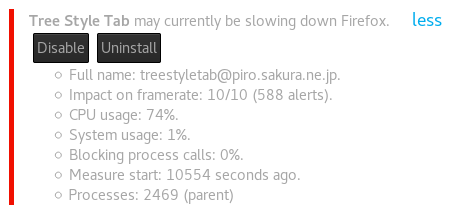
I'm under Firefox 54.0 (64-bit), under Fedora, with TST version 0.19.2017061601
At the time of this screenshot, I had a hundred tabs, with less than 10 loaded.
Interesting fact however, one of my tabs was a running YouTube video, and closing it made TST go back to almost no resource usage. I noticed it a few other times, with different sites, and so far it seems to happen every time one of my tabs does some heavy work.
I was also wondering if this could be caused by a conflict of some kind between add-ons. Is there a way to display debug information about what TST is doing ? Logs, or something similar ?
 toadjaune
on 7 Jul 2017
toadjaune
on 7 Jul 2017
TST 0.19.x is already obsolete, so I close this.
piroor
on 22 Oct 2018
Related issues
 NightSharp
·
3Comments
NightSharp
·
3Comments
 viking2
·
3Comments
viking2
·
3Comments
 allixx
·
4Comments
allixx
·
4Comments
 waldyrious
·
4Comments
waldyrious
·
4Comments
 array
·
4Comments
array
·
4Comments
Most helpful comment
Even with less amount of tabs it is pretty slow.
And I have around 50-100 tabs. Performance issues occur when I have a lot of top level tabs (almost the whole tab bar is filled) with 5-10 tabs inside.