Treemacs: Center project when selected or opened at window bottom
Maybe a selected project should becentered in the Treemacs window when a project is selected (at least if it's at the bottom of the window).
Two projects
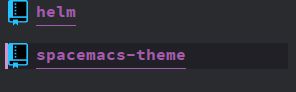
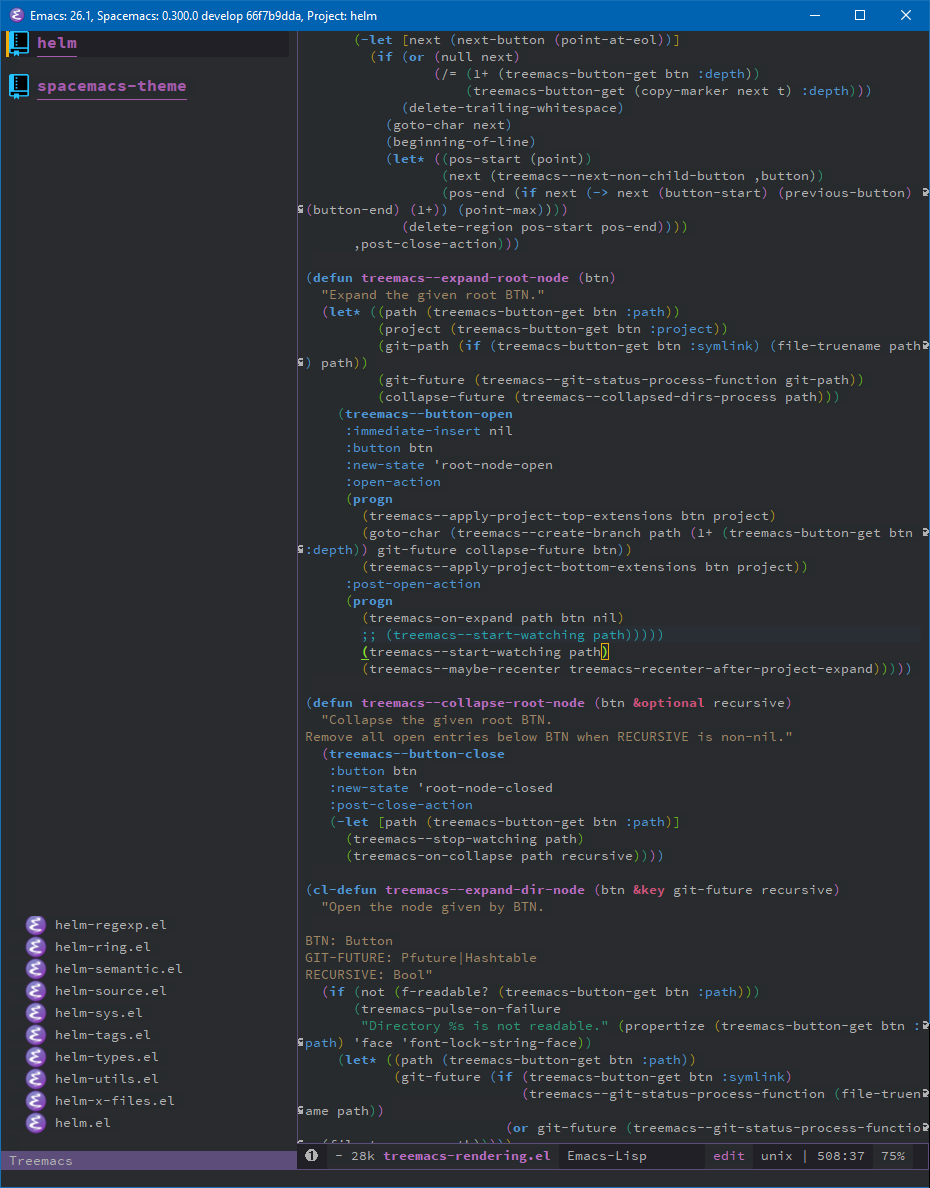
Helm project open
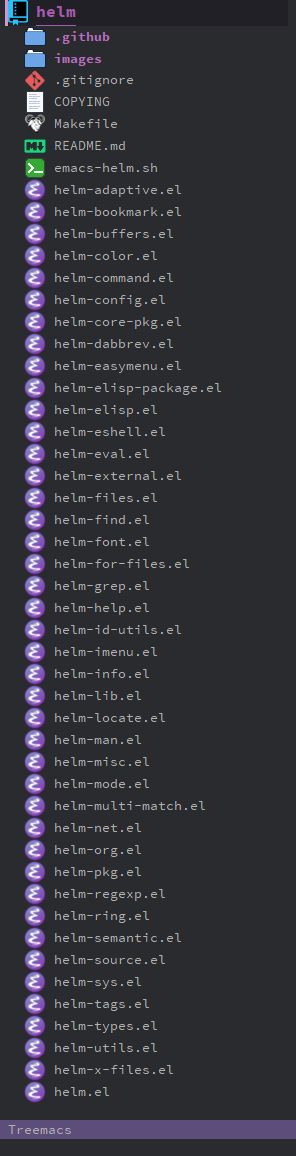
Spacemacs-theme project selected C-j
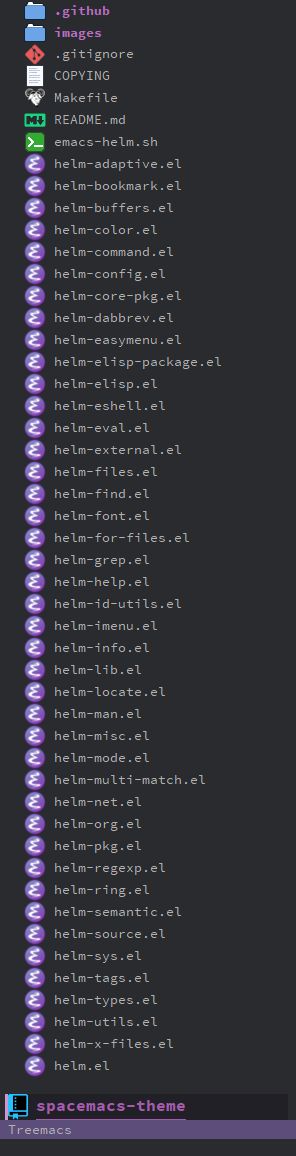
Spacemacs-theme project centered C-l (Ctrl and lowercase L) and opened TAB
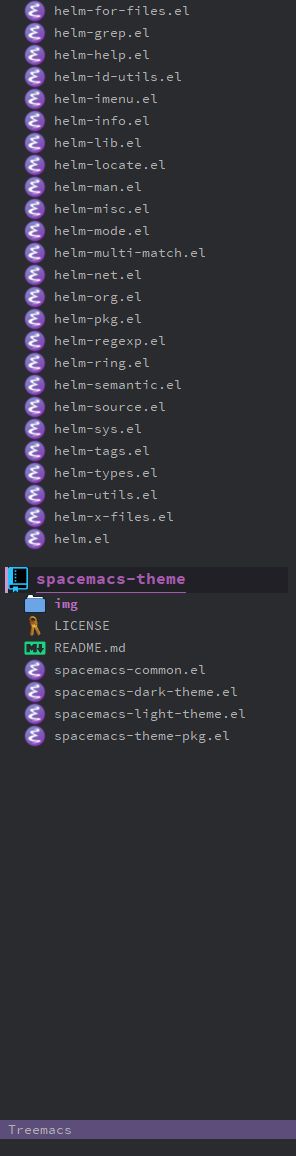
Another option could be to center a selected project (possibly only if it's at the bottom of the window) when it's opened TAB. Currently there's no visible change because the project files are below the window.
 duianto
All 27 comments
I never noticed this myself because I use a scroll-margin of 10, but this is doable.
Spacemacs-theme project selected
C-j
That's easy. I can add a customization option to call recenter whenever you navigate between projects.
Another option could be to center a selected project (possibly only if it's at the bottom of the window) when it's opened
TAB.
Should be easy, too, the code's already there thanks to treemacs-recenter-after-file-follow (wasn't that also your idea?).
 Alexander-Miller
on 6 Feb 2019
Alexander-Miller
on 6 Feb 2019
I don't remember that command so it might have been someone else 😃
duianto
on 6 Feb 2019
It is not a command, but a user option. Setting it to non-nil will call recenter with file-follow-mode when point is closer than treemacs-follow-recenter-distance to the start/end of the window. There's the same option for tag-follow-mode. You might want look into it if you use either follow-mode.
The new options will be shaped to the same pattern: treemacs-recenter-after-project-navigation and treemacs-recenter-after-project-expand.
Alexander-Miller
on 6 Feb 2019
I've had an idea: all the recentering will use the same basic code, but for some cases you want to always recenter, and in some based on treemacs-follow-recenter-distance (I'll need to rename that). For that purpose I'll expand the values of the recenter-after-* vars. They should be on-distance or always. t will mean the same as on-distance for backward compatibility.
Alexander-Miller
on 8 Feb 2019
Changes are pushed. I think I caught everything. See changelog for details.
Alexander-Miller
on 10 Feb 2019
Jumping between to projects now recenters the target project 👍
But expanding (TAB) a project at the bottom of the Treemacs window doesn't seem to work.
treemacs-recenter-after-project-expand is set to on-distance by default, but changing it to always doesn't do anything either.
When directory searching SPC s d (helm-dir-smart-do-search) through:
~/.emacs.d/elpa/26.1/develop/treemacs-20190210.1200/
then it only finds two entries:
treemacs-customization.el:360:12:(defcustom treemacs-recenter-after-project-expand 'on-distance
treemacs-customization.el:410:4: * treemacs-recenter-after-project-expand
The first one looks like the definition and the second one is in the docstring for:
(defcustom treemacs-recenter-distance 0.1.
It seems like it might not be used anywhere yet.
duianto
on 10 Feb 2019
Oops. https://github.com/Alexander-Miller/treemacs/commit/d2d2ed4ec13181d4d52f028636f8ac2ea2535f63 will take care of that.
Alexander-Miller
on 11 Feb 2019
That didn't seem to work, expanding a project at the bottom doesn't center it.
But another issue appeared.
- With two projects added,
- The second project is collapsed,
- The first project is expanded and collapsed,
then ten files from the first project are visible at the bottom of the Treemacs window.
Expanding the second project hides the first projects ten files, and they don't appear as long as the second project is expanded.
But they reappear when steps 2 and 3 are followed.
duianto
on 11 Feb 2019
Well this is surprisingly non-trivial. Let's reopen while I investigate.
Alexander-Miller
on 11 Feb 2019
hen ten files from the first project are visible at the bottom of the Treemacs window.
I cannot reproduce that part. Maybe there's something more specific at play here, like the size of the first project. Can you verify that it's https://github.com/Alexander-Miller/treemacs/commit/d2d2ed4ec13181d4d52f028636f8ac2ea2535f63 that's responsible?
Alexander-Miller
on 11 Feb 2019
It might be a redrawing issue that depends on the Emacs frame height.
With two projects added.
The first project has to have a couple of files in it (I'm seeing the issue with 8 files, I haven't tested what the minimum number is but the issue might take up a certain percentage of the Emacs frame height)
With the second project collapsed (it also works with no files in the second project)
Expand the first project.
Resize the height of the Emacs frame so that the top of the second projects blue book icon just disappears (it doesn't happen with 1px smaller or larger).
Now collapse, expand and collapse the first project.
Here's a screen recording:
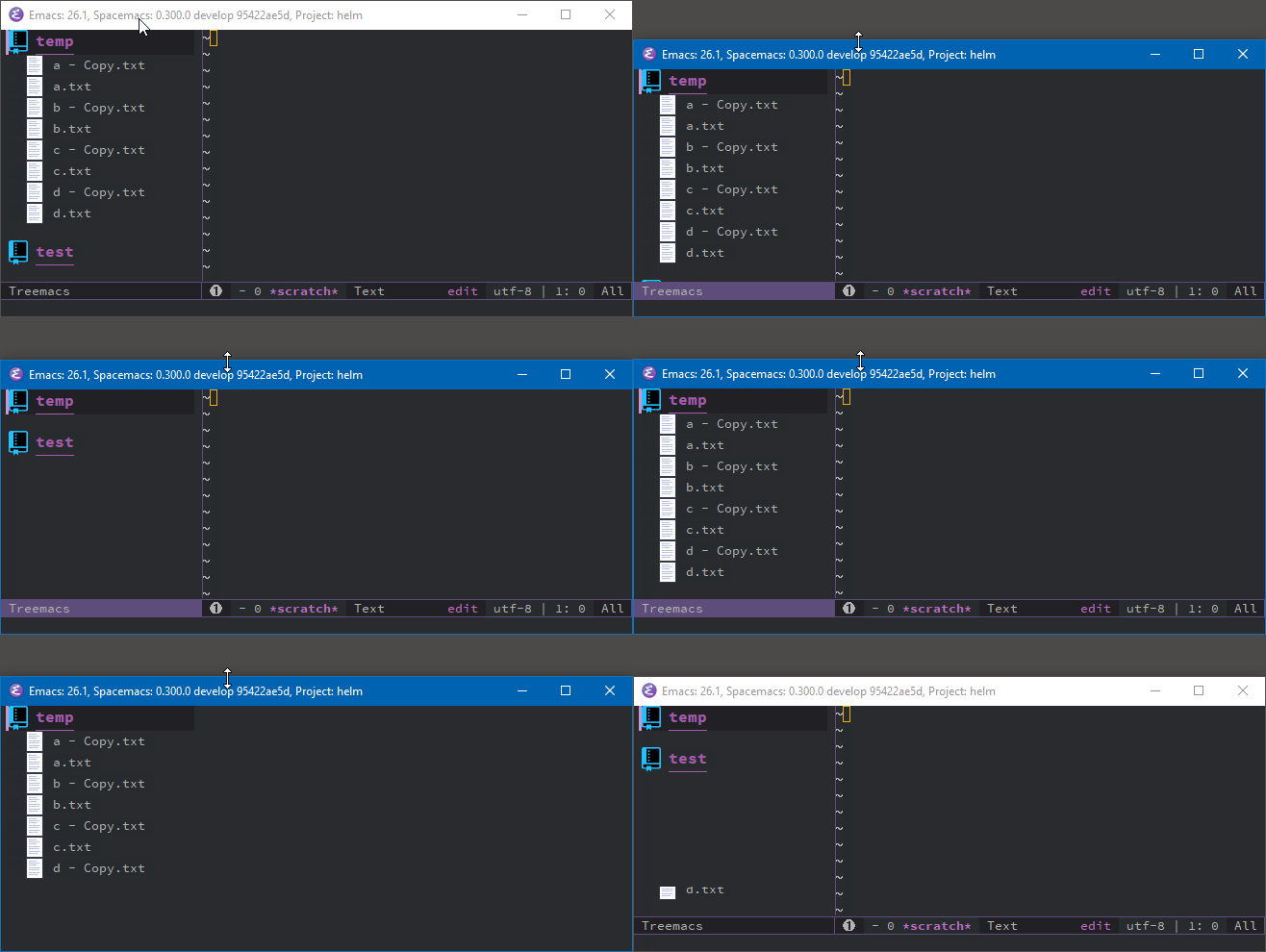
This was observed with treemacs-20190211.623 on the latest Spacemacs develop branch 95422ae5d, in Emacs 26.1 on Windows 10.
If your unable to reproduce the issue, then I can try other variables:
- Ubuntu 18.04
- Emacs 27.050
- pre Treemacs d2d2ed4,
- Without Spacemacs (just Emacs and Treemacs)
Update:
It might be windows specific:
The issue also occurs in Spacemacs develop 95422ae5d, Emacs 26.1 and 27.0.50, Windows 10, with:
- treemacs-20190206.1927 (pre
d2d2ed4) - treemacs-20190104.1527 (pre
d2d2ed4)
It also happens without Spacemacs:
Emacs -q with the package user dir set as the Spacemacs package directory:
(setq package-user-dir "~/.emacs.d/elpa/26.1/develop/")
(package-initialize)
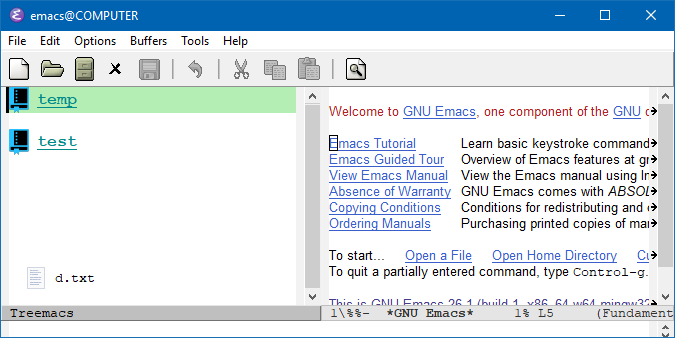
The issue does not occur in Spacemacs develop 95422ae5d, Emacs 27.0.50, Ubuntu 18.04.1., with:
- treemacs-20190202.1224 (pre
d2d2ed4) - treemacs-20190211.623,
duianto
on 12 Feb 2019
Are you saying that it's d2d2ed4 that's making this happen in windows? Strange, but let's try again with https://github.com/Alexander-Miller/treemacs/commit/2c5aa498bcc94cc53df3adc9681dd378edabf410. That'll fix the placement of the recenter-when calculation and should make it more accurate to boot.
You can also quickly see whether the remaining node at the bottom is due to a redisplay glitch: check whether it the same mouse-over face as the other nodes. If it doesn't it's a display remnant that wasn't cleaned up.
Alexander-Miller
on 12 Feb 2019
Sorry for not being clear. the issue is not related to d2d2ed4, because it also happens with the two previous versions that I had in C:\Users\username\.emacs.d\.cache\.rollback\26.1\develop:
- treemacs-20190206.1927 (pre
d2d2ed4) - treemacs-20190104.1527 (pre
d2d2ed4)
which were released before d2d2ed4 (20190211)
It seems to just be a redisplay glitch because it's not possible to navigate to the stray files at the bottom, the selection stops on the last project or on an empty line below it if the last project has been expanded at least once.
duianto
on 12 Feb 2019
Now (treemacs-20190212.1802) the project also gets centered when expanding near the bottom 👍
But it also happens near the top, when a project with lots of files is expanded near the top then a lot of the files disappear below the window, one probably want to see as many files as possible in the just expanded project.
duianto
on 12 Feb 2019
Hmm.. if the expanded project should show as many files as possible, then maybe it shouldn't move the project if all the expanded files fit in the window.
If any files will appear below the window then it could move up the project just enough to fit in the window.
I don't know how hard that is to implement, but it might be something to consider.
duianto
on 12 Feb 2019
It's quite doable and thankfully has no impact on performance, even if I have to account for 5000 new lines. Just need to figure out how to wrap it properly, it doesn't exactly fit the always or on-distance pattern anymore. Probably a third value will do.
Alexander-Miller
on 12 Feb 2019
treemacs-recenter-after-project-expand can now be set to on-visibility.
Alexander-Miller
on 2 Mar 2019
TLDR:
The calculation for recentering near the bottom seems to be based on the screen (display resolution) height, instead of the Treemacs window height, for both on-distance and on-visibility.
Long version:
The docstring for treemacs-recenter-after-project-expand says:
- ’on-visibility: recenter only when the newly rendered lines don’t fit the
current screen
screen seems to be referring to the height of the displays resolution.
It should probably be based on the height of the Treemacs window.
The Emacs frame height can't be used either, since for example the Emacs *Help* window can be open at the bottom which reduces the height of all windows.
Currently with a screen height of 1200px.
- When Emacs fills the screen height,
treemacs-recenter-after-project-expand=on-visibility.- Two projects have been added, the first (top) project has lots of items (dirs/files) to make it possible to move the second project to the bottom of the Treemacs window. The second project has
7items, and is selected in the explanation below.
When the project title is on line 43 (treemacs--current-screen-line) or greater, then there's one empty line below the projects last item, and when TAB is pressed then the project moves to the top.
It leaves a lot of empty space below it since the project only has 7 items. Maybe it should be centered to match the command name.
The Treemacs windows last fully visible line is 51, the project can be moved there quickly with zb (evil-scroll-line-to-bottom) or by pressing C-l (lowercase L) (recenter-top-bottom) a couple of times.
But when the Emacs frame is restored to the default startup size: 672x651. Then the bottom line in the Treemacs window is 26, and TAB doesn't recenter the line.
The same issue occurs when:
treemacs-recenter-after-project-expand = on-distance
When Emacs fills the screen height, then TAB recenters the project at line 4 or less, and at 45 or greater. (as expected)
Bit with the default Emacs frame size, it only recenters from line 4 or less, but the bottom line is 26 and TAB doesn't recenter the project from there, so on-distance seems to also calculate the distance based on the screen height.
Setting: treemacs-recenter-after-project-expand to nil or always seems to be working as expected.
duianto
on 3 Mar 2019
screen seems to be referring to the height of the displays resolution.
All those calculations are based on window lines, specifically the number of lines visible in the treemacs window, and the currently focused screen line. You can check the correctness of the height calculation your yourself with
(with-selected-window (treemacs-get-local-window)
  (treemacs--lines-in-window))
(The calculation will be wrong anywhere but the treemacs window since it takes the height of treemacs' icons into account)
on-visibility is calculated like this: You have 40 screen lines in the treemacs window, the position of point is on the 30th. You press TAB and render 15 new lines 15 > (40 - 30), therefore (recenter 0).
For on-distance, with the same example: distance from the top is 30 / 40 = 0.75, distance from bottom is 1.0 - 0.75 = 0.25. We would've recentered if either value would've been smaller then treemacs-recenter-distance.
It leaves a lot of empty space below it since the project only has 7 items. Maybe it should be centered to match the command name.
The 0 in (recenter 0) is negotiable. We could recenter on something like current-line - (new-lines - (all-lines - current-line)). For the previous example that'd be 30 - (15 - (40 - 30)) = 25.
As for your other examples: screenshots would be great, it's difficult to follow just in my head.
Alexander-Miller
on 3 Mar 2019
Your right, I should have added screenshots.
With the Emacs frame filling the screen height, when the spacemacs-theme project is located here or farther down, then it moves it to the top when it's expanded.
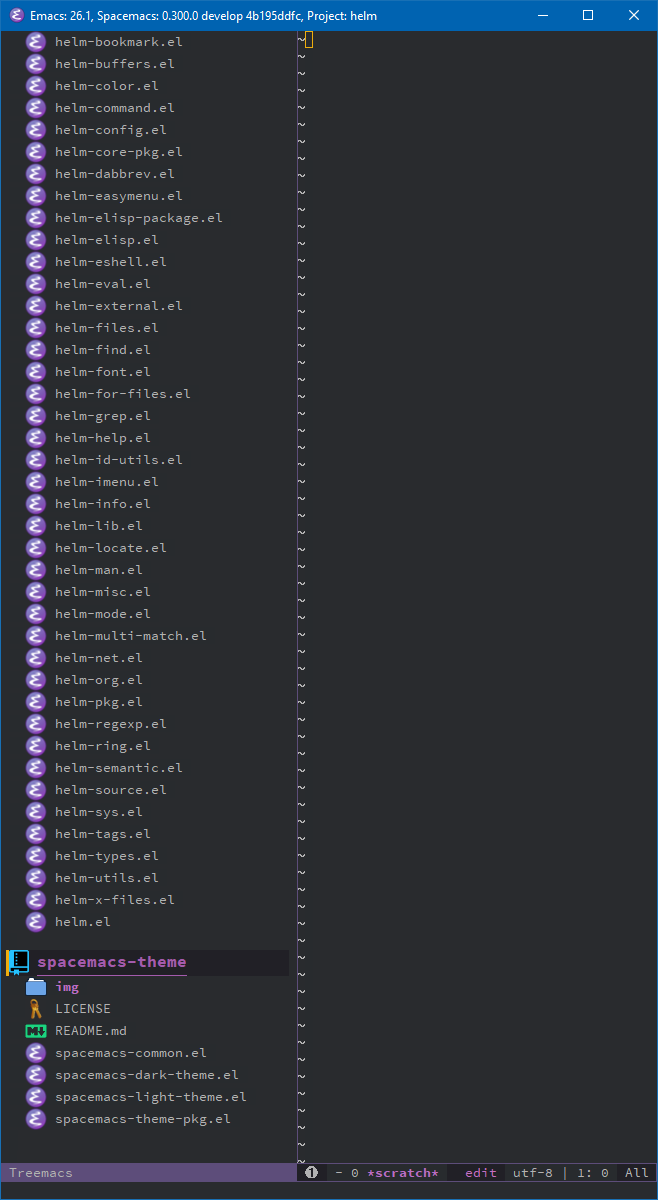
When the Emacs frame has the default startup size, then it doesn't recenter when it's expanded, even at the bottom.
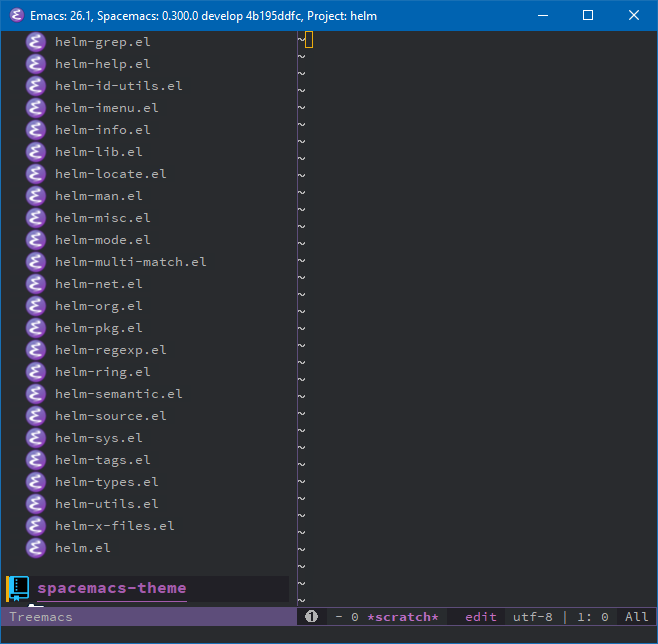
duianto
on 3 Mar 2019
Interesting. You should add a line like (treemacs-log "Lines %s/%s" current-line all-lines) to treemacs--maybe-recenter and see what gets logged when the recenter doesn't work. Ideally it should be something like 30.0/30.0 though I guess it is possible that the larger size of the project icon makes the calculation slightly inaccurate.
Alexander-Miller
on 3 Mar 2019
all-lines doesn't seem to be recalculated when the Emacs frame is resized.
Emacs started with the default size (second screenshot), but when it's resized to fill the screen height, and the project is moved to the bottom zb, and TAB is pressed then the message says:
[Treemacs] Lines 51.0/26.0
But something changed because, now the project moves to the top when the project is at:
[Treemacs] Lines 19.0/26.0
or greater, both when Emacs has the default or full screen height.
All I did was made a copy of: treemacs-rendering.el with the suffix _backup
then renamed treemacs-rendering.elc to also have the suffix _backup.
Then in the file treemacs-rendering.el, in the treemacs--maybe-recenter function, I added the treemacs log line here:
    (let* ((current-line (float (treemacs--current-screen-line)))
           (all-lines (float (treemacs--lines-in-window))))
      (treemacs-log "Lines %s/%s" current-line all-lines)
And restarted Emacs.
duianto
on 3 Mar 2019
Aaah, now I know what happened. It's a pretty subtle bug with the inline library: I forgot to wrap the function body in inline-quote, so the number of screen lines basically gets treated as a (compile-time) constant.
https://github.com/Alexander-Miller/treemacs/commit/787d12bb93ae3ab14f178eb8fd14e406bc98e1c5 will take care of it.
Alexander-Miller
on 3 Mar 2019
Confirmed, that seems to fix it. Thanks.
duianto
on 3 Mar 2019
Recenter on visibility is now smart enough to recenter only as much as is necessary to show the new lines.
Alexander-Miller
on 3 Mar 2019
That's great.
Could the same thing be implemented for treemacs-recenter-after-project-jump.
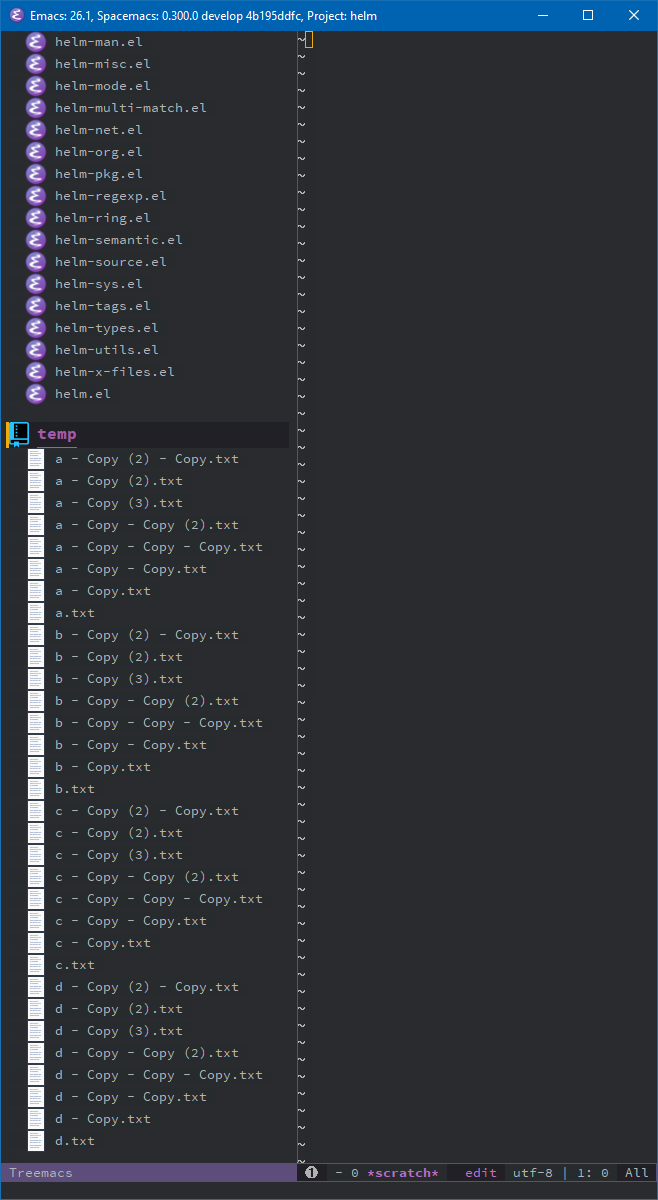
Currently with two projects with lots of files, jumping to the second project C-j, centers it but there are files below the bottom of the window.
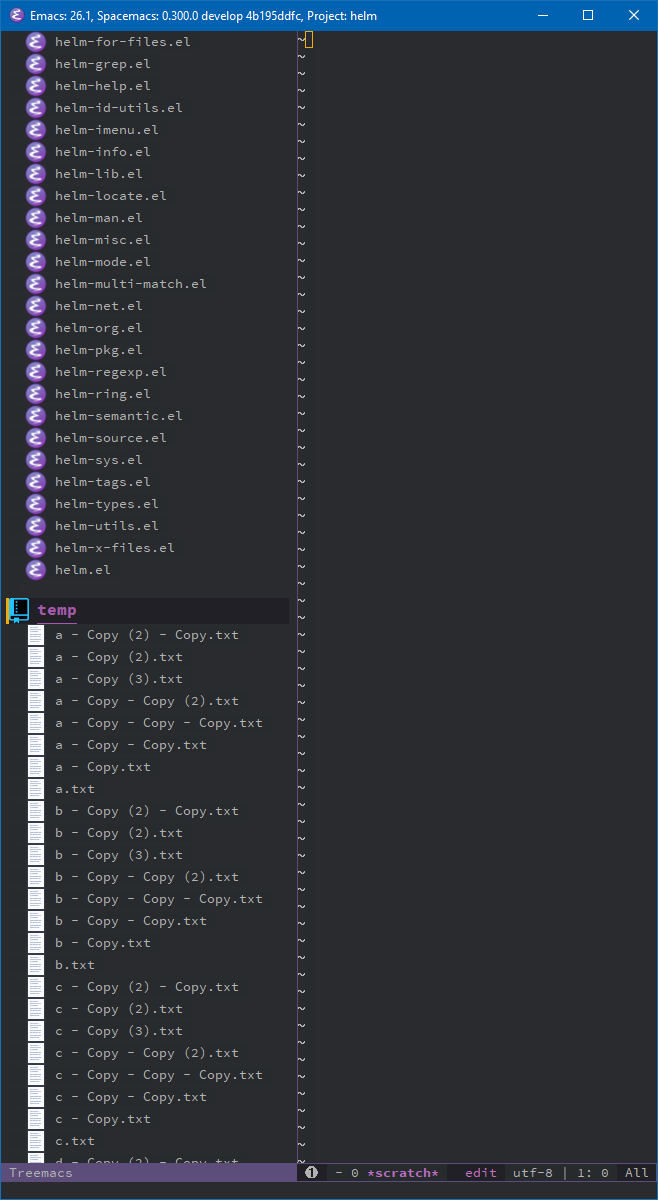
Closing and expanding it shows all files:
duianto
on 3 Mar 2019
Could the same thing be implemented for treemacs-recenter-after-project-jump.
Alexander-Miller
on 5 Mar 2019
Related issues
 ianpan870102
·
5Comments
ianpan870102
·
5Comments
 FieryCod
·
4Comments
Alexander-Miller
·
12Comments
FieryCod
·
4Comments
Alexander-Miller
·
12Comments
 kenkangxgwe
·
9Comments
kenkangxgwe
·
9Comments
 gerdint
·
5Comments
gerdint
·
5Comments