Translate-plugin: Input preset converter cannot listen field of current language only
Expected and actual behavior
When I write a title for e.g. new Blog article, I expect autogenerated slug in selected language, but I receive this same slug for all languages! As a result of this behavior there is non existing article language mutation created!
I think this issue needs deep improvement in input preset converter, or to create new solution for this Translate plugin.
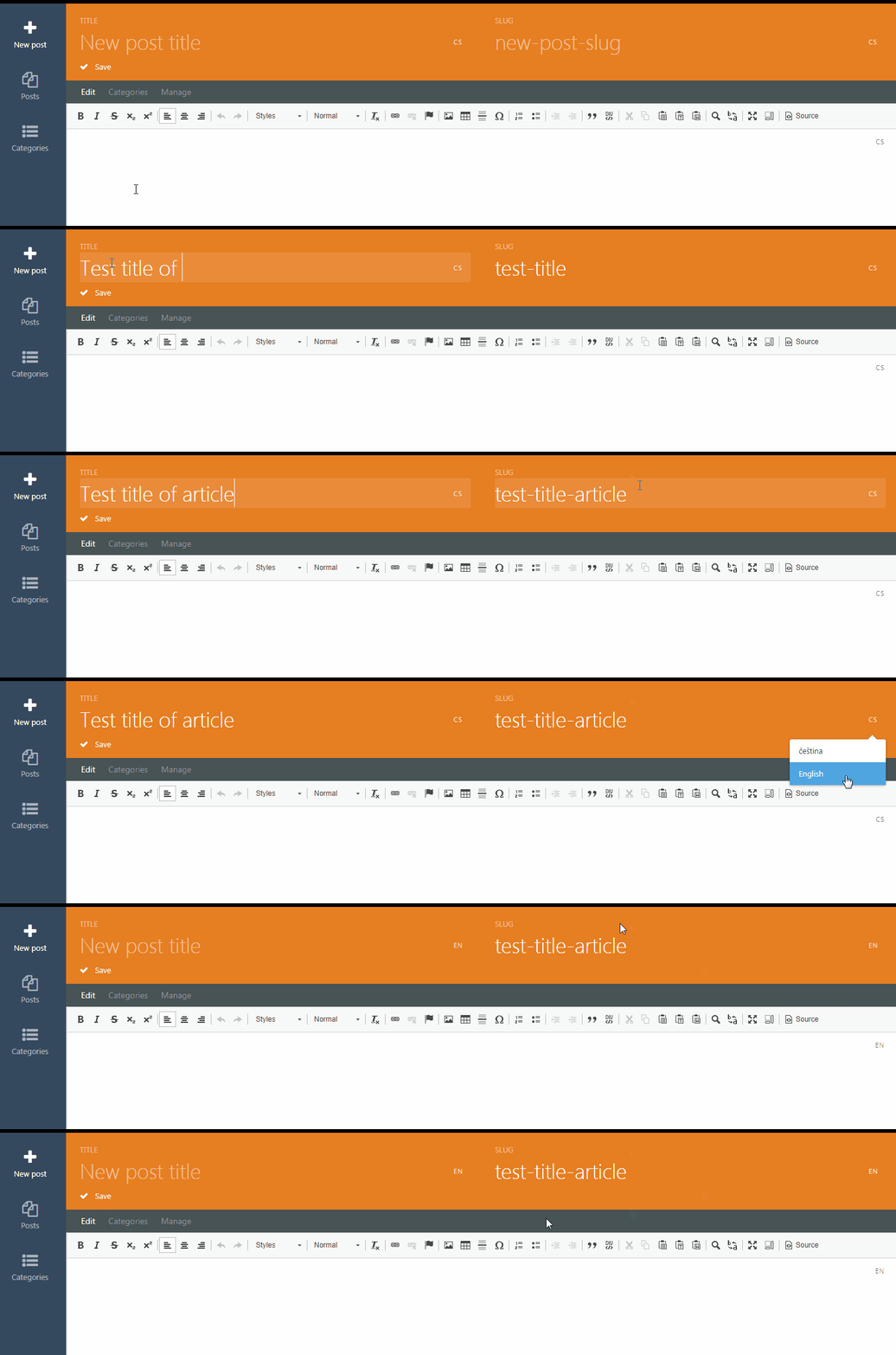
This bug really need a quick fix, it breaks function of whole plugin. (I am not able to do good PR for this issue.)
 Rike-cz
All 10 comments
@munxar @vannut thoughts?
 LukeTowers
on 15 Dec 2018
LukeTowers
on 15 Dec 2018
@LukeTowers confirm this bug, it is really annoying and needs to be fixed asap.
I could take care of this.
BTw. It affects in all plugins that use Pages/Blog/etc.
 munxar
on 15 Dec 2018
munxar
on 15 Dec 2018
Awesome, thanks @munxar
LukeTowers
on 15 Dec 2018
what I debugged so far is, that if any (!) preset feature is used on a translatable text field, this bug happens.
e.g.
fields:
    name:
        label: Name
        span: left
        type: text
    slug:
        label: Slug
        span: right
        type: text
        preset:
            field: name
            type: slug
if name and slug are translatable, then entering text into the name field will write all hidden RLTranslate[x][y] fields. Because it writes all those fields, even if the default language was set, the data gets overwritten for all languages.
because there is no server side interaction, I'm pretty sure we have to fix the presets javascript code.
update:
The only way I see this to work, is to overwrite the modules/system/assets/ui/js/input.preset.js in the MLControl trait.
munxar
on 15 Dec 2018
@munxar, sounds like a plan. Would you like to make a PR for this issue? I'll do the testing for you 😄
 w20k
on 16 Dec 2018
w20k
on 16 Dec 2018
Everything should be done inside modules/system/assets/ui/js/input.preset.js, as @munxar said.
Here https://github.com/octobercms/october/blob/master/modules/system/assets/ui/js/input.preset.js#L230
and https://github.com/octobercms/october/blob/master/modules/system/assets/ui/js/input.preset.js#L240
That should be fairly simple to implement:
- First, find an active locale for
$('.ml-btn[data-active-locale]:first', this.$el)this.$el.siblings('.ml-btn[data-active-locale]').text()or refactor data-active-locale to store local in data attribute - Second, get elements locale (
data-locale-value="en") - Third, if both fields are present and equal '===' -> .val($value) (on('paste'|'input', func())
w20k
on 29 Jan 2019
@munxar and @w20k what is the best way to "overwrite" the input.preset.js code in your opinion?
 mjauvin
on 26 Mar 2019
mjauvin
on 26 Mar 2019
@mjauvin if I'm not mistaken, the backend ui including the input.preset.js code is loaded always before any plugins code. So if we inject a multilang version of the input.preset.js jQuery plugin inside of MLControl.loadLocaleAssets()
like this:
$this->addJs('/plugins/rainlab/translate/assets/js/multilingual.js', 'RainLab.Translate');
        $this->addJs('/plugins/rainlab/translate/assets/js/ml-input.preset.js', 'RainLab.Translate'); // <- here
        $this->addCss('/plugins/rainlab/translate/assets/css/multilingual.css', 'RainLab.Translate');
it should work. main problem is to reduce the code duplication. so I think a better way would be to extend the existing implementation with events and handle them in the ml-input.preset.js.
munxar
on 27 Mar 2019
@mjauvin I'd not say it should be overwritten, more likely just add a few lines of code, as I've already described above.
A single check for data-lang-value|data-locale-value (can't remember which one was used or should be used there) attribute and if it's present use that input not all with CSS selector :). The simple fix as it could be. And somewhere in the Translate plugin add the new attribute.
w20k
on 27 Mar 2019
This was fixed by the following PRs:
https://github.com/octobercms/october/pull/4217
https://github.com/rainlab/translate-plugin/pull/458
mjauvin
on 4 May 2019
Related issues
 yeomann
·
6Comments
yeomann
·
6Comments
 spartanatreyu
·
3Comments
spartanatreyu
·
3Comments
 sophie-vdv
·
4Comments
sophie-vdv
·
4Comments
 Ladylain
·
3Comments
Ladylain
·
3Comments
 FelixINX
·
5Comments
FelixINX
·
5Comments
Most helpful comment
what I debugged so far is, that if any (!) preset feature is used on a translatable text field, this bug happens.
e.g.
if name and slug are translatable, then entering text into the name field will write all hidden RLTranslate[x][y] fields. Because it writes all those fields, even if the default language was set, the data gets overwritten for all languages.
because there is no server side interaction, I'm pretty sure we have to fix the presets javascript code.
update:
The only way I see this to work, is to overwrite the modules/system/assets/ui/js/input.preset.js in the MLControl trait.