Transgui: Connection hang
Local: Win10, fully updated - Fast gaming PC
Remote: Debian 9, fully updated - HP Proliant server
When downloading quickly (up to 1gbit/s) I get the timeout icon and the GUI doesn't update:

Login/connection to the remote host in other ways is no problem and the CPU on it isn't overtaxed. The only thing that hangs is Transgui. I does update if I wait a while (minutes+).

(12 cores, 4gb)
 Dustie
All 13 comments
Does the transmission download and distribute files?
If you stop the transmission connection is as long?
 leonsoft-kras
on 14 Apr 2020
leonsoft-kras
on 14 Apr 2020
I can see it was a rather poor bug report. Sorry about that.
Yes, the Transmission daemon on the host itself works fine and I can connect by other means to it. It is only the TransGUI that seems to hang. The local network doesn't seem to be the problem as both web, SSH and SMB access to the server are okay.
If you stop the transmission connection is as long?
I'm sorry I dont understand your question.
Let me know if there are any info or tests I can do.
Dustie
on 14 Apr 2020
100500 times answered similar questions.
TRGUI receives data from the transmission according to the RPC protocol.
If the transmission (program!) is busy, then the data arrives with a delay.
Can you stop all downloads and uploads?
There is a hang of TRGUI in this case?
limit transmission bandwidth. what will be the result?
leonsoft-kras
on 15 Apr 2020
When TransGUI hangs... if you connect via web browser, how is this connection?
Fluid?
In my case (a low powered ARM NAS) when Transmission daemon is dowloading full throtle my TransGUI lost connection or hangs... but the web browser interface connect a little better but takes forever for update... That is a sign what this is a server side issue.
 antekgla
on 15 Apr 2020
antekgla
on 15 Apr 2020
100500 times answered similar questions.
Ok. That tells something.
Can you stop all downloads and uploads?
No, I cannot do anything since Transgui hangs.
limit transmission bandwidth. what will be the result?
Are you asking me if slowing down transmission makes a difference in a bug report about using it with high speed? Yes, yes it does but that doesn't matter since neither the network or the host is working hard enough to make a difference on other ways to connect as already stated.
As I said I can connect to the host via other means just fine (web and SSH) so I already answered that question. If you still believe it is a TRANSMISSION bug feel free to say so instead of being snippy.
In my case (a low powered ARM NAS)
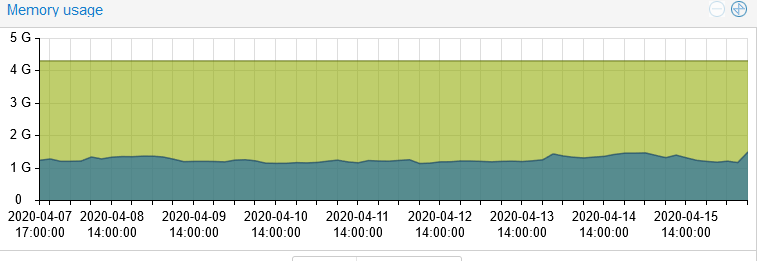
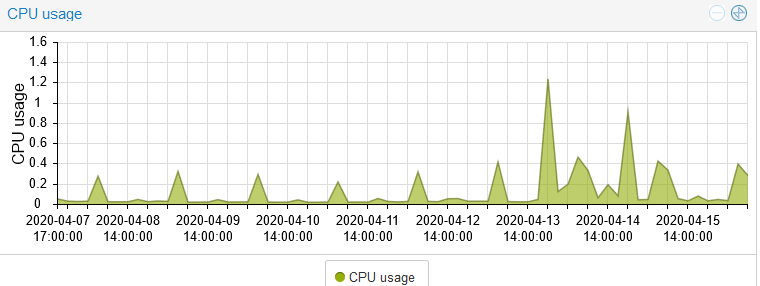
Transmission is running in Proxmox on a dual CPU Xeon 24 core HP Proliant with 32GB RAM and 2 x 1 gigabit fiber. It has access to 12 cores and 4GB (doesn't make a difference if I add more) and it is in no way working hard:
Dustie
on 16 Apr 2020
Useless conversation. You dont want or cannot try to change or verify anything. What to discuss?
We dont need your CPU, network speed, etc. Do you want to prove that TRGUI hangs and the problem is on its side? Oh well. Live with it.
If you think a little logically, then:
- all operations (connection, uploading, downloading) are performed by the transmission
(read it 10 times) - TRGUI connects to transmission
- transmission permits connect
- TRGUI asks the transmission for a list of files
- transmission sends information
- TRIGI draws a list of files
It's all. If your connection freezes, there is no display of files - where does TRGUI slow it down ?!
Try to change at least something in the settings of your transmission.
You wrote several times that you have access via the Web!
leonsoft-kras
on 17 Apr 2020
Your english is very poor. I did everything I was asked and did answer.
Transmission is fast.
It downloads fast.
It is fast in a CLI interface over the network via SSH.
It is fast in web interface over the network.
Everything is super snappy and fast and NOTHING is working hard.
Not network.
Not CPU.
Not RAM.
Not drives.
Everything is super fast and fluid.... EXCEPT TransGUI as soon as it need to show anything going fast.
Instead of being angry answer this:
Two clients showing the same info works perfectly fine and fast. One is super slow and hangs. Nothing is working hard. Where do you think the problem is? Try giving an answer instead of being angry.
Dustie
on 17 Apr 2020
Source files are available to everyone. Set breakpoints and find freezes.
Tell everyone the results, and suggest changes to the code (if you find something).
Good luck!
P.S. I am not the author of the program. I tuned my transmission. Nothing freezes me.
leonsoft-kras
on 18 Apr 2020
If I wanted to help code I would not want to do it in this environment of anger and dismissal. Clearly there's no interest to admit problems. I do (or did back in the day) code in Free pascal and delphi but this.... no thanks. I'll use the web interface instead. Unsubscribed.
Dustie
on 18 Apr 2020
Worst community ever.
Dustie
on 19 Apr 2020
Let's just calm down and focus on the problem itself, and let's not assume somebody is offensive, shall we?
I known that we all want a better software to use, and I also think that we all spend our own free time to help achieve that.
Not everyone is a native speaker of English, sometimes the words were just picked up not very precisely, might lead to some misunderstanding and bad feeling, but I'm willing to believe that we don't want to be offensive, let's try to continue the conversation without personal feelings if you both agree with me 🙂
 PeterDaveHello
on 19 Apr 2020
PeterDaveHello
on 19 Apr 2020
it keeps hanging for me too. it happens when transmission daemon is downloading something. at those times its always using up all the cpu resources and slowing down everything on the machine where transmission-daemon runs. at that point this interface (which runs on another machine and connects to the daemon box which runs on the same lan) starts having connection timeout issues (because there are no cpu resources left for handling new requests when the extremely heavy download process runs) and for some reason it hangs if the connection is not stable. no crash tho it just sits there in not responding status and eventually gets out of that state and works until there are connection issues again
 username-not-taken
on 20 Apr 2020
username-not-taken
on 20 Apr 2020
CPU and network power are not affected.
So programmed the network interfaces of the transmission <-> TR GUI
(protocol RPC. For the Web is possible in a different way).
Source codes (main.pas). CTRL + F "Reconnect"
4752: TickTimerTimer
4801: DoConnect
4948: function TMainForm.DoConnect
5034: RpcObj.Connect;
1) connection - performed in the thread of the graphic window
2) the connection function is waiting for a response from the RPC protocol
3) until the transmission responds, the TR GUI hangs.
CTRL + F “HideWaitMsg”, “AppBusy”.
You can see that the “hourglass” appears during interaction under the RPC protocol.
If TR GUI quickly receives data from the transmission - the hang is not visible.
They offer a program for asynchronous operation with transmission.
You will remove the hangs of TR GUI.
But until the transmission responds, there will be no connection, there will be no data.
leonsoft-kras
on 22 Apr 2020
Related issues
 Jimbolino
·
7Comments
Jimbolino
·
7Comments
 LYCX2015
·
11Comments
leonsoft-kras
·
9Comments
LYCX2015
·
11Comments
leonsoft-kras
·
9Comments
 noeRls
·
5Comments
noeRls
·
5Comments
 Fytch
·
8Comments
Fytch
·
8Comments
Most helpful comment
Let's just calm down and focus on the problem itself, and let's not assume somebody is offensive, shall we?
I known that we all want a better software to use, and I also think that we all spend our own free time to help achieve that.
Not everyone is a native speaker of English, sometimes the words were just picked up not very precisely, might lead to some misunderstanding and bad feeling, but I'm willing to believe that we don't want to be offensive, let's try to continue the conversation without personal feelings if you both agree with me 🙂