Transgui: Dark mode on macOS
Text in the app is not visible.
Transmission Remote GUI 5.18.0
macOS Catalina 10.15.1 > Preferences > General > Appearance (Dark) > Highlight color (Graphite)

 hekm77
All 13 comments
I second that, focus color needs a little change.
 bonovski
on 19 Nov 2019
bonovski
on 19 Nov 2019
To make it a more complete example:
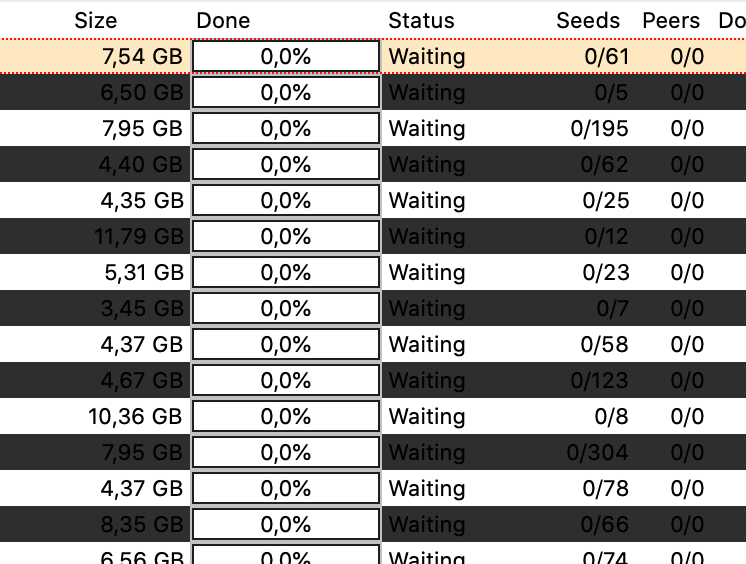
This is in the morning, when colors go from dark to light. It is the same mess in the evening when they go from light to dark.
 mat813
on 19 Dec 2019
mat813
on 19 Dec 2019
Yep, MacOS Dark mode Font color adjustment really appreciated!
 sIRwa2
on 24 Dec 2019
sIRwa2
on 24 Dec 2019
Same problem here.
 ormanya
on 17 Jan 2020
ormanya
on 17 Jan 2020
same issue
 0x5e
on 1 Mar 2020
0x5e
on 1 Mar 2020
On Mac OSX Mojave in Dark Mode using 5.18.0, everything looks good except "Text Area" field. They use black font over dark grey background.
 myrandor
on 28 Mar 2020
myrandor
on 28 Mar 2020
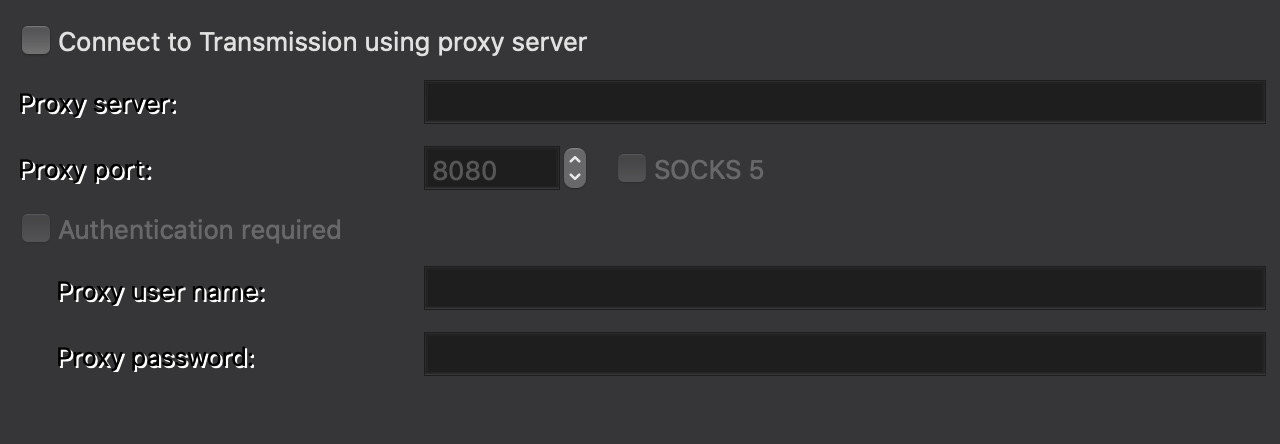
Only problem I've seen is when things are disabled... The labels look odd
 reedy
on 3 May 2020
reedy
on 3 May 2020
9 months and counting. Any active devs with the skill set to fix this and compile a dev build to share? I'd be very grateful as well as others, I'm betting.
 neo-neo1
on 30 Jul 2020
neo-neo1
on 30 Jul 2020
here to report the same issues, hopefully someone will pick up the project and fix it!!
 asherman07
on 18 Aug 2020
asherman07
on 18 Aug 2020
Update 10/27/20: To clarify, this only turns off _dark mode_ for this one app and leaves _dark mode_ applied for all other apps.
Here's a workaround that will disable _dark mode_ for the Transmission Remote GUI app so that you can at least see the Table GUI. Paste this into the terminal and press return:
defaults write com.transgui NSRequiresAquaSystemAppearance -bool yes
Then restart the Transmission Remote GUI app if it was already open.
To reverse this change in the future, paste this into the terminal.app and press return:
defaults write com.transgui NSRequiresAquaSystemAppearance -bool no
 BlackRockCity
on 24 Oct 2020
BlackRockCity
on 24 Oct 2020
Hardly a workaround if it disables dark mode.
neo-neo1
on 24 Oct 2020
It only disables it for this particular application while leaving all others in dark mode. If your priority is to get the table to render properly, this is one method.
Sent from my iPhone
On Oct 24, 2020, at 11:36, neo-neo1 notifications@github.com wrote:
Hardly a workaround if it disables dark mode.
—
You are receiving this because you commented.
Reply to this email directly, view it on GitHubhttps://nam10.safelinks.protection.outlook.com/?url=https%3A%2F%2Fgithub.com%2Ftransmission-remote-gui%2Ftransgui%2Fissues%2F1268%23issuecomment-716028874&data=04%7C01%7C%7C2394f222ff964845611608d878435e31%7C84df9e7fe9f640afb435aaaaaaaaaaaa%7C1%7C0%7C637391578014574656%7CUnknown%7CTWFpbGZsb3d8eyJWIjoiMC4wLjAwMDAiLCJQIjoiV2luMzIiLCJBTiI6Ik1haWwiLCJXVCI6Mn0%3D%7C1000&sdata=HSCmDtrxXaZJ2BXW0BKencxDqxmiWSXzJYM43UzgEos%3D&reserved=0, or unsubscribehttps://nam10.safelinks.protection.outlook.com/?url=https%3A%2F%2Fgithub.com%2Fnotifications%2Funsubscribe-auth%2FAACKZDU4TQL3VD5WFD4IZKTSMMGCRANCNFSM4JLELUZQ&data=04%7C01%7C%7C2394f222ff964845611608d878435e31%7C84df9e7fe9f640afb435aaaaaaaaaaaa%7C1%7C0%7C637391578014574656%7CUnknown%7CTWFpbGZsb3d8eyJWIjoiMC4wLjAwMDAiLCJQIjoiV2luMzIiLCJBTiI6Ik1haWwiLCJXVCI6Mn0%3D%7C1000&sdata=u0by%2FtdLVQq5aIwFuArQRwWdri2bq3zXl7HlB6nx5jU%3D&reserved=0.
BlackRockCity
on 25 Oct 2020
Assuming from the above that the application uses Lazarus for its interface, there's example code to detect light/dark mode changes, including automatic mode, here:
https://wiki.lazarus.freepascal.org/Dark_theme#Example_2_2
It came from discussion in this thread:
https://forum.lazarus.freepascal.org/index.php?topic=43111.0
I hope the app can be updated to respond to mode changes, currently you either have to restart the app twice a day or disable dark mode for it, neither of which are ideal. Am happy to help with any testing etc.
 hippydave
on 15 Dec 2020
hippydave
on 15 Dec 2020
Related issues
 leonsoft-kras
·
9Comments
leonsoft-kras
·
9Comments
 ploink
·
7Comments
ploink
·
7Comments
 mrplumber
·
13Comments
mrplumber
·
13Comments
 Jimbolino
·
7Comments
Jimbolino
·
7Comments
 volo-thomas
·
11Comments
volo-thomas
·
11Comments
Most helpful comment
Update 10/27/20: To clarify, this only turns off _dark mode_ for this one app and leaves _dark mode_ applied for all other apps.
Here's a workaround that will disable _dark mode_ for the Transmission Remote GUI app so that you can at least see the Table GUI. Paste this into the terminal and press return:
defaults write com.transgui NSRequiresAquaSystemAppearance -bool yes
Then restart the Transmission Remote GUI app if it was already open.
To reverse this change in the future, paste this into the terminal.app and press return:
defaults write com.transgui NSRequiresAquaSystemAppearance -bool no
https://apple.stackexchange.com/questions/338044/can-i-turn-to-dark-mode-only-for-specific-apps-in-macos-mojave