Transgui: 5.15 regular startup errors, crash
Using Remote Gui 5.15 and Transmission 2.93 x64 daemon on Windows 8.1
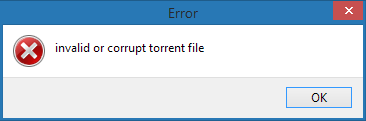
Ever since upgrading to 5.15, I have been getting these popups when starting the application. Usually two pop-ups in a row. The torrents are all fine and have been working with 5.14.
One time I got a third error popup, which looked like a longer bit of text or code and which I did not screenshot, unfortunately. TRGUI then crashed afterwards.
 Tharn
Tharn
All 30 comments
yes i saw this too but it only happenned on 1st launch after installing.
tbh i would rather like to see the existing bugs fixed rather than adding new features at this point.
 rd1
on 22 Mar 2018
rd1
on 22 Mar 2018
scratch that, it just happenned again on starting the frontend.
lets wait and see if v5.15.1 fixes this
rd1
on 22 Mar 2018
You have the option to monitor the clipboard for torrents or magnets ON?
If YES please when occurs this error try to post the content of the clipboard BEFORE launching the program.
Or if you use a clipboard manager post the prior to last entry. (transGUI erase the clipboard content after that error).
 antekgla
on 22 Mar 2018
antekgla
on 22 Mar 2018
Yes, I had 'Automatically add torrent links from the clipboard' set to on.
I can confirm that TRGUI gives that error when I have text in the clipboard that contains [ ] / ? & % $ and so on.
Tharn
on 22 Mar 2018
I need you copy exactly the content of your clipboard when fires this error. I need that for debug the new function isHash
antekgla
on 22 Mar 2018
I just had about a paragraph of regular text containing a few BBCodes such as [url=url://goes.here]and that was all[/url].
You can make TRGUI show the error by copying this text.
The error happens with all text that contains these characters I described in my previous post. I copied these single special characters, opened TRGUI and each of them produced an error popup.
For catching magnets and .torrents, it strikes me as better to have a whitelist with set formats where TRGUI will try to pull the clipboard, otherwise it should ignore it.
magnet:*
*:\[...]*.torrent
*://[...]*.torrent
/[...]*.torrent or something similar for Linux filesystems
Am I wrong?
Tharn
on 22 Mar 2018
I can´t reproduce the error in my TransGUI 5.15 on Windows 7 x64.
I copy the text you provide and nothing happens.
I copy any text with that characters and the error not happens.
I copy every single character you say cause trouble, but again in my TransGUI dont fires the error.
I try to think what is the problem but I am disoriented.
antekgla
on 22 Mar 2018
It may have something to do with system locale. My Win 8.1 is set to English (US) interface with German keyboard/numbers/dates.
Some loophole in the new Hash detection? Nothing else with the 'copy from clipboard' function was changed, right?
Edit: I also discovered that by copying a short story I could make TRGUI reliably crash on startup. I used http://textfiles.com/stories/13chil.txt
Tharn
on 22 Mar 2018
It may have something to do with system locale. My Win 8.1 is set to English (US) interface with German keyboard/numbers/dates.
I don't think so.
You say what with 5.14 works OK. The only difference between 5.14 and 5.15 in clipboard management is the detection os magnets hashes (only hashes without the magnet:?xt=urn:btih: construction).
function IsHash(Hash: String): boolean;
  var i: integer;
  begin
        if Hash = '' then exit;
        if Length(Hash) = 32 then   // possible base32 encoded hash
                        try
                           Hash:=StrToHex(Base32Decode(UpperCase(Hash)));
                        except
                           exit;
                        end;
       if Length(Hash) <> 40 then exit;
       Result := true;
       for i := 1 to 40 do if not (Hash[i] in ['a' .. 'f', 'A'..'F', '0'..'9']) then Result := false;
  end;
That function check clipboard content only for strings with lenght 32 or 40 otherwise returns false.
Besides checks if 32 char strings are encoded in base32. and decode in a 40 char hash.
After that check what the characters are hexadecimal characters (0-9 and A-F)
Only then (if the string has 40 characters and are hexadecimal) the function return true.
When that function returns true TransGUI add the magnet:?xt=urn:btih: part y only after that try to add the magnet.
As you see the characters you say are not allowed and for that not treated like a torrent hash.
antekgla
on 22 Mar 2018
Thank you for the explanation, however I'm not a programmer. I just try to report bugs. Something broke and since this is the only change that touches on the clipboard functionality, we have to assume it's something to do with 6e5cb4c7bf90ad0445b771f952f813cbac5547fd
Tharn
on 22 Mar 2018
I made a small change in the function.
Please can you test the new exe I adjunt here:
antekgla
on 22 Mar 2018
This seems to have fixed it. The special characters and the short story both still allow TRGUI to start up properly. Cheers!
Tharn
on 23 Mar 2018
Fixed with https://github.com/transmission-remote-gui/transgui/commit/f53c87c4941d656ecf39aee728c0f6457e0316a3
Apparentely it is a good advice to initializate all variables, and dont assume the default value of anything. :laughing:
antekgla
on 23 Mar 2018
I leave this open until next release.
antekgla
on 23 Mar 2018
I had to disable the clipboard feature because it kept on crashing when I had anything copied on the clipboard. For example, I was trying to add some trackers to a torrent and it would try to add all individual urls in my clipboard as torrents.
 Sushubh
on 23 Mar 2018
Sushubh
on 23 Mar 2018
I had to disable the clipboard feature because it kept on crashing when I had anything copied on the clipboard. For example, I was trying to add some trackers to a torrent and it would try to add all individual urls in my clipboard as torrents.
Are you running TransGUI in Windows?
You try the file I upload in a earlier message?
antekgla
on 23 Mar 2018
I did not try that upload. But I did notice an update 5.15.1 and installed it. Does it include the fix? I have not turned on clipboard feature back on. Should I enable it and check?
Sushubh
on 23 Mar 2018
Not sadly 5.15.1 DONT include the fix because the commit was after the release.
Thats why I upload a Windows .exe because another systems we provide temporarily builds thru Travis CI.
You have to ask @PeterDaveHello about Travis because I dont know how download this temporary builds.
antekgla
on 23 Mar 2018
ok. that file seems to work fine. enabled clipboard. copied a long list of urls. changed focus to the app. no crash. seems fine!
Sushubh
on 23 Mar 2018
ok. that file seems to work fine. enabled clipboard. copied a long list of urls. changed focus to the app. no crash. seems fine!
Good!!! :+1:
For curiosity what is your version of Windows?
antekgla
on 23 Mar 2018
I see this in Linux version too, can live with it just wondered when it may go into release?
 IanBlakeley
on 23 Mar 2018
IanBlakeley
on 23 Mar 2018
Well the new release came out today (without this fix) so I guess next month would be fixed.
I you dont want to wait ask @PeterDaveHello how to download Travis CL temporary builds.
antekgla
on 23 Mar 2018
@IanBlakeley what's your Linux arch? i386, amd64 or armv6/armv7?
 PeterDaveHello
on 23 Mar 2018
PeterDaveHello
on 23 Mar 2018
@PeterDaveHello can you download and attach in a message in this thread all the Travis CL temporary builds (except Windows what I did) because thats downloads expires in 1 week?
antekgla
on 23 Mar 2018
@antekgla I prefer to just release v5.15.2 sooner, maybe 12 hours later, what do you think?
PeterDaveHello
on 23 Mar 2018
@antekgla I prefer to just release v5.15.2 sooner, maybe 12 hours later, what do you think?
That would be great!!!!
I did not want to bother you anymore because you made 2 releases in a very short time... but if this dont mind you I think what that is the real solution. (I dont was aware of this problem because in my system that function works OK all the time),
antekgla
on 23 Mar 2018
@antekgla no problem at all, I prefer to fix this sooner, so the impact will be smalle.
I agree that think we do release to quick, maybe need to get some testing plans or something like that, to ensure the release with less issues, but that's the future plan.
PeterDaveHello
on 23 Mar 2018
I am using Mint 18.2 but no worries can live with it on start up or if you want me to test a pre-release can do also
IanBlakeley
on 23 Mar 2018
v5.15.2 released: https://github.com/transmission-remote-gui/transgui/releases/tag/v5.15.2
PeterDaveHello
on 23 Mar 2018
Thanks @PeterDaveHello :+1:
antekgla
on 23 Mar 2018
Related issues
 sheykh-sleky
·
5Comments
sheykh-sleky
·
5Comments
 pasha-zzz
·
11Comments
pasha-zzz
·
11Comments
 Pusha1d
·
7Comments
Pusha1d
·
7Comments
 Fytch
·
8Comments
PeterDaveHello
·
4Comments
Fytch
·
8Comments
PeterDaveHello
·
4Comments