Hi,
I am using tmux for training data on a remote machine, and I naturally use tqdm do display progress. However, when I detach my tmux screen and attach again later, the progress bars go full 1-line-per-iteration mode (like it does on a notebook when interrupted for instance). I am using tqdm autonotebook, but same goes for classic tqdm. I feel like it is quite the same as this very old issue #122. As it is quite old, I thought it would be better to repost. You can see a screen of the bug below.
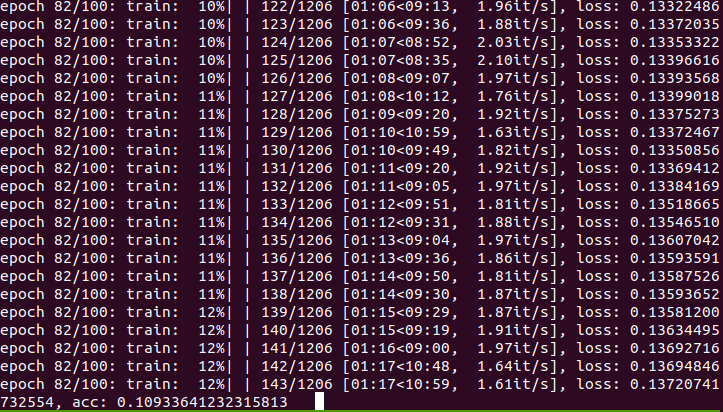
Tmux runs on bash, and the server is on CentOS. Some specs are below.
python
In [2]: print(tqdm.__version__, sys.version, sys.platform)
4.32.1 3.6.7 |Anaconda, Inc.| (default, Oct 23 2018, 19:16:44)
[GCC 7.3.0] linux
 schwobr
All 5 comments
dynamic_ncols=True?
 casperdcl
on 13 Jun 2019
casperdcl
on 13 Jun 2019
Doesn't work either, but you made me realize it has nothing to do with tmux. It was a coincidence that each time I checked, I started it with my terminal in full screen but reattached with small terminal. The problem is indeed when the terminal is too small. So I guess this is not much of an issue, but is there a way to make it fit on multiple lines when necessary instead of printing it line by line ?
schwobr
on 13 Jun 2019
one bar on multiple lines isn't (yet) supported, but you could always piggy back off nested bars with custom bar_formats to split the information across two bars.
casperdcl
on 17 Jun 2019
duplicate of #630
casperdcl
on 23 Aug 2019
I 'm not sure this is a duplicate, the problem arises from reattaching to a tmux with a smaller screen. If you reattach in a smaller window, and the size of the output shrinks and gets messed up. But then, if you resize the window to it's larger size, the output does not enlarge.
 jfuruness
on 3 Aug 2020
jfuruness
on 3 Aug 2020
Related issues
 Erawpalassalg
·
4Comments
Erawpalassalg
·
4Comments
 demiangomez
·
4Comments
demiangomez
·
4Comments
 techkang
·
4Comments
techkang
·
4Comments
 mrclary
·
5Comments
mrclary
·
5Comments
 CrazyPython
·
5Comments
CrazyPython
·
5Comments
Most helpful comment
I 'm not sure this is a duplicate, the problem arises from reattaching to a tmux with a smaller screen. If you reattach in a smaller window, and the size of the output shrinks and gets messed up. But then, if you resize the window to it's larger size, the output does not enlarge.