Tornadofx: menu of menubar is not styleable with typeSafeCSS
addClass() for menu inside menubar is assigned to the menubar instead of the menu itself.
Therefor not changable with type Safe CSS.
menubar {
    menu("menuOne") {
        addClass(Styles.menuOneStyle)
        item("menuItemOne")
        item("menuItemTwo")
        item("menuItemThree")
    }
    menu("menuTwo") {
        addClass(Styles.menuTwoStyle)
        item("menuItemOne")
        item("menuItemTwo")
        item("menuItemThree")
    }
    menu("menuThree") {
        addClass(Styles.menuThreeStyle)
        item("menuItemOne")
        item("menuItemTwo")
        item("menuItemThree")
    }
}
 Mosch0512
All 13 comments
class Styles : Stylesheet() {
    companion object {
        val menuOneStyle by cssclass()
        val menuTwoStyle by cssclass()
        val menuThreeStyle by cssclass()
    }
    init {
        menuOneStyle {
            backgroundColor += c("red")
        }
        menuTwoStyle {
            backgroundColor += c("blue")
        }

        menuThreeStyle {
            backgroundColor += c("black")
        }
    }
}


Mosch0512
on 12 Mar 2019
You're right. It seems like we should have added the css manipulations to Styleable instead of Node etc. I will look into moving them.
 edvin
on 12 Mar 2019
edvin
on 12 Mar 2019
@edvin thx a lot for the fast response
btw.: I love TornadoFX :D
Mosch0512
on 12 Mar 2019
I've made the change locally, checking in with everyone on the slack channel to see if anybody can remember a reason we didn't do this in the first place. If there are no objections I will commit it soon.
edvin
on 12 Mar 2019
https://github.com/edvin/tornadofx/pull/37 mybe you can find sth related to that here :)
Mosch0512
on 12 Mar 2019
There, fix is committed, and I'll push a new snapshot to sonatype right away :) Thanks for reporting!
edvin
on 12 Mar 2019
Love you men <3
Btw how many changes will be there with JavaFX 11?
Mosch0512
on 12 Mar 2019
Hehe :) There won't be any huge changes anywhere, it's mostly just adapting to the changed packages and public API, but also removing deprecated classes. As we're writing Kotlin code, we're not really affected by the change of JVM version. I know I keep saying this but not delivering - but hopefully it won't be long until we have a working J11+ version.
edvin
on 12 Mar 2019
@edvin i have a problem with the new snapshot.
because my company is not allowing the cert of /no/tornado/tornadofx/1.7.19-SNAPSHOT/ i have to do an workaround and manually compile the jars.
And i am getting an exception with the Layout Debugger.
It is possible that this only happens to me because i cant use your snapshot from gradle.
dependencies {
    compile "org.jetbrains.kotlin:kotlin-stdlib-jdk8:$kotlin_version"

    compile files("lib/tornadofx-1.7.19.jar", "lib/tornadofx-1.7.19-sources.jar", "lib/tornadofx-1.7.19-javadoc.jar")
}
Reproduction:
- run app
- open Layout Debugger (ALT+WIN+J)
- click on TreeItem.text
Exception should now be visible.
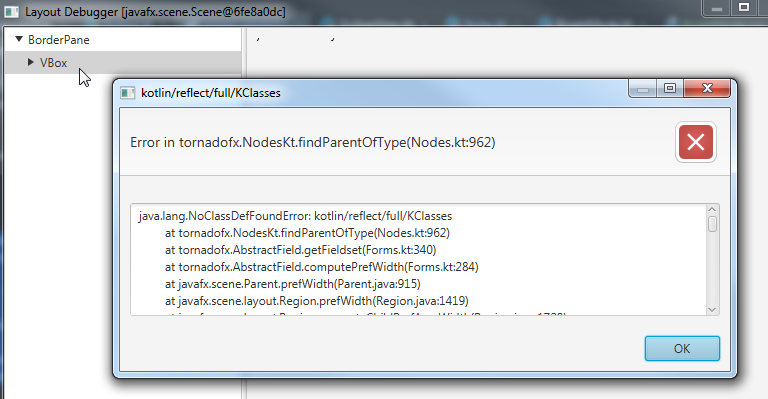
Exception:
java.lang.NoClassDefFoundError: kotlin/reflect/full/KClasses
    at tornadofx.NodesKt.findParentOfType(Nodes.kt:962)
    at tornadofx.AbstractField.getFieldset(Forms.kt:340)
    at tornadofx.AbstractField.computePrefWidth(Forms.kt:284)
    at javafx.scene.Parent.prefWidth(Parent.java:915)
    at javafx.scene.layout.Region.prefWidth(Region.java:1419)
    at javafx.scene.layout.Region.computeChildPrefAreaWidth(Region.java:1728)
    at javafx.scene.layout.Region.getMaxAreaWidth(Region.java:1997)
    at javafx.scene.layout.Region.computeMaxPrefAreaWidth(Region.java:1861)
    at javafx.scene.layout.VBox.computePrefWidth(VBox.java:409)
    at javafx.scene.Parent.prefWidth(Parent.java:915)
    at javafx.scene.layout.Region.prefWidth(Region.java:1419)
    at javafx.scene.layout.Region.computeChildPrefAreaWidth(Region.java:1728)
    at javafx.scene.layout.Region.getMaxAreaWidth(Region.java:1997)
    at javafx.scene.layout.Region.computeMaxPrefAreaWidth(Region.java:1861)
    at javafx.scene.layout.VBox.computePrefWidth(VBox.java:409)
    at javafx.scene.Parent.prefWidth(Parent.java:915)
    at javafx.scene.layout.Region.prefWidth(Region.java:1419)
    at com.sun.javafx.scene.control.skin.ScrollPaneSkin.computeScrollNodeSize(ScrollPaneSkin.java:929)
    at com.sun.javafx.scene.control.skin.ScrollPaneSkin.layoutChildren(ScrollPaneSkin.java:822)
    at javafx.scene.control.Control.layoutChildren(Control.java:578)
    at javafx.scene.Parent.layout(Parent.java:1087)
    at javafx.scene.Parent.layout(Parent.java:1093)
    at javafx.scene.Parent.layout(Parent.java:1093)
    at javafx.scene.Parent.layout(Parent.java:1093)
    at javafx.scene.Scene.doLayoutPass(Scene.java:552)
    at javafx.scene.Scene$ScenePulseListener.pulse(Scene.java:2397)
    at com.sun.javafx.tk.Toolkit.lambda$runPulse$29(Toolkit.java:398)
    at java.security.AccessController.doPrivileged(Native Method)
    at com.sun.javafx.tk.Toolkit.runPulse(Toolkit.java:397)
    at com.sun.javafx.tk.Toolkit.firePulse(Toolkit.java:424)
    at com.sun.javafx.tk.quantum.QuantumToolkit.pulse(QuantumToolkit.java:518)
    at com.sun.javafx.tk.quantum.QuantumToolkit.pulse(QuantumToolkit.java:498)
    at com.sun.javafx.tk.quantum.QuantumToolkit.pulseFromQueue(QuantumToolkit.java:491)
    at com.sun.javafx.tk.quantum.QuantumToolkit.lambda$runToolkit$408(QuantumToolkit.java:319)
    at com.sun.glass.ui.InvokeLaterDispatcher$Future.run(InvokeLaterDispatcher.java:95)
    at com.sun.glass.ui.win.WinApplication._runLoop(Native Method)
    at com.sun.glass.ui.win.WinApplication.lambda$null$152(WinApplication.java:177)
    at java.lang.Thread.run(Thread.java:748)
You need to include kotlin-reflect in your classpath :) Alternatively, you can download the file and install it in your local repo so you don't need to access it over http.
edvin
on 13 Mar 2019
Dude you are amazing :)
Will i see you on JavaLand?
Mosch0512
on 13 Mar 2019
Haha :) No, I won't make it, too much stuff going on as usual :)
edvin
on 13 Mar 2019
thx a lot for the help :)
Mosch0512
on 14 Mar 2019
Related issues
 chinzen
·
7Comments
chinzen
·
7Comments
 Bastercall
·
3Comments
Bastercall
·
3Comments
 spkingr
·
4Comments
spkingr
·
4Comments
 arslancharyev31
·
7Comments
arslancharyev31
·
7Comments
 pavan-p
·
3Comments
pavan-p
·
3Comments
Most helpful comment
Hehe :) There won't be any huge changes anywhere, it's mostly just adapting to the changed packages and public API, but also removing deprecated classes. As we're writing Kotlin code, we're not really affected by the change of JVM version. I know I keep saying this but not delivering - but hopefully it won't be long until we have a working J11+ version.