Tools: Linting doesn't find conda-forge channels
Hi,
when running 'nf-core lint', several packages are listed as unknown versions, even though there are available from the given channels. Example:
ERROR: Test Failures:
http://nf-co.re/errors#8: Conda dependency had an unknown version: ca-certificates=2019.3.9
http://nf-co.re/errors#8: Conda dependency had an unknown version: expat=2.2.5
http://nf-co.re/errors#8: Conda dependency had an unknown version: jinja2=2.10.1
http://nf-co.re/errors#8: Conda dependency had an unknown version: jpeg=9c
http://nf-co.re/errors#8: Conda dependency had an unknown version: pthread-stubs=0.4
http://nf-co.re/errors#8: Conda dependency had an unknown version: pyparsing=2.4.0
http://nf-co.re/errors#8: Conda dependency had an unknown version: tk=8.6.8
For instance, if the package 'expat=2.2.5' is explicitly given as from the conda-forge channel,
the error disappears. (conda-forge::expat=2.2.5).
The lint tool should figure out where to get the package from as the channels are given.
Here the channel order:
channels:
- bioconda
- conda-forge
- defaults
Cheers,
Kevin
 KevinMenden
All 28 comments
Hi,
as far as I got it from https://bioconda.github.io/#set-up-channels the
channel order should be:
- defaults
- bioconda
- conda-forge
Maybe this is causing the issue?
Cheers,
Simon
On 4/10/19 1:36 PM, Kevin Menden wrote:
Hi,
when running 'nf-core lint', several packages are listed as unknown versions, even though there are available from the given channels. Example:
ERROR: Test Failures:
http://nf-co.re/errors#8: Conda dependency had an unknown version: ca-certificates=2019.3.9
http://nf-co.re/errors#8: Conda dependency had an unknown version: expat=2.2.5
http://nf-co.re/errors#8: Conda dependency had an unknown version: jinja2=2.10.1
http://nf-co.re/errors#8: Conda dependency had an unknown version: jpeg=9c
http://nf-co.re/errors#8: Conda dependency had an unknown version: pthread-stubs=0.4
http://nf-co.re/errors#8: Conda dependency had an unknown version: pyparsing=2.4.0
http://nf-co.re/errors#8: Conda dependency had an unknown version: tk=8.6.8For instance, if the package 'expat=2.2.5' is explicitly given as from the conda-forge channel,
the error disappears. (conda-forge::expat=2.2.5).
The lint tool should figure out where to get the package from as the channels are given.Here the channel order:
channels:
- bioconda
- conda-forge
- defaults
Cheers,
Kevin
--
M.Sc. Simon Heumos
Bioinformatics Research Scientist
Quantitative Biology Center (QBiC)
Eberhard Karls Universität Tübingen
Auf der Morgenstelle 10, D-72076 Tübingen
phone: +49-7071-29-70296
email: simon.[email protected]
 subwaystation
on 10 Apr 2019
subwaystation
on 10 Apr 2019
That should be resolved by now tools V1.6. - is it still persisting?
 apeltzer
on 10 Apr 2019
apeltzer
on 10 Apr 2019
Changing the channel order did not help ...
Also adding channel::
KevinMenden
on 10 Apr 2019
just to confirm @KevinMenden , which version of nf-core tools?
 sven1103
on 10 Apr 2019
sven1103
on 10 Apr 2019
1.6
KevinMenden
on 10 Apr 2019
If you want to replicate, try to lint this repo:
KevinMenden
on 10 Apr 2019
@KevinMenden Did you try this channel order?
https://github.com/nf-core/atacseq/blob/b17c935599c04cef65812392c5cde5366de54209/environment.yml#L4-L7
I was having the same issues with 1.5 but they disappeared with yesterday's release due to a fix from @ewels
Also, maybe check that you are actually running 1.6 😨 ?
 drpatelh
on 10 Apr 2019
drpatelh
on 10 Apr 2019
@drpatelh yes I tried that before, tried again now, it's also failing.
I also checked the nf-core version again:
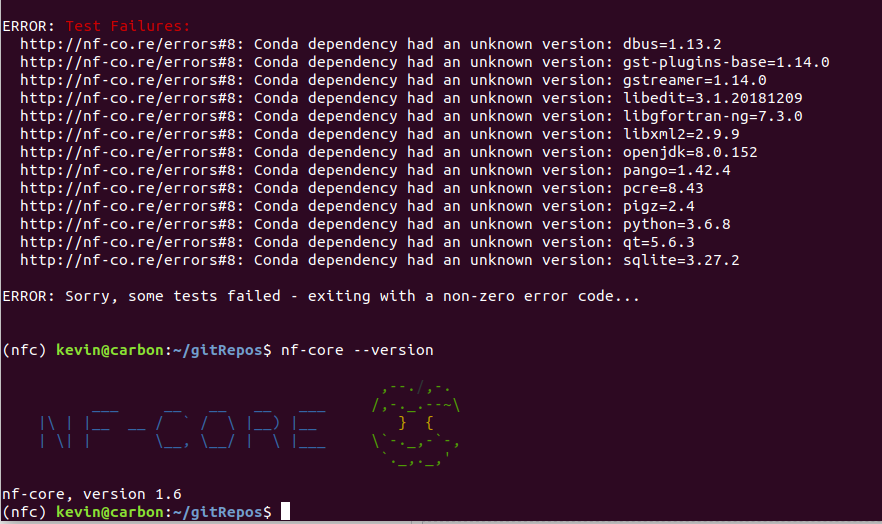
:-(
As a side note, nf-core gives me the following warning when I run it:
/home/kevin/anaconda3/envs/nfc/lib/python3.6/site-packages/nf_core/lint.py:264: YAMLLoadWarning: calling yaml.load() without Loader=... is deprecated, as the default Loader is unsafe. Please read https://msg.pyyaml.org/load for full details.
self.conda_config = yaml.load(fh)
Maybe somthing is off with my conda installation of nf-core tools??
KevinMenden
on 10 Apr 2019
@KevinMenden I have reproduced the error you are getting locally too. Im wondering whether its necessary to explicitly specify individual libraries/tools as these may also be dependencies that will be installed with certain tools. Maybe worth simplifying the environment a little and seeing if it works!
Just ignore the pyyaml issue. Basically, the authors of the package annoyingly changed the name of a function we are using in tools so it now chucks up an error.
drpatelh
on 11 Apr 2019
@drpatelh Alright, thanks! I will try that and report how it works.
KevinMenden
on 11 Apr 2019
That solved the issue :-)
I'm closing it, but I feel like a short comment about this behavior would be helpful in the linting section?
Since the environment was valid, but the linting failed, I imagine I won't be the last who just copies the output of 'conda env export' into the environment file and then this happens :-)
KevinMenden
on 11 Apr 2019
I will reopen the issue, for me it is not solved.
The expected behaviour of the linting is to successfully make an API call to Anaconda and query the package information, which clearly was not the case here.
sven1103
on 11 Apr 2019
@KevinMenden I did some debugging. The issue is, that your pinned version numbers for these packages are not available on Anaconda (yet).
Maybe we should print out the version numbers we found for a package, such that you can easily pin a version number that exists on Anaconda.
sven1103
on 12 Apr 2019
However, if a package lives in multiple channels, then it is impossible to guess which one you meant. For these cases, you must assign the channel with <channel>::<pkg>=<version>.
sven1103
on 12 Apr 2019
There's unfortunately no option with the 'conda env export' command to print the channel in front of every package, it only includes the channels at the top of the environment file.
I'm guessing this is the order which conda uses to look for the packages - shouldn't that in theory be enough to find the package?
So you check the channels in that order, and if the package exists but not with the correct version number, you try the next channel. I would guess this is the way conda does it too, as they are able to build new environments from this file with just this information.
Are you only checking in the first channel that has some version number for a specific package?
KevinMenden
on 13 Apr 2019
Sure, we can implement an exhaustive search and collect all results. But what if a package is present with the same version in multiple channels? Guess we could then report this as linting error, cause the package could not be uniquely determined. Plus: print the channels in which the same package version was found, so the user can assign the correct channel manually then.
What do you think @KevinMenden ? I also ping @apeltzer @drpatelh here, to gather some ideas.
sven1103
on 13 Apr 2019
Just found this: you can search for a package name and get all findings with owners (channels).
Try:
https://api.anaconda.org/search?name=expat
This gives you a lot of different owners that provide the package with overlapping versions :)
sven1103
on 13 Apr 2019
If you have clashing / non-unique package names, I'd also issue a warning. Its possible to specify by the user which channel to use for a specific package, thus making this quite easy to fix for the user (prepending e.g. bioconda::PACKAGE is enough).
apeltzer
on 14 Apr 2019
I agree. It's better that a warning is issued rather than the wrong instance of a package being reported. The same versions won't be available in different channels too. It's probably something that should be checked/clarified when initially creating the environment, and then it shouldnt be a problem thereafter.
drpatelh
on 14 Apr 2019
It's probably something that should be checked/clarified when initially creating the environment, and then it shouldnt be a problem thereafter.
If you export the environment, then you don't know from which channel an installed package is originated from. At least I could find out a way yet, to determine this :(
sven1103
on 14 Apr 2019
So i guess the simplest solution for know would be, to not stop the iterative search for a package on the first sucessful hit given the channels (current implementation), but search all channels that are specified in the environment.yaml, and raise a warning if the package with same version was found in more than one given channel.
Agree?
sven1103
on 14 Apr 2019
It's probably something that should be checked/clarified when initially creating the environment, and then it shouldnt be a problem thereafter.
If you export the environment, then you don't know from which channel an installed package is originated from. At least I could find out a way yet, to determine this :(
conda list should give you this no? But if you run it within the activated environment.
This information wont be available to the linting though because you cant source the environment.
Warnings are fine with me. Maybe with something suggesting which packages should be pinned only if the same version is available in multiple channels, and if it has already been pinned in environment.yml then no warning?
drpatelh
on 14 Apr 2019
one possibility would also be to run conda list -n yourenv -e -c and then remove the build number and replaye the -version by =version in a python script or similar. This gives the channels::package=version.
Build number should always be the part after the last - and the version number the part before that.
nf-core-1.6-py_0 -> nf-core, 1.6, py_0
I generally don't think that writing custom code to export an environment is such a good idea but that is the only way I can think of to get the info.
Will not help to generalize the linting but at least make the current linting work I guess.
 KochTobi
on 14 Apr 2019
KochTobi
on 14 Apr 2019
@phue found that the channel pinning slows the creation of the conda environment.
https://github.com/nf-core/methylseq/issues/74
If this is the case then its probably best not to pin all of the packages e.g. most packages in bioconda wont be available in conda-forge anyway. So it may be better to just pin those packages that have exactly the same versions available in multiple channels defined in environment.yml. Packages that have different versions available in multiple channels will be resolved by conda so its probably not worrying about those as long as the version exists.
drpatelh
on 14 Apr 2019
Sorry didn't look at GitHub too much over the weekend :-)
I agree that a warning would actually be nice, pointing to the channels that could not be resolved. In theory, conda should be able to build an exact copy of an environment when building from the output of conda env export, right? If you then give that as your environment.yml file, issuing an error is not correct, but a warning would be the way to go (in my opinion).
The user could be pointed to the conda list command that @drpatelh mentioned. I rarely used that before but it makes it easy to pin a package to the correct channel :)
@KochTobi maybe it's not such a bad idea of adding a tool to nf-core tools that does this. Of course, making sure that this actually works correctly is another thing ...
KevinMenden
on 14 Apr 2019
Having marinated on this a little, I do agree that it should be possible to build an environment that has been exported, however, I think it's better practice to create yml files that are human readable in terms of the packages they contain, and, as such, required by the pipeline! These sorts of version clashes are more likely to occur for low-level tools that should be left to conda to resolve.
drpatelh
on 14 Apr 2019
@drpatelh good point. I would suggest to put in 1-2 sentences somewhere in the doc to explain this, or just include it as nf-core best practice guideline. The safest way would probably be to create a yml file using conda env export --no-builds and then manually delete all packages that are not directly used during the pipeline. This way conda makes sure the packages are compatible and the channels are in the correct order.
It's not really possible to to catch this with linting, right? So I would stick to issuing warnings in case of clashing package versions. But that's up to you guys.
KevinMenden
on 15 Apr 2019
Another thing I ran into with @d4straub recently in the ampliseq pipeline: We had to add separate subchannels of conda-forge to get things going again. I'm talking about specific packages built against gcc7 and others, e.g. here: https://github.com/nf-core/ampliseq/blob/57e1ee2f9028d0a8c5838ee8aa8cf4b383f61174/environment.yml#L9
This wasn't found and had the same error message in the logfile that you saw too @KevinMenden .
apeltzer
on 18 Jul 2019
Related issues
 jinmingda
·
4Comments
jinmingda
·
4Comments
 ewels
·
8Comments
ewels
·
5Comments
ewels
·
8Comments
ewels
·
5Comments
 lucacozzuto
·
5Comments
apeltzer
·
5Comments
lucacozzuto
·
5Comments
apeltzer
·
5Comments
Most helpful comment
conda listshould give you this no? But if you run it within the activated environment.This information wont be available to the linting though because you cant source the environment.
Warnings are fine with me. Maybe with something suggesting which packages should be pinned only if the same version is available in multiple channels, and if it has already been pinned in
environment.ymlthen no warning?